
Audio-Technica AT-LP140XP Direct-Drive Professional Turntable User Manual
Content
audio-technica AT-LP140XP Direct-Drive Professional Turntable Review and Manual
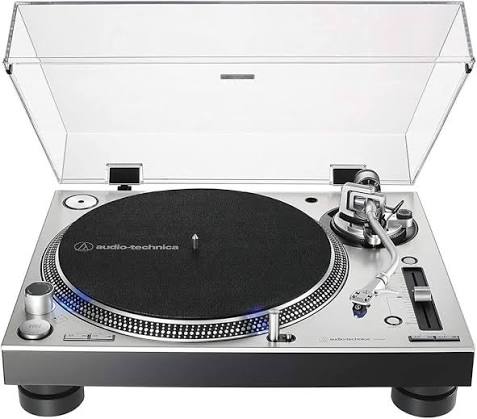
The audio-technica AT-LP140XP Direct-Drive Professional Turntable is built for DJs, vinyl enthusiasts, and home studios that need reliable direct-drive performance with precise control. It combines a high-torque DC motor, fully manual operation, and a die-cast aluminum platter to deliver fast start-up, stable playback, and solid vibration resistance. The S-shaped tonearm, adjustable pitch control, and quartz speed lock make it especially attractive for beatmatching, live mixing, and detailed record playback.
This professional turntable supports 33-1/3, 45, and 78 RPM playback, making it versatile for modern collections and older shellac records with the correct stylus. It also includes reverse play, a stroboscopic platter, and a target light, features that appeal to performance-focused users. The audio-technica AT-LP140XP Direct-Drive Professional Turntable is a strong fit for beginner DJs, mobile performers, audiophiles who prefer manual decks, and collectors who want a rugged, dependable deck with classic analog control.
In terms of value, the AT-LP140XP typically sits in the midrange professional turntable category, with an estimated price range of about $400 to $600 depending on region, finish, and retailer availability. It is commonly available through electronics stores, pro audio dealers, and major online marketplaces. For users searching for a durable direct-drive DJ turntable with dependable performance and straightforward setup, this model remains one of the most practical options in its class.
Specifications of the Audio-Technica AT-LP140XP Professional DJ Turntable
- Drive system: Direct drive with high-torque DC motor for fast start-up and consistent rotation.
- Operation: Fully manual, which gives the user complete control over cueing and playback.
- Speeds: 33-1/3 RPM, 45 RPM, and 78 RPM for broad record compatibility.
- Platter: Die-cast aluminum platter designed to reduce unwanted resonance.
- Starting torque: Greater than 2.2 kgf-cm for responsive performance.
- Wow and flutter: Under 0.2%, supporting stable pitch and smoother audio playback.
- Signal-to-noise ratio: Greater than 50 dB for clean analog output.
- Output level: 5.5 mV nominal at 1 kHz, 5 cm/sec.
- Pitch control: Selectable ±8%, ±16%, and ±24% ranges for precise speed adjustment.
- Additional features: Reverse play, quartz speed lock, stroboscopic platter, target light, and adjustable tonearm height.
- Dimensions: 452 mm wide, 352 mm deep, 158.6 mm high.
- Weight: 10 kg without the dust cover.
Compared with entry-level belt-drive turntables, the AT-LP140XP offers much faster response and better control for DJ use. Compared with other professional direct-drive decks, it stands out for its strong feature set and competitive value, especially for users who want a manual deck without unnecessary extras such as Bluetooth or USB.
How to Set Up the Audio-Technica AT-LP140XP Direct-Drive Professional Turntable
Place the turntable on a flat, stable surface away from speakers and heavy foot traffic. Attach the platter mat, fit the platter, mount the headshell, and balance the tonearm before setting tracking force and anti-skate. Connect the RCA cables to a phono input on a mixer, amplifier, or external phono preamp; use line-level input only if your audio chain includes proper amplification. Plug in the power supply and select the correct voltage for your region before powering on.
Next, choose the playback speed, set the pitch slider to zero, and confirm that the quartz lock indicator is functioning if you want exact speed stability. If you are using the turntable for DJ performance, test cueing, reverse play, and pitch adjustment with a record you do not mind handling repeatedly. If the sound is weak or distorted, recheck cartridge alignment, tracking force, and whether the output is connected to the correct input type.
Safety tip: keep liquids away from the deck, avoid moving the unit while the platter is spinning, and never force the tonearm or pitch slider. If the platter fails to spin or speed appears unstable, power off the unit, inspect cable connections, and verify that the stylus is correctly installed.
Troubleshooting Common AT-LP140XP Problems and Fixes
- No sound: Confirm that the RCA cables are connected to the correct phono or line input and that the cartridge is seated properly.
- Distortion or weak output: Check tracking force, anti-skate, and cartridge alignment; incorrect setup is the most common cause.
- Speed fluctuation: Make sure the pitch slider is centered and that quartz lock is engaged when needed.
- Hum or noise: Keep signal cables separated from power cables and confirm ground-related connections in your audio system.
- Platter not rotating: Verify power, voltage selection, and that the start/stop controls are functioning correctly.
- Stylus skipping: Clean records, inspect the stylus for wear, and reduce vibration from the mounting surface.
The AT-LP140XP does not typically display error codes, so most issues are resolved through basic inspection and setup correction. Preventive care includes keeping the stylus clean, storing the dust cover properly, and avoiding excessive force on the tonearm or cueing lever. For warranty and support, users should contact Audio-Technica through regional customer service channels, authorized dealers, or the product support section of the manufacturer’s website.
Pros and Cons of the Audio-Technica AT-LP140XP Direct-Drive Turntable
Pros
- High-torque direct drive: Ideal for DJs who need fast response and dependable speed control.
- Professional feature set: Reverse play, pitch adjustment, quartz lock, and target light add real performance value.
- Solid build quality: The die-cast aluminum platter and heavy chassis help reduce vibration.
- Versatile playback: Supports 33-1/3, 45, and 78 RPM records.
- Strong value for money: Delivers many pro-level functions at a moderate price point.
Cons
- Fully manual design: Not ideal for users who want automatic start or stop functions.
- No USB or Bluetooth: Less convenient for casual users seeking modern digital connectivity.
- DJ-focused setup: The included controls and layout may feel more specialized than consumer-friendly decks.
- Requires setup knowledge: Best results depend on correct cartridge alignment and tonearm calibration.
Against alternatives like consumer-oriented turntables with built-in preamps, the AT-LP140XP offers better performance control and durability. Against higher-end DJ decks, it remains competitively priced while still delivering most of the practical features that matter in real use.
Customer Reviews and User Feedback on the AT-LP140XP
Overall user feedback for the audio-technica AT-LP140XP Direct-Drive Professional Turntable is strongly positive, especially among DJs and vinyl collectors. Many customers rate it around 4.5 out of 5 stars for build quality, speed stability, and ease of use after setup. Common praise includes the strong motor, accurate pitch control, and the dependable feel of the tonearm and platter.
Typical complaints focus on the fully manual design, which can be less convenient for casual listeners, and the lack of USB or Bluetooth features. Some users also note that sound quality improves significantly after proper cartridge adjustment and stylus care. A frequently repeated recommendation is to pair the deck with a quality external phono preamp and a well-aligned cartridge for the best results.
For buyers who want a rugged direct-drive turntable with DJ-ready controls and proven reliability, this model is an easy recommendation. For users who prefer plug-and-play convenience or wireless playback, another Audio-Technica model may be a better fit.
Faqs
How do I set up the audio-technica AT-LP140XP Direct-Drive Professional Turntable for the first time?
What should I do if the audio-technica AT-LP140XP Direct-Drive Professional Turntable is running too fast or too slow?
Does the audio-technica AT-LP140XP Direct-Drive Professional Turntable need a phono preamp?
Can the audio-technica AT-LP140XP Direct-Drive Professional Turntable play 78 RPM records correctly?
Why does my audio-technica AT-LP140XP Direct-Drive Professional Turntable produce hum or weak sound?
How do I adjust tracking force and anti-skate on the audio-technica AT-LP140XP Direct-Drive Professional Turntable?
What maintenance does the audio-technica AT-LP140XP Direct-Drive Professional Turntable need to stay in good condition?
Is the audio-technica AT-LP140XP Direct-Drive Professional Turntable compatible with DJ mixers and recording setups?
More audio-technica manuals
- Audio-Technica ATH-M20xBT Wireless Headphones User Manual
- Audio-Technica AT-LPW30TK Belt-Drive Turntables User Manual
- Audio-Technica AT-LP60XBT-USB Automatic Wireless Turntable User Manual
- Audio-Technica AT-LP5 Direct-Drive Turntable User Manual
- Audio-Technica ATH-SR30BT Wireless Headphones User Manual
- Audio-Technica ATH-SQ1TW2 Wireless Headphones User Manual
Leave a Comment