
Audio-Technica AT-LPW30TK Belt-Drive Turntables User Manual
Content
Audio-Technica AT-LPW30TK Belt-Drive Turntable Manual
Introduction
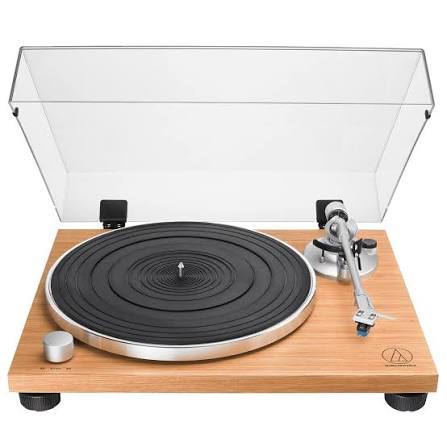
The Audio-Technica AT-LPW30TK is a fully manual, two-speed belt-drive turntable designed for listeners who want a clean analog experience with reliable everyday performance. Built with a DC servo motor, a die-cast aluminum platter, and a straight aluminum tonearm, it combines classic vinyl playback with practical modern convenience through a switchable built-in phono preamp. That makes it a strong choice whether you are connecting directly to powered speakers, a stereo receiver, or a dedicated phono input.
The AT-LPW30TK is especially appealing to first-time vinyl users, casual collectors, and anyone upgrading from a basic starter turntable. Its manual operation gives users full control over cueing and playback, while the AT-VM95C cartridge platform offers a solid foundation for future stylus upgrades. The wood-finish design also adds a more refined look than many entry-level decks, making it suitable for living rooms, home offices, and compact hi-fi setups.
In typical retail markets, the audio-technica AT-LPW30TK Belt-Drive Turntables usually sit in the mid-range budget category, often around the low-to-mid $200s to low $300s depending on region, shipping, and promotions. It is widely available through Audio-Technica dealers and major audio retailers, though stock and pricing can vary by country.
Specifications
- Type: 2-speed, fully manual belt-drive turntable
- Motor: DC servo motor
- Speeds: 33-1/3 RPM and 45 RPM
- Platter: Die-cast aluminum for stable rotation
- Wow and flutter: Less than 0.15% WRMS at 33 RPM, 3 kHz
- Signal-to-noise ratio: Greater than 60 dB
- Output modes: PHONO and LINE via switchable built-in preamp
- Preamp gain: 35 dB nominal, RIAA equalized
- Cartridge platform: Audio-Technica AT-VM95 series compatibility
- Tonearm: Straight aluminum tonearm with adjustable counterweight and anti-skate
- Power: 100-240V AC, 50/60 Hz
- Dimensions: 420 mm W x 340 mm D x 116.9 mm H
- Weight: 3.90 kg without dust cover
Compared with similar entry-level belt-drive turntables, the audio-technica AT-LPW30TK Belt-Drive Turntables stand out for their built-in preamp, manually controlled tonearm, and upgrade-friendly cartridge family. It offers a more hi-fi-focused design than many plastic-heavy competitors while remaining simple to use.
Setup Guide
Start by placing the turntable on a level, vibration-free surface away from speakers and direct sunlight. Install the platter, drive belt, mat, counterweight, and headshell cartridge if they are not already fitted. After that, connect the RCA cables to either a phono input or a line-level input depending on the preamp setting.
- Set the PHONO/LINE switch before powering on. Use PHONO for an external phono stage or receiver phono input.
- Use LINE when connecting directly to powered speakers or an amplifier without a phono input.
- Balance the tonearm, then set tracking force according to the cartridge specifications.
- Adjust anti-skate to match the tracking force.
- Select 33-1/3 or 45 RPM using the speed control.
If the platter does not spin, confirm the belt is seated correctly around the motor pulley and platter groove. If audio is weak or distorted, recheck the PHONO/LINE setting and cable connections. Avoid touching the stylus tip, and keep the dust cover open only during playback if resonance is not an issue.
Troubleshooting
Most issues with the audio-technica AT-LPW30TK Belt-Drive Turntables are mechanical or connection-related rather than electronic. If the unit will not start, check the power source, AC adapter connection, and belt installation. If speed sounds unstable, inspect whether the belt is stretched, dirty, or misaligned.
- No sound: Verify the PHONO/LINE switch, amplifier input, and RCA cables.
- Hum or noise: Make sure grounding and cable routing are correct, and keep the turntable away from power bricks and wireless devices.
- Skipping: Recheck tracking force, anti-skate, and record condition.
- Distortion: Confirm cartridge alignment and stylus condition.
- Platter does not rotate: Refit the belt and ensure the platter is seated properly.
The product does not typically use display-based error codes, so troubleshooting is based on symptoms. Preventive care includes periodic belt inspection, stylus replacement when worn, and keeping the platter and tonearm dust-free. For warranty service or support, use Audio-Technica’s regional customer service channels and authorized dealers for repair guidance, parts, and replacement options.
Pros & Cons
Pros
- Clean, classic belt-drive sound that suits everyday vinyl listening
- Built-in phono preamp adds flexibility for simple system setup
- AT-VM95 cartridge family makes future upgrades easy
- Solid die-cast platter improves rotational stability
- Attractive wood-style finish gives it a premium look for the price
- Good value for listeners who want manual control without complexity
Cons
- Fully manual operation may not suit users who want automatic start and stop
- No USB, Bluetooth, or digital recording features
- Not ideal for DJ-style use or high-vibration environments
- Stock cartridge is entry-level, so audiophiles may want an upgrade
For value for money, the audio-technica AT-LPW30TK Belt-Drive Turntables compare favorably with similarly priced manual decks, especially for users who want analog-focused performance and an upgrade path. If you want more automation or wireless features, a competitor may be a better fit; if you want a straightforward hi-fi turntable, this model is an excellent match.
Customer Reviews
Typical customer feedback for the AT-LPW30TK averages around 4 out of 5 stars, with praise focused on its elegant design, easy setup, and dependable everyday sound. Many users describe the turntable as a smart upgrade from ultra-budget models because it feels more stable and refined.
Common complaints usually involve the fully manual operation, the need for careful cartridge setup, and the lack of wireless or USB features. Buyers who want a plug-and-play experience often recommend pairing it with powered speakers and setting the LINE output mode for simplicity. A frequent testimonial theme is that it “sounds better than expected for the price” and “looks more expensive than it is.” For most casual vinyl listeners, this model is a strong buy.
Final Verdict
The audio-technica AT-LPW30TK Belt-Drive Turntables deliver a well-balanced mix of style, simplicity, and upgrade potential. If you want a manual turntable with a built-in preamp, solid construction, and a clear path to better sound over time, it is one of the most practical choices in its class.
Faqs
How do I set up audio-technica AT-LPW30TK Belt-Drive Turntables for the first time?
What should I do if audio-technica AT-LPW30TK Belt-Drive Turntables is not spinning or playing sound?
How do I connect audio-technica AT-LPW30TK Belt-Drive Turntables to powered speakers or an amplifier?
What makes the audio-technica AT-LPW30TK Belt-Drive Turntables different from other manual turntables?
Which stylus upgrades work with audio-technica AT-LPW30TK Belt-Drive Turntables?
How do I set tracking force and anti-skate on audio-technica AT-LPW30TK Belt-Drive Turntables?
What maintenance does audio-technica AT-LPW30TK Belt-Drive Turntables need to stay in good condition?
Why does audio-technica AT-LPW30TK Belt-Drive Turntables sound distorted or skip on some records?
More audio-technica manuals
- Audio-Technica AT-LP140XP Direct-Drive Professional Turntable User Manual
- Audio-Technica AT-LP5 Direct-Drive Turntable User Manual
- Audio-Technica ATH-M20xBT Wireless Headphones User Manual
- Audio-Technica ATH-SQ1TW2 Wireless Headphones User Manual
- Audio-Technica AT-LP60XBT-USB Automatic Wireless Turntable User Manual
- Audio-Technica Powered Bookshelf Speakers AT-SP3X User Manual
Leave a Comment