
Audio-Technica AT-LP5 Direct-Drive Turntable User Manual
Content
Audio-Technica AT-LP5 Direct-Drive Turntable Manual
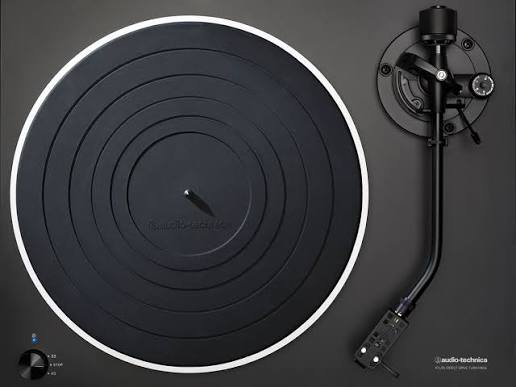
The Audio-Technica AT-LP5 Direct-Drive Turntable is a fully manual, feature-rich vinyl player built for listeners who want stable speed, clean analog playback, and flexible connectivity in one package. It combines a direct-drive, high-torque motor with a J-shaped tonearm, a die-cast aluminum platter, and a switchable built-in phono preamp, making it an excellent choice for both beginners and experienced vinyl enthusiasts. The AT-LP5 is especially appealing to users who want a turntable that can connect to powered speakers, AV receivers, or a computer for digitizing records through USB. Its AT95Ex Dual Moving Magnet cartridge and removable headshell also make stylus replacement and cartridge upgrades straightforward.
This model suits home listening, vinyl archiving, and casual DJ-style use where speed stability matters. It supports 33-1/3 and 45 RPM playback and offers anti-resonance design elements that help reduce unwanted vibration and improve low-frequency performance. The AT-LP5 is typically positioned in the mid-range turntable market, with an estimated price range of about $350 to $450 depending on retailer, condition, and availability. It is commonly available through major audio retailers, online marketplaces, and Audio-Technica dealers, though stock can vary because this model is often sold as a legacy or limited-availability product. For buyers searching for a direct-drive turntable with USB output, strong build quality, and a practical all-around feature set, the Audio-Technica AT-LP5 remains a compelling option.
Specifications and Key Features of the AT-LP5 Direct-Drive Turntable
- Type: 2-speed, fully manual turntable with direct drive
- Motor: DC motor with high starting torque
- Speeds: 33-1/3 RPM and 45 RPM
- Platter: Die-cast aluminum for improved stability and reduced resonance
- Wow and flutter: Less than 0.2% WRMS at 33 RPM
- Signal-to-noise ratio: Greater than 50 dB
- Cartridge: AT95Ex Dual Moving Magnet stereo cartridge with replaceable stylus
- Headshell: Lightweight AT-HS10 removable headshell
- Tonearm: J-shaped design to help minimize tracking error
- Phono preamp: Switchable built-in pre-amplifier for PHONO or LINE output
- USB output: Computer connection for digitizing records
- Output levels: PHONO and LINE outputs for flexible system matching
- Weight: About 10.5 kg for solid, low-vibration performance
The AT-LP5 compares favorably with many belt-drive competitors in its class because it emphasizes speed consistency, lower maintenance, and easier integration with modern audio setups. It is a strong choice for users who want direct-drive performance without moving into the price range of audiophile-only models.
How to Set Up the Audio-Technica AT-LP5 Direct-Drive Turntable
Start by placing the turntable on a flat, stable surface away from speakers, subwoofers, and direct sunlight. Attach the platter mat, place the aluminum platter correctly, and make sure the counterweight and headshell are installed before powering on the unit. Next, connect the audio cables based on your setup: use the LINE output if your amplifier or speakers do not have a phono input, or switch to PHONO mode if you are using an external phono stage or receiver with phono support. If you plan to digitize vinyl, connect the USB port to your computer and install your preferred recording software.
Balance the tonearm carefully, set the tracking force according to the cartridge specifications, and adjust anti-skate for better channel balance. Confirm that the stylus is clean and that the stylus guard is removed before playback. For best results, level the feet so the platter sits evenly. If you hear hum, check that the ground connection is secure and that cables are not running near power cords. Never move the turntable while the platter is spinning, and avoid touching the stylus with your fingers. A common setup mistake is leaving the preamp switch in the wrong position, which can cause weak or distorted sound.
Troubleshooting Common AT-LP5 Turntable Problems
If the platter does not spin, confirm that the power adapter is connected properly and that the unit is receiving power. If sound is very quiet, check whether the preamp switch matches your amplifier input; PHONO into a line-level input will sound weak, while LINE into a phono input can distort. If you hear hum or buzz, inspect the ground wire, reposition audio cables, and keep the turntable away from other electronics. If playback sounds distorted, verify tracking force, anti-skate, and cartridge alignment.
The AT-LP5 does not typically display error codes, so most issues are solved through mechanical and connection checks rather than menu-based resets. If USB transfer is not working, try another cable, another USB port, or different recording software. Preventive care includes keeping the stylus clean, using a dust cover when the table is not in use, and checking belt-free direct-drive operation periodically for dust buildup around the platter and tonearm. Audio-Technica support and authorized service channels are the best options for warranty questions, replacement parts, and technical help. If the unit was purchased from a retailer, keep your receipt and serial information available before contacting support.
Pros and Cons of the Audio-Technica AT-LP5 Direct-Drive Turntable
Pros
- Stable direct-drive performance: Good speed consistency for vinyl playback and archiving.
- Flexible connectivity: Built-in switchable phono preamp and USB output make it easy to use with modern systems.
- Solid construction: The heavy aluminum platter and substantial chassis help reduce unwanted vibration.
- Upgradeable design: The removable headshell and replaceable stylus make maintenance easier.
- Good value: Offers a strong feature set for the price, especially compared with many entry-level audiophile turntables.
Cons
- Fully manual operation: No automatic start or stop function, which may not suit casual users.
- Legacy availability: Can be harder to find new, depending on region and retailer.
- USB is basic: Fine for archiving, but serious digitizers may prefer an external audio interface.
- Not fully audiophile-tier: Competing models in a higher price range may offer more refined tonearms or isolation.
For buyers comparing the AT-LP5 with belt-drive alternatives, the biggest advantage is its direct-drive stability and easier day-to-day use. For users who want a reliable, practical, and well-built vinyl player, the Audio-Technica AT-LP5 Direct-Drive Turntable delivers strong overall value.
Customer Reviews and User Feedback
Average user sentiment for the AT-LP5 is generally positive, with many owners giving it around 4.4 out of 5 stars. Common praise focuses on the sturdy build, dependable speed, and easy setup. One typical comment is, “It feels solid, sounds clean, and works well with both my receiver and PC.” Another frequent highlight is the removable headshell, which makes cartridge changes much easier for beginners and hobbyists.
Common complaints include the lack of automatic features and occasional confusion about the preamp switch during setup. Some users also note that the USB output is convenient for transfers, but not a substitute for high-end recording gear. Overall, the AT-LP5 is widely recommended for vinyl listeners who want a direct-drive turntable with practical features, good sound, and long-term usability. It is especially appealing to buyers who prioritize performance and flexibility over full automation.
Faqs
How do I set up the Audio-Technica AT-LP5 Direct-Drive Turntable for the first time?
What should I do if the Audio-Technica AT-LP5 Direct-Drive Turntable has no sound or very low volume?
Can the Audio-Technica AT-LP5 Direct-Drive Turntable connect to powered speakers or an amplifier without a phono input?
How do I use the USB output on the Audio-Technica AT-LP5 Direct-Drive Turntable to digitize vinyl?
Why is the Audio-Technica AT-LP5 Direct-Drive Turntable making speed fluctuations or pitch instability noise?
What cartridge and stylus maintenance does the Audio-Technica AT-LP5 Direct-Drive Turntable require?
How do I adjust tracking force and anti-skate on the Audio-Technica AT-LP5 Direct-Drive Turntable?
How often should I clean and maintain the Audio-Technica AT-LP5 Direct-Drive Turntable?
More audio-technica manuals
- Audio-Technica AT-LPW30TK Belt-Drive Turntables User Manual
- Audio-Technica ATH-SQ1TW2 Wireless Headphones User Manual
- Audio-Technica AT-LP140XP Direct-Drive Professional Turntable User Manual
- Audio-Technica Powered Bookshelf Speakers AT-SP3X User Manual
- Audio-Technica ATH-M20xBT Wireless Headphones User Manual
- Audio-Technica AT-LP8X Semi-Automatic Direct-Drive Turntable User Manual
Leave a Comment