
Audio-Technica ATH-M20xBT Wireless Headphones User Manual
Content
Audio-Technica ATH-M20xBT Wireless Headphones: Complete Product Manual
Introduction
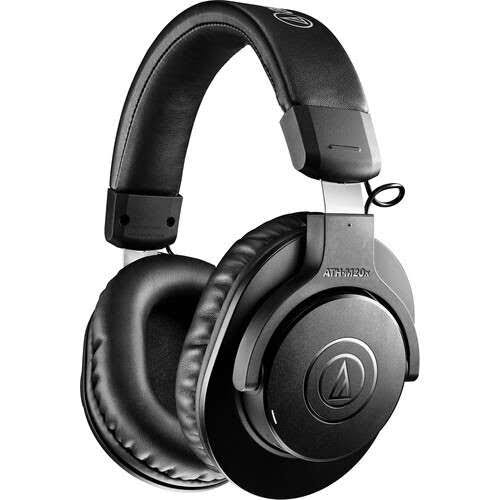
The Audio-Technica ATH-M20xBT Wireless Headphones are designed for listeners who want dependable wireless performance, long battery life, and the familiar studio-style sound of the M-Series in a more flexible everyday package. Built as closed-back, over-ear Bluetooth headphones, they combine 40 mm drivers, Bluetooth 5.0, and support for both wireless and wired listening, making them a practical choice for commuting, home use, remote work, and casual music production. The headphones are lightweight at about 216 g, which helps reduce fatigue during long listening sessions, while the closed-back design improves passive isolation for office environments and travel.
One of the biggest strengths of the ATH-M20xBT Wireless Headphones is battery performance. With up to 60 hours of continuous playback, they are well suited to users who do not want to charge frequently. The included 3.5 mm audio cable also ensures that you can keep listening even when the battery runs low. This makes the model especially appealing to students, remote workers, budget-conscious buyers, and listeners who want a reliable Bluetooth headphone for daily use.
At an estimated price range of around $67 to $100 depending on retailer and region, the ATH-M20xBT sits in the affordable wireless headphone category. Availability is generally broad through major electronics stores, online marketplaces, and Audio-Technica dealers. For users searching for the Audio-Technica ATH-M20xBT Wireless Headphones review, setup guide, or specifications, this model offers a strong balance of value, comfort, and practical features.
Specifications
- Type: Closed-back dynamic, over-ear wireless headphones
- Driver size: 40 mm
- Frequency response: 5 Hz to 32,000 Hz
- Sensitivity: 100 dB/mW
- Impedance: 36 ohms
- Bluetooth version: 5.0
- Supported codecs: SBC and AAC
- Wireless range: Approximately 10 m line of sight
- Battery life: Up to 60 hours of music playback
- Charging time: About 4 hours
- Weight: Approximately 216 g
- Microphone: Omnidirectional electret condenser mic
- Mic sensitivity: -42 dB
- Included accessories: USB-C charging cable and 1.2 m audio cable
In comparison with similar budget wireless over-ear headphones, the ATH-M20xBT stands out for its very long battery life and wired fallback option. It is less feature-heavy than premium models with active noise cancellation, but it offers a more straightforward studio-inspired listening experience. For buyers comparing Audio-Technica wireless headphones, this model is a strong entry-level option that emphasizes sound quality, endurance, and simplicity rather than smart features.
Setup Guide: How to Pair and Use the ATH-M20xBT Wireless Headphones
Setting up the Audio-Technica ATH-M20xBT Wireless Headphones is straightforward. First, fully charge the headphones using the included USB-C cable for about four hours before the initial use. Once charged, press and hold the power button until the indicator light signals pairing mode. On your phone, laptop, or tablet, open Bluetooth settings and select the headphone name from the available devices list.
For everyday use, keep your device within about 10 meters for the best connection quality. If you want wired playback, connect the included 3.5 mm audio cable to the headphone jack and your device. This is useful when the battery is low or when you want to avoid Bluetooth latency for video editing or casual gaming.
Helpful configuration tips include selecting AAC on compatible devices for improved wireless audio quality and ensuring your phone’s Bluetooth is turned on before pairing. If pairing fails, turn Bluetooth off and on again, restart the headphones, and remove the device from your Bluetooth list before reconnecting. Do not use the headphones while charging in wet environments, avoid excessive heat, and keep the earcups and controls dry to protect the battery and electronics.
Troubleshooting
If the headphones do not power on, charge them for at least 30 minutes and try again. If Bluetooth pairing fails, delete the device entry on your phone or computer, then pair again from scratch. If sound is cutting out, move closer to the source device, remove nearby wireless interference, and make sure the headphones are not connected to multiple devices at once.
Common issues include low volume, one-sided playback, or microphone problems during calls. Check that the audio cable is fully inserted if using wired mode, confirm the source device volume is not muted, and verify that the correct output device is selected in system settings. There are no widely used error codes for this model, so most fixes are based on reset, re-pairing, and cable checks.
To prevent future problems, store the headphones in a cool, dry place, charge them with a compatible USB power source, and avoid pulling the cable sharply. For warranty service, contact the retailer or Audio-Technica support through the company’s official regional customer service channels. Keep your proof of purchase, serial number, and order details ready when requesting help.
Pros and Cons
Pros
- Excellent battery life with up to 60 hours of playback
- Lightweight design that stays comfortable for long listening sessions
- Wireless and wired listening options add flexibility
- Balanced, studio-style sound profile that suits music, podcasts, and calls
- Affordable price makes it a strong value-for-money headphone
- Simple controls and easy Bluetooth pairing for everyday use
Cons
- No active noise cancellation, so outside noise is only passively reduced
- Limited codec support compared with higher-end wireless headphones
- Less premium feature set than alternatives with app support or EQ customization
- Microphone performance is adequate, but not class-leading for noisy environments
For buyers comparing the ATH-M20xBT to alternatives, it is best suited to users who care more about dependable sound and battery life than advanced features. If you want ANC or app-based customization, a higher-tier model may be better. If you want an affordable Bluetooth headphone with a wired backup and strong day-to-day usability, this model is an excellent choice.
Customer Reviews
Customer feedback for the Audio-Technica ATH-M20xBT Wireless Headphones is generally positive, with many users praising the long battery life, comfortable fit, and reliable connection. A common rating pattern is around 4 to 4.5 stars out of 5, especially among buyers who want a simple wireless headphone for work and travel.
Typical praise includes comments such as, “The battery lasts forever,” and “The sound is clear and punchy for the price.” Common complaints focus on the lack of noise cancellation and the absence of advanced app features. Some users also note that the microphone is fine for calls but not ideal in loud spaces.
Overall, these headphones are recommended for students, commuters, remote workers, and budget-focused listeners who want a dependable wireless audio solution. If your priority is value, battery life, and Audio-Technica sound tuning, the ATH-M20xBT is an easy recommendation.
Faqs
How do I set up audio-technica ATH-M20xBT Wireless Headphones for the first time?
Why are my audio-technica ATH-M20xBT Wireless Headphones not pairing with my phone or laptop?
Can audio-technica ATH-M20xBT Wireless Headphones connect to two devices at once?
What Bluetooth codecs do audio-technica ATH-M20xBT Wireless Headphones support, and why does it matter?
How can I get the best sound quality from audio-technica ATH-M20xBT Wireless Headphones?
How long does the battery last on audio-technica ATH-M20xBT Wireless Headphones, and how fast do they charge?
Can I use audio-technica ATH-M20xBT Wireless Headphones with a wired connection when the battery is dead?
How should I clean and maintain audio-technica ATH-M20xBT Wireless Headphones for long-term use?
More audio-technica manuals
- Audio-Technica AT-LP60XBT-USB Automatic Wireless Turntable User Manual
- Audio-Technica AT-LP140XP Direct-Drive Professional Turntable User Manual
- Audio-Technica ATH-SR30BT Wireless Headphones User Manual
- Audio-Technica AT-LPW30TK Belt-Drive Turntables User Manual
- Audio-Technica AT-LP3 Fully Automatic Belt-Drive Turntable User Manual
- Audio-Technica AT-LP5 Direct-Drive Turntable User Manual
Leave a Comment