
Audio-Technica ATH-CK3TW Wireless Headphones User Manual
Content
Introduction to the Audio-Technica ATH-CK3TW Wireless Headphones
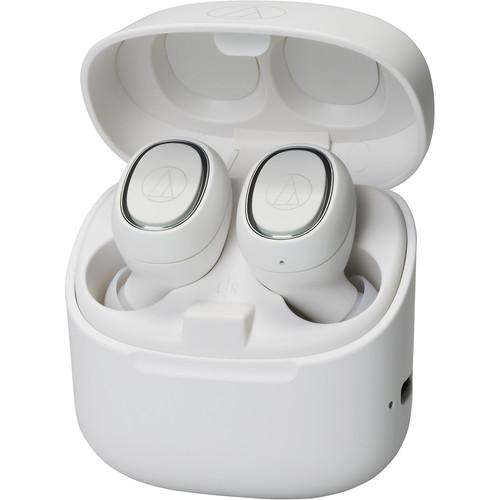
The Audio-Technica ATH-CK3TW Wireless Headphones are a compact true wireless earbud set designed for everyday listening, hands-free calling, and portable convenience. Built around 5.8 mm dynamic drivers, they aim to deliver a balanced sound signature with clear mids, solid bass, and crisp high frequencies, making them suitable for music, podcasts, and online meetings. With Bluetooth 5.0 connectivity, a lightweight design, and a charging case that extends total playback to about 30 hours, this model offers a practical mix of mobility and performance.
These wireless earbuds are a strong fit for commuters, students, office users, and casual listeners who want reliable Audio-Technica sound in a compact form. The MEMS microphone, omnidirectional pickup, and support for common Bluetooth audio profiles make the ATH-CK3TW useful for phone calls and video chats as well as entertainment. Their low weight also helps reduce ear fatigue during longer sessions.
The estimated price range is typically in the mid-budget category, often landing around $80 to $150 depending on region, stock, and seller promotions. Availability may vary because this model has appeared in different markets under multiple color options, including black, white, blue, and red. For buyers looking for true wireless headphones with a familiar audio brand, the Audio-Technica ATH-CK3TW Wireless Headphones remain a compelling choice for simple, everyday use.
Specifications: Audio-Technica ATH-CK3TW Wireless Headphones Features and Technical Details
- Driver type: 5.8 mm dynamic drivers for compact true wireless audio output.
- Frequency response: 20 Hz to 20,000 Hz for standard full-range listening.
- Sensitivity: 98 dB/mW for efficient output at moderate volume levels.
- Impedance: 16 ohms, making them easy to drive from Bluetooth devices.
- Bluetooth version: 5.0 for stable wireless connectivity and improved pairing reliability.
- Codec support: aptX and SBC, which helps improve compatibility and streaming quality.
- Microphone: MEMS type with omnidirectional pickup for voice calls.
- Microphone sensitivity: -38 dB for practical call performance in quiet to moderate environments.
- Battery life: up to about 6 hours per charge, with up to about 30 hours using the charging case.
- Charging time: about 2 hours for the earbuds and 2.5 hours for the case.
- Weight: approximately 4.7 g per earbud and 49.7 g for the case.
- Compared with similar true wireless earbuds, the ATH-CK3TW emphasizes light weight, reliable battery life, and Audio-Technica tuning rather than premium noise cancelling features.
Setup Guide for Audio-Technica ATH-CK3TW Wireless Headphones
Start by fully charging the earbuds and the charging case before first use. Place both earbuds in the case and connect the case to power until the indicators show a full charge. This helps ensure accurate battery calibration and stable initial pairing.
To pair, remove the earbuds from the case and enable Bluetooth on your phone, tablet, laptop, or desktop adapter. Select the ATH-CK3TW from the available device list. If the connection does not appear immediately, return the earbuds to the case, close the lid, reopen it, and try again. On some devices, clearing old Bluetooth records improves pairing success.
For best results, confirm that your source device supports Bluetooth 5.0 or at least the required audio profiles. Keep the earbuds within close range during setup and avoid strong wireless interference from crowded networks or other Bluetooth accessories. If only one earbud connects, reset the pair by placing both earbuds back into the case and repeating the pairing process.
Safety precautions: do not use the earbuds at unsafe listening levels, especially near traffic or machinery. Avoid charging in damp areas, and do not expose the earbuds or case to high heat. If the charging contacts are dirty, clean them gently with a dry, soft cloth before recharging.
Troubleshooting the ATH-CK3TW Bluetooth Earbuds
Common issue: no sound from one earbud. First, confirm both earbuds are charged and properly seated in the case. Then reconnect Bluetooth on the source device. If the problem persists, delete the device from Bluetooth settings and pair again.
Common issue: unstable connection or dropouts. Move closer to the source device, reduce interference from Wi-Fi routers or other wireless products, and make sure the earbuds are not blocked by your body or thick clothing. A full recharge can also improve performance if battery levels are low.
Common issue: low microphone quality. Check that the mic openings are not covered by dirt or moisture. Keep the earbuds correctly positioned, and test call quality in a quieter environment. Because the microphone is omnidirectional, background noise may still be noticeable in busy locations.
If the earbuds do not enter pairing mode, perform a reset by placing them in the charging case, waiting briefly, and restarting the pairing sequence. There are no widely used public error codes for this model, so most fixes rely on power cycling, re-pairing, or cleaning the charging contacts. For warranty support, contact the retailer where the product was purchased or the official Audio-Technica regional support team. Have the model name, serial number, and proof of purchase ready when requesting help.
Pros and Cons of the Audio-Technica ATH-CK3TW Wireless Headphones
Pros
- Lightweight earbuds that are comfortable for long listening sessions.
- Up to 30 hours of total playback with the charging case, which is strong for daily use.
- Bluetooth 5.0 with aptX support offers dependable wireless performance on compatible devices.
- Balanced sound tuning works well for music, podcasts, and calls.
- Compact case makes the earbuds easy to carry in a pocket or bag.
- Good value for listeners who want Audio-Technica sound without paying for premium extras.
Cons
- No active noise cancellation, so outside noise can still be heard in busy places.
- Battery life per charge is solid but not class-leading compared with newer models.
- Microphone performance is functional rather than exceptional in loud environments.
- Controls and feature set are simpler than many newer true wireless alternatives.
- May feel less advanced than competitors with app support, transparency mode, or wireless charging.
Overall, the ATH-CK3TW offers good value for money if you want dependable true wireless headphones with a trusted audio brand and do not need advanced premium features.
Customer Reviews for Audio-Technica ATH-CK3TW Wireless Headphones
User feedback for the ATH-CK3TW is generally positive, with many owners praising the lightweight fit, easy Bluetooth pairing, and clear everyday sound. A common rating pattern is around 4 out of 5 stars, especially among users who prioritize comfort and portability over extra features. One typical comment is, “They sound clean, stay comfortable for hours, and the battery life is enough for my workday.”
Frequent complaints usually mention the absence of active noise cancelling and only average call quality in noisy areas. Some users also note that the feature set feels basic compared with newer true wireless earbuds. Even so, buyers who want a straightforward and affordable option often recommend them for commuting, study sessions, and casual listening. If your priority is simple operation, reliable wireless audio, and strong brand reputation, the Audio-Technica ATH-CK3TW Wireless Headphones remain a sensible purchase.
Faqs
How do I set up audio-technica ATH-CK3TW Wireless Headphones for the first time?
What should I do if audio-technica ATH-CK3TW Wireless Headphones will not connect to my phone?
Which devices are compatible with audio-technica ATH-CK3TW Wireless Headphones?
How long does the battery last on audio-technica ATH-CK3TW Wireless Headphones?
How do I fix low volume or weak sound on audio-technica ATH-CK3TW Wireless Headphones?
What do the touch controls on audio-technica ATH-CK3TW Wireless Headphones do?
Are audio-technica ATH-CK3TW Wireless Headphones good for workouts or rainy conditions?
How should I clean and maintain audio-technica ATH-CK3TW Wireless Headphones?
More audio-technica manuals
- Audio-Technica 3000 Series Professional UHF Wireless System User Manual
- Audio-Technica ATH-WB2022 Wireless Headphones User Manual
- Audio-Technica ATH-MSR7NC Noise-Cancelling Headphones User Manual
- Audio-Technica AT-LP3 Fully Automatic Belt-Drive Turntable User Manual
- Audio-Technica System 10 Digital Wireless System ATW-1101 User Manual
- Audio-Technica ATH-SR30BT Wireless Headphones User Manual
Leave a Comment