
Audio-Technica AT-LP1240-USB XP Edition DJ turntable User Manual
Content
audio-technica AT-LP1240-USB XP Edition DJ Turntable: Comprehensive Product Manual and Review
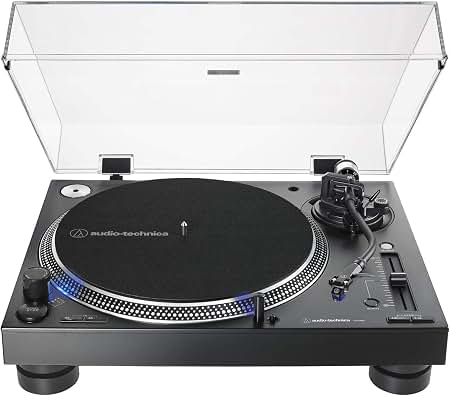
Introduction: A Professional DJ Turntable Built for Performance and Vinyl Digitizing
The audio-technica AT-LP1240-USB XP Edition DJ turntable is a high-torque, direct-drive deck designed for serious DJs, collectors, and anyone who wants a durable, feature-rich turntable for both mixing and archiving vinyl. It combines manual operation, a stable S-shaped tonearm, selectable 33-1/3, 45, and 78 RPM speeds, and a built-in USB output for easy vinyl-to-digital conversion. That makes it a strong fit for club use, home DJ setups, and users who want to preserve records without sacrificing analog sound quality.
One of the biggest advantages of the audio-technica AT-LP1240-USB XP Edition DJ turntable is its professional layout. The high-torque direct-drive motor is built for fast start-up and dependable performance, while the built-in phono preamp adds flexibility for connecting to powered speakers, mixers, or external audio interfaces. The included DJ cartridge, headshell, dust cover, slipmat, and target light make it ready to use out of the box. For users who want both analog playback and USB recording in one unit, it offers an efficient all-in-one solution.
This model is best suited to DJs, vinyl enthusiasts, and content creators who need a robust turntable with upgrade potential. Typical pricing generally falls around $529.95 to $599.00, depending on the retailer and availability. It is commonly available through major audio retailers and online marketplaces, though stock can vary because it is a specialty pro-audio product.
Pros & Cons: Is the AT-LP1240-USB XP Worth the Money?
- Pros: Direct-drive motor delivers strong torque and quick response, which is ideal for beatmatching, back-cueing, and DJ performance.
- Pros: Built-in USB output and phono preamp make it versatile for digitizing records or connecting to a wide range of audio systems.
- Pros: Manual, rugged design feels stable and professional, with a heavy chassis that helps reduce unwanted vibration.
- Pros: Supports 78 RPM playback, which is useful for collectors with older shellac records.
- Pros: Solid value for money compared with other professional DJ turntables that often cost more while offering fewer digital features.
- Cons: It is not fully automated, so beginners may prefer a simpler consumer turntable.
- Cons: The stock cartridge is decent for DJ use, but audiophiles may want to upgrade for better home-listening detail.
- Cons: Heavier and more performance-focused than entry-level alternatives, so it may feel overbuilt for casual vinyl listening.
- Cons: Compared with less expensive belt-drive models, it prioritizes durability and torque over a softer, hi-fi listening profile.
For users comparing it with alternatives, this turntable sits closer to pro-grade DJ models than to budget USB decks. It offers better torque and sturdier construction than many home-friendly options, making it a better choice for demanding use.
Customer Reviews: What Buyers Say About the AT-LP1240-USB XP
Customer feedback is generally positive, with many users rating it around 4.5 out of 5 stars for its reliability, build quality, and performance. Buyers frequently describe it as an “absolute unit” and praise its strong direct-drive motor, smooth pitch response, and dependable long-term operation. Many also appreciate that it can play records and digitize vinyl through USB without extra equipment.
Common complaints focus on the stock cartridge being adequate rather than exceptional, and some users note that the table is best suited to DJing or archival work rather than pure audiophile listening. A few reviewers also mention that its size and weight make it less convenient for small spaces. Overall, the audio-technica AT-LP1240-USB XP Edition DJ turntable is often recommended for DJs, vinyl archivists, and buyers who want a durable, upgradeable deck with strong all-around value.
- Average user sentiment: 4.5/5 stars
- Common praise: strong torque, solid construction, easy USB recording
- Common complaint: cartridge can be improved with an upgrade
- Best for: DJ performance, vinyl transfer, and heavy daily use
Key Features of the Audio-Technica AT-LP1240-USB XP Edition DJ Turntable
- Direct-drive, high-torque DC motor for fast start-up and stable playback
- Fully manual operation for precise cueing and mixing control
- 33-1/3, 45, and 78 RPM speed support
- Built-in phono preamp and USB output for flexible connectivity
- S-shaped tonearm with anti-skate adjustment
- Included DJ cartridge, headshell, dust cover, and slipmat
- Designed for analog playback and vinyl-to-digital conversion
Setup and Use: Quick Start Guide
- Place the turntable on a level, vibration-free surface.
- Install the platter, slipmat, and counterweight according to the manual.
- Attach the headshell and cartridge, then balance the tonearm.
- Set tracking force and anti-skate based on the cartridge specifications.
- Choose PHONO or LINE output depending on your audio system.
- Connect USB if you want to digitize records on a computer.
- Test playback at 33-1/3, 45, or 78 RPM before regular use.
Who Should Buy the AT-LP1240-USB XP?
This model is ideal for DJs who need a durable direct-drive turntable, collectors who want 78 RPM compatibility, and vinyl fans who need USB recording for archiving records. If you want a turntable that balances performance, flexibility, and long-term reliability, the audio-technica AT-LP1240-USB XP Edition DJ turntable is a smart purchase.
Faqs
How do I set up the audio-technica AT-LP1240-USB XP Edition DJ turntable for the first time?
Why is the audio-technica AT-LP1240-USB XP Edition DJ turntable running too fast or too slow?
Can I use the audio-technica AT-LP1240-USB XP Edition DJ turntable with a computer for vinyl recording?
What cartridge and stylus should I use with the audio-technica AT-LP1240-USB XP Edition DJ turntable?
How do I fix humming or audio noise on the audio-technica AT-LP1240-USB XP Edition DJ turntable?
What audio-technica AT-LP1240-USB XP Edition DJ turntable features matter most for DJ performance?
How do I maintain the audio-technica AT-LP1240-USB XP Edition DJ turntable for long-term reliability?
Why does the audio-technica AT-LP1240-USB XP Edition DJ turntable sound distorted or skip on some records?
More audio-technica manuals
- Audio-Technica AT-LP60-USB Automatic Belt-Drive Stereo Turntable User Manual
- Audio-Technica AT-LP2022 Belt-Drive Turntable User Manual
- Audio-Technica ATH-WS99BT Wireless Headphones User Manual
- Audio-Technica System 10 PRO Digital Wireless System ATW-1301 User Manual
- Audio-Technica System 9 VHF Wireless System ATW-901a/G User Manual
- Audio-Technica AT2040USB Hypercardioid Dynamic USB Microphone User Manual
Leave a Comment