
Audio-Technica ATH-WS99BT Wireless Headphones User Manual
Content
Audio-Technica ATH-WS99BT Wireless Headphones Manual and Review
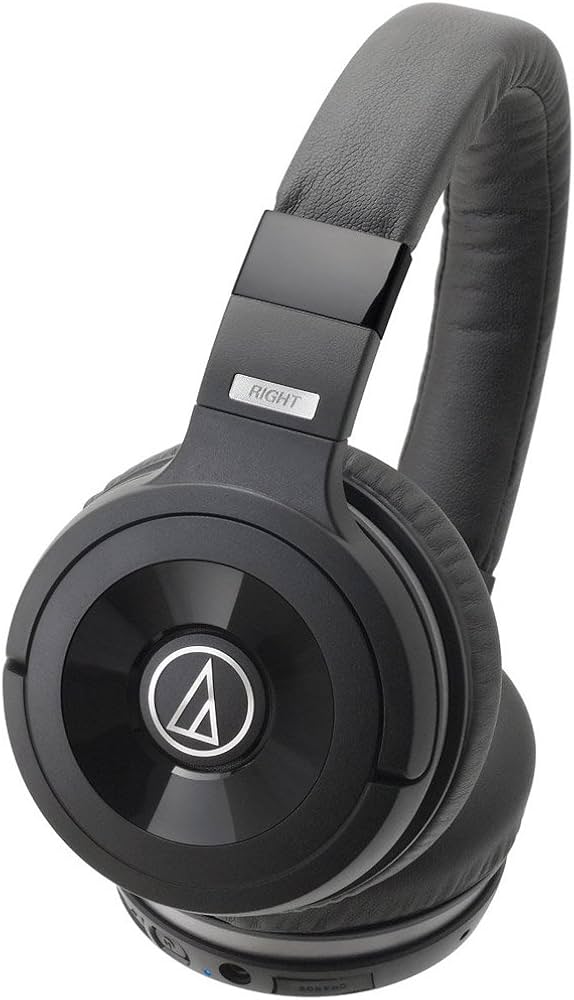
The Audio-Technica ATH-WS99BT Wireless Headphones are a solid-bass Bluetooth model designed for listeners who want strong low-end performance without giving up wireless convenience. Built around 53 mm drivers, a closed-back dynamic design, and support for SBC, aptX, and AAC codecs, these headphones aim to deliver punchy bass, clear mids, and dependable everyday usability. The ATH-WS99BT Wireless Headphones are a practical fit for commuting, casual music listening, home use, and phone calls, especially for users who prefer a warm, energetic sound signature.
One of the biggest selling points is the combination of wireless playback and wired fallback support, which makes them more versatile than many older Bluetooth-only headphones. They also feature a built-in microphone, Bluetooth 3.0+EDR connectivity, and a rated communication range of about 10 meters in ideal conditions. The design leans toward comfort and durability, with a weight of 275 g and a foldable, travel-friendly form factor. Official pricing has historically sat around $249.95, while typical market pricing can vary depending on stock, region, and seller availability. Because this model is older, availability may be limited to remaining inventory, refurbished units, or secondhand listings.
For buyers searching for solid bass headphones, wireless over-ear headphones, or an Audio-Technica model with aptX and AAC support, the ATH-WS99BT Wireless Headphones remain an interesting choice. They appeal most to bass lovers, commuters, and users who want a simple, no-nonsense wireless headset with a recognizable Audio-Technica tuning. If you value strong low-frequency output more than modern extras like active noise cancellation or app-based controls, this model still has relevance as a straightforward everyday headphone.
Pros and Cons of Audio-Technica ATH-WS99BT Wireless Headphones
Pros
- Powerful bass response with 53 mm drivers, making them a strong pick for hip-hop, EDM, pop, and action-heavy media.
- Supports SBC, aptX, and AAC codecs, which helps with better wireless sound quality on compatible devices.
- Closed-back design helps reduce sound leakage and improves focus during listening sessions.
- Includes wired listening support, so you can keep using them when the battery runs low.
- Built-in microphone adds value for calls and hands-free use.
- Good value for listeners who want premium brand tuning without paying flagship ANC prices.
Cons
- Battery life is modest by modern standards at about 6 hours of continuous wireless use, which is far behind newer Bluetooth headphones.
- No active noise cancellation, so they are less ideal for very loud trains, airplanes, or open offices.
- Bluetooth 3.0+EDR is dated compared with newer wireless standards.
- Some users may find the bass-heavy tuning less suitable for acoustic, classical, or analytical listening.
- Compared with newer alternatives, they lack app customization, multipoint features, and advanced controls.
In value-for-money terms, the audio-technica ATH-WS99BT Wireless Headphones make the most sense if found at a discounted price. Compared with modern alternatives from Sony, JBL, or newer Audio-Technica wireless models, they trade convenience features for stronger bass character and a simpler design.
Customer Reviews for Audio-Technica ATH-WS99BT Wireless Headphones
User feedback for the audio-technica ATH-WS99BT Wireless Headphones is generally positive among bass-focused listeners, with many owners rating them around 4 out of 5 stars for sound and everyday use. A common praise is the energetic low-end performance, especially for bass-driven genres, with listeners often describing the sound as “fun,” “full,” and “powerful.” One typical testimonial is: “The bass is deep without completely drowning out vocals, and they sound great for long listening sessions.”
Common complaints include shorter battery life, older Bluetooth technology, and the lack of noise cancellation. Some users also mention that the sound stage is not the widest and that the tuning can feel too warm for critical listening. Another frequent comment is: “Great sound, but I wish the battery lasted longer and the headset had more modern features.” Overall, these headphones are recommended for buyers who prioritize bass, simple wireless operation, and Audio-Technica sound quality over the latest convenience features.
Audio-Technica ATH-WS99BT Wireless Headphones Specifications at a Glance
- Type: Closed-back dynamic
- Driver size: 53 mm
- Frequency response: 8 Hz to 26,000 Hz
- Impedance: 37 ohms
- Sensitivity: 105 dB/mW
- Bluetooth: 3.0+EDR
- Supported codecs: SBC, aptX, AAC
- Battery life: About 6 hours continuous use
- Charging time: About 3 hours
- Weight: 275 g without cord
- Microphone: Built-in condenser mic
- Wireless range: About 10 m in line of sight
Who Should Buy the ATH-WS99BT?
The ATH-WS99BT Wireless Headphones are best for listeners who want bold bass, reliable wireless playback, and a straightforward over-ear design. They are a smart choice for commuters, casual listeners, and anyone who enjoys a lively sound signature for modern music. If you want longer battery life, active noise cancellation, or the latest Bluetooth features, a newer model may be a better fit. If your priority is strong low-end sound and a trusted audio brand, the ATH-WS99BT still offers a compelling experience.
Faqs
How do I pair audio-technica ATH-WS99BT Wireless Headphones for the first time?
Why won’t my audio-technica ATH-WS99BT Wireless Headphones connect to my phone or laptop?
What should I do if the sound from audio-technica ATH-WS99BT Wireless Headphones is low or uneven?
Can I use audio-technica ATH-WS99BT Wireless Headphones with TVs, gaming consoles, and PCs?
How can I get better bass and overall performance from audio-technica ATH-WS99BT Wireless Headphones?
How do I extend battery life on audio-technica ATH-WS99BT Wireless Headphones during daily use?
What is the best way to clean and maintain audio-technica ATH-WS99BT Wireless Headphones?
How do I fix audio dropouts or lag on audio-technica ATH-WS99BT Wireless Headphones?
More audio-technica manuals
- Audio-Technica System 9 VHF Wireless System ATW-901a/G User Manual
- Audio-Technica AT-LP60-USB Automatic Belt-Drive Stereo Turntable User Manual
- Audio-Technica System 10 Wireless Stompbox System ATW-1501 User Manual
- Audio-Technica AT-LP1240-USB XP Edition DJ turntable User Manual
- Audio-Technica AT2020USB+ Cardioid Condenser USB Microphone User Manual
- Audio-Technica AT-LP2022 Belt-Drive Turntable User Manual
Leave a Comment