
Audio-Technica System 10 Wireless Stompbox System ATW-1501 User Manual
Content
Audio-Technica System 10 Wireless Stompbox System ATW-1501 Manual and Product Guide
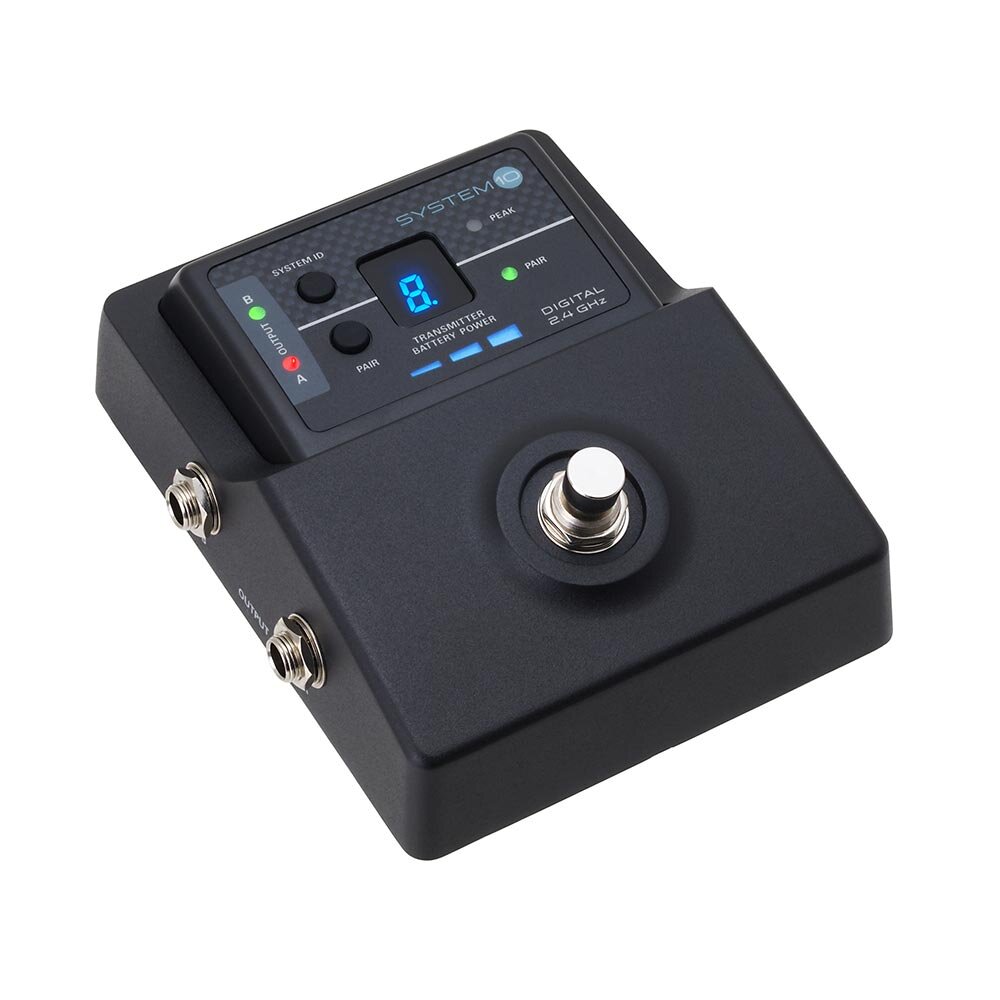
Introduction: Audio-Technica System 10 Wireless Stompbox System ATW-1501 Overview
The audio-technica System 10 Wireless Stompbox System ATW-1501 is a digital 2.4 GHz wireless guitar and instrument system designed for players who want clean signal transmission, simple setup, and pedalboard-friendly operation. Built for live performance, rehearsal rooms, and stage rigs, it pairs a stompbox-style receiver with a compact bodypack transmitter, making it a strong choice for guitarists, bassists, and multi-instrument performers who want to move freely without being tied to a cable.
This wireless stompbox system stands out for its automatic channel selection, up to eight paired transmitters, and 24-bit/48 kHz digital audio performance. It is designed to deliver full-range sound from 20 Hz to 20 kHz, while the receiver’s compact footprint helps it fit neatly into modern pedalboards. The ATW-1501 also includes a 12 dBV balanced output and a 10 mW transmitter output, giving users a practical, stage-ready setup for most small to medium performance environments.
Ideal users include gigging musicians, worship teams, session players, and home-studio performers who need a reliable wireless guitar system with low clutter and quick pairing. Typical price range varies by region and seller, but new units commonly fall in the mid-range wireless system category, often around a few hundred dollars depending on stock, condition, and bundle. Availability can be inconsistent because this is a specialized model, so buyers often find it through pro audio retailers, marketplace listings, or remaining dealer inventory.
Troubleshooting: Common ATW-1501 Problems and Fixes
One of the most common issues with the audio-technica System 10 Wireless Stompbox System ATW-1501 is pairing confusion. If the system ID does not stay selected, press the receiver’s System ID button and then press and hold Pair within 15 seconds. If the pairing window expires, the ID reverts to the previous setting. Another frequent issue is low audio level, which is often caused by the instrument volume being turned down, the cable path not being fully seated, or the receiver output not matching the connected mixer or amp input.
If the receiver does not power on, confirm the AC adapter is connected properly and that the power source is active. If signal dropouts occur, keep the transmitter within the system’s recommended operating range and avoid heavy Wi-Fi congestion when possible. For battery-related problems, replace the transmitter batteries with fresh AA alkaline cells and turn the transmitter off when not in use to preserve life. Error codes may vary by region and display mode, but any abnormal flashing or missing RF indication should be treated as a pairing, power, or range issue first.
Preventive care includes storing the unit dry, avoiding extreme heat, and checking batteries before each performance. For support, Audio-Technica provides product assistance, repair guidance, and parts help through its regional customer service channels. Warranty coverage is typically tied to the original purchase proof, so keep your receipt and serial information accessible when requesting service.
Pros and Cons of the Audio-Technica ATW-1501 Wireless Stompbox System
Pros
- Compact stompbox receiver fits easily on pedalboards and touring rigs.
- Digital 2.4 GHz operation reduces the hassle of traditional frequency coordination.
- Auto channel selection and simple pairing make setup fast for live shows.
- Up to eight paired transmitters adds flexibility for multi-guitar or backup setups.
- 24-bit/48 kHz audio and 20 Hz to 20 kHz response deliver strong instrument clarity.
- Good value for players who want a practical wireless guitar system without excessive complexity.
Cons
- Battery management is essential, since the bodypack uses two AA batteries.
- 2.4 GHz systems can be more sensitive to crowded wireless environments than some UHF alternatives.
- It is not the cheapest option if you only need a basic practice-room wireless setup.
- Availability may be limited compared with newer wireless guitar systems.
- Players seeking long-distance stage coverage may prefer larger-format alternatives with broader ecosystem support.
Compared with entry-level wireless guitar systems, the ATW-1501 feels more polished and stage-focused. Compared with premium rack-based alternatives, it is easier to set up and more pedalboard-friendly, though it may not offer the same advanced control or expanded range.
Customer Reviews: What Users Say About the ATW-1501
Customer feedback for the audio-technica System 10 Wireless Stompbox System ATW-1501 is generally positive, with many players praising the quick setup, compact receiver design, and clean sound quality. A common rating pattern is around 4 to 5 stars from musicians who value convenience and reliable performance during rehearsals and live sets. One typical comment is: “It was easy to pair, sounded natural, and kept my pedalboard neat.”
Common complaints usually focus on battery life, wireless congestion in busy environments, and the fact that it may require more attention than a simple cable. Some users also note that price can feel high if the system is used only occasionally. Still, most buyers who need a dependable wireless stompbox for guitar or bass consider it a worthwhile purchase, especially for live performers who want a clean setup and flexible movement on stage.
Key Specs and Buying Summary
- Wireless type: Digital 2.4 GHz instrument system
- Audio quality: 24-bit / 48 kHz
- Frequency response: 20 Hz to 20 kHz
- Transmitter output: 10 mW
- Receiver output: 12 dBV balanced
- Transmitter power: 2 AA alkaline batteries
- Typical runtime: About 6 hours with alkaline batteries
- Receiver size: Compact stompbox format for pedalboards
If the goal is a reliable, easy-to-use wireless guitar system with professional sound and a pedalboard-friendly design, the audio-technica System 10 Wireless Stompbox System ATW-1501 remains a strong choice for modern performers.
Faqs
How do I set up the audio-technica System 10 Wireless Stompbox System ATW-1501 for the first time?
Why is my audio-technica System 10 Wireless Stompbox System ATW-1501 dropping signal or cutting out during use?
What pedals and instruments work best with the audio-technica System 10 Wireless Stompbox System ATW-1501?
How can I get the best sound quality from the audio-technica System 10 Wireless Stompbox System ATW-1501?
Is the audio-technica System 10 Wireless Stompbox System ATW-1501 compatible with pedalboards and direct-to-PA setups?
What should I do if the audio-technica System 10 Wireless Stompbox System ATW-1501 sounds noisy or distorted?
How do I maintain the audio-technica System 10 Wireless Stompbox System ATW-1501 for reliable long-term use?
What are the most important performance settings to check on the audio-technica System 10 Wireless Stompbox System ATW-1501 before a live gig?
More audio-technica manuals
- Audio-Technica AT2020USB+ Cardioid Condenser USB Microphone User Manual
- Audio-Technica System 9 VHF Wireless System ATW-901a/G User Manual
- Audio-Technica AT-LP60XUSB Automatic Belt-Drive Turntable User Manual
- Audio-Technica ATH-WS99BT Wireless Headphones User Manual
- Audio-Technica 3000 Series UHF Wireless System ATW-R3210 User Manual
- Audio-Technica AT-LP60-USB Automatic Belt-Drive Stereo Turntable User Manual
Leave a Comment