
Audio-Technica AT-LP60XUSB Automatic Belt-Drive Turntable User Manual
Content
audio-technica AT-LP60XUSB Automatic Belt-Drive Turntable Review and Manual
Introduction
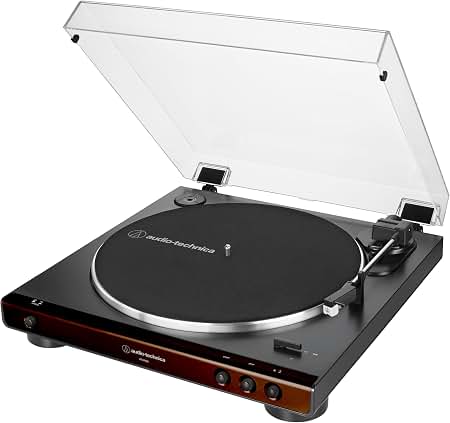
The audio-technica AT-LP60XUSB Automatic Belt-Drive Turntable is a popular entry-level record player built for listeners who want simple operation, dependable performance, and easy vinyl-to-digital conversion. This fully automatic belt-drive turntable handles playback with one-touch start and stop controls, making it especially appealing for beginners, casual vinyl fans, dorm rooms, and home offices. Its built-in phono preamp lets you connect directly to powered speakers, stereo systems, or a computer without needing extra equipment, while the USB output makes it a practical choice for archiving records to a PC or Mac.
Key strengths include 33 1/3 RPM and 45 RPM support, a pre-installed cartridge, an aluminum platter, and a compact footprint that fits easily on shelves and desks. The automatic operation reduces handling errors, which is useful for users who want a low-maintenance turntable for everyday listening. The audio-technica AT-LP60XUSB Automatic Belt-Drive Turntable also appeals to first-time buyers who value convenience over upgrade-heavy audiophile features.
Estimated pricing typically falls around the budget-to-midrange bracket, often near $120 to $180 depending on color, retailer, and region. Availability remains broad through major electronics stores, online marketplaces, and Audio-Technica dealers. For anyone searching for a straightforward USB turntable for vinyl playback and digitization, the audio-technica AT-LP60XUSB Automatic Belt-Drive Turntable offers strong value and reliable functionality.
Pros & Cons of the AT-LP60XUSB Turntable
Pros
- Fully automatic operation makes record playback easy for beginners and casual users.
- USB output is ideal for digitizing vinyl records on a Windows PC or Mac.
- Built-in phono preamp supports flexible connection to powered speakers and home audio systems.
- Compact and lightweight design works well in small spaces.
- Good value for money for users who want convenience without a large budget.
- Supports 33 1/3 and 45 RPM records, covering most modern and classic vinyl collections.
Cons
- Not designed for advanced audiophile upgrades or deep customization.
- Fully automatic mechanism limits manual control compared with more premium turntables.
- Sound quality is solid for the price, but not as detailed as higher-end belt-drive models.
- USB recording is practical, though serious archivists may prefer a separate audio interface for maximum quality.
- Some buyers may outgrow it if they later want replaceable components and broader upgrade paths.
Compared with similarly priced beginner turntables, the audio-technica AT-LP60XUSB Automatic Belt-Drive Turntable stands out for its ease of use and dependable feature set. It is a stronger everyday choice than many no-name USB record players, but buyers seeking more upgrade potential may prefer a model like the AT-LP70X or a manual turntable in a higher price tier.
Customer Reviews and User Feedback
Customer feedback for the audio-technica AT-LP60XUSB Automatic Belt-Drive Turntable is generally positive, with many users giving it around 4 to 4.5 out of 5 stars. Buyers frequently praise the simple setup, automatic start/stop function, and the convenience of converting vinyl to digital files. One common testimonial style comment is: “Perfect for my first turntable—easy to use, compact, and the USB feature worked exactly as expected.”
Common compliments include reliable playback, solid value, and a user-friendly design that works well for new vinyl collectors. Frequent complaints focus on the lack of a power button on some setups, limited upgradeability, and sound quality that is good but not premium. Some users also note that the included features are aimed more at convenience than serious audio experimentation.
Overall, the audio-technica AT-LP60XUSB Automatic Belt-Drive Turntable is widely recommended for first-time buyers, casual listeners, and anyone who wants a simple USB turntable for everyday use. It is especially attractive if you want a plug-and-play record player with phono and line output options.
Technical Specifications at a Glance
- Type: Fully automatic belt-drive turntable
- Speeds: 33 1/3 RPM and 45 RPM
- USB: Yes, for computer connection and vinyl digitization
- Built-in phono preamp: Yes
- Platter: Aluminum
- Weight: 2.6 kg
- Dimensions: 359.5 mm x 97.5 mm x 373.3 mm
- Output options: Phono, line out, USB
Who Should Buy the AT-LP60XUSB?
This automatic belt-drive turntable is best for beginners, gift buyers, apartment dwellers, and vinyl listeners who want a low-fuss setup. It is also a smart pick for users who want to transfer records to a computer without buying extra equipment. If your priority is easy operation, compact size, and dependable everyday playback, this model is an excellent fit.
Frequently Asked Questions
Can the AT-LP60XUSB connect directly to speakers?
Yes. The built-in phono preamp allows direct connection to powered speakers or audio systems with line-level inputs.
Can it digitize vinyl records?
Yes. The USB output is designed for recording records to a computer using compatible audio software.
Is this turntable good for beginners?
Yes. Its fully automatic operation, simple connections, and compact design make it one of the easiest beginner turntables to use.
Faqs
How do I set up the audio-technica AT-LP60XUSB Automatic Belt-Drive Turntable for the first time without damaging the stylus or records?
Why is my audio-technica AT-LP60XUSB Automatic Belt-Drive Turntable playing at the wrong speed, and how can I fix it?
Can the audio-technica AT-LP60XUSB Automatic Belt-Drive Turntable connect directly to powered speakers or do I need a separate amplifier?
How do I digitize vinyl with the audio-technica AT-LP60XUSB Automatic Belt-Drive Turntable using USB?
What should I do if the audio-technica AT-LP60XUSB Automatic Belt-Drive Turntable skips or mistracks on certain records?
How do I know whether to use phono or line output on the audio-technica AT-LP60XUSB Automatic Belt-Drive Turntable?
What maintenance does the audio-technica AT-LP60XUSB Automatic Belt-Drive Turntable need to keep sound quality consistent?
Is the audio-technica AT-LP60XUSB Automatic Belt-Drive Turntable a good choice for beginners who want automatic playback and easy setup?
More audio-technica manuals
- Audio-Technica 3000 Series UHF Wireless System ATW-R3210 User Manual
- Audio-Technica AT2020USB+ Cardioid Condenser USB Microphone User Manual
- Audio-Technica AT-LP8X Semi-Automatic Direct-Drive Turntable User Manual
- Audio-Technica System 10 Wireless Stompbox System ATW-1501 User Manual
- Audio-Technica Powered Bookshelf Speakers AT-SP3X User Manual
- Audio-Technica System 9 VHF Wireless System ATW-901a/G User Manual
Leave a Comment