
Setup & Usage: Aukey 2-in-1 Wireless Transmitter & Receiver User Manual
Content
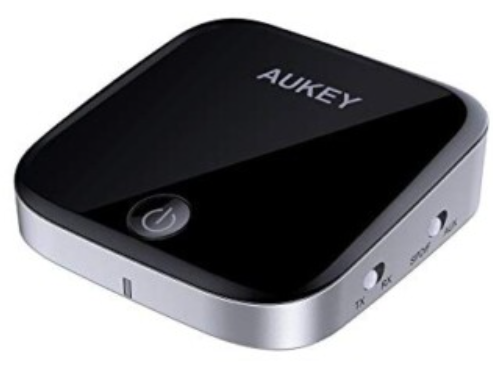
AUKEY 2-in-1 Wireless Transmitter & Receiver
Introduction
The AUKEY 2-in-1 Wireless Transmitter & Receiver is a versatile Bluetooth adapter designed to seamlessly bridge the gap between non-Bluetooth devices and modern wireless audio technology. By combining both transmitter and receiver functions, this compact device enables users to wirelessly stream audio from TVs, computers, or other legacy audio sources to Bluetooth headphones or speakers, as well as receive Bluetooth signals from smartphones or tablets to play audio on wired home stereo systems. Its dual functionality makes it an ideal solution for enhancing audio setups without replacing existing equipment.
Key benefits include Bluetooth 5.0 support for stable connections with up to 50 meters range, aptX Low Latency codec for synchronized audio-video experience, and the ability to connect two Bluetooth headphones simultaneously for shared listening. Lightweight and portable, the AUKEY transmitter and receiver are perfect for home entertainment, gaming, and on-the-go audio needs. It supports multiple use cases such as upgrading older TVs, enabling wireless music streaming on wired speakers, and providing a low-latency audio link for gaming devices.
Priced competitively in the range of approximately $25 to $8,0 depending on the model and retailer, it is widely available through online marketplaces such as Amazon and eBay. Its affordable price combined with high functionality makes it attractive to audiophiles, gamers, and everyday users seeking enhanced wireless audio flexibility.
Package Contents
- 2-in-1 Wireless Transmitter & Receiver
- 3.5mm Audio Cable
- Micro-USB Charging Cable
- User Manual
- Warranty Card
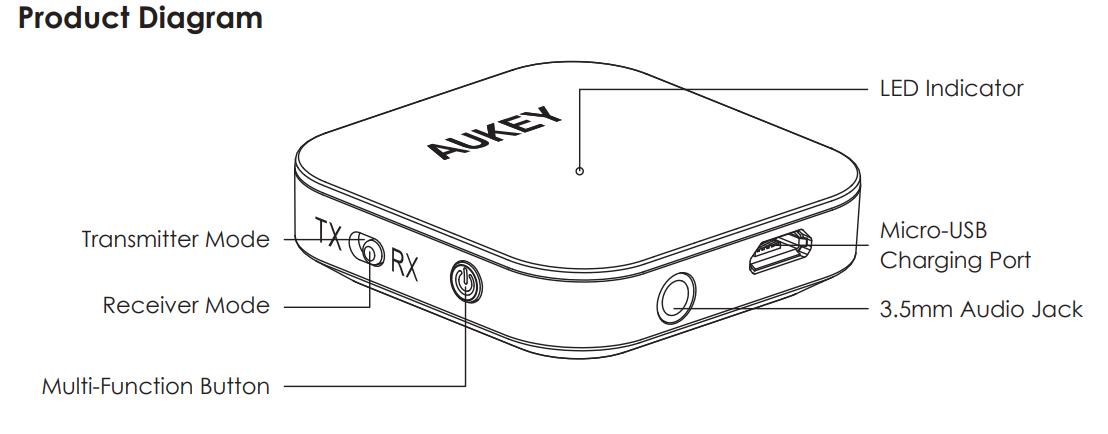
Product Diagram
Specifications
- Model
- BR-C19
- Technology
- BT 4.1, A2DP, AVRCP
- Frequency Range
- 2.4GHz - 2.48GHz
- Input
- DC 5V
- Charging Time
- 2 hours
- Continuous Use Time
- 12 hours (Receiver Mode) / 13 hours (Transmitter Mode)
- Battery Type
- Li-Polymer (250mAh)
- Operating Range
- Up to 10m / 33ft
- Dimensions
- 44 × 44 × 12.4mm / 1.73" x 1.73" x 0.47"|
- Weight
- 18g / 0.63oz
Getting Started
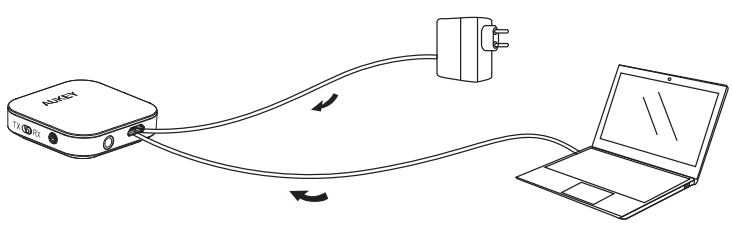
Please fully charge your product before first use. To charge, connect it to a USB charger or charging port with the included micro-USB cable. When the red LED indicator turns off, your BR-C19 is fully charged and ready for use. Charging takes around 2 hours.
Pairing
Transmitter Mode
- Choose the transmitter mode. Connect one end of the included 3.5mm audio cable to the 3.5mm audio jack on the BR-C19, and connect the other end of the cable to your audio output device (TV, computer, CD player, MP3 player, or other) that doesn’t have a wireless function
- Power on the BR-C19, and it will automatically enter pairing mode (LED indicator flashing blue rapidly). To manually enter pairing (usually to pair with a different device), double-press the multi-function button
- Activate the pairing function of your wireless-compatible audio device (like wireless headphones or speakers)
- When the BR-C19 has connected with the wireless audio device, the LED indicator will stay blue
Notes
- In transmitter mode, the BR-C19 will automatically exit pairing mode and go into standby (LED indicator flashing blue once every second) after 2 minutes if no device is paired
- In transmitter mode, the pairing list of your BR-C19 includes up to 4 paired device,s and the BR-C19 will automatically reconnect to the last two successfully paired devices
- When you power off, wait for 3 seconds before switchinmodesde. When you turn on the BR-C19 in receiver mode, the transmitter mode pairing list will be cleared
Receiver Mode
- Choose the receiver mode. Connect one end of the included 3.5mm audio cable to the 3.5mm audio jack on the BR-C19, and connect the other end of the cable to your audio equipment (wired headphones, speaker, or stereo system). Wired headphones may also be used by directly connecting their audio cable to the BR-C19
- Power on the BR-,C19 and it will automatically enter pairing mode (LED indicator flashing red and blue alternately). To manually enter pairing (usually to pair with a different device), double-press the multi-function button
- Activate the pairing function of your wireless-compatible audio device (like a smartphone) and select “AUKEY BR-C19”
- If a code or pin is required for pairing, enter “0000”
Notes
- In receiver mode, the BR-C19 will automatically shut down after 5 minutes in pairing mode if no device is paired
- In receiver mode, the pairing list of the BR-C19 includes up to 8 paired dev,ices and the BR-C19 will automatically reconnect to the last two paired devices
- When you power off, wait for 3 seconds before switcmodes mode. When you turn on the BR-C19 in transmitter mode, the receiver mode pairing list will be cleared
Simultaneous Connection with Two Devices
In transmitter mode, two connected wireless devices (such as wireless headphones) can receive sound from the same source (such as a TV) simultaneously. In receiver mode, two wireless devices (such as phones) can be simultaneously connected to one audio output device (such as a speaker), but sound can only be received from one source at a time.
- Follow the instructions in the “Pairing” section to pair the BR-C19 with Device A
- Once paired, disable the wireless function on Device A and then double-press the multi-function button to enter pairing mode
- Activate the wireless function of Device B and connect with “AUKEY BR-C19”
- Once paired with Device B, reactivate the wireless function on Device A and connect with “AUKEY BR-C19”
- If you cannot connect the second device, try double-pressing the multi-function button again
Product Care & Use
- Please keep away from liquids and extreme heat
- Do not use headphones or speakers at high volume for extended periods, as this may cause permanent hearing damage or loss
Warranty & Customer Support
For questions, support, or warranty claims, contact us at the address below that corresponds with your region. Please include your Amazon order number and product model number.
- Amazon US orders: support.us@aukey.com
- Amazon EU orders: support.eu@aukey.com
- Amazon CA orders: support.ca@aukey.com
- Amazon JP orders: support.jp@aukey.com
Troubleshooting Guide for AUKEY 2-in-1 Wireless Transmitter & Receiver
Common issues with the AUKEY 2-in-1 Wireless Transmitter & Receiver include connectivity problems, audio latency, device not pairing, and intermittent audio dropouts. To resolve these:
- No pairing or connection: Ensure the device is in the correct mode (Transmitter or Receiver) using the slide switch, and that Bluetooth is enabled on your source device. Restart both devices and clear any previous Bluetooth pairings.
- Audio latency or out-of-sync sound: Confirm thathe t the aptX Low Latency codec is enabled on both transmitter and receiver devices. Avoid physical obstructions and maintain the recommended operating range (up to 50m for some models, 10m for others).
- Intermittent audio dropouts: Reduce interference by moving wireless routers or other Bluetooth devices away from the unit and ensuring the battery is charged or the power supply is stable.
- Error codes: The AUKEY transmitter/receiver generally uses LED indicators rather than detailed error codes. Refer to the user manual for LED status interpretations.
Preventive measures include keeping firmware updated (if applicable), charging the internal battery fully before use, and avoiding excessive physical stress on ports. The product typically includes a 24-month warranty backed by AUKEY’s customer support. For assistance, users can contact support via support@aukey.com or visit the official AUKEY website.
Pros & Cons of the AUKEY 2-in-1 Wireless Transmitter & Receiver
Pros
- Dual functionality: Combines transmitter and receiver modes, minimizing the need for separate devices.
- Bluetooth 5.0 with aptX Low Latency: Provides improved range (up to 50m in some models) and synchronized audio for watching TV or gaming.
- Compact and portable: Lightweight design makes it easy to carry and install in various setups.
- Multi-device connectivity: Supports simultaneous connection of two Bluetooth headphones for shared audio experiences.
- Wide device compatibility: Works with TVs, computers, smartphones, tablets, headphones, and speakers.
Cons
- Range limitations: Some models have shorter operating ranges (up to 10 meters), which may constrain placement.
- Setup complexity: Initial mode switching and pairing can be confusing for non-technical users without carefully consulting the manual.
- Battery life: Continuous use time varies (~13 hours depending on model); users may need frequent recharging for extended use.
- Bypass mode limitations: The cable pass-through mode may not support all signal types or devices seamlessly.
- Price competition: Alternatives with similar features are available at comparable prices, requiring buyers to evaluate specific needs.
Customer Reviews and Ratings of the AUKEY 2-in-1 Wireless Transmitter & Receiver
Customers generally praise the AUKEY 2-in-1 Wireless Transmitter & Receiver for its reliable Bluetooth connectivity, easy portability, and versatility in supporting various audio devices. Many users highlight the aptX Low Latency codec as a significant advantage for watching TV and gaming without noticeable audio delay. The ability to connect two headphones simultaneously is also frequently lauded as a great feature for families and roommates.
Common complaints include occasional pairing difficulties, limited range in crowded wireless environments, and some confusion around switching modes, especially for first-time users. Battery life is acceptable fo,r most but noted as a potential downside during long listening sessions without USB power. Overall, the device receives star ratings mostly in the range of 4 to 4.5 out of 5, with recommendations for those seeking an affordable and functional wireless audio solution that enhances older audio hardware.
Faqs
How do I set up the aukey 2-in-1 Wireless Transmitter & Receiver for the first time?
What should I do if the aukey 2-in-1 Wireless Transmitter & Receiver is not pairing with my Bluetooth device?
Can the aukey 2-in-1 Wireless Transmitter & Receiver connect to multiple devices simultaneously?
What audio input and output connections are compatible with the aukey 2-in-1 Wireless Transmitter & Receiver?
How can I optimize the audio performance of the aukey 2-in-1 Wireless Transmitter & Receiver?
What maintenance is required to keep the aukey 2-in-1 Wireless Transmitter & Receiver functioning properly?
Is the aukey 2-in-1 Wireless Transmitter & Receiver compatible with all Bluetooth audio devices?
How do I switch between transmitter and receiver modes on the aukey 2-in-1 Wireless Transmitter & Receiver?
More aukey manuals
- Usage: Aukey Foldable 21W Solar Charger User Guide
- How to: Aukey SoundTank Wireless Speaker User Manual
- How to Use: Aukey 12W Floor Lamp User Manual
- How to Connect: Aukey AudioLink Wireless Speaker SK-A6 User Manual
- Setup: Aukey PowerHub XL Charging Station PA-S14 User Guide
- How to Use: Aukey Foldable On-Ear Wireless Headphones User Manual
Leave a Comment