
Setup: Aukey PowerHub XL Charging Station PA-S14 User Guide
Content
aukey PowerHub XL Charging Station PA-S14
Introduction
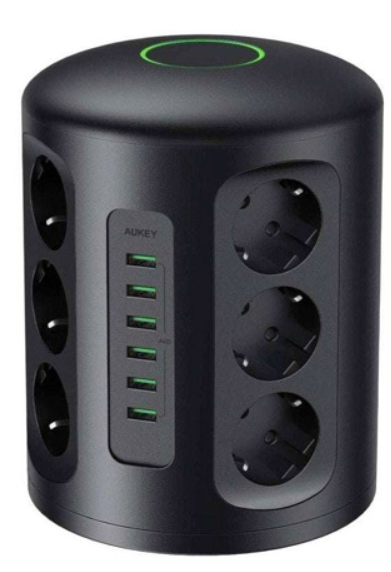
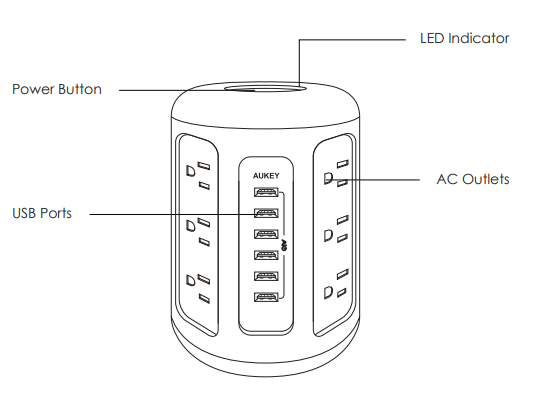
The Aukey PowerHub XL Charging Station PA-S14 is a versatile, high-capacity power tower designed to streamline and organize your workspace or home environment. Featuring a robust combination of 12 AC outlets and 6 USB ports, this charging station delivers a centralized solution for powering numerous devices simultaneously, including laptops, smartphones, tablets, speakers, and other electronic gadgets. Its unique cylindrical design optimizes space by providing vertical outlets and USB ports, allowing easy access and reducing clutter from tangled cords.
Equipped with AiPower adaptive charging technology, the PowerHub XL intelligently detects connected devices and supplies the safest maximum recharge rate, offering up to 2.4A per USB port (with a total USB output of 6A). This ensures efficient and safe charging for all your USB-powered gadgets. Additionally, the sturdy design includes a 4.9-foot power cable to extend reach and convenience.
Ideal for home offices, entertainment centers, and busy workstations, the PA-S14 model supports heavy-duty power needs, making it perfect for professionals, students, and tech enthusiasts who require a reliable and organized power solution. The charging station retails at an estimated price range of $40 to $50 and is readily available through major online retailers and Aukey’s official store.
Getting Started
- Plug the PowerHub XL into a wall socket
- Press the Power Button to turn on/off
- Plug in your AC and USB-powered devices
Product Care
- Please keep away from liquids and extreme heat
Warranty & Customer Support
For questions, assistance, support, or warranty claims, please contact us at the address below that corresponds with your region. Please include your Amazon order number and product model number.
Specifications
- Model
- PA-S14
- Input
- 100 - 240V 15A 50Hz / 60Hz
- USB Output
- 5V 2.4A (6A Max)
- AC Output
- 100 - 240V 15A 1875W
- Dimensions
- 117 x 117 x 172mm / 4.61" x 4.61" x 6.77"
- Weight
- 885g / 31.22oz
Troubleshooting the Aukey PowerHub XL Charging Station PA-S14
Despite its reliable design, users may encounter occasional issues with the PowerHub XL. Common problems include USB ports not charging devices or some AC outlets feeling loose. To resolve these:
- USB ports not charging: Ensure the PowerHub is firmly plugged into a live wall outlet and the power button on top is switched on (indicated by a green LED ring). Check cables and devices for faults.
- Loose AC outlets: Confirm the plug is fully inserted. The outlets are designed with medium firmness to balance ease of use and secure connection.
- Charging speed issues: The total USB output is limited to 6A. If all USB ports are occupied, charging speeds will be distributed evenly and may be slower than single-port maximums. Use fewer USB ports simultaneously for faster charging per device.
No specific error codes are displayed on the device, but overheating or overload protection will automatically cut power to prevent damage. To prevent issues, avoid plugging in devices exceeding the station’s max load of 3500 W, and do not use damaged power cables.
ThAukeyey PowerHub XL PA-S14 comes with a limited warranty covering defects and operational faults. For assistance, customers can contact Aukey support via their official website or customer service email. Prompt support ensures minimal downtime and optimal device performance.
Pros & Cons of the Aukey PowerHub XL Charging Station PA-S14
Pros
- High Capacity: Twelve AC outlets and six USB ports provide extensive power options for multiple devices simultaneously.
- Space-Saving Design: Vertical cylindrical layout reduces desk clutter and facilitates easy plug access.
- Adaptive Charging: AiPower technology optimizes USB charging current for device safety and efficiency.
- Durable Build: Sturdy housing with firm yet accessible outlets and a long power cord enhances usability.
- Value for Money: Competitively priced at around $45, offering features comparable to premium power hubs.
Cons
- Limited USB Power Distribution: Total USB output is capped at 6A, which may slow charging if all USB ports are in use.
- No USB Power Delivery: USB-C ports do not support fast charging standards like USB PD.
- Basic User Manual: Minimal documentation requiring users to refer to online resources for advanced troubleshooting.
- Not Portable: Designed primarily for stationary use, it is bulkier than compact chargers.
Customer Reviews of aukey PowerHub XL Charging Station PA-S14
Customers praise the Aukey PowerHub XL Charging Station PA-S14 for its ability to declutter and centralize power needs effectively, with many highlighting its sturdy design and ample outlet availability. The adaptive AiPower USB charging technology receives positive mentions for safeguarding device batteries.
Common feedback includes complaints about slower charging speeds when multiple USB ports are used simultaneously, reflecting the 6A total USB output limit. Some users also wish for USB-C fast charging support, which the device lacks. Overall, the product holds an average rating close to 4.5 out of 5 stars, with many recommending it for home offices and gaming setups due to its convenience and reliability.
Buyers suggest the PowerHub XL is an excellent investment for those needing to power multiple devices without socket shortages or clutter. It is frequently recommended for anyone seeking a robust, multi-outlet power station at a reasonable price.
Faqs
How do I set up the aukey PowerHub XL Charging Station PA-S14 for the first time?
What should I do if the aukey PowerHub XL Charging Station PA-S14 is not working properly?
Can I use the aukey PowerHub XL Charging Station PA-S14 with all types of USB devices?
How does the cylindrical design of the aukey PowerHub XL Charging Station PA-S14 benefit me?
What are the key features that make the aukey PowerHub XL Charging Station PA-S14 different?
How often should I maintain the aukey PowerHub XL Charging Station PA-S14?
Can I use the aukey PowerHub XL Charging Station PA-S14 in different countries with varying voltage requirements?
How does the aukey PowerHub XL Charging Station PA-S14 protect my devices from overcharging or overheating?
More aukey manuals
- Setup: Aukey Wireless FM Transmitter User Manual
- How to Use: Aukey 12W Floor Lamp User Manual
- Pairing & Usage: Aukey Neckband Magnetic Wireless Earbuds User Manual
- Usage: Aukey Foldable 21W Solar Charger User Guide
- Setup: Aukey Ultrasonic Aroma Diffuser User Manual
- Setup & Usage: Aukey 2-in-1 Wireless Transmitter & Receiver User Manual
Leave a Comment