
Pairing & Usage: Aukey Neckband Magnetic Wireless Earbuds User Manual
Content
Aukey Neckband Magnetic Wireless Earbuds
Introduction
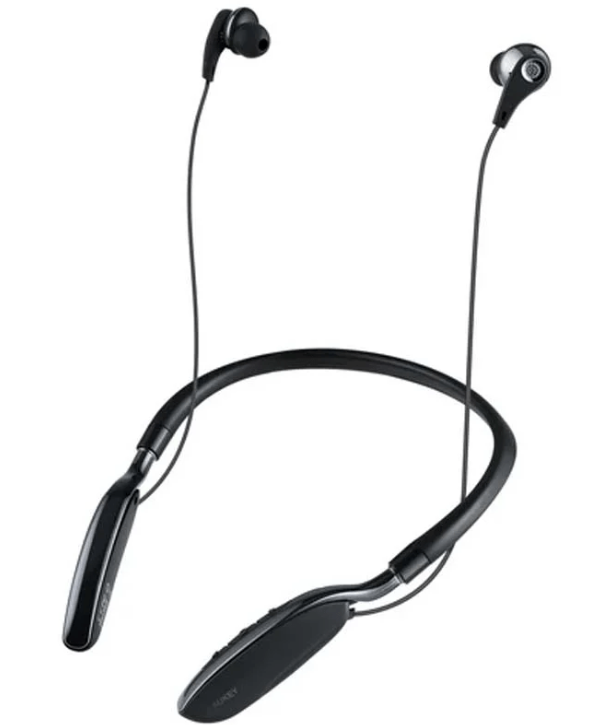
The aukey Neckband Magnetic Wireless Earbuds offer a versatile and comfortable audio solution designed for users seeking high-quality sound combined with wireless convenience. Featuring magnetic earbuds that snap together when not in use, these neckband-style earbuds provide enhanced portability and prevent tangling, making them ideal for daily activities such as commuting, exercising, or working from home. Equipped with Bluetooth 4.1 technology, the earbuds deliver stable connectivity within a range of up to 33 feet, supporting seamless music playback and clear hands-free calls.
Key benefits include up to 8 hours of continuous playback, quick 1.5-hour charging time, and built-in dual mics with 6th generation cVc noise cancellation technology for crystal-clear voice communication. The flexible neckband is cushioned with soft, leather-like material ensuring all-day comfort, while multiple ear-tip sizes guarantee a secure, noise-isolating fit. These earbuds are sweat and water-resistant, making them suitable for workouts and outdoor use.
Targeted at fitness enthusiasts, commuters, and professionals who require reliable wireless audio with hands-free call functionality, these earbuds blend usability with advanced features at a competitive price range of approximately $30 to $40. They are widely available through online retailers and Aukey’s official stores, offering a great balance between affordability and performance in the wireless earbuds market.
Package Contents
- Neckband Magnetic Wireless Earbuds
- Micro-USB Cable
- Three Sets of Ear-Tips
- User Manual
- Warranty Card
Product Diagram
Specifications
- Model: EP-B61
- Technology: BT 4.2, A2DP, AVRCP, HSP, HFP
- Driver: 1 x 10mm / 0.39” speaker driver (in each earpiece)
- Sensitivity: 91dB ±3dB
- Frequency Response: 20Hz – 10KHz
- Impedance: 32 ohm
- Battery Life: 8 hours
- Charging Time: 2 hours
- Charging Input: DC 5V
- Battery: Li-Polymer (120mAh)
- Operating Range: Up to 10m / 33’
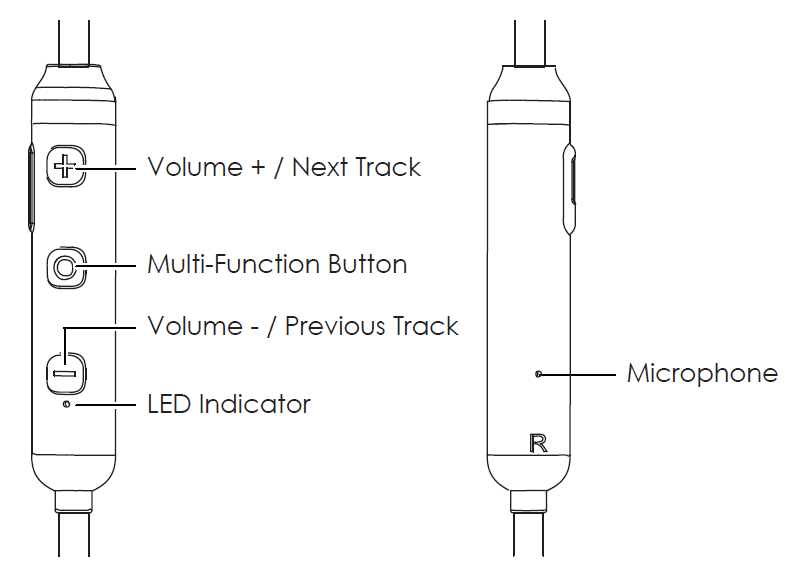
- Controls: Three-button in-line control
- Weight: 22g / 0.78oz
Getting Started
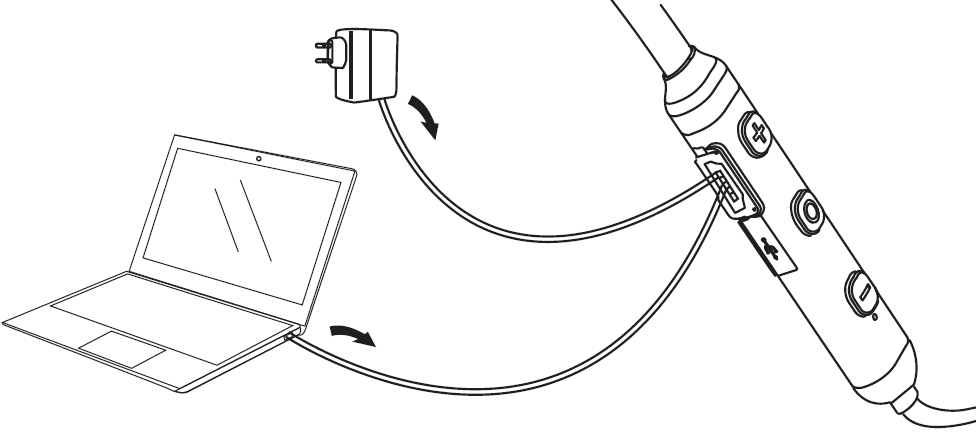
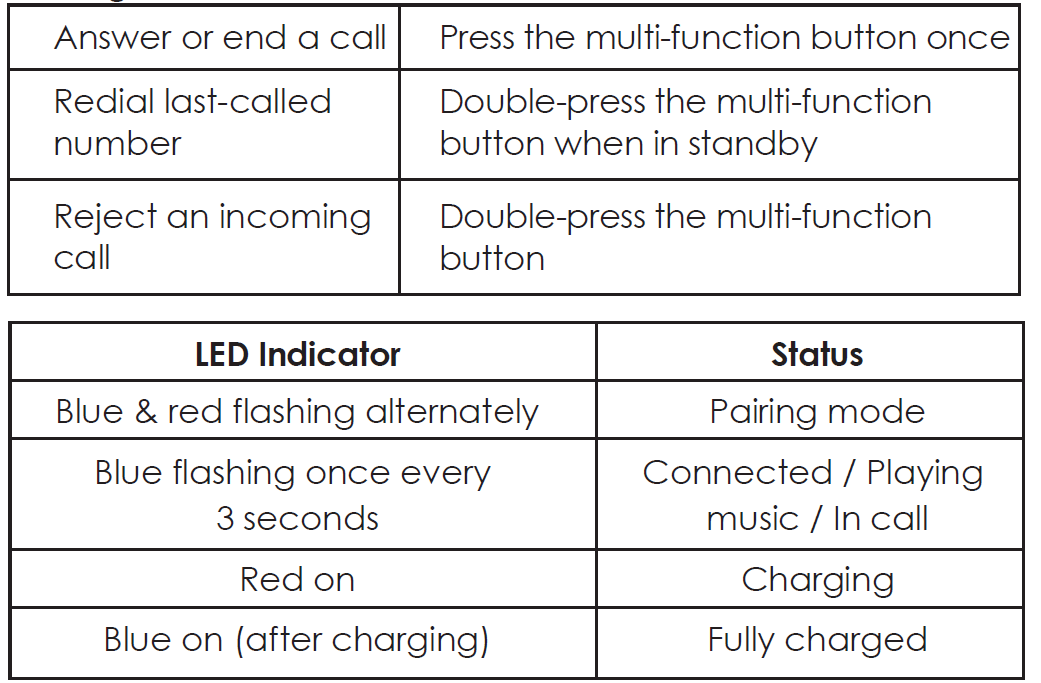
Fully charge your earbuds before first use. To charge, simply connect one end of the included micro-USB cable to a USB charging port and the other end to the input port on the earbuds. When the red charging indicator light turns blue, your earbuds are fully charged and ready for use. Charging takes around 2 hours.
Turning On / Off
- To power on, press and hold the multi-function button for 3 seconds, and the LED indicator will flash blue three times
- To power off, press and hold the multi-function button for 3 seconds, and the LED indicator will flash red three times
Pairing
Starting with the earbuds powered off:
- Press and hold the multi-function button for 3 seconds to power on. The earbuds will automatically enter pairing mode, with the LED flashing red and blue alternately, after a moment. To avoid automatic connection to a previously paired device, press and hold for 5 seconds to manually enter pairing mode instead
- Turn on the pairing function of the device you want to pair with the earbuds
- In the list of available devices, find and select “AUKEY EP-B61”. When connected, the LED indicator will flash blue once every 3 seconds
- If a code or PIN is required for pairing, please enter “0000”
Simultaneous Connection with Two Devices
- Follow the instructions in the “Pairing” section to pair the earbuds with Device A
- Once paired, disable wireless function on Device A
- Repeat steps 2 and 3 from the “Pairing” section to pair with Device B
- Once paired with Device B, reactivate wireless function on Device A and select “AUKEY EP-B61” in the list of paired devices
- You can now make and receive calls from either of the two paired devices
Controls & LED Indicators
Streaming Audio
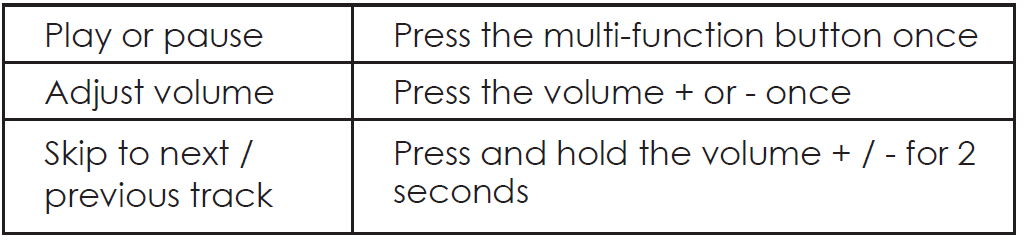
Once paired, you can wirelessly stream audio from your device to the earbuds. Music will automatically pause when you receive an incoming phone call and resume once the call is ended.
Troubleshooting Guide for aukey Neckband Magnetic Wireless Earbuds
Common issues with the aukey Neckband Magnetic Wireless Earbuds and their solutions include:
- Earbuds not pairing: Ensure Bluetooth is enabled on your device and the earbuds are in pairing mode (both earbuds separated and blinking). Reset by turning off and on, then attempt pairing again.
- One earbud not working: Check battery levels and charge both earbuds fully. If problem persists, reset the earbuds by holding the multifunction button for 10 seconds.
- Audio cutting out: Confirm the device is within Bluetooth range (under 33 feet) and remove obstacles. Interference from other wireless devices can also cause issues.
- Low volume or muffled sound: Clean the ear tips and speaker mesh from debris. Adjust volume on both the earbuds and connected device.
- Mic not working during calls: Ensure the microphone is not obstructed and the earbuds are properly connected. Restart the device and earbuds.
Preventive measures include keeping the earbuds and charging case dry, cleaning the ear tips regularly, and avoiding exposure to extreme temperatures. The product comes with a 1-year limited warranty covering manufacturing defects. For additional support, users can contact Aukey customer service via their official website or authorized retailers.
Warranty & Customer Support
For questions, support, or warranty claims, contact us at the address below that corresponds with your region. Please include your Amazon order number and product model number.
- Amazon US orders: support.us@aukey.com
- Amazon EU orders: support.eu@aukey.com
- Amazon CA orders: support.ca@aukey.com
- Amazon JP orders: support.jp@aukey.com
Pros & Cons of aukey Neckband Magnetic Wireless Earbuds
Pros
- Long battery life: Up to 8 hours of playback with fast 1.5-hour charging ensures extended use without frequent recharging.
- Magnetic earbuds: Convenient magnetic design prevents tangling and makes storage easy when not in use.
- Comfortable neckband: Soft, flexible leather-like material enhances wearing comfort for long durations.
- Clear call quality: Dual mics with 6th generation cVc noise cancellation provide excellent voice clarity during phone calls.
- Water and sweat resistance: Suitable for workouts and outdoor activities.
Cons
- Bluetooth 4.1: While stable, it is an older version compared to more recent Bluetooth 5+ earbuds offering potentially better connectivity and energy efficiency.
- No charging case: Unlike true wireless models, these neckband earbuds rely on built-in battery without a portable charging case for on-the-go recharges.
- Limited advanced features: Lacks touch controls, voice assistant integration, and customizable EQ settings found in premium competitors.
Compared to fully wireless earbuds, the aukey Neckband Magnetic Wireless Earbuds provide a better fit security and longer battery life but trade off some modern conveniences. Their excellent value for money fits users prioritizing comfort, call quality, and ease of use.
Customer Reviews of aukey Neckband Magnetic Wireless Earbuds
Users commonly praise the aukey Neckband Magnetic Wireless Earbuds for their comfort and stable wireless connection, highlighting the magnetic feature as a practical design element that helps keep the earbuds secure when not in use. Many appreciate the clear call quality enabled by the dual noise-cancelling microphones and the impressive battery life supporting extended daily use.
Some complaints include occasional Bluetooth connectivity drops and the absence of a charging case, which limits portability compared to true wireless earbuds. A few users note that the sound could benefit from a more balanced bass profile for audiophile preferences. Overall, customer ratings average around 4 out of 5 stars, with strong recommendations for users seeking reliable, affordable neckband earbuds with good call functionality.
Frequent advice includes ensuring a snug fit with the provided ear-tip sizes and keeping firmware updated if applicable. Buyers suggest these earbuds as a solid purchase for fitness enthusiasts and remote workers looking for a balance of quality and convenience.
Faqs
How do I set up my aukey Neckband Magnetic Wireless Earbuds for the first time?
What should I do if my aukey Neckband Magnetic Wireless Earbuds are not pairing with my phone?
Can aukey Neckband Magnetic Wireless Earbuds connect to multiple devices simultaneously?
How long does the battery last on aukey Neckband Magnetic Wireless Earbuds, and how do I optimize battery performance?
Are aukey Neckband Magnetic Wireless Earbuds compatible with both Android and iOS devices?
What features make aukey Neckband Magnetic Wireless Earbuds suitable for workouts and outdoor use?
How do I clean and maintain my aukey Neckband Magnetic Wireless Earbuds to ensure longevity?
Why does my aukey Neckband Magnetic Wireless Earbuds have audio dropouts and how can I fix this problem?
More aukey manuals
- Setup: Aukey Ultrasonic Aroma Diffuser User Manual
- Setup: Aukey Wireless FM Transmitter User Manual
- How to Charge: Aukey 26500mAh Universal Power Bank User Manual
- Setup: Aukey PowerHub XL Charging Station PA-S14 User Guide
- How to Pair: Aukey Radius Wireless Speaker User Manual
- How to Use: Aukey 12W Floor Lamp User Manual
Leave a Comment