
How to Charge: Aukey 26500mAh Universal Power Bank User Manual
Content
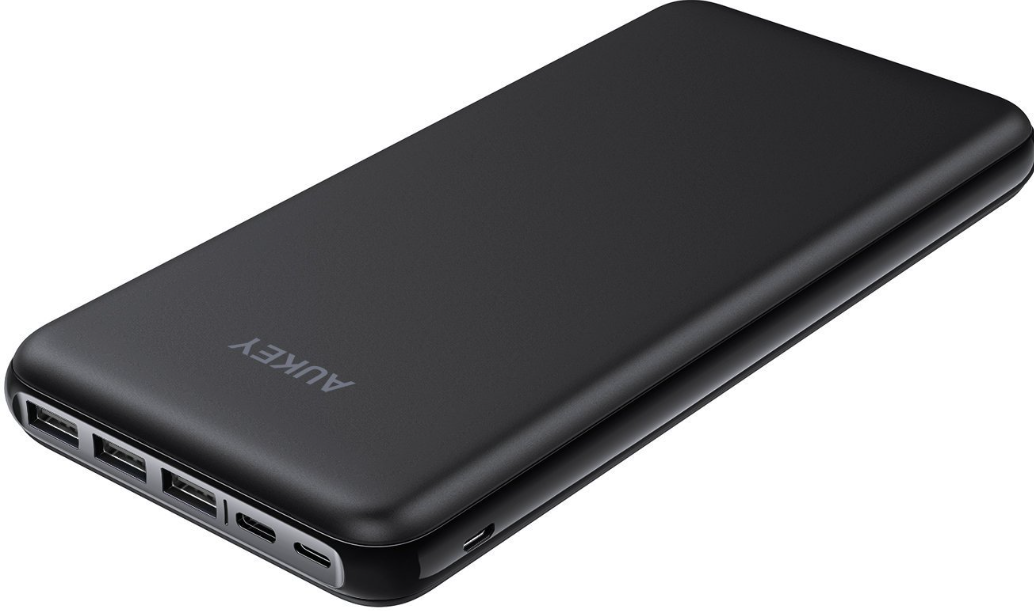
AUKEY 26500mAh Universal Power Bank
Introduction
The AUKEY 26500mAh Universal Power Bank is a powerhouse designed to keep your devices charged on the go. With a massive capacity of 26500mAh, it can charge your iPhone 8 up to 10 times, or your 9.7-inch iPad Pro approximately three times. This power bank is perfect for travelers, students, and professionals who need reliable power for their smartphones, tablets, and other USB-compatible devices. It features USB-C input for fast charging and compatibility with various devices, making it a versatile accessory for daily use.
The estimated price range for the AUKEY 26500mAh Universal Power Bank is between $40 and $60, depending on the retailer and any ongoing promotions. It is widely available on online platforms and in tech stores, making it easily accessible to consumers. Whether you're looking for a reliable backup power source for your devices or a convenient travel companion, this power bank is an excellent choice.
Package Contents
- 26500mAh Universal Power Bank
- USB A to C Cable
- User Manual
- Warranty Card
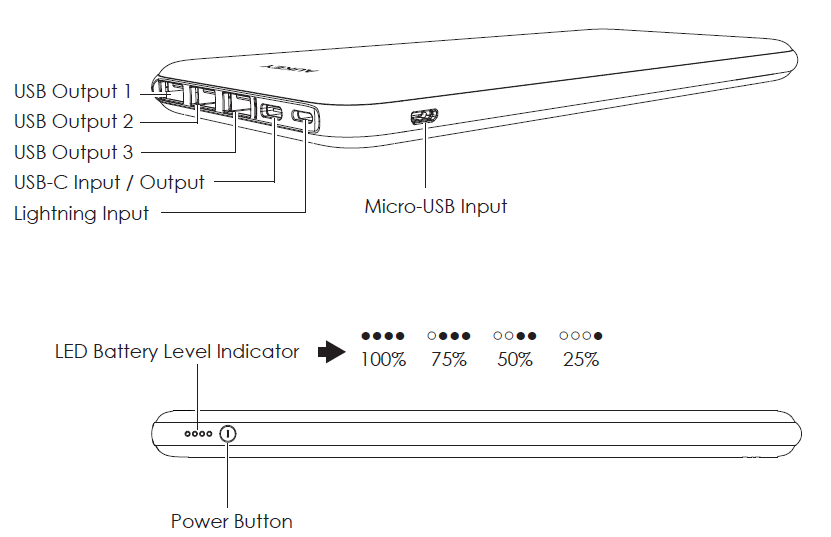
Product Diagram
Specifications
- Model: PB-Y15
- Capacity: 26500mAh / 98.05Wh
- Battery Type: Lithium Polymer
- Charging Time: 16 hours
- Micro-USB Input: DC 5V 2A
- Lightning Input: DC 5V 1.5A
- USB-C Input / Output: DC 5V 1.5A
- USB-A Output 1 / 2: DC 5V 3A Max
- USB-A Output 3: DC 5V 2.4A Max
- Dimensions: 200 x 96 x 20mm / 7.87” x 3.78” x 0.79”
- Weight: 605g /21.34oz
Getting Started
Charging the Power Bank
Fully charge your power bank before first use.
- Connect a Micro-USB / USB-C / Lightning charging cable to a USB charger or charging port
- Connect the other end to the Micro-USB / USB-C / Lightning input port on the power bank
- Unplug the power bank when fully charged
Charging Your Devices
- Connect the charging cable to your device’s charging port
- Connect the other end to the appropriate USB output port on PB-Y15
- Unplug your device when fully charged
- To check the remaining battery level, press the power button
Product Care
- Keep away from liquids and extreme heat
- Charge your PB-Y15 at least once every 3 months
- Don’t charge your devices while charging the power bank
- Dispose of battery according to local environmental law
Warranty & Customer Support
For questions, support, or warranty claims, contact us at the address below that corresponds with your region. Please include your Amazon order number and product model number.
- Amazon US orders: support.us@aukey.com
- Amazon EU orders: support.eu@aukey.com
- Amazon CA orders: support.ca@aukey.com
- Amazon JP orders: support.jp@aukey.com
Troubleshooting
Common issues with power banks often include charging problems or device compatibility issues. Here are some troubleshooting steps:
- Charging Issues: Ensure that the power bank is properly charged and that the cable is securely connected to both the power bank and your device.
- Device Compatibility: Check if your device is compatible with the output voltage and current of the power bank.
- Overheating: Avoid using the power bank near heat sources or in direct sunlight to prevent overheating.
For more serious issues, AUKEY offers a warranty and support options. You can contact their customer service for assistance or visit their website for more detailed troubleshooting guides.
Pros and Cons
Pros
- High Capacity: Charges devices multiple times, ideal for long trips or heavy usage.
- Fast Charging: Supports quick charging protocols for faster power-up times.
- Universal Compatibility: Can charge a wide range of devices via USB-C and USB-A ports.
- Value for Money: Offers excellent capacity at a competitive price point.
Cons
- Size and Weight: Large and heavy, which may be inconvenient for some users.
- No Digital Display: Lacks a screen to show charge levels or other status information.
Customer Reviews
Users generally praise the AUKEY 26500mAh Universal Power Bank for its reliability and high capacity. Common praises include its ability to charge multiple devices at once and its long-lasting battery life. However, some users have noted that it can be bulky and lacks a digital display for precise charge tracking.
Overall, it is well-rated for its performance and value, with many users recommending it for travel or daily use. If you're looking for a reliable power bank that can handle multiple charges of your devices, this is a solid choice.
Faqs
How do I properly set up the aukey 26500mAh Universal Power Bank for first-time use?
What should I do if the aukey 26500mAh Universal Power Bank is not charging my device?
Can the aukey 26500mAh Universal Power Bank charge laptops, tablets, and smartphones simultaneously?
Is the aukey 26500mAh Universal Power Bank compatible with fast charging protocols like Power Delivery and Quick Charge?
How can I optimize the performance and charging speed of the aukey 26500mAh Universal Power Bank?
What maintenance tips ensure the longevity of the aukey 26500mAh Universal Power Bank?
Does the aukey 26500mAh Universal Power Bank support charging low-power devices like smartwatches or wireless earbuds?
What are the key features that differentiate the aukey 26500mAh Universal Power Bank from other power banks?
More aukey manuals
- How to Pair: Aukey Radius Wireless Speaker User Manual
- Setup: Aukey Ultrasonic Aroma Diffuser User Manual
- Setup: Aukey 7W LED Desk Lamp User Manual
- Pairing & Usage: Aukey Neckband Magnetic Wireless Earbuds User Manual
- How to Pair: Aukey EP-C10 Bluetooth Earbuds User Manual
- Setup: Aukey Wireless FM Transmitter User Manual
Leave a Comment