
Setup: Aukey 7W LED Desk Lamp User Manual
Content
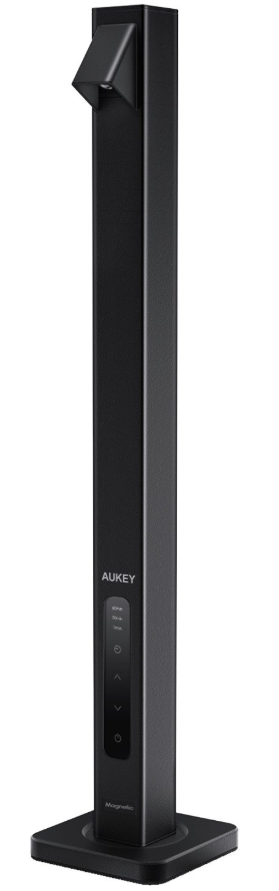
Aukey 7W LED Desk Lamp
Introduction
The Aukey 7W LED Desk Lamp is a sleek, modern lighting solution designed to enhance any workspace or study environment with efficient, eye-friendly illumination. Featuring a powerful 7-watt LED light source, this desk lamp delivers bright, consistent light while consuming minimal energy, making it both eco-friendly and cost-effective.
Key benefits of the Aukey 7W LED Desk Lamp include adjustable brightness levels and a flexible arm design that allows precise positioning, reducing eye strain during long reading, writing, or computer sessions. Its compact footprint makes it ideal for small desks, dorm rooms, and home offices. The lamp’s cool white light closely mimics natural daylight, promoting focus and productivity for students, professionals, and creatives alike.
With an estimated price range of $20 to $35, the Aukey 7W LED Desk Lamp offers excellent value compared to other LED lamps in its category. It is widely available through online retailers such as Amazon and Aukey’s official store, ensuring easy access and convenient shipping options worldwide. Whether you need a reliable light for late-night study or a stylish accent for your workspace, the Aukey 7W LED Desk Lamp balances functionality and affordability seamlessly.
Package Contents
- 7W LED Desk Lamp
- Metal Base
- Power Adapter
- User Manual
- Warranty Card
Specifications
- Model: LT-ST20
- Luminous Flux: 300lm (max)
- Color Temperature: 4000K
- Color Rendering Index: ≥80Ra
- Input: AC 100-240V 50/60Hz
- USB Output: DC 5V 1A
- Power Consumption: 7W (lamp use only); 12W (lamp and charging port)
- LED Lifespan: 20000 hours
- Material: Aluminum Alloy
- Dimensions: 410 x 80 x 80mm / 16.14” x 3.15” x 3.15”
- Weight: 560g / 19.75oz
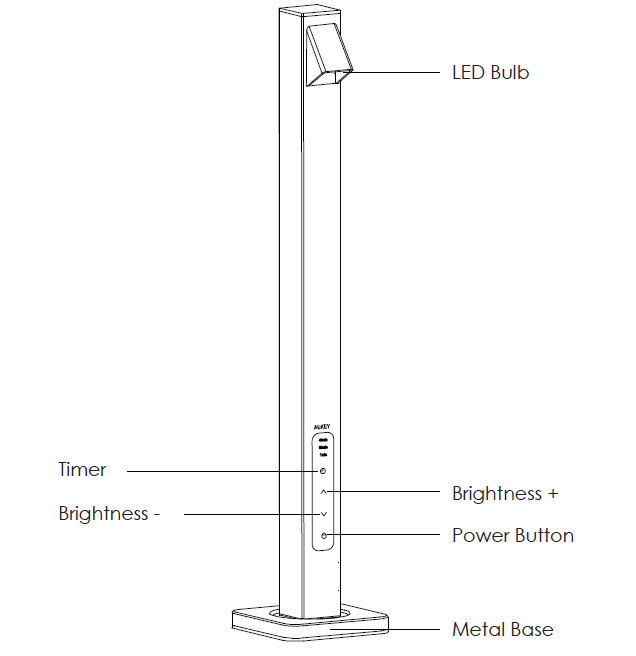
Product Diagram
Troubleshooting Your Aukey 7W LED Desk Lamp: Common Issues and Fixes
Despite its quality, users might occasionally face issues with the Aukey 7W LED Desk Lamp. Here are some common problems and solutions to consider:
- Lamp Won’t Turn On: Ensure the lamp is plugged in properly and the power outlet is functional. Try a different outlet if uncertain.
- Flickering Light: Check the LED bulb connections and ensure the brightness settings are stable. Avoid using incompatible dimmer switches.
- Touch Controls Not Responding: Power cycle the lamp by unplugging it, waiting 10 seconds, and plugging it back in. This can reset the touch control system.
- Loose or Wobbly Arm: Tighten any adjustable joints carefully without over-tightening to maintain flexibility.
Preventive measures include avoiding exposure to water, using the lamp within the recommended voltage range, and regularly cleaning the lamp surface with a dry cloth to prevent dust accumulation. The Aukey 7W LED Desk Lamp comes with a standard one-year warranty covering manufacturing defects. For additional support, customers can contact Aukey’s customer service via their website or include contact details in the user manual for prompt assistance.
Getting Started
Setting Up
- Carefully place the lamp on the base. When the bottom of the lamp is close to the base, they will magnetically connect. Rotate the lamp to your desired direction..
- Connect the included power adapter to a power outlet and then to the power input on the lamp.
On/Off, Brightness, and Timer Controls
- Press any button to turn on the lamp. Press the power button to turn off
- Press ∧ or ∨ to adjust the brightness (Min, Low, Medium, High, and Max)
- Press repeatedly to cycle through timer settings (1min, 30min, 60min) or turn the timer off
Light Memory Function
The lamp switches on with the last-set brightness level, so you don’t need to repeat brightness adjustment to reach your preferred setting.
Charging Your USB Device
This lamp comes with a USB port to charge your smartphone, tablet, wireless earbuds, and any other 5V USB devices.
Product Care & Use
- Do not repair, disassemble, or modify the product
- Keep away from liquids and extreme heat
Warranty & Customer Support
For questions, support, or warranty claims, contact us at the address below that corresponds with your region. Please include your Amazon order number and product model number.
- Amazon US orders: support.us@aukey.com
- Amazon EU orders: support.eu@aukey.com
- Amazon CA orders: support.ca@aukey.com
- Amazon JP orders: support.jp@aukey.com
Pros & Cons of the Aukey 7W LED Desk Lamp
- Pros:
- Energy-efficient 7W LED providing bright, natural white light ideal for reading and task work.
- Adjustable brightness and flexible arm design offer customizable lighting angles.
- Compact, minimalist design fits well in small spaces such as dorms and home offices.
- Affordable price point makes it accessible without sacrificing quality.
- Low heat emission ensures safe operation during extended use.
- Cons:
- Limited color temperature options might not suit users who prefer warmer light tones.
- Touch-sensitive controls can occasionally be less responsive, especially in humid conditions.
- Not rechargeable; requires continuous power connection,, which might limit portability.
- Brightness might be insufficient for very large workspaces compared to higher-wattage lamps.
Compared to similar LED desk lamps in the $20–$40 range, the Aukey 7W LED Desk Lamp shines with its blend of simplicity and efficiency, though users seeking multi-color lighting or USB charging might prefer other models.
Customer Reviews and Feedback on the Aukey 7W LED Desk Lamp
Customers generally praise the Aukey 7W LED Desk Lamp for its bright illumination and user-friendly adjustable arm. Many highlight its positive impact on reducing eye strain during long study or work sessions. Typical star ratings average around 4 to 4.5 out of 5 stars, reflecting broad satisfaction with its performance and value.
Common praises include the lamp’s compact design,, fitting well on crowded desks, and the energy savings from LED technology. Some users note occasional unresponsiveness of the touch controls, especially after prolonged use, and recommend gentle cleaning of the sensor area to improve reaction time. A few reviews mention that the lamp’s light may feel too cool or intense for some, suggesting pairing with ambient lighting for comfort.
Overall, the Aukey 7W LED Desk Lamp is recommended for students, professionals, and anyone seeking an affordable, efficient desk light with straightforward functionality.
Faqs
How do I set up the aukey 7W LED Desk Lamp for the first time?
What should I do if my aukey 7W LED Desk Lamp is flickering during use?
How can I troubleshoot if my aukey 7W LED Desk Lamp does not turn on?
What are the key features of the aukey 7W LED Desk Lamp that enhance its performance?
Can the aukey 7W LED Desk Lamp be used with a dimmer switch or smart home systems?
How do I maintain and clean my aukey 7W LED Desk Lamp to ensure longevity?
What could cause a buzzing sound in the aukey 7W LED Desk Lamp and how can I fix it?
How do I optimize the lighting performance of my aukey 7W LED Desk Lamp for reading or work?
Tags
More aukey manuals
- How to Pair: Aukey EP-C10 Bluetooth Earbuds User Manual
- How to Pair: Aukey Radius Wireless Speaker User Manual
- Setup: Aukey Dashboard Camera DR-02 User Manual
- How to Charge: Aukey 26500mAh Universal Power Bank User Manual
- How to Use: Aukey SmartWatch 2 Pro User Manual
- Setup: Aukey Ultrasonic Aroma Diffuser User Manual
Leave a Comment