
Setup: Aukey Dashboard Camera DR-02 User Manual
Content
Aukey Dashboard Camera DR-02
Introduction
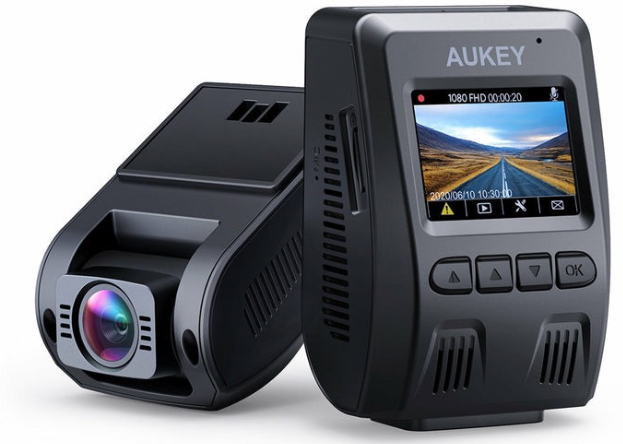
The Aukey Dashboard Camera DR-02 is a compact and reliable dash cam designed to capture high-quality Full HD 1080p video footage for drivers seeking enhanced road safety and evidence recording. Featuring a 170° wide-angle lens and a 2-inch LCD screen, this camera delivers clear daytime and decent nighttime video, making it ideal for everyday commuting, rideshare drivers, and fleet vehicle monitoring. The DR-02 stands out with its straightforward user interface, durable build, and essential safety features such as a G-sensor for automatic collision detection.
Targeted at budget-conscious users who want a dependable dash cam without excessive complexity, the Aukey DR-02 is well-suited for private car owners, professional drivers, and anyone wanting to document road incidents for insurance or legal purposes. It comes with an adhesive mount for easy installation and supports microSD cards up to 128GB, accommodating hours of continuous recording.
Typically priced between $60 to $80, the Aukey Dashboard Camera DR-02 is widely available through online retailers like Amazon and Walmart, often praised for its value-for-money balance of features and video quality. While the DR-02 lacks built-in WiFi on the standard model, an upgraded “P” version with WiFi is available at a slightly higher price. The camera's solid performance and 24-month warranty make it an attractive option in the affordable dash cam market.
Package Contents
- Dashboard Camera
- Dual-Port USB Car Charger
- Mini USB Cable
- Sticker Mount
- Two 3M Stickers
- Six Cable Clips
- User Manual
- Warranty Card
Specifications of the Aukey Dashboard Camera DR-02
- Model: DR02
- Image Sensor: Sony Exmor IMX323 2.19 Megapixel CMOS Sensor
- CPU: NT96655
- Screen: 1.5" LCD
- Wide-Angle Lens: 170°
- Material: PC + ABS, 6 Layer-Glass
- Recording Resolutions: 1080p (30fps), 720p (60fps),720p (30fps), WVGA, VGA
- Image Format: JPEG
- Sound Recording: On / Off
- Gravity Sensor Sensitivity: Low / Medium / High
- Recording Modes: Loop, Motion Detection, Time-Lapse, Emergency Recording
- Exposure Value: -1.0, -2/3, -1/3, +0.0, +1/3, +2/3, +1.0
- Micro SD Card: 128GB support (Max), Class 10
- Operating Temperature: -30°C - 75°C (-22°F - 167°F)
- Input: DC 5V/1A-2A via Mini USB
- Size: 77 x 50.5 x 37mm / 3" x 2" x 1.45"
Compared to other dash cams in its price range, the Aukey DaAukeyAukeyrd Camera DR-02 offers a competitive 1080p video quality, reliable hardware, and a simple interface, although it lacks advanced features like parking mode and audio notifications. Its use of proven components ensures decent performance, but users seeking 4K or dual-channel recording may consider alternatives.
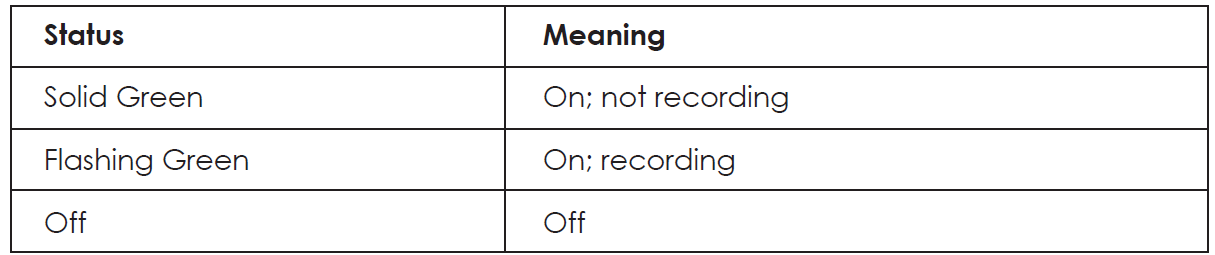
System LED Indicator
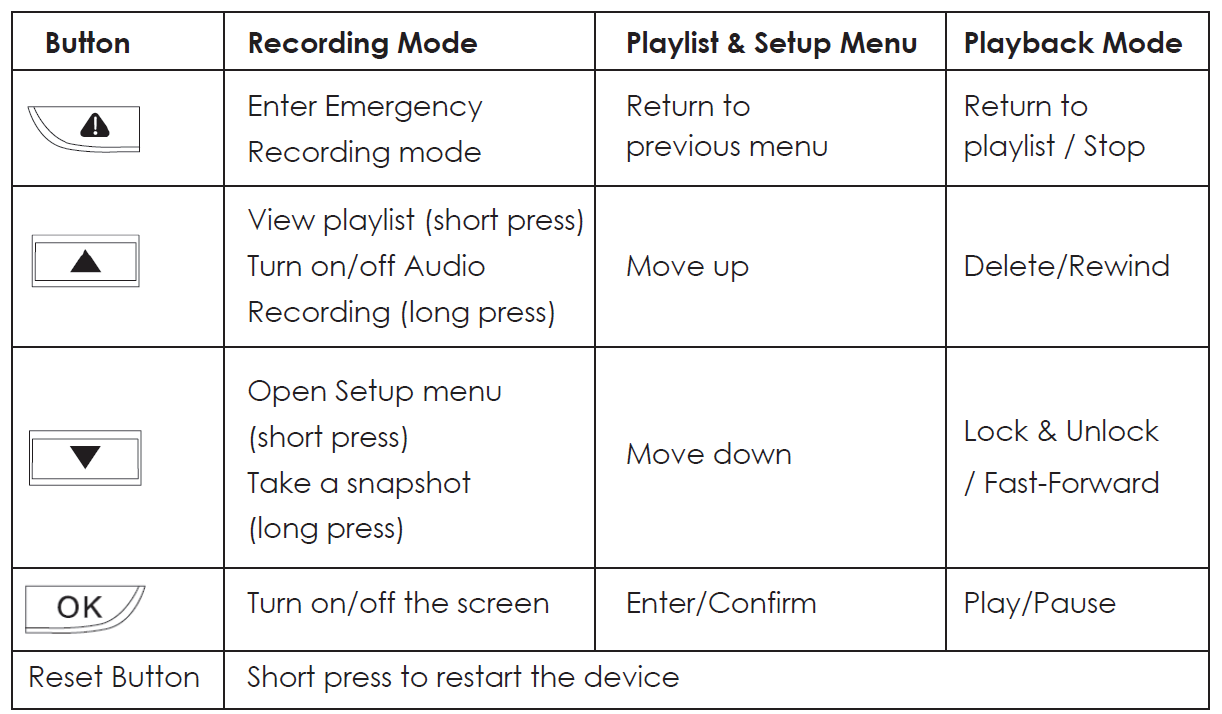
Control Buttons
Installation & Powering On/Off
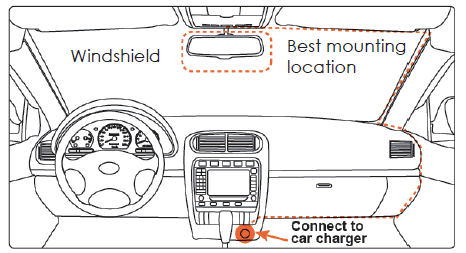
For optimal performance, install the AUKEY DR02 in the top-center of your windshield facing directly ahead. Lens direction can be adjusted up and down. Use the cable clips to help fix the power cable conveniently and safely,, like in the picture below.
Caution:
We are not responsible for any damage caused to or by the air bag due to incorrect placement of the device or its cable.
Troubleshooting Guide for aukey Dashboard Camera DR-02
- Camera Does Not Power On: Check the car charger connection and ensure the supercapacitor is charged; verify the fuse in your vehicle’s cigarette lighter circuit.
- Video Files Are Corrupted or Not Playing: Format the microSD card in the camera before use and replace it if damaged; use Class 10 or higher microSD cards for reliability.
- G-Sensor Not Locking Files: Sensitivity settings may be too low; adjust in the menu. If issues persist, reset the camera to factory settings.
- No GPS Data Recorded: Ensure the optional GPS module is properly connected and positioned with a clear view of the sky.
- Error Messages on Screen: Refer to the user manual error codes; common errors relate to memory card issues or overheating.
Preventive measures include regularly formatting the SD card, avoiding extreme temperatures, and securely mounting the camera. The Aukey DaAukeyAukeyrd Camera DR-02 comes with a 24-month warranty, and Aukey provides responsive customer support via their official website and authorized retailers.
To power on, insert the car charger into your car’s 12V socket, then connect the included cable to the car charger and to the Mini USB port of the DR02. Insert a Micro SD Card into the Micro SD card slot and format it using the ‘Format’ option in Dash Camera ‘Setup.’ After powering on each time, the system will start recording automatically. To power off, disconnect the Mini USB cable.
Video Recording
- Loop Recording: Recording will begin automatically after powering on with a Micro SD Card in the device. Each recorded file is up to ten minutes long, with old footage being replaced when the Micro SD Card storage is full.
- Motion Detection Recording: Switch on motion detection in ‘Setup.’ This function will start recording video when the dash camera detects motion in front and stop recording when motion is no longer detected.
- Time-Lapse Recording: Switch on time-lapse recording in ‘Setup.’ This function will capture a picture per second to make a video played at 30fps.
USB File Transfer
- Connect the device to your computer using the included USB-A to Mini USB cable. It should be recognized as a removable device (with a USB connector image displayed on-screen) and be titled ‘No Name’ on the computer.
- Find the video recording files located in the \AUKEY\MOVIE folder (or \AUKEY\PHOTO for snapshots).
- Copy the files to your computer.
Micro SD Card File Transfer
- Shut down the device (by disconnecting the power cable) and eject the Micro SD Card.
- Insert the Micro SD Card into a computer Micro SD card slot or reader,, and your computer will automatically detect the Micro SD Card.
- Find the video recording files located in the \AUKEY\MOVIE folder (or \AUKEY\PHOTO for snapshots).
- Copy the files to your computer.
Warranty & Customer Support
For questions, support, or warranty claims, please contact us at the address below that corresponds with your region. Please include your Amazon order number and product model number.
- Amazon US orders: support.us@aukey.com
- Amazon EU orders: support.eu@aukey.com
- Amazon CA orders: support.ca@aukey.com
- Amazon JP orders: support.jp@aukey.com
Pros & Cons of aukey DaAukeythe the rd Camera DR-02
Pros
- Clear 1080p Video Quality: Offers sharp daytime footage with decent night vision for the price point.
- Wide 170° Field of View: Captures a broad perspective to record multiple lanes and roadside activity.
- Solid Build & Reliability: Uses a supercapacitor instead of a battery, improving durability in heat and cold.
- Easy Installation: Simple adhesive mount and intuitive interface make setup straightforward.
- Affordable Price: Excellent value with key dash cam features and a 24-month warranty.
Cons
- No Built-in WiFi (Standard Model): Limits convenient video transfer; WiFi available only on the more expensive DR-02 P model.
- Small Screen Size: The 1.5-inch display may be too small for some users to navigate menus comfortably.
- No Parking Mode: Lacks continuous monitoring when the vehicle is parked, a feature common in more advanced models.
- Fixed Mounting Angle: Adhesive mount does not swivel, preventing rear or side window recording.
Overall, the Aukey Camera DR-02 balances essential features and dependable performance for budget-conscious users but may fall short for those seeking advanced connectivity or multi-angle recording options.
Customer Reviews for aukey Dashboard Camera DR-02
Users consistently praise the Aukey DaAukeyAukeyrd Camera DR-02 for its reliable 1080p video quality and ease of use, often highlighting the clear license plate recognition during daytime driving. Many appreciate the sturdy supercapacitor that withstands varying weather conditions without failure. The 24-month warranty also reassures buyers about product longevity.
Common complaints include the lack of built-in WiFi on the standard DR-02 model, which requires manual SD card removal to view footage. Some users mention that the night video quality is satisfactory but not outstanding compared to premium dash cams. Additionally, the small screen size and no parking mode are noted as limitations by more tech-savvy customers.
Overall, the Aukey DAukeyard Camera DR-02 holds an average rating of approximately 4 out of 5 stars on major retail sites, with frequent recommendations for anyone wanting a straightforward, affordable dash cam without unnecessary extras.
Faqs
How do I properly set up the aukey Dashboard Camera DR-02 for first-time use?
What steps should I take if the aukey Dashboard Camera DR-02 is not recording video?
Can the aukey Dashboard Camera DR-02 record both front and rear views simultaneously?
Is the aukey Dashboard Camera DR-02 compatible with WiFi or mobile apps for remote viewing?
How can I optimize video quality and performance on the aukey Dashboard Camera DR-02?
What maintenance is recommended to keep the aukey Dashboard Camera DR-02 functioning well over time?
What should I do if the aukey Dashboard Camera DR-02 screen shows error messages without audio alerts?
Does the aukey Dashboard Camera DR-02 support GPS tracking and how is it used?
Tags
More aukey manuals
- How to Use: Aukey SmartWatch 2 Pro User Manual
- How to Pair: Aukey EP-C10 Bluetooth Earbuds User Manual
- Setup: Aukey Mini RGB Light User Manual
- Setup: Aukey 7W LED Desk Lamp User Manual
- Setup: Aukey Graphite Lite Q 10W Wireless Fast Charger User Manual
- How to Pair: Aukey Radius Wireless Speaker User Manual
Leave a Comment