
How to Use: Aukey SmartWatch 2 Pro User Manual
Content
aukey SmartWatch 2 Pro
Introduction
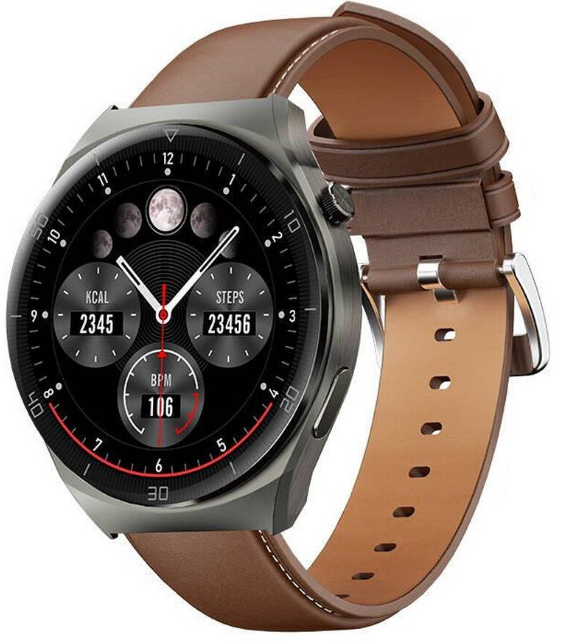
The Aukey SmartWatch 2 Pro is a feature-rich wearable designed for users seeking a blend of style, health monitoring, and smart connectivity in a single device. This advanced smartwatch stands out with its 1.45-inch high-resolution TFT LCD touchscreen, offering vibrant visuals and a responsive interface that is easy to navigate in any lighting condition. Built with a durable zinc alloy frame and a breathable silicone strap, the Aukey SmartWatch 2 Pro is not only comfortable for all-day wear but also robust enough for active lifestyles.
Key benefits include on-wrist Bluetooth calling, which allows you to answer or make calls directly from your wrist—ideal for busy professionals, fitness enthusiasts, and anyone who values hands-free convenience. The device offers comprehensive health monitoring, tracking your heart rate, blood oxygen levels (SpO2), and sleep patterns with precise sensors for actionable health insights.. With over 10 sport modes, it supports a wide range of activities, from running and cycling to swimming, thanks to its IP67-rated water and dust resistance. The Aukey SmartWatch 2 Pro also delivers up to 15 days of standby time on a single charge, minimizing the need for frequent charging and ensuring reliability during travel or extended outdoor activities..
The Aukey SmartWatch 2 Pro is a versatile companion for everyday life, designed for tech-savvy individuals, fitness enthusiasts, and busy professionals. Its estimated price ranges from $65 to $90 USD, making it an affordable option in the mid-range smartwatch market[2][4]. The device is widely available through major online retailers and electronics stores, ensuring easy access for global consumers.
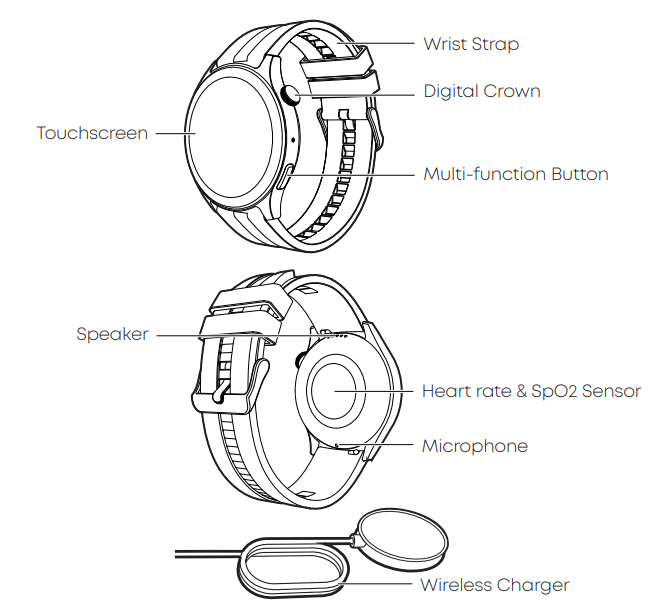
Product Diagram
Specifications
- Model
- SW-2P|
- Screen
- 1.45-inch TFT LCD
- Resolution
- 412 x 412
- Bluetooth Version
- BLE5.3+BT3.0l
- Sensors
- PPG sensor, G-sensor
- Battery Capacity
- 300mAh Li-polymer
- Battery Life
- Up to 15 days
- Operating Temperature
- -5°C - 45°C / 23°F - 113°F
- IP Rating
- IP67
- System Compatibility
- Android 5 / iOS 12 or higher
- Data Sync Platform
- AUKEY FIT Pro APP
- Watch Body Dimensions
- 51.5 x 46.8 x 13.3mm (÷0.2mm)|
- Watch Strap Width
- 22mml
- Weight (Watch Strap Included)
- 62g
Getting Started
Wearing
For maximum comfort, it's recommended that you wear the watch one finger-width away from your wrist bones with the strap fastened firmly but not too tight. Note: A loose watch strap on your wrist may affect data collection of the sensors' data collection.
Installing the AUKEY Fit Pro App
Long-press the multi-function button to turn on the watch, and use your phone to scan the QR code on the watch screen or below to download and install the "AUKEY Fit pro" app for data sync. This app is also available in your phone's app store.
- Note: For a stable and continuous connection between the smartwatch and the App, please ensure that the Bluetooth function of your device is on and the App on your device is running in the background.
Bluetooth 5.3 Pairing
- Download and install the app on your device.
- Launch the app and register or log in to access the home screen.
- Open the app and navigate to "Devices" > "Add New Device" > Select…
- From the list of available devices, choose SW-2P with the strongest signal. Follow the on-screen instructions on your phone and tap the pairing button displayed on the watch screen to confirm the pairing.
- Once paired successfully, the Bluetooth icon on the watch will turn blue, indicating a successful Bluetooth 5.3 connection.
Bluetooth 3.0 Pairing:
- iPhone Users: Enjoy Bluetooth 5.3+3.0 dual Bluetooth one-tap pairing by following the system prompts.
- Android Users: For the initial setup, tap "Pair with call service" in the Bluetooth pairing prompt and follow the on-screen instructions to complete the Bluetooth 5.3+3.0 pairing.
- Subsequent connections between the phone and the watch will automatically remember the Bluetooth 3.0 connection for convenient one-tap pairing.
- If the Bluetooth 3.0 connection doesn't automatically connect, manually search for the Bluetooth watch model "SW-2P" on your phone.
Charging
- Connect the wireless charger to a standard 5V USB charger with 1A output. Place the watch on the wireless charger with the crown aligned to the charging cable. The watch and the wireless charger will magnetically attract and attach to each other.
Note:
- Charge the watch for over 2 hours before the first use.
- If the watch battery is completely drained, the watch may take 1 minute to show the charging status icon after being connected to power.
Product Care & Use
- Avoid tight watch wearing in daily use and keep the area of watch contact clean & dry. Rinse the wrist strap regularly. If you experience skin irritation from wearing the watch, take it off and consult a doctor.
- Do not operate the watch underwater. Wipe off water before pressing the button or operating the touchscreen.
Warranty & Customer Support
For questions, support, or warranty claims, please contact your seller directly.
Operating the Watch:
- Quick Settings: Swipe down from the top of the home screen.
- Notifications: Swipe up from the bottom of the home screen.
- Switching Home Screens: Swipe left or right on the home screen.
- Back Navigation: Swipe from the left edge to the right.
- Changing Watch Faces: Press and hold on the home screen for 3 seconds or use the digital crown on the watch.
- Power On/Off: Long-press the digital crown for 3 seconds.
- Screen Wake-up: When the screen is off, a short press of the digital crown. Function Access: On the home screen, a short press of the digital crown. Return to Home Screen: In any function page, a short press of the digital crown. Sport Modes: Short-press the bottom right multifunction button to enter the sport modes.
- Activity Pause/Resume: Short-press the bottom right multifunction button.
Troubleshooting Common Issues with the Aukey SmartWatch 2 Pro
While the Aukey SmartWatch 2 Pro is designed for reliability, users may occasionally encounter issues. Common problems include syncing failures with smartphones, unresponsive touchscreens, or battery drain. Most syncing issues can be resolved by ensuring Bluetooth is enabled on both devices, restarting the smartwatch, or reinstalling the companion app. If the touchscreen becomes unresponsive, a soft reset (holding the power button for 10 seconds) often restores functionality. Excessive battery drain may be caused by excessive notifications or background apps; adjusting these settings in the app can help extend battery life.
Should the device display an error code, consult the user manual or the Aukey support website for specific troubleshooting steps. Preventive measures include keeping the device firmware updated, avoiding exposure to extreme temperatures, and regularly cleaning the charging contacts. The Aukey SmartWatch 2 Pro comes with a standard manufacturer’s warranty—typically 12 months—with options to extend coverage through select retailers[5]. For further assistance, contact Aukey customer support via their official website or the retailer where the product was purchased. Always retain your proof of purchase for warranty claims.
Pros and Cons of the Aukey SmartWatch 2 Pro
Advantages
- On-Wrist Bluetooth Calling: Make and receive calls directly from your wrist, offering genuine hands-free convenience
- Comprehensive Health Monitoring: Tracks heart rate, blood oxygen, sleep, and more with accurate sensors for holistic health insights
- Long Battery Life: Up to 15 days of standby time ensures you stay connected without constant recharging
- Durable Design: Zinc alloy frame and IP67 water/dust resistance make it suitable for active and outdoor use.
- Affordable Price: Competitive pricing offers excellent value for the features provided
- Wireless Charging: Supports convenient cable-free charging for added ease
Disadvantages
- Display Technology: Uses a TFT LCD instead of AMOLED, which may affect contrast and brightness compared to pricier models
- Limited App Ecosystem: Fewer third-party apps compared to leading brands like Apple or Samsung.
- Build Quality: While durable, the materials may not feel as premium as high-end competitors.
- No Built-in GPS: Relies on a connected smartphone for location tracking.
When compared to alternatives, the Aukey SmartWatch 2 Pro stands out for its combination of health features, Bluetooth calling, and battery life at a mid-range price. However, users seeking advanced smart features or a more luxurious build may consider higher-end models.
Customer Reviews and Testimonials
User feedback for the Aukey SmartWatch 2 Pro highlights its affordability, reliable health tracking, and the convenience of on-wrist calling. Many appreciate the long battery life and the clarity of the 1.45-inch display, noting it as a strong value-for-money choice in the smartwatch market. Common praises include the ease of use, comfortable fit, and the range of sport modes for fitness enthusiasts.
Some users mention minor drawbacks, such as the lack of advanced smart features found in more expensive wearables and occasional syncing issues with certain smartphone models. Star ratings across retailers generally range from 4 to 4.5 out of 5, reflecting overall satisfaction with the device’s performance and features. Testimonials frequently recommend the Aukey SmartWatch 2 Pro for budget-conscious buyers and those new to smartwatches, emphasizing its reliability for daily health monitoring and communication.
Frequently mentioned issues include the need for more customizable watch faces and improved app integration. Despite these, the consensus is that the Aukey SmartWatch 2 Pro delivers solid performance for its price, making it a smart choice for everyday use and fitness tracking.
Faqs
How do I set up my aukey SmartWatch 2 Pro for the first time?
What should I do if my aukey SmartWatch 2 Pro is not syncing health data properly?
Can I make and receive calls directly from the aukey SmartWatch 2 Pro?
Is the aukey SmartWatch 2 Pro compatible with all smartphones?
How can I maximize the battery life of my aukey SmartWatch 2 Pro?
What health and fitness tracking features does the aukey SmartWatch 2 Pro offer?
How do I clean and maintain my aukey SmartWatch 2 Pro to ensure durability?
Why is my aukey SmartWatch 2 Pro touchscreen unresponsive and how can I fix it?
More aukey manuals
Leave a Comment