
How to Pair: Aukey EP-C10 Bluetooth Earbuds User Manual
Content
Aukey EP-C10 Bluetooth Earbuds
Introduction
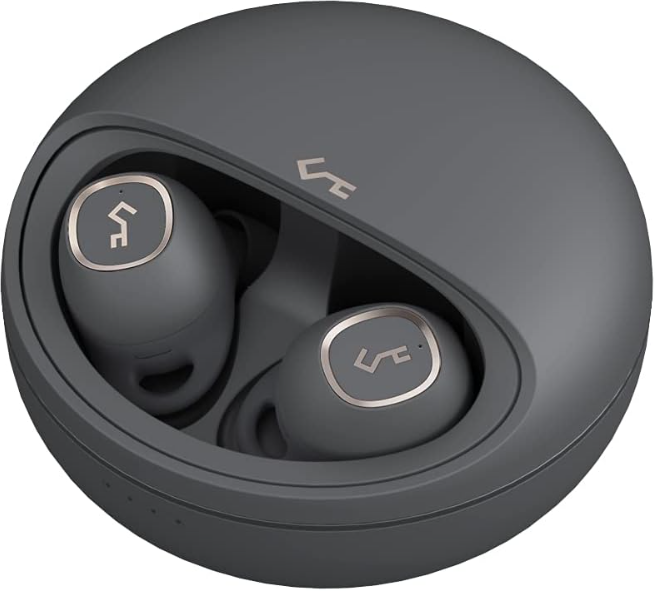
The Aukey EP-C10 Bluetooth Earbuds are a compact, fully wireless audio solution designed to deliver rich sound quality with reliable connectivity. Engineered with Bluetooth 5.0 technology, these earbuds offer a stable connection and low latency, suitable for everyday use, workouts, commuting, and calls. Featuring ergonomic design with multiple ear tip sizes, the EP-C10 ensures a secure and comfortable fit for extended wear.
Key benefits include up to 7 hours of continuous playback on a single charge, extended to 24 hours using the portable charging case with Qi wireless charging support. Their IPX5 water resistance rating makes them ideal for active users encountering sweat or light rain. Intuitive touch controls enable seamless music playback, call management, and volume adjustments without needing to access your device.
Targeted at audiophiles and casual listeners alike, the Aukey EP-C10 Bluetooth Earbuds blend affordability with premium features such as graphene-enhanced drivers delivering crisp highs and deep bass. Available globally through online retailers and major marketplaces, these earbuds typically retail within the $50–$110 price range, offering strong value for their performance and build quality.
Package Contents
- Wired Earbuds
- 3 Pairs of Ear-Tips (S / M / L)
- User Manual
- Warranty Card
Specifications
- Model: EP-C10
- Frequency Response: 20Hz-20kHz
- Sensitivity: 88dB±3dB
- Interface: 3.5mm Connector
- Cord Length: 1.2m / 3.9ft
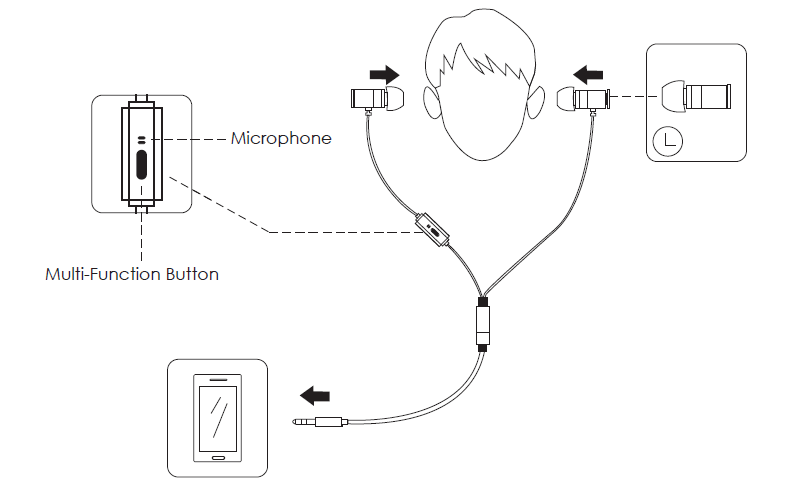
Product Diagram
Getting Started
Finding the Right Fit
There are three pairs of ear-tips (S / M / L) for a comfortable, customized fit.
Controls

Product Care
- Please keep away from liquids and extreme heat
- Do not use headphones at high volume for extended periods, as this may cause permanent hearing damage or loss.
Troubleshooting Guide for aukey EP-C10 Bluetooth Earbuds
Users may encounter common issues such as pairing difficulties, one earbud not connecting, or intermittent audio dropouts. To resolve these:
- Pairing Problems: Ensure the earbuds are fully charged, then reset by placing both buds in the case and holding the touch sensors for 10 seconds until LEDs flash. Reinitiate pairing on your device.
- Single Earbud Use: If one bud disconnects, remove both from the case and pair again. The earbuds support automatic switching to single mode if one is removed.
- Audio Issues: Clean the earbud mesh carefully to prevent blockage. Check the volume controls and phone equalizer settings.
Preventive tips include regularly charging the case and earbuds, avoiding exposure to extreme moisture beyond IPX5 limits, and storing them properly in the charging case to maintain battery health.
The Aukey EP-C10 comes with a limited warranty covering manufacturing defects, and customer support is accessible via Aukey’s official website or authorized retailers. For assistance, users can contact Aukey support through their online help center or email.
Warranty & Customer Support
For questions, support, or warranty claims, contact us at the address below that corresponds with your region. Please include your Amazon order number and product model number.
- Amazon US orders: support.us@aukey.com
- Amazon EU orders: support.eu@aukey.com
- Amazon CA orders: support.ca@aukey.com
- Amazon JP orders: support.jp@aukey.com
Pros & Cons of the Aukey EP-C10 Bluetooth Earbuds
Pros
- Excellent Battery Life: Up to 7 hours per charge and 24 hours total with the charging case supporting all-day use.
- Water Resistance: IPX5 rating protects against sweat and rain, making it suitable for workouts and outdoor use.
- Touch Controls: A user-friendly touch interface for play/pause, volume, and track navigation enhances convenience.
- Wireless Charging: Qi-compatible charging case adds a modern, cable-free convenience.
- Sound Quality: Graphene diaphragm drivers deliver balanced audio with clear highs and rich bass.
Cons
- Microphone Quality: The Integrated microphone may not perform optimally in noisy environments for calls.
- Volume Adjustment: Touch control for volume can be imprecise and sometimes unresponsive.
- Build Quality: Plastic construction is adequate but less premium compared to higher-end models.
- Competition: Competes with similarly priced earbuds offering active noise cancellation, which the EP-C10 lacks.
Customer Reviews of aukey EP-C10 Bluetooth Earbuds
Users commonly praise the Aukey EP-C10 Bluetooth Earbuds for their long battery life, solid sound quality, and comfortable fit, particularly highlighting their suitability for sports and casual listening. Many appreciate the convenience of wireless charging and stable Bluetooth 5.0 connectivity.
On the downside, some users report the microphone's limited clarity during calls and occasional touch control sensitivity issues. Despite these concerns, the earbuds generally receive favorable ratings—averaging around 4 out of 5 stars—with reviewers recommending them as a budget-friendly alternative to premium brands.
Typical recommendations include using the earbuds in quiet environments for calls and adjusting EQ settings on devices for optimal audio experience. Overall, most customers find the Aukey EP-C10 earbuds to be a reliable, value-packed wireless audio solution.
Faqs
How do I set up my aukey EP-C10 Bluetooth Earbuds for the first time?
What should I do if my aukey EP-C10 Bluetooth Earbuds won’t charge properly?
Can aukey EP-C10 Bluetooth Earbuds connect to both Android and iOS devices?
How can I use touch controls on aukey EP-C10 Bluetooth Earbuds to manage music and calls?
What is the battery life of aukey EP-C10 Bluetooth Earbuds and how can I maximize it?
Are aukey EP-C10 Bluetooth Earbuds water-resistant for sports and outdoor use?
How do I clean and maintain my aukey EP-C10 Bluetooth Earbuds for optimal performance?
What can I do if aukey EP-C10 Bluetooth Earbuds experience connection drops or audio issues?
More aukey manuals
Leave a Comment