
Setup: Aukey Wireless FM Transmitter User Manual
Content
Aukey Wireless FM Transmitter
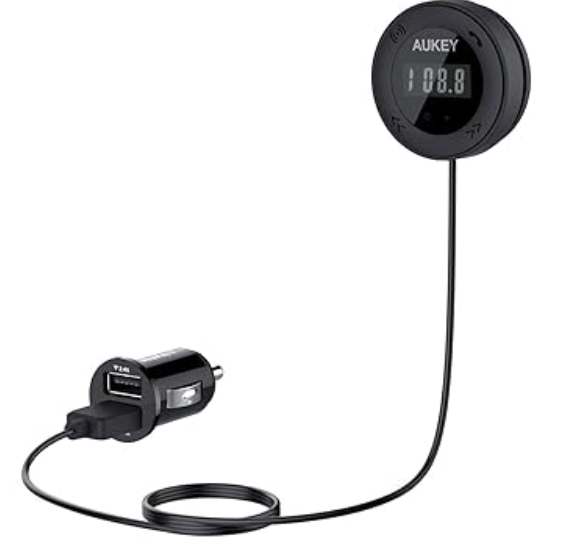
Introduction
The aukey Wireless FM Transmitter is a versatile in-car audio solution designed to wirelessly stream music, calls, and audio content from your smartphone or other Bluetooth-enabled devices directly to your car's FM stereo system. By leveraging FM transmission technology, it eliminates the need for auxiliary cables or complex installations, making it ideal for vehicles lacking modern Bluetooth car audio integration.
Key benefits of the aukey Wireless FM Transmitter include a clear LED display showing FM channels, call information, and even car battery voltage for added vehicle monitoring. It features dual USB charging ports with 2.4A output each, allowing simultaneous charging of multiple devices while you drive. Its powerful FM signal transmission minimizes interference by effectively overpowering nearby stations, ensuring consistent and high-quality audio output. The transmitter also supports easy Bluetooth pairing with fast auto-scan to find the clearest available frequency.
Targeted at commuters, rideshare drivers, and anyone seeking a hassle-free way to upgrade their older vehicle audio system, this transmitter suits a broad range of users. Whether you want to stream playlists, take hands-free calls, or keep devices charged on the go, the aukey Wireless FM Transmitter offers a practical, affordable solution. It generally retails in the $20-$35 price range and is widely available online on platforms such as Amazon, AliExpress, and eBay.
Package Contents
- Wireless FM Transmitter
- 3.5mm Audio Cable
- User Manual
- Warranty Card
Specifications
- Model: BR-C12
- Technology: BT 3.0, A2DP, AVRCP, HSP, HFP
- FM Frequency Range: 88.1 – 107.9MHz
- Operating Range: 5m / 16.4ft
- USB Output: 5V 2.4A (max)
- USB Audio Input: Up to 32GB (flash drive)
- Audio File Formats: MP3, WMA
- Dimensions: 120 × 147 × 41mm / 4.72” × 5.79” × 1.61”
- Weight: 95g / 3.35oz
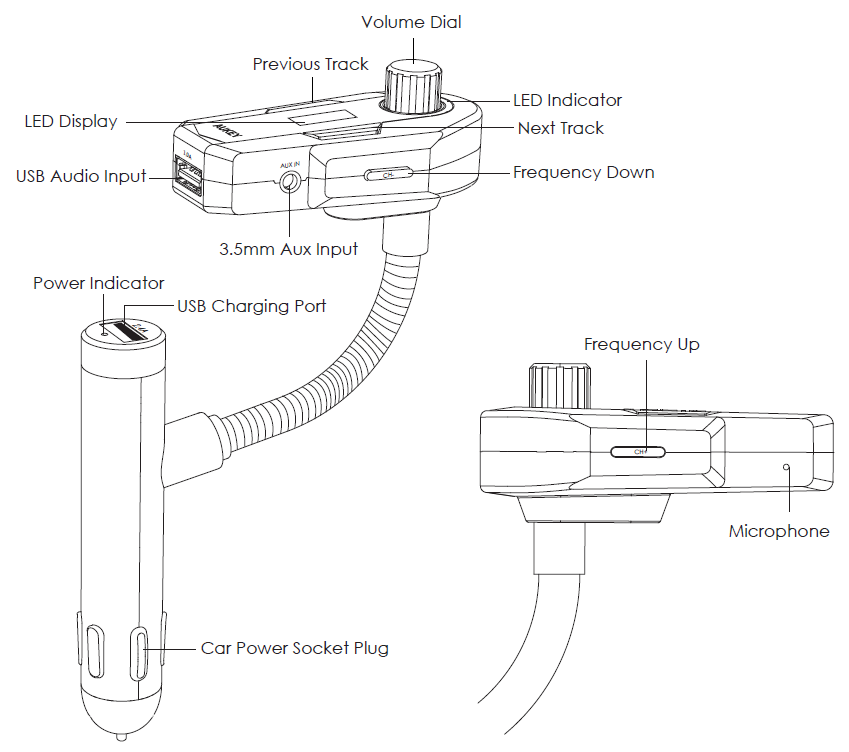
Product Diagram
Turn On / Off
- Plug the car charger part of this product into your car’s power socket
- The BR-C12 will automatically power on / off when you start / turn off the engine
Pairing
- Activate your mobile phone's pairing function
- In the list of available devices, find and select “BR-C12”
- If a code or pin is required for pairing, please enter “0000”
- When successfully paired, the blue LED indicator will remain on
Setting FM Frequency
- Tune the car radio to any unused frequency
- Set the BR-C12 FM transmitter to the same frequency by pressing frequency up / down
- Now you can enjoy music from your device over your car stereo system
USB Audio Input
Plug a USB flash drive into the USB audio input port on the FM transmitter and your car stereo system will automatically play the music on the flash drive. Supports MP3 and WMA audio file formats.
Aux Input
Plug an MP3 / MP4 player or other 3.5mm audio device into the Aux input on the FM transmitter. Control the music on your audio device.
LED Indicator & Controls

Streaming Audio
Once connected, you can stream music from your device to your car. Music will automatically pause when you receive an incoming phone call, and resume once the call has ended.

Making Calls
Once paired with your smartphone, incoming phone calls can be managed via the FM transmitter.

Charging Your Devices
Use the USB charging port on the car charger to charge smartphones, tablets, GPS units, cameras, and other USB-powered devices.

Product Care & Use
- If the BR-C12 doesn’t power on, ensure it is fully inserted into the car power socket and the engine is on
- Using your original device charging cable or one of an equivalent standard recommended
- Switch to another FM frequency if the current one has noise / interference
- Do not repair, disassemble, or modify this product
- Keep away from liquids and extreme heat
Warranty & Customer Support
For questions, support, or warranty claims, contact us at the address below that corresponds with your region. Please include your Amazon order number and product model number.
- Amazon US orders: support.us@aukey.com
- Amazon EU orders: support.eu@aukey.com
- Amazon CA orders: support.ca@aukey.com
- Amazon JP orders: support.jp@aukey.com
Troubleshooting Common Issues with the aukey Wireless FM Transmitter
Users may occasionally encounter problems such as poor audio quality, connection drops, or pairing difficulties. Here are common issues and solutions:
- Audio interference or static noise: Ensure you select an unused FM frequency using the transmitter's auto-scan feature. Avoid frequencies near local radio stations to minimize signal overlap.
- Bluetooth pairing failures: Reset the transmitter by unplugging and reconnecting it, then put your device into Bluetooth pairing mode. Clear previous pairings if necessary.
- Device not charging or slow charging: Verify the USB cables and ports are intact. Use the original USB cable and ensure the vehicle's 12V socket is powered.
- No sound from car stereo: Confirm the car radio is tuned exactly to the transmitter’s FM frequency. Adjust volume levels on both the car stereo and the transmitting device.
Preventive measures include parking in areas with minimal radio interference and regularly updating your phone’s Bluetooth software. The aukey Wireless FM Transmitter generally comes with a standard 12-month warranty covering manufacturing defects. For support, users can contact aukey customer service through their official website or retailer support channels, where prompt assistance and replacement options are available.
Pros & Cons of the aukey Wireless FM Transmitter
- Pros:
- Easy wireless connection via Bluetooth for hands-free calls and music streaming.
- Dual USB charging ports (2.4A each) support fast charging for multiple devices simultaneously.
- Clear LED display provides useful information including FM frequency and battery voltage.
- Effective FM transmission with strong signal to reduce interference and static.
- Compact design with included magnetic mount and adhesive stickers for flexible placement.
- Affordable price point offers excellent value compared to built-in car Bluetooth upgrades.
- Cons:
- FM signal quality can vary depending on the vehicle and local radio environment.
- Some users report occasional Bluetooth disconnections under certain conditions.
- Lacks advanced features like app integration or voice assistant support found in premium models.
- Setup may require manual frequency adjustment in areas with crowded FM bands.
Customer Reviews of the aukey Wireless FM Transmitter
Many customers praise the aukey Wireless FM Transmitter for its ease of use and reliable Bluetooth connectivity. Positive feedback often highlights the clear LED display and the convenience of dual USB ports, which enhance its functionality beyond just audio transmission. Users appreciate the device’s ability to minimize FM interference better than some competing transmitters.
Typical complaints center around occasional static or Bluetooth pairing challenges, especially in high-traffic radio areas, but most find these issues manageable with frequency adjustments. The device regularly earns a strong average rating of 4 out of 5 stars. Buyers frequently recommend it as a cost-effective upgrade for older cars lacking built-in Bluetooth, noting the excellent balance of features and price.
Faqs
How do I set up the aukey Wireless FM Transmitter for the first time?
What should I do if the aukey Wireless FM Transmitter is not producing clear audio?
Can I use the aukey Wireless FM Transmitter with non-smartphone devices like MP3 players?
How often should I maintain the aukey Wireless FM Transmitter to ensure optimal performance?
What are the key features that make the aukey Wireless FM Transmitter different from other FM transmitters?
How do I troubleshoot if the aukey Wireless FM Transmitter is not turning on?
Can I use the aukey Wireless FM Transmitter in older vehicles with limited radio frequencies?
How do I optimize the aukey Wireless FM Transmitter for better sound quality?
More aukey manuals
- Pairing & Usage: Aukey Neckband Magnetic Wireless Earbuds User Manual
- Setup: Aukey PowerHub XL Charging Station PA-S14 User Guide
- Setup: Aukey Ultrasonic Aroma Diffuser User Manual
- How to Use: Aukey 12W Floor Lamp User Manual
- How to Charge: Aukey 26500mAh Universal Power Bank User Manual
- Usage: Aukey Foldable 21W Solar Charger User Guide
Leave a Comment