
How to: Aukey SoundTank Wireless Speaker User Manual
Content
Aukey SoundTank Wireless Speaker
Introduction
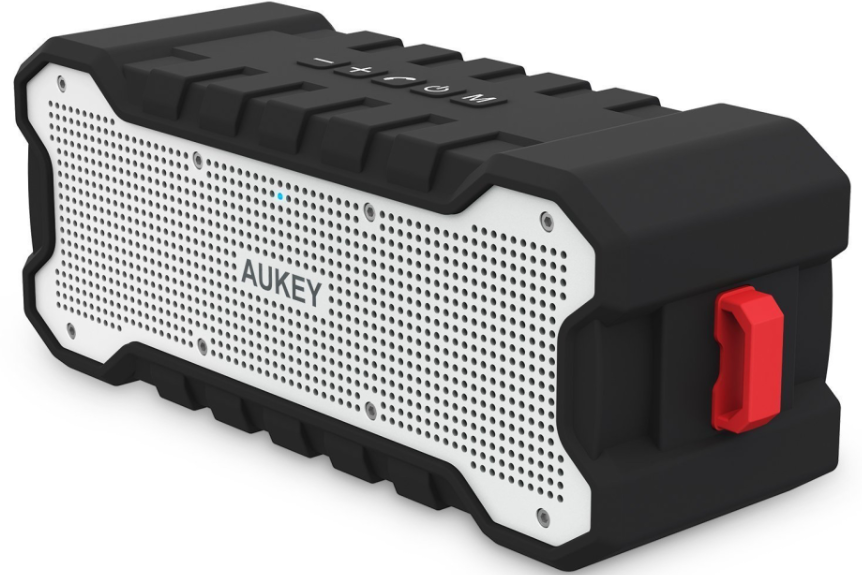
The aukey SoundTank Wireless Speaker (Model SK-M12) is a rugged, portable Bluetooth speaker designed for those who demand reliable, high-quality sound on the go. Perfect for outdoor enthusiasts, travelers, and casual listeners alike, this speaker combines durable construction with impressive audio performance. It features a splash-resistant silicone housing and shockproof design, making it an ideal companion for hiking, camping, beach trips, or backyard gatherings. With an extensive battery life of up to 30 hours, users can enjoy uninterrupted music all day and well into the night.
The speaker’s dual 5W drivers and bass-boosting passive radiator deliver clear, room-filling audio suitable for both indoor and outdoor environments. Equipped with Bluetooth 4.1 technology, it ensures quick pairing and a stable connection within a 33-foot range. Additional connectivity options, such as an auxiliary input, allow compatibility with non-Bluetooth devices. The built-in microphone supports hands-free calls, enhancing its versatility.
Currently priced affordably around $50 to $60, the aukey SoundTank Wireless Speaker offers excellent value, competing well with other portable Bluetooth speakers in its class. Available through major online retailers and Aukey’s official website, it appeals to budget-conscious consumers seeking durable design, long battery life, and solid audio performance.
Package Contents
- SoundTank Wireless Speaker
- 3.5mm Audio Cable
- User Manual
- Micro-USB Cable
- Reset pin
- Warranty Card
Specifications of the aukey SoundTank Wireless Speaker
- Model Number: SK-M12
- Bluetooth Version: 4.1 with a wireless range of up to 33 ft (10 meters)
- Audio Drivers: Dual 5W drivers plus a bass-boosting passive radiator
- Battery: Rechargeable 2600mAh Li-Polymer battery
- Playtime: Up to 30 hours on a full charge (approx. 6-hour charging time)
- Standby Time: Up to 100 hours
- Connectivity: Bluetooth, 3.5mm AUX input
- Durability: Splash-resistant silicone housing, shockproof design
- Additional Features: Built-in microphone for calls, 1/4"-20 tripod screw mount
- Weight: Approximately 1.5 lbs (lightweight for portability)
- udio Profiles Supported: A2DP, AVRCP, HSP, HFP
Compared to similar portable Bluetooth speakers, the aukey SoundTank stands out with its balance of ruggedness, extended battery life, and clear sound quality. While not fully waterproof, its splash resistance surpasses many budget speakers. The inclusion of a tripod mount is a unique feature for versatile outdoor use.
Product Diagram
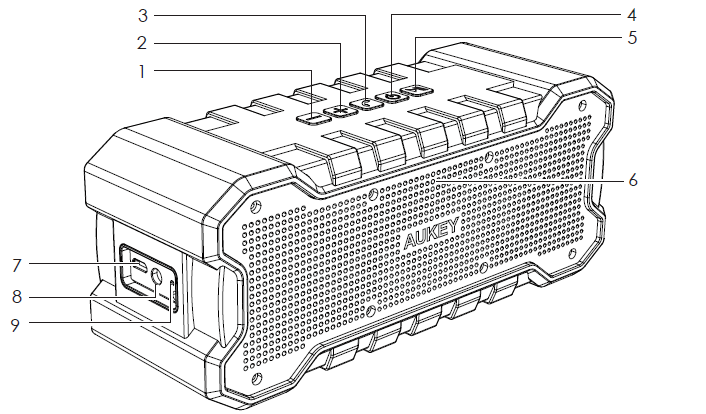
- Volume Down
- Volume Up
- Call Button
- Power Button
- Multi-function Button
- LED Indicator
- Micro-USB Charging Port
- Aux in
- Reset
Charging
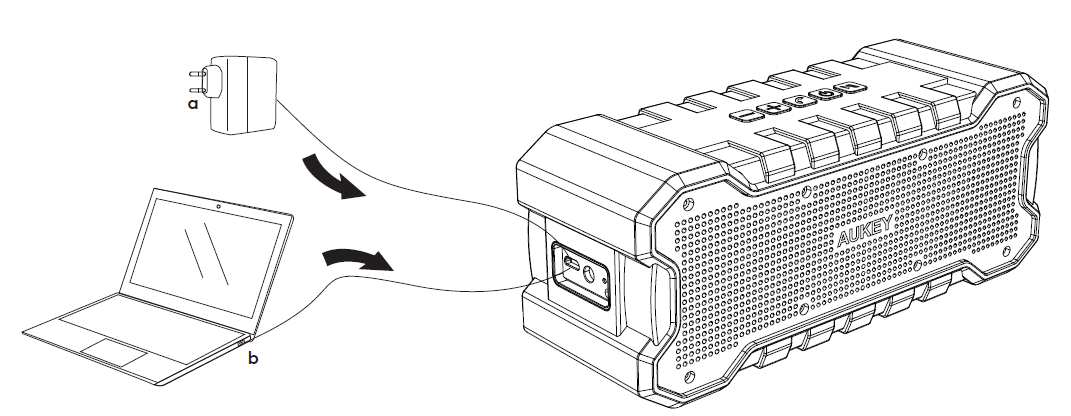
Please fully charge the SoundTank before first use. Connect your SK-M12 to a USB power source with the included Micro-USB cable to charge.
Power On/Off
To power on, short press the Power Button. To power off, long press the Power Button for 3s or until the LED indicator turns off.
Pairing
- Long press the Power Button until the LED indicator starts to flash blue quickly
- Activate the pairing function on your phone or other compatible devices and select “AUKEY SK-M12”
- If a code or pin is required for pairing, please enter “0000”
- When successfully paired, the LED indicator will stay blue
Notes
- SK-M12 will automatically shut down after 10 minutes in pairing mode if no devices are paired
- If your paired device is switched off or disconnected, the SK-M12 will automatically shut down after 5 minutes
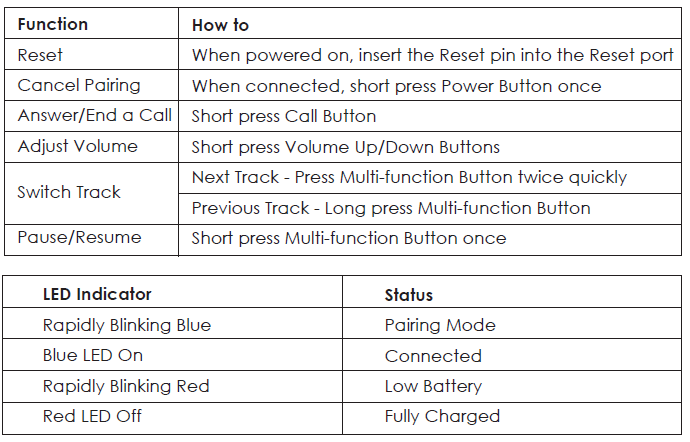
Troubleshooting the aukey SoundTank Wireless Speaker
- Problem: Speaker does not power on.
Solution: Ensure the battery is charged. Connect the speaker to a power source using the provided micro-USB cable and charge for at least 2 hours before trying again. - Problem: Bluetooth connection issues or intermittent sound.
Solution: Turn off and then turn on Bluetooth on your device, restart the speaker, and re-pair. Avoid obstacles between the speaker and device to maintain the 33 ft wireless range. - Problem: No sound during AUX input.
Solution: Confirm the AUX cable is securely connected and the speaker is set to the AUX mode by pressing the mode button. Check volume levels on both the speaker and the audio source. - Problem: Speaker volume too low.
Solution: Increase volume using both the speaker’s controls and the connected device. Ensure no device volume limits are active. - Preventive Measures: Keep the speaker away from heavy rain or submerged water as it is splash-resistant but not fully waterproof. Avoid dropping from heights greater than 3 feet to prevent damage.
The aukey SoundTank comes with a limited warranty (typically 24 months) covering manufacturing defects. For further assistance, customers can contact Aukey support via their official website or through authorized retailer customer service channels.
Warranty & Customer Support
For questions, assistance, support, or warranty claims, please contact us at the address below that corresponds with your region. Please include your Amazon order number and product model number.
- Amazon US orders: support@aukey.com
- Amazon EU orders: support.eu@aukey.com
- Amazon CA orders: support.ca@aukey.com
- Amazon JP orders: support.jp@aukey.com
Please note, AUKEY can only provide after sales service for products purchased directly from AUKEY. If you have purchased from a different seller, please contact them directly for service or warranty issues.
Pros & Cons of the aukey SoundTank Wireless Speaker
- Pros:
- Impressive battery life up to 30 hours, ideal for extended use
- Rugged, splash-resistant design with shockproof silicone housing
- Clear, room-filling sound with enhanced bass from passive radiator
- Built-in microphone supports hands-free calling
- Tripod mount adds versatile placement options outdoors
- Affordable price point offering excellent value
- Cons:
- Not fully waterproof—only splash resistant, limiting some outdoor uses
- Plastic grilles and silicone casing are functional but lack premium aesthetic
- Bluetooth 4.1 is stable but not the latest Bluetooth standard
- Switching between Bluetooth and AUX can sometimes be slow or require repeated presses
Compared to alternatives such as JBL Flip or Anker Soundcore models, the aukey SoundTank offers better battery life but falls short in premium finish and full waterproofing. It remains a strong contender for users prioritizing durability and long playtime within a budget.
Customer Reviews of the aukey SoundTank Wireless Speaker
User reviews commonly praise the aukey SoundTank Wireless Speaker for its robust battery life and solid sound output at an affordable price. Many highlight its durability for outdoor activities and appreciate the inclusion of an auxiliary input for flexible connectivity.
Complaints often mention the splash resistance limitation, noting it should not be exposed to heavy rain or submersion. Some users report occasional difficulty switching between Bluetooth and AUX modes, and a few mention the plastic housing looks less premium compared to higher-end competitors.
Overall customer star ratings average around 4 out of 5 stars, with positive testimonials recommending it for casual outdoor use and budget-conscious buyers seeking a tough, long-lasting Bluetooth speaker.
Faqs
How do I set up the aukey SoundTank Wireless Speaker for the first time?
What can I do if my aukey SoundTank Wireless Speaker is not pairing with my phone?
Can I use the aukey SoundTank Wireless Speaker with non-Bluetooth devices?
What are the main features of the aukey SoundTank Wireless Speaker that enhance outdoor use?
How do I maximize the battery life of my aukey SoundTank Wireless Speaker during use?
What should I do if the aukey SoundTank Wireless Speaker’s sound is distorted or muffled?
How do I clean and maintain the aukey SoundTank Wireless Speaker for long-term use?
Is the aukey SoundTank Wireless Speaker compatible with all smartphones and tablets?
More aukey manuals
- Setup & Usage: Aukey 2-in-1 Wireless Transmitter & Receiver User Manual
- How to Connect: Aukey AudioLink Wireless Speaker SK-A6 User Manual
- Usage: Aukey Foldable 21W Solar Charger User Guide
- How to Use: Aukey Foldable On-Ear Wireless Headphones User Manual
- How to Use: Aukey 12W Floor Lamp User Manual
- How to Connect: Aukey Eclipse Wireless Speaker User Manual
Leave a Comment