
How to Connect: Aukey Eclipse Wireless Speaker User Manual
Content
Aukey Eclipse Wireless Speaker
Introduction
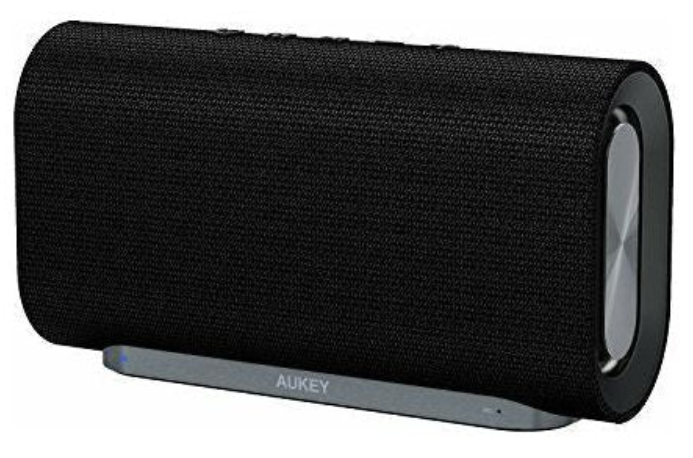
The Aukey Eclipse Wireless Speaker is a premium Bluetooth speaker designed to deliver powerful, clear audio with a sleek, classic aesthetic. Featuring dual 10W drivers and dual passive radiators, it produces a total output of 20 watts, providing rich bass and balanced sound quality ideal for indoor and outdoor use. Its elegant woven fabric finish and compact size make it as stylish as it is portable.
This speaker is perfect for music enthusiasts, home office users, and casual listeners who want a reliable wireless audio solution with hands-free calling capabilities. It also suits those who appreciate a minimalist design that fits seamlessly into various environments, from living rooms to work desks.
With Bluetooth 4.2 connectivity and an operating range of up to 10 meters, the Aukey Eclipse ensures quick pairing with smartphones, tablets, and laptops. Its robust 4000mAh Li-ion battery offers up to 12 hours of continuous playback, making it convenient for extended listening sessions without frequent recharging.
Priced competitively around the $50 to $60 mark, it provides excellent value for those seeking a mid-range wireless speaker with premium features. Availability may vary by region, but it is commonly found through online retailers and select electronics stores.
Package Contents
- Eclipse Wireless Speaker
- Micro-USB Cable
- 3.5mm Audio Cable
- User Manual
- Warranty Card
Specifications
- Model: SK-M30
- Technology: BT 4.2, A2DP, AVRCP, HSP, HFP
- Audio Output Power: 2 × 10W
- Frequency Response: 40Hz-20KHz
- Signal-to-Noise Ratio: ≥86dB
- Microphone Sensitivity: 35 ±3dB
- Input: DC 5V
- Charging Time: 4 hours
- Play Time: 12 hours (at 50% volume)
- Talk Time: 10 hours
- Standby Time: 120 hours
- Battery Type: Li-ion (2 x 2000mAh)
- Operating Range: Up to 10m / 33ft
- Operating Temperature: 14°F- 122°F / -10°C- 50°C
- Dimensions: 211 × 114 × 64mm / 8.3” × 4.5” × 2.5”
- Weight: 800g / 28.2oz
Specifications of the Aukey Eclipse Wireless Speaker
- Audio Output: Dual 10W drivers (20W total) with dual passive radiators for enhanced bass
- Bluetooth Version: 4.2
- Bluetooth Profiles: A2DP, AVRCP, HSP, HFP
- Frequency Range: 40Hz – 20kHz
- Operating Range: Up to 10 meters
- Battery: 4000mAh Li-ion, providing 12 hours of playback, 10 hours of talk time, 120 hours of standby
- Charging Time: Approximately 4 hours via micro-USB port
- Dimensions: 211 × 114 × 64 mm
- Weight: 800 grams
- Additional Features: Hands-free calling, LED indicator, bass enhancement mode, AUX input
- Build: Woven fabric exterior with metallic side plates and rubber base grip..
- Comparison: Offers a more refined indoor-friendly design compared to Aukey’s rugged outdoor speakers, with a focus on clear, balanced sound and portability
Product Diagram
Powering On / Off
- To power on, press and hold the power button for 3 seconds,, and the LED indicator will turn blue.
- To power off, press and hold the power button for 3 seconds , and the LED indicator will turn off..
Pairing
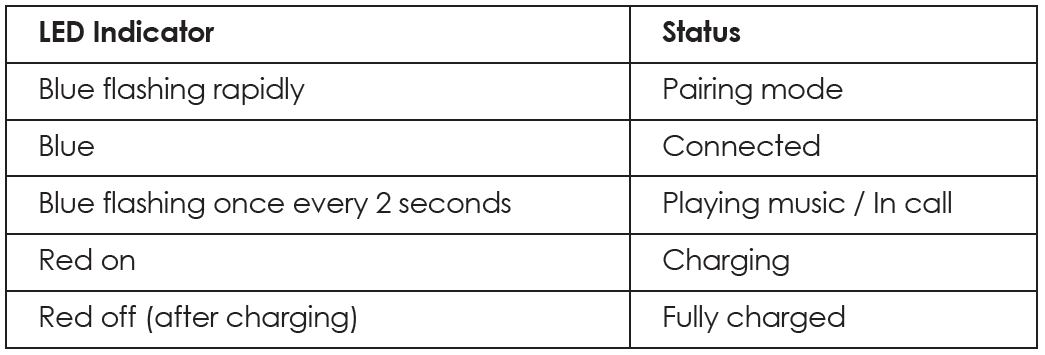
- When you turn on the speaker, the speaker will automatically enter pairing mode and the LED indicator will start to flash blue rapidly mode and the LED indicator will start to flash blue rapidly..
- Activate the pairing function on your phone or other compatible device and select “AUKEY SK-M30”
- If a code or pin is required for pairing, enter “0000”
- When successfully paired, the LED indicator will stay on
Notes
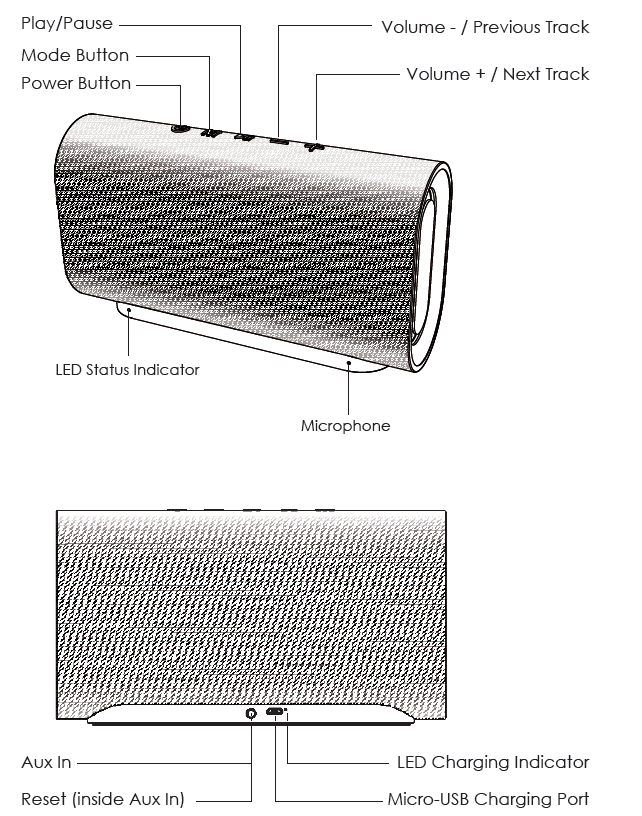
- To reset the speaker (to clear program errors), use a straightened paper clip or a toothpick to carefully short-press the reset button (towards the top at the back, furthest inside the 3.5mm Aux in jack)
- The speaker will automatically shut down after 10 minutes in pairing mode if no devices are paired..
- If your paired device is switched off or manually disconnected, the speaker will enter pairing mode and automatically shut down after 10 minutes..
- If the speaker or connected device exceeds the operating range, the speaker will disconnect. The connection to the last successfully connected device will be re-established once you re-enter wireless range within 10 minutes. To connect to other devices, please repeat the Previous "Pairing" steps..
Playing Audio via Aux Connection
Connect the SK-M30 to your PC, laptop, or other device with an Aux output using the included 3.5mm audio cable. Press the power button to turn on, and the LED indicator will flash blue once every 2 seconds.
Notes
- The speaker will disconnect from your phone or other paired devices when an audio cable is plugged into the Aux in jack. Short-press the mode button to switch back to Bluetooth mode
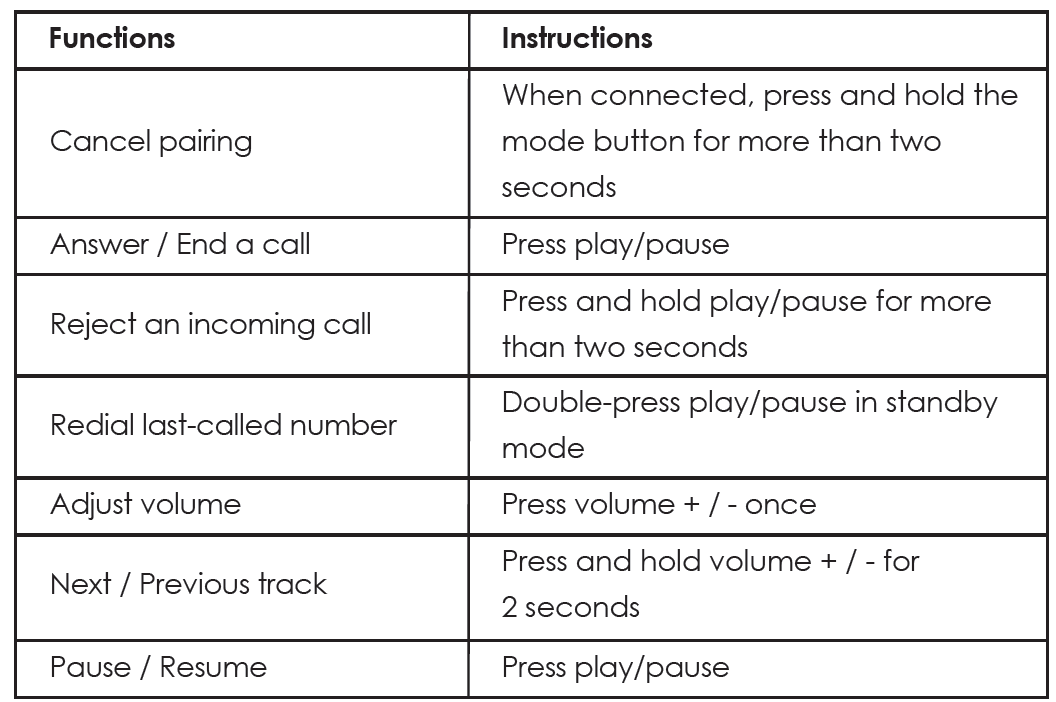
- When playing audio using the Aux in jack, press the volume+/- to adjust the volume and short-press play/pause to pause or resume. Next/previous track control on the speaker is disabled in Aux mode..
- For some computers, you may need to access the audio control panel to manually set the speaker as the default audio device..
Controls & LED Indicators
Product Care & Use
- Keep away from liquids, extreme heat, and strong magnetic fields
- Do not use this speaker at high volume for extended periods, as this may cause permanent hearing damage or loss
Troubleshooting Guide for the Aukey Eclipse Wireless Speaker
- Problem: Speaker won't power on
Solution: Ensure the battery is charged by connecting to a power source using the micro-USB cable. Check the charging indicator LED. If unresponsive after charging, try a different cable or adapter. - Problem: Bluetooth connection issues
Solution: Confirm the speaker is in pairing mode (LED indicator blinking). Restart Bluetooth on your device and try reconnecting. Remove previous pairings if necessary. - Problem: Low sound or no audio
Solution: Verify volume levels on both the speaker and connected device. Check that the correct audio source is selected (Bluetooth or AUX). Restart the speaker. - Problem: Distorted sound at high volume
Solution: Avoid playback above 75% volume to reduce compression distortion. Use the bass enhancement mode wisely depending on the music genre. - Preventive Measures: Keep the speaker dry, clean the fabric surface gently, and avoid dropping it to maintain longevity.
- Warranty & Support: Comes with a 12 224-month warranty, depending on the retailer. Contact Aukey customer service via their official website or authorized sellers for assistance and replacement.
Warranty & Customer Support
For questions, support, or warranty claims, contact us at the address below that corresponds with your region. Please include your Amazon order number and product model number.
- Amazon US orders: support.us@aukey.com
- Amazon EU orders: support.eu@aukey.com
- Amazon CA orders: support.ca@aukey.com
- Amazon JP orders: support.jp@aukey.com
Pro & Cons of the Aukey Eclipse Wireless Speaker
- Pros:
- Powerful 20W output with deep bass from dual passive radiators
- Stylish, classic fabric design fits well in any indoor setting
- Long battery life (up to 12 hours) with quick 4-hour charging
- Bluetooth 4.2 ensures stable wireless connectivity
- Hands-free calling feature adds convenience
- Includes AUX input for wired connections
- Affordable price point offering great value
- Cons:
- Heavier than ultra-portable speakers at 800 grams
- Limited outdoor ruggedness compared to Aukey’s outdoor models
- Sound compression is noticed at volumes above 75%
- Charging via micro-USB rather tthe he than less future-proof USB-C
Customer Reviews of the Aukey Eclipse Wireless Speaker
Users of the Aukey Eclipse Wireless Speaker commonly praise its sound quality, emphasizing the rich bass and clear mids that outperform many competitors in the same price range. The fabric finish and build quality receive positive notes for aesthetic appeal and durability.
Many reviews highlight the 12-hour battery life and ease of Bluetooth pairing as major advantages. Some customers, however, mention the speaker’s weight as a consideration for portability and note that sound distortion can occur at very high volumes.
Star ratings generally range from 4 to 4.5 out of 5 stars, with recommendations leaning toward users seeking a budget-friendly speaker for indoor use and casual outdoor listening. The hands-free calling feature is frequently cited as a useful bonus.
Overall, purchasers recommend the Aukey Eclipse for its balance of performance, style, and price, especially as a gift or personal use speaker for moderate volume needs.
Faqs
How do I set up the aukey Eclipse Wireless Speaker for the first time?
What should I do if my aukey Eclipse Wireless Speaker is not connecting via Bluetooth?
Can I use the aukey Eclipse Wireless Speaker for hands-free phone calls?
Is the aukey Eclipse Wireless Speaker compatible with all Bluetooth devices?
How can I optimize the sound quality and bass performance on my aukey Eclipse Wireless Speaker?
What is the battery life of the aukey Eclipse Wireless Speaker and how long does it take to recharge?
How do I care for and maintain the aukey Eclipse Wireless Speaker to ensure long-lasting performance?
Why does the aukey Eclipse Wireless Speaker sometimes have poor microphone quality during calls, and how can I improve it?
More aukey manuals
- How to Use: Aukey Foldable On-Ear Wireless Headphones User Manual
- How to Use: Aukey Portable Wireless Speaker User Manual
- How to Connect: Aukey AudioLink Wireless Speaker SK-A6 User Manual
- Pairing & Setup: Aukey Wireless Earbuds User Manual
- How to: Aukey SoundTank Wireless Speaker User Manual
- How to Use: Aukey 10000mAh USB-C Power Bank User Manual
Leave a Comment