
How to Use: Aukey Portable Wireless Speaker User Manual
Content
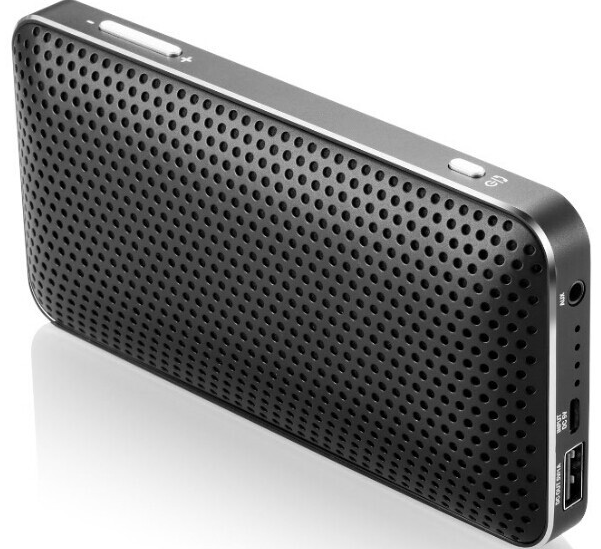
Aukey Portable Wireless Speaker
Introduction
The Aukey Portable Wireless Speaker is a versatile, rugged Bluetooth speaker designed for users seeking powerful sound on the go. Featuring advanced Bluetooth connectivity (Bluetooth 4.1 or 4.2, depending on the model), this compact speaker delivers rich, clear audio with deep bass, making it ideal for outdoor adventures, home use, or travel. The speaker offers long battery life—up to 30 hours on some models—ensuring uninterrupted playback for extended periods without frequent charging.
Its durable, splash-resistant design, combined with a silicone casing and shock protection, makes it perfect for active users who want a robust audio companion for activities like hiking, biking, or beach outings. Additional features include built-in microphones for hands-free calling, easy-to-use controls for volume and playback, and auxiliary input options for wired connections.
Available primarily through online retailers such as Amazon, the Aukey Portable Wireless Speaker generally retails between $30 and $80, depending on the model and specifications. This price range positions it as an affordable option delivering excellent value, especially considering its long battery life and rugged build. Ideal for tech enthusiasts, outdoor lovers, and casual listeners looking for a dependable portable speaker, the Aukey Portable Wireless Speaker balances sound quality, portability, and durability with an accessible price point.
Package Contents
- Portable Wireless Speaker
- Micro-USB Cable
- 3.5mm Audio Cable
- User Manual
- Warranty Card
Specifications
- Model: SK-A2
- Technology: BT 4.2, A2DP, AVRCP, HSP, HFP
- Audio Output Power: 2 x 3.5W
- Frequency Range: 2.4 - 2.48GHz
- Charging Time: 2.5 hours
- Play Time: 6 hours (at 50% volume)
- Battery Type: Li-ion (2200mAh)
- Micro-USB Input: DC 5V 1A
- USB Output: DC 5V 1A
- Operating Range: Up to 10m / 33ft
- Operating Temperature: -20°C - 60°C / -4°F - 140°F
- Dimensions: 140 x 76 x 25mm / 5.51” x 2.99” x 0.98”
- Weight: 225g / 7.94oz
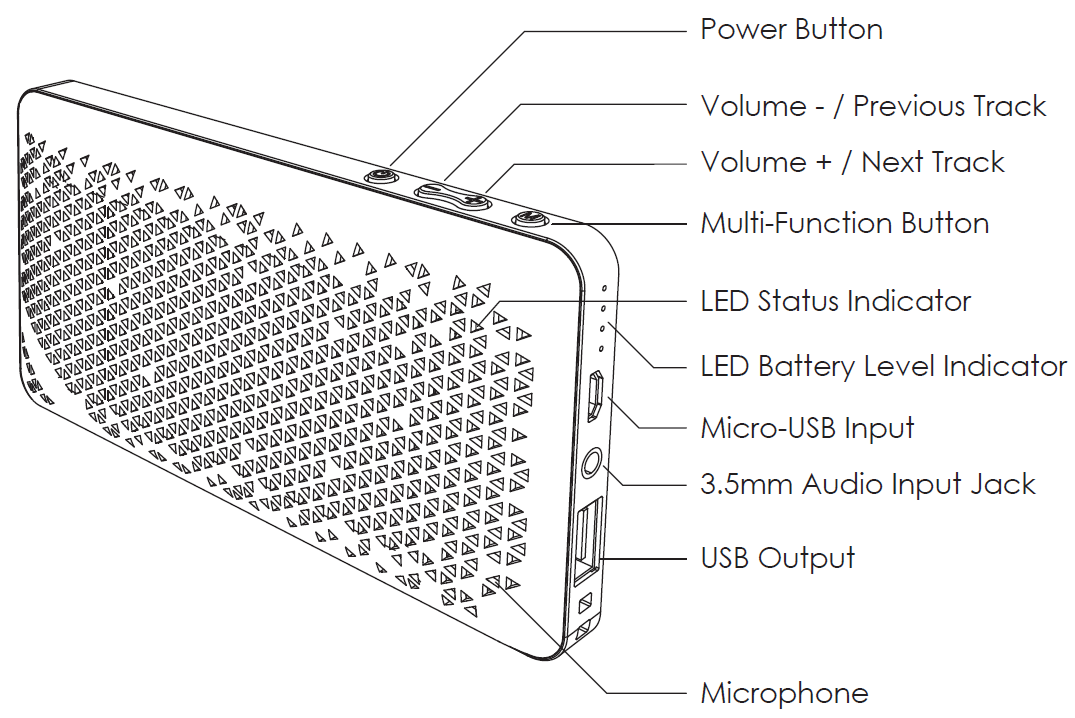
Product Diagram
Charging Your Speaker
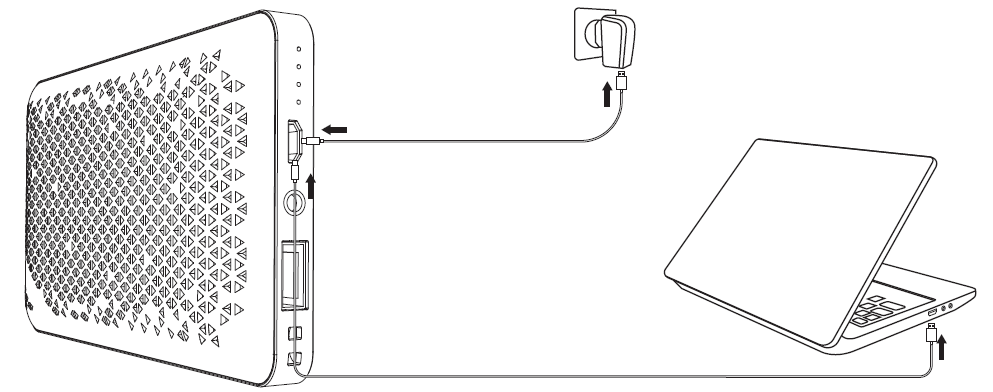
Please fully charge this speaker before first use. Connect it to a USB charger or charging port with the included micro-USB cable to charge. When all four white LED battery level indicator lights stay on, your speaker is fully charged and ready for use. Charging takes around 2.5 hours.
Powering On / Off
- Press and hold the power button for 2 seconds to power on or off (LED indicator blue or off)
Pairing
- When you turn on the speaker, it will automatically enter pairing mode,, and the LED indicator will start to flash blue rapidly.
- Activate the pairing function on your phone or other compatible device and select “AUKEY SK-A2”
- If a code or pin is required for pairing, enter “0000”
- When successfully paired, you will hear a tone, and the LED indicator will flash once every 5 seconds
Notes
- The speaker will automatically shut down after 10 minutes in pairing mode if no devices are paired.d
- If your paired device is switched off or manually disconnected, the speaker will enter pairing mode and automatically shut down after 10 minutes
- If the speaker or connected device exceeds the operating range, the speaker will disconnect. The connection to the last successfully connected device will be re-established once you re-enter wireless range within 10 minutes. To connect to other devices, please repeat the previous “Pairing” steps.
Playing Audio via Audio Input Connection
Connect the SK-A2 to your PC, laptop, or other device with a nanaudio output port using the included 3.5mm audio cable. Turn on the speaker, and the flashing blue LED indicator will turn red.
Notes
- The speaker will disconnect from your phone or other paired devices when an audio cable is plugged into the audio input jack
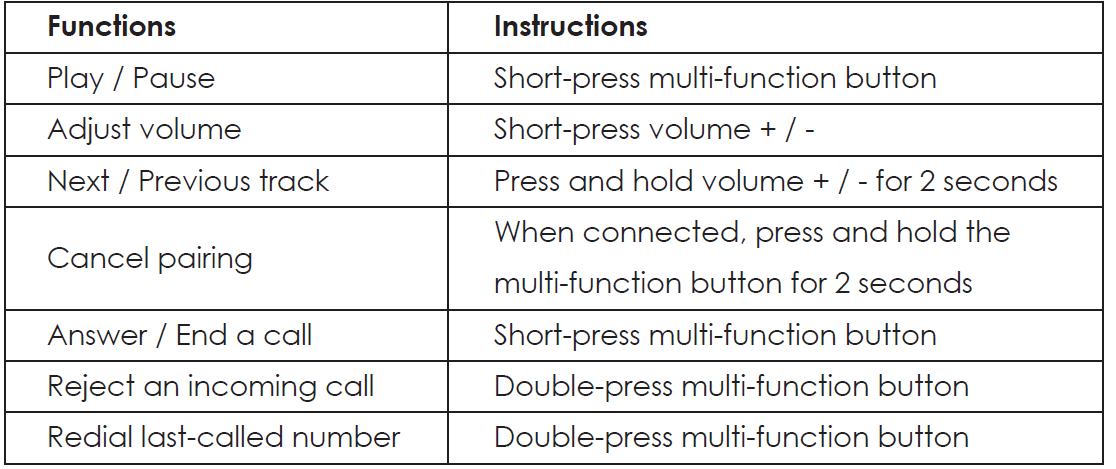
- When playing audio using the audio input jack, short-press the volume + / - to adjust the volume and short-press the multi-function button to play or pause. Next/previous track control on the speaker is disabled in wired mode..
- For some computers, you may need to access the audio control panel to manually set the speaker as the default audio device
Charging Your Devices
Connect one end of your charging cable to your device’s charging port and the other end to the USB output port on the speaker. Unplug your device when it’s fully charged. To check the battery level of the speaker, short-press the power button.
Controls & LED Indicators

Product Care & Use
- Keep away from liquids, extreme heat, and strong magnetic fields
- Do not use this speaker at high volume for extended periods, as this may cause permanent hearing damage or loss
Warranty & Customer Support
For questions, support, or warranty claims, contact us at the address below that corresponds with your region. Please include your Amazon order number and product model number.
- Amazon US orders: support.us@aukey.com
- Amazon EU orders: support.eu@aukey.com
- Amazon CA orders: support.ca@aukey.com
- Amazon JP orders: support.jp@aukey.com..
Troubleshooting the Aukey Portable Wireless Speaker
Common issues with the Aukey Portable Wireless Speaker include Bluetooth connectivity problems, low sound output, and battery charging difficulties. To resolve pairing issues, ensure the speaker is in Bluetooth mode with a flashing blue LED, then remove any previous pairings on your device and rediscover the speaker within a 33-foot range. Restarting both devices often clears temporary glitches.
If the speaker volume is low or distorted, check the audio source and connection type; use the AUX cable if Bluetooth is unstable. For battery issues, charge the speaker fully using the provided micro-USB cable, and avoid using incompatible chargers to prolong battery life. If the speaker does not power on, try a reset by holding the power button for several seconds.
There are no specific error codes typically displayed; however, indicator lights can signal battery status or connectivity. Preventive measures include keeping the speaker dry despite its splash resistance, avoiding extreme temperatures, and charging regularly to maintain battery health.
The Aukey Portable Wireless Speaker comes with a 24-month warranty covering manufacturing defects. For support, users can contact Aukey's customer service via their official website or through the retailer where the speaker was purchased.
Pros & Cons of the Aukey Portable Wireless Speaker
- Pros:
- Long battery life up to 30 hours, enabling extended use without frequent charging
- Rugged and splash-resistant design suitable for outdoor activities
- Clear, balanced sound with enhanced bass due to dual drivers and a passive bass radiator
- Bluetooth 4.1/4.2 connectivity with a reliable wireless range of up to 33 feet
- Hands-free calling capability with built-in microphone
- Includes both Bluetooth and AUX input options for flexible connectivity
- Affordable price range providing excellent value compared to competitors
- Cons:
- Some models emit a loud connection beep, which cannot be disabled, potentially annoying some users
- Build quality is functional but lacks a premium finish; mostly plastic with silicone casing
- Charging time can be relatively long (up to 8 hours) for a full battery recharge
- Not fully waterproof; rated splash-resistant rather than fully waterproof (IPX6 or less)
- No advanced smart features like voice assistant integration
Compared to alternatives in the same price segment, such as JBL GO or Anker Soundcore, the aAukeyPortable Wireless Speaker offers superior battery life and ruggedness but falls slightly behind in premium design and smart features.
Customer Reviews of the Aukey Portable Wireless Speaker
Users consistently praise the Aukey Portable Wireless Speaker for its impressive battery longevity and solid sound quality, especially the bass response for a compact device. Many highlight its ruggedness and portability as major advantages for outdoor use. The hands-free calling feature receives positive remarks for clear voice pickup.
Common complaints include the loud and unavoidable connection beep and the plastic-heavy build, which some consider less premium. A few users mention longer charging times and occasional Bluetooth pairing delays, though these are infrequent.
Overall, the speaker holds an average rating of around 4 out of 5 stars on major retail platforms, with recommendations for casual users and outdoor enthusiasts looking for an affordable, durable Bluetooth speaker with long battery life.
Faqs
How do I set up my aukey Portable Wireless Speaker for the first time?
What should I do if my aukey Portable Wireless Speaker is not connecting via Bluetooth?
Can I use the aukey Portable Wireless Speaker with non-Bluetooth devices?
How long does the battery last on the aukey Portable Wireless Speaker and how can I optimize it?
What key features make the aukey Portable Wireless Speaker suitable for outdoor use?
How do I maintain and care for my aukey Portable Wireless Speaker to ensure longevity?
Why does my aukey Portable Wireless Speaker make a beeping sound when connecting and can I disable it?
Is the aukey Portable Wireless Speaker compatible with both Android and iOS devices?
More aukey manuals
- How to Connect: Aukey Eclipse Wireless Speaker User Manual
- Pairing & Setup: Aukey Wireless Earbuds User Manual
- How to Use: Aukey Foldable On-Ear Wireless Headphones User Manual
- How to Use: Aukey 10000mAh USB-C Power Bank User Manual
- How to Connect: Aukey AudioLink Wireless Speaker SK-A6 User Manual
- Charging & Setup: Aukey Power Bank 5000mAh User Manual
Leave a Comment