
Pairing & Setup: Aukey Wireless Earbuds User Manual
Content
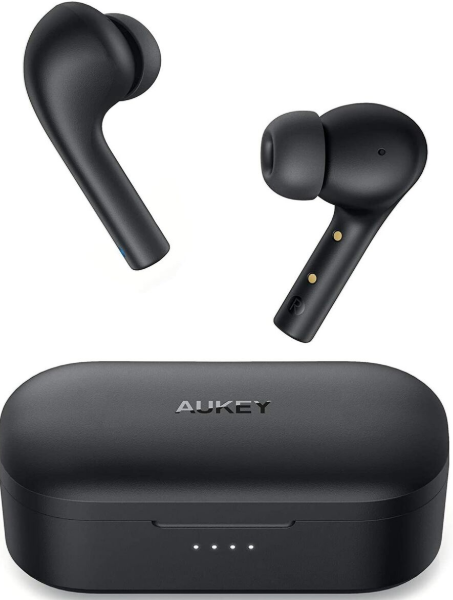
Aukey Wireless Earbuds
Introduction
The Aukey Wireless Earbuds combine advanced audio technology with a sleek design to deliver an exceptional listening experience for music lovers and on-the-go professionals alike. Featuring Bluetooth 5.3 connectivity, these earbuds ensure stable and fast pairing with a wide range of devices, including smartphones, tablets, and laptops. The earbuds are engineered with high-sensitivity speakers—ranging from 6mm to 13mm drivers depending on the model—that produce rich bass and clear highs, perfect for immersive sound during workouts, commuting, or casual listening.
Lightweight and ergonomic, typically weighing around 3.5g to 7g per earbud, Aukey Wireless Earbuds offer comfort for extended wear. Touch controls provide intuitive management of calls, music playback, and voice assistant activation without reaching for your device. Models with active noise cancellation (ANC) and transparency modes enhance the listening environment, allowing users to block out distractions or stay aware of surroundings as needed.
Battery life varies by model but generally provides approximately 3.5 hours of continuous use per charge, with an additional three charges available via the compact charging case—totaling up to 15-30 hours of playback. Charging times are fast, typically around 1.5 to 2 hours via USB-C. Waterproof ratings such as IPX5 or IPX6 make them suitable for workouts and outdoor activities.
Priced between approximately $50 and $170, depending on features and model, Aukey Wireless Earbuds are accessible for budget-conscious consumers seeking quality sound and functionality. They are ideal for athletes, commuters, remote workers, and casual listeners looking for true wireless freedom with reliable performance.
Package Contents
- Wireless Earbuds
- Micro-USB Cable
- Three Sets of Ear-Tips (S / M / L)
- Carrying Pouch
- User Manual
- Warranty Card
Specifications
- Model: EP-E7
- Technology: BT 4.1, A2DP, AVRCP, HSP, HFP
- Chipset: CSR8635
- Input: 5V
- Charging Time: 2 hours
- Play Time: 4 hours
- Standby Time: 180+ hours
- Operating Range: Up to 10m / 33ft
- Battery Capacity: 40mAh
- Weight: 14.6g / 0.51oz
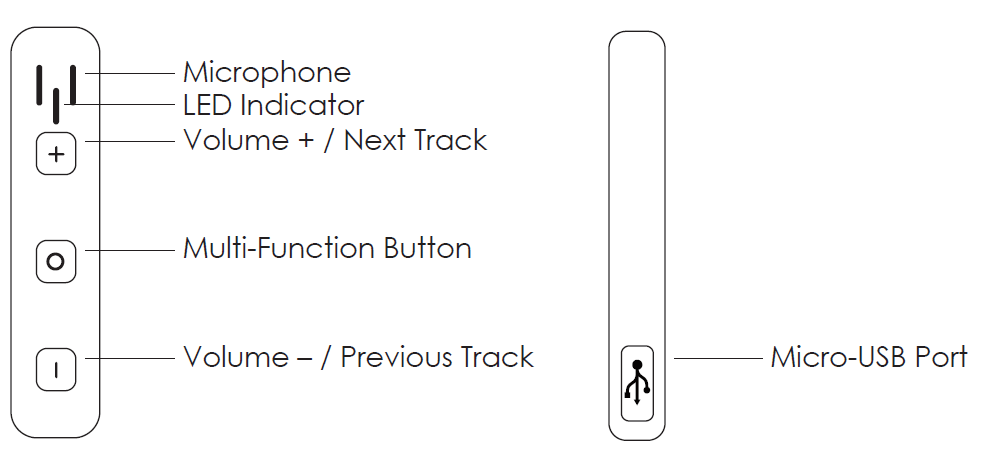
Product Diagram
Getting Started
Charging
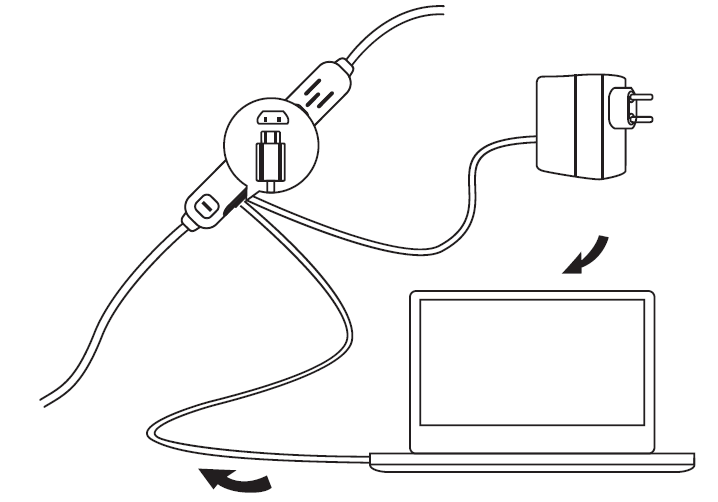
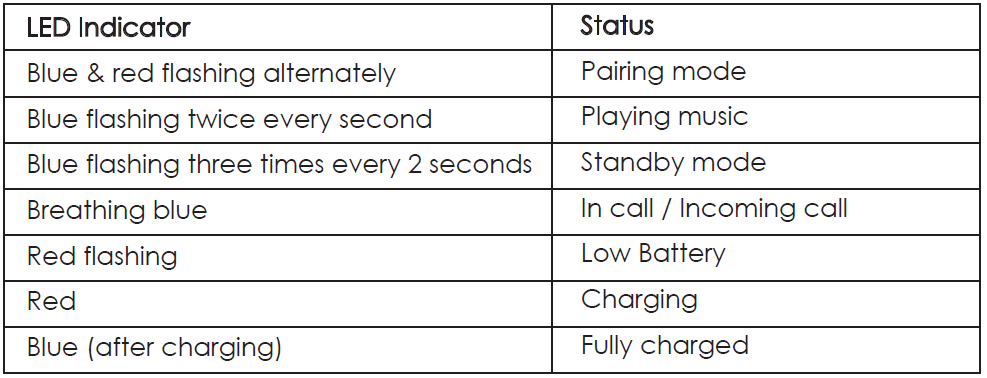
Please fully charge your earbuds before first use. Before charging, make sure the earbuds are turned off. To charge, simply connect one end of the micro-USB cable to a USB charging port and the other end to the input port on the earbuds. When the red LED indicator light turns blue, your earbuds are fully charged and ready for use. Charging takes around two hours.
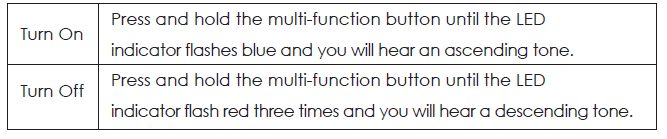
Turning On / Off
Pairing
Starting with your earbuds powered off:
- Press and hold the multi-function button for 5 seconds or until the LED starts flashing red and blue alternately.
- Turn on the pairing function of the device you want o pair with earbuds.
- In the list of available devices, find and select “AUKEY EP-E7”.
- If a code or pin is required for pairing, please enter “0000”.
Notes
- The earbuds will automatically shut down after 5 minutes in pairing mode if no devices are paired
- If ..your paired device is turned off or disconnected, the earbuds will automatically enter pairing mode and shut down after 5 minutes
- The maximum wireless operating range is 33ft (10m). If you exceed this range, the earbuds may disconnect from your device and go into standby mode.
- The connection will be re-established once you re-enter he wireless ran in 5 minutes. The earbuds automatically reconnect to the last paired device.
- To connect with other devices, please repeat the previous “Pairing” steps
Controls & Voice Notification
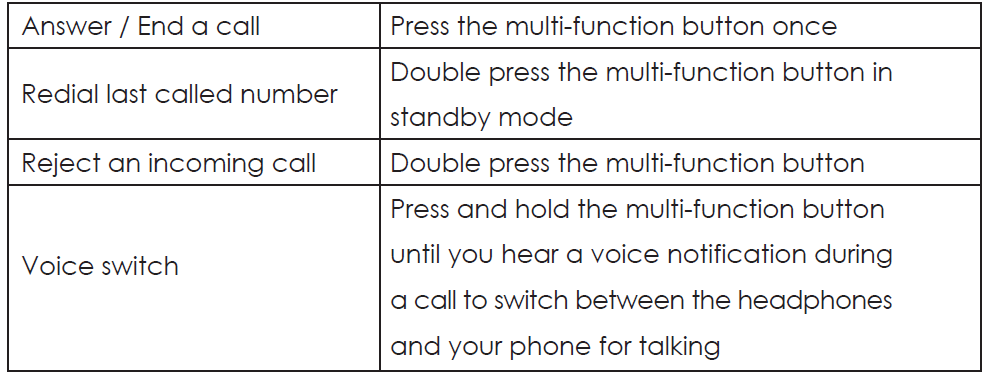
Making Calls
Once paired with your smartphone, making and answering phone calls can be managed via remote control.
Streaming Audio
Once paired, you can wirelessly stream audio from your device to your earbuds. Music will automatically pause when you receive an incoming phone call, and resume once the call is ended.

LED Indicator
Product Care & Use
- Please keep away from liquids and extreme heat
- Do not use the earbuds at high volume for extended periods, as this may cause permanent hearing damage or loss
W. Warranty & Customer Support
For questions, support, or warranty claims, contact us at the address below that corresponds with your region. Please include your Amazon order number and product model number.
- Amazon US orders: support.us@aukey.com
- Amazon EU orders: support.eu@aukey.com
- Amazon CA orders: support.ca@aukey.com
- Amazon JP orders: support.jp@aukey.com
Pros & Cons of Aukey Wireless Earbuds
Pros
- High-Quality Sound: Equipped with 6mm to 13mm drivers delivering rich bass and clear treble for immersive audio experiences.
- Latest Bluetooth 5.3 Technology: Ensures fast, stable connections with low latency (as low as 80ms), perfect for gaming and video calls.
- Comfortable & Lightweight: Semi-in-ear or ergonomic designs weigh as little as 3.5g per earbud for comfortable all-day wear.
- Touch Controls & Voice Assistant Support: Easy management of playback, calls, and virtual assistants without device access.
- Active Noise Cancelling (ANC) & Transparency Mode: Available on select models (e.g., EP-M1 NC), improving audio immersion and situational awareness.
- Good Battery Life: Up to 6 hours of music playback per charge, with multiple recharges via the charging case.
- Water Resistance: IPX5 to IPX6 ratings make these earbuds suitable for workouts and outdoor use.
- Competitive Pricing: Offers strong value compared to premium brands like Apple AirPods or Samsung Galaxy Buds.
Cons
- Battery Life Varies by Model: Some models offer only around 3.5 hours per charge, which may require frequent recharging for heavy users.
- Fit May Not Suit All Users: Semi-in-ear designs might lack the secure fit preferred for intense physical activities.
- Limited ANC Models: Noise cancellation is not present on all Aukey earbuds, limiting options for users needing this feature.
- Touch Controls Sensitivity: Some users report occasional unresponsiveness or accidental touches.
- Brand Recognition: Less well-known compared to major competitors, which might affect buyer confidence despite solid performance.
Customer Reviews and User Feedback on Aukey Wireless Earbuds
Customers generally praise Aukey Wireless Earbuds for their sound quality, comfortable fit, and seamless Bluetooth pairing. Many appreciate the strong bass response and clear voice calls with dual MEMS microphones. Users highlight the benefit of touch controls and voice assistant integration, which makes daily use convenient.
Common complaints include limited battery life on some models (around 3.5 hours) and occasional touch control sensitivity issues. Some users desire a more secure fit for vigorous exercise, especially with semi-in-ear designs. The active noise cancellation feature on select models receives positive remarks for effectively reducing ambient noise, but its absence on others is noted.
Star ratings typically range from 4 to 4.5 out of 5 across various retail platforms, with testimonials emphasizing value for money when compared to higher-priced earbuds with similar features. Buyers recommend Aukey Wireless Earbuds for those seeking affordable true wireless options with modern features, especially for casual listening and everyday use.
Faqs
How do I set up my aukey Wireless Earbuds for the first time?
What should I do if my aukey Wireless Earbuds won’t connect to my smartphone?
Why is there no sound coming from my aukey Wireless Earbuds even though they are connected?
Can I use aukey Wireless Earbuds with any Bluetooth-enabled device?
How can I improve the call quality on my aukey Wireless Earbuds?
What is the maximum wireless range of aukey Wireless Earbuds and how does environment affect it?
How do I reset my aukey Wireless Earbuds if they are malfunctioning?
What maintenance should I perform to keep my aukey Wireless Earbuds working properly?
More aukey manuals
- How to Use: Aukey Portable Wireless Speaker User Manual
- How to Use: Aukey 10000mAh USB-C Power Bank User Manual
- How to Connect: Aukey Eclipse Wireless Speaker User Manual
- Charging & Setup: Aukey Power Bank 5000mAh User Manual
- How to Use: Aukey Foldable On-Ear Wireless Headphones User Manual
- How to Use: Aukey LED Desk Lamp LT-ST31 Instruction Guide
Leave a Comment