
How to Use: Aukey LED Desk Lamp LT-ST31 Instruction Guide
Content
Aukey LED Desk Lamp LT-ST31
Introduction
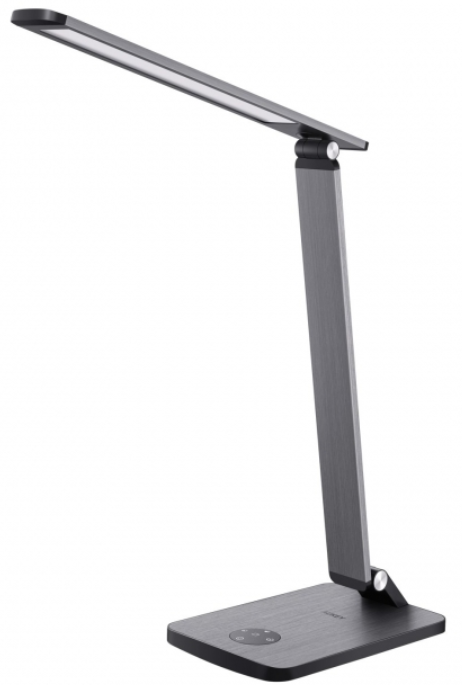
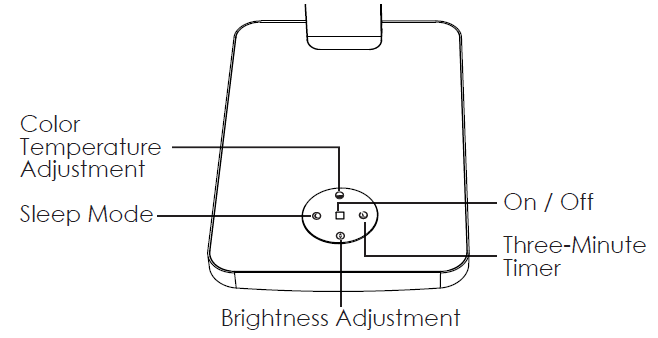
The Aukey LED Desk Lamp LT-ST31 is a versatile and feature-rich lighting solution designed for home offices, study spaces, and any area requiring adjustable and comfortable lighting. This desk lamp offers a range of benefits, including adjustable brightness, color temperature settings (from warm white at 2700K to cool white at 6500K), and a sleep mode for soft background lighting. The lamp's ergonomic design allows for easy positioning and adjustment, making it suitable for reading, working, or relaxing. With its vibration feedback, users can intuitively navigate through different settings without needing to constantly glance at the controls.
The Aukey LED Desk Lamp LT-ST31 is ideal for students, professionals, and anyone seeking a reliable and energy-efficient lighting solution. It typically retails within the $20 to $40 price range, making it an affordable option for those looking to enhance their workspace with modern lighting technology. The lamp is widely available on online platforms such as Amazon and the official Aukey website.
Package Contents
- 10W LED Desk Lamp
- Power Adapter
- User Manual
- Warranty Card
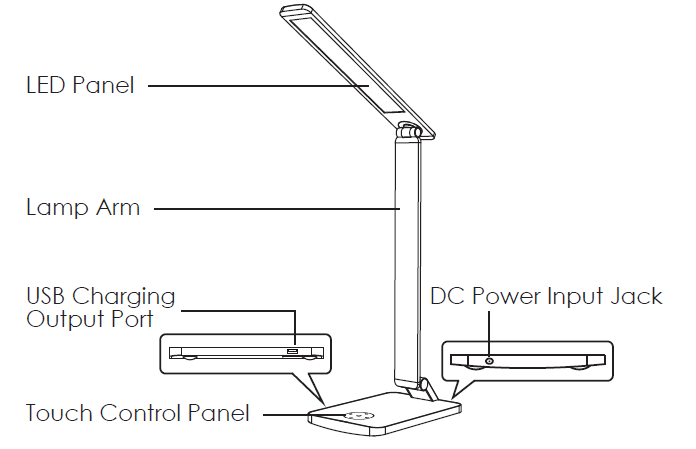
Product Diagram
Specifications
- Model: LT-ST31
- Luminous Flux: 550 1m (max)
- Color Temperature: 2700-6500K
- Color Rendering Index: 280Ra
- Input: AC 100-240V 50/60Hz
- Operating Voltage: DC 12V 2A
- USB Output: DC 5V 2.4A
- Power Consumption: 40000 hours
- LED Lifespan: SMD 2835
- LED Type: 90
- Number of LEDs: Aluminum, ABS
- Materials: 320 x 200 x 415mm
- Dimensions: / 12.6" x 7.87" x 16.34'
- Weight: 0.95kg / 2.091b
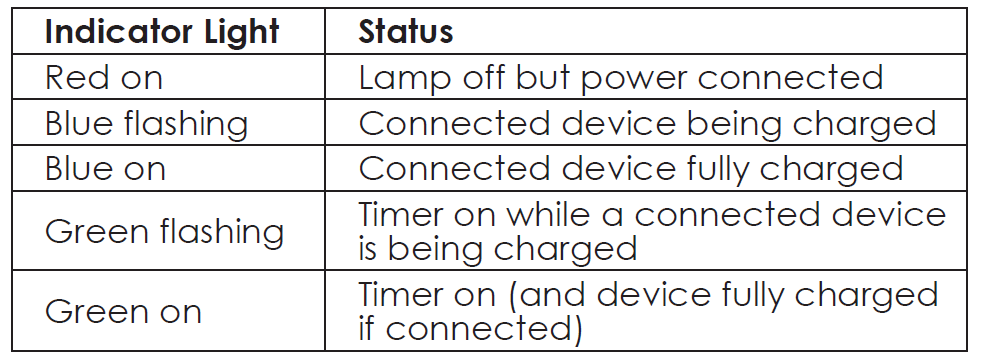
LED Status Indicator Meanings
Product Care
- Do not repair, disassemble, or modify the product
- Keep away from liquids and extreme heat
Troubleshooting the Aukey LED Desk Lamp LT-ST31
While the Aukey LED Desk Lamp LT-ST31 is designed to be reliable, users may encounter some common issues. Here are some troubleshooting tips:
- Dimming Issues: Ensure the brightness adjustment button is pressed correctly. If the lamp does not dim, check for any dust or debris on the touch controls.
- Color Temperature Malfunction: Restart the lamp by turning it off and on again. If the issue persists, refer to the user manual for detailed instructions.
- Preventive Measures: Regularly clean the lamp to prevent dust buildup, and avoid exposing it to excessive moisture.
- Warranty and Support: Aukey offers a warranty for its products, and support can be accessed through its official website or customer service email.
For further assistance, contact Aukey's customer support team via their website.
Warranty & Customer Support
For questions, support, or warranty claims, contact us at the address below that corresponds with your region. Please include your Amazon order number and product model number.
- Amazon US orders: support.us@aukey.com
- Amazon EU orders: support.eu@aukey.com
- Amazon CA orders: support.ca@aukey.com
- Amazon JP orders: support.jp@aukey.com
Please note, AUKEY can only provide after-sales service for products purchased directly from AUKEY. If you have purchased from a different seller, please contact them directly for service or warranty issues.
Pros and Cons of the Aukey LED Desk Lamp LT-ST31
Here is a balanced view of the benefits and drawbacks of the Aukey LED Desk Lamp LT-ST31:
Pros:
- Adjustable Brightness and Color Temperature: Offers flexibility for different lighting needs.
- Sleep Mode: Provides a convenient nightlight setting with soft background lighting.
- Energy Efficiency: Uses LED technology for reduced power consumption.
- Value for Money: Affordable price with a range of features.
Cons:
- Limited Portability: Not designed for battery-powered use, making it less portable than some alternatives.
- Dependence on Power Source: Requires a constant power supply, which can be a drawback in areas with frequent power outages.
Customer Reviews and Feedback for the Aukey LED Desk Lamp LT-ST31
Users generally praise the Aukey LED Desk Lamp LT-ST31 for its versatility and ease of use. Common praises include its adjustable color temperature and sleep mode, which many find convenient for late-night work or reading. However, some users have noted that the lamp can feel a bit flimsy and lacks a battery option, making it less portable than other models.
Based on user reviews, the Aukey LED Desk Lamp LT-ST31 is recommended for those seeking a reliable and feature-rich desk lamp for home or office use. It consistently receives a high rating of around 4.5 out of 5 stars, with many users appreciating its value for money and performance.
Faqs
How do I properly set up the aukey LED Desk Lamp LT-ST31 for optimal desk lighting?
What steps can I take if the aukey LED Desk Lamp LT-ST31 is not turning on or responding to touch controls?
How do I adjust the brightness and color temperature on the aukey LED Desk Lamp LT-ST31?
Can the aukey LED Desk Lamp LT-ST31’s sleep mode be used as a nightlight, and how is it activated?
What power requirements does the aukey LED Desk Lamp LT-ST31 have, and can it be used with USB chargers?
How often should I clean and maintain my aukey LED Desk Lamp LT-ST31 to ensure longevity?
What should I do if the brightness or color temperature adjustment on the aukey LED Desk Lamp LT-ST31 feels unresponsive?
Does the aukey LED Desk Lamp LT-ST31 support an auto-off timer, and how can I use it effectively?
More aukey manuals
- Charging & Setup: Aukey Power Bank 5000mAh User Manual
- How to Use: Aukey 10000mAh Universal Power Bank User Manual
- How to Use: Aukey 10000mAh USB-C Power Bank User Manual
- How to Use: Aukey Floor Lamp 6.5W LT-ST34 User Manual
- Pairing & Setup: Aukey Wireless Earbuds User Manual
- How to Use: Aukey Portable Wireless Speaker User Manual
Leave a Comment