
How to Use: Aukey 10000mAh Universal Power Bank User Manual
Content
Aukey 10000mAh Universal Power Bank
Introduction
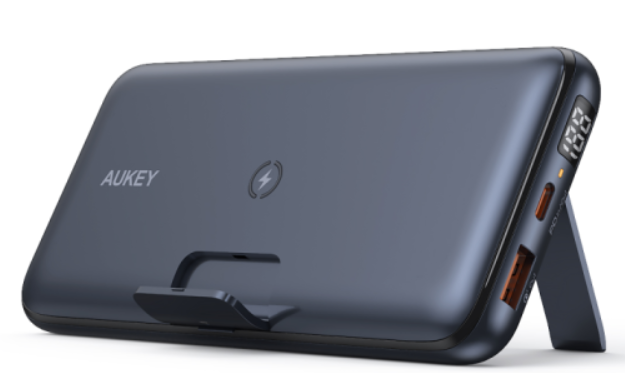
The Aukey 10000mAh Universal Power Bank is a versatile and compact portable charger designed to keep your devices powered on the go. Boasting a substantial 10,000mAh lithium polymer battery capacity, this power bank supports fast charging technologies such as USB-C Power Delivery (PD) 3.0 and Qualcomm Quick Charge 3.0, enabling rapid and efficient charging for a wide range of smartphones, tablets, and other USB-compatible electronics. The device also offers convenient wireless charging with up to 10W output, allowing users to power Qi-enabled devices without cables.
Key benefits of this power bank include dual fast charging outputs—20W USB-C PD and 18W Quick Charge—plus a foldable kickstand for hands-free device viewing while charging. Its sleek, lightweight design makes it ideal for frequent travelers, commuters, or anyone needing reliable power backup during daily activities. Whether you want to charge your iPhone, Android device, or Bluetooth accessories, this power bank delivers flexibility and speed.
Targeted at tech-savvy individuals and professionals who demand quick, efficient charging solutions, the Aukey 10000mAh Universal Power Bank fits seamlessly into backpacks or purses for everyday use. It is available through major retailers and online stores, typically priced between $35 and $50, depending on the seller and bundled offers. This product is a robust choice for users seeking a balance of portability, power, and advanced charging features.
Specifications
- Model
- PB-Y22
- Technology
- USB Power Delivery 2.0, Qualcomm® Quick Charge™ 3.0, AiPower
- Capacity
- 10000mAh / 37Wh
- Battery Type
- Lithium polymer
- Micro-USB Input
- DC 5V 2A
- Lightning Input
- DC 5V 2A, 9V 2A
- USB-C Input (Power Delivery 2.0)
- DC 5V 3A, 9V 2A
- USB-C Output (Power Delivery 2.0)
- DC 5V 3A, 9V 2A, 12V 1.5A
- USB Output (Quick Charge 3.0)
- DC 5V-6.5V 3A, 6.5V-9V 2A, 9V-12V 1.5A
- Total Power Output
- 18W
- Dimensions
- 107 x 69 x 24mm / 4.21" x 2.72" x 0.94"
- Weight
- 235g / 8.29oz
What is USB Power Delivery (PD)?
USB Power Delivery is a new, universal multi-voltage charging standard that dynamically negotiates power output over a USB Type-C connection to safely and efficiently recharge a wide range of compatible devices.
To get USB PD, the following are required:
Device (phone, tablet, laptop) that supports USB PD, USB-C charger with USB PD, D USB-C tUSB-C C cable
What is Quick Charge 3.0?
Charge compatible devices up to four times faster than conventional charging. Quick Charge 3.0 is engineered to refuel devices twice as fast as Quick Charge 1.0 and is up to 38% more efficient than Quick Charge 2.0. Backward-compatible with Quick Charge 2.0/1.0 devices.
Getting Started
Charging the Power Bank
Fully charge your power bank before first use.
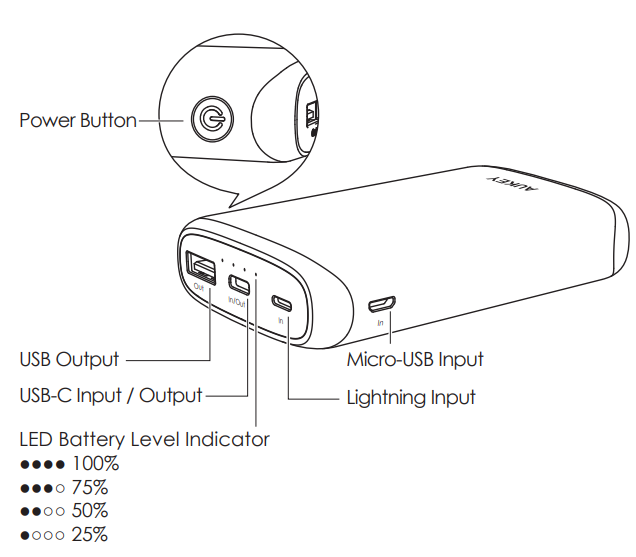
- Connect the included USB-A to C cable / a Micro-USB cable / Lightning cable to a USB charger or charging port.
- Connect the other end to the USB-C / Micro-USB / Lightning input port on the power bank.k
- Unplug the power bank when fully charged
Charging Your Device
- Connect the charging cable to your device’s charging port.rt Connect the other end to a USB output port on PB-Y22 . Unplug your device when fully charged. rged
- To check the remaining battery level, press the power button
Low-Current Charging Mode
This mode is customized to charge low-current devices (below 60mA). Try switching to this mode if a low-powered device (such as a fitness tracker or wireless headphones) isn’t charged in the standard charging mode.
- Double-press the power button to enter or exit low-current charging mode. The LED indicator lights will flash sequentially while charging in this mode and display battery level when exited.ng it After 2 hours of charging in this the mode, power bank automatically switches back to standard charging mode and turns off.
- To end charging early, exit low-current charging mode. However, extra charging in this mode won’t harm your device's battery.
Product Care & Use
- Keep away from liquids and extreme heat.
- Don’t charge your devices while recharging the power bank.k Recharge the PB-Y22 at least once every 3monthst.hs
- Dispose of the battery according to local environmental law
- The PB-Y22 doesn’t accept simultaneous Micro-USB, Lightning, and USB-C power input
Warranty & Customer Support
- For questions, support, or warranty claims, contact us at the address below that corresponds with your region. Please include your Amazon order number and product model number.
- Amazon US order: support.us@aukey.com
- Amazon EU order: support.eu@aukey.com
- Amazon CA order: support.ca@aukey.com
- Amazon JP order: support.jp@aukey.com
- Please note, AUKEY can only provide after-sales service for products purchased directly from AUKEY. If you have purchased from a different seller, please contact them directly for service or warranty issues.
Troubleshooting the Aukey 10000mAh Universal Power Bank
Common issues with the Aukey 10000mAh Universal Power Bank often relate to charging delays or failure to power devices. If the power bank does not charge your device:
- Ensure the power bank is fully charged by connecting it to a compatible charger with USB-C input.
- Verify that the charging cables and ports are not damaged or obstructed.
- For wireless charging, confirm that your device supports Qi wireless standards and is aligned correctly on the power bank's charging surface.
Error codes are generally not displayed on this model, but LED indicators show battery status: four LEDs indicate remaining power levels. If the power bank fails to charge or turn on, reset it by disconnecting all devices and charging the unit for at least 2 hours. Avoid exposure to extreme temperatures to prevent battery degradation.
The Aukey 10000mAh Universal Power Bank comes with a 24-month limited warranty covering manufacturing defects. For support, contact AUKEY customer service via their official website or authorized retailer channels. Prompt assistance is available for troubleshooting and warranty claims.
Pros & Cons of the Aukey 10000mAh Universal Power Bank
Pros
- Fast Dual Charging: Supports 20W USB-C Power Delivery and 18W Quick Charge 3.0 for rapid device charging.
- Wireless Charging Capability: Offers up to 10W Qi wireless output for cable-free convenience.
- Portable Design: Slim, lightweight form factor with foldable kickstand for hands-free use.
- Battery Indicator: LED display provides clear visibility of remaining power.
- Compatibility: Works with a wide range of dev, ices including iPhones, Androids, tablets, and Bluetooth accessories.
Cons
- Single USB-C Output: Some users may prefer multiple USB-C ports for simultaneous fast charging.
- Wireless Charging Power: Wireless output maxes at 10W, which is slower compared to some wireless chargers.
- Price Variation: Availability and pricing can fluctuate, sometimes placing it at a higher price point than competitors.
Compared to alternatives, this power bank offers a balanced mix of wired and wireless fast charging, making it a competitive option for users prioritizing versatility and portability at a mid-range price.
Customer Reviews and Feedback on the Aukey 10000mAh Universal Power Bank
Users frequently praise the Aukey 10000mAh Universal Power Bank for its fast charging performance and compact size. Many highlight the convenience of wireless charging and the foldable stand, which enhances usability during video calls or media consumption. Positive feedback includes a reliable battery capacity sufficient to charge smartphones like the iPhone 13 up to 60% in 30 minutes via USB-C PD.
Common complaints revolve around the desire for additional USB-C ports and somewhat slower wireless charging speeds. Despite these minor drawbacks, overall satisfaction rates are high, with many users recommending this power bank for travel and everyday use. Star ratings commonly range from 4 to 5 stars, reflecting strong consumer confidence in the product’s build quality and charging efficiency.
Several verified purchasers endorse the Aukey 10000mAh Universal Power Bank for its excellent value and durability, making it a dependable choice for anyone seeking a versatile portable charger.
Faqs
How do I set up the aukey 10000mAh Universal Power Bank for first-time use?
What should I do if the aukey 10000mAh Universal Power Bank is not charging my device?
Can the aukey 10000mAh Universal Power Bank charge two devices simultaneously, and how does it affect charging speed?
Is the aukey 10000mAh Universal Power Bank compatible with all smartphones, including iPhone and Android devices?
What are the key features of the aukey 10000mAh Universal Power Bank that improve user experience?
How can I optimize the charging performance of the aukey 10000mAh Universal Power Bank?
What maintenance tips should I follow to prolong the life of the aukey 10000mAh Universal Power Bank?
Why does the aukey 10000mAh Universal Power Bank have a foldable stand, and how can I use it effectively?
More aukey manuals
- How to Use: Aukey LED Desk Lamp LT-ST31 Instruction Guide
- How to Use: Aukey Floor Lamp 6.5W LT-ST34 User Manual
- Charging & Setup: Aukey Power Bank 5000mAh User Manual
- How to Use: Aukey 10000mAh USB-C Power Bank User Manual
- Pairing & Setup: Aukey Wireless Earbuds User Manual
- How to Use: Aukey Portable Wireless Speaker User Manual
Leave a Comment