
How to Use: Aukey 10000mAh USB-C Power Bank User Manual
Content
AUKEY 10000mAh USB-C Power Bank
Introduction
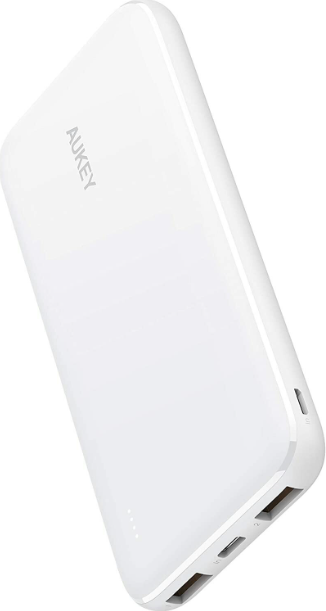
The AUKEY 10000mAh USB-C Power Bank is a sleek, portable charging solution designed for users who need reliable power on the go. Whether you’re a frequent traveler, a busy professional, or a student, this high-capacity portable charger ensures your devices stay charged throughout the day. With advanced USB-C Power Delivery (PD) technology, it delivers rapid charging speeds—compatible with the latest smartphones, tablets, and even some laptops—making it a versatile addition to your tech toolkit.
Key benefits include a compact, lightweight design (typically around 242g), a robust 10000mAh lithium-polymer battery, and multiple output ports for simultaneous device charging. Unique selling points are fast charging support (up to 30W PD on select models), intuitive battery level indicators, and built-in safety features to protect your devices from overcharging, overheating, and short circuits. Some models also offer wireless charging and a foldable stand for hands-free use, enhancing convenience for users with Qi-compatible devices.
This power bank is ideal for commuters, travelers, outdoor enthusiasts, and anyone who relies on their devices throughout the day. It’s especially useful for charging iPhones, Android phones, AirPods, and tablets. The estimated price range is $40–$60, depending on the specific model and features, and it is widely available from major online retailers and the official AUKEY website.e
Specifications
- Model
- PB-Y13
- Technology
- USB-C Power Delivery, Qualcomm# Quick Charge ™ 3.0
- Capacity
- 10000mAh / 37Wh
- Battery Type
- Lithium polymer
- Micro-USB Input
- DC SV 2A|
- USB-C Input (Power Delivery)
- DC 5V 1.5A, 9V 2A|
- USB-C Output (Power Delivery)
- DC 5V 3A, 9V 2A, 12V 1.5A|
- USB Output 1 (Quick Charge 3.0)|
- DC 5V-6V 3A, 6V-9V 2A, 9V-12V 1.5A|
- USB Output 2
- DC SV 2.4A|
- Total Power Output
- 18W
- Dimensions
- 138 x 72 x 15mm / 5.43" x 2.83" x 0.6"'|
- Weight
- 245g / 8.64oz
Getting Started
Charging the Power Bank
Fully charge your power bank before first use.
- Connect the Micro-USB / USB-C charging cable to a USB charger or charging port.rt
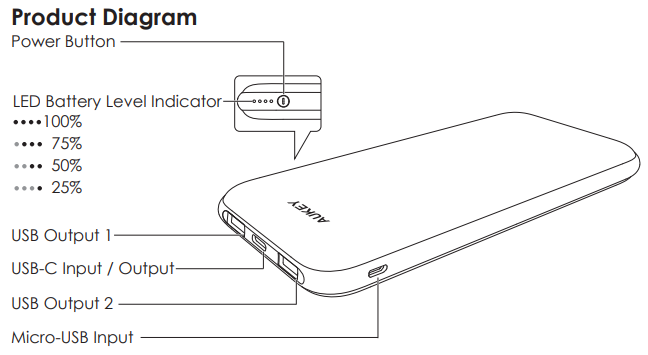
- Connect the other end to the Micro-USB / USB-C input port on the power bank
- Unplug the power bank when fully charged.rged
- Note: Recharge the power bank in 4 hours or less with a USB-C to USB-C cable and an 18W or higher USB-C Wall Charger with Power Delivery.
Charging Your Device
- Connect the charging cable to your device’s charging port
- Connect the other end to a USB output port on PB-Y13
- Unplug your device when fully charged
- To check the remaining battery level, press the power button
Product Care & Use
- Keep away from liquids and extreme heat
- Don’t charge your devices while charging the power bank
- Charge your PB-Y13 at least once every 3 months
- Dispose of the battery according to local environmental law
- The PB-Y13 doesn’t accept simultaneous micro-USB and USB-C power input
Warranty & Customer Support
For questions, support, or warranty claims, contact us at the address below that corresponds with your region. Please include your Amazon order number and product model number.
- Amazon US order: support.us@aukey.com
- Amazon EU order: support.eu@aukey.com
- Amazon CA order: support.ca@aukey.com
Troubleshooting Common Issues
Even the most reliable power banks can encounter issues. Below are common problems, solutions, and preventive measures for your AUKEY 10000mAh USB-C Power Bank.
Device Not Charging
- Check Connections: Ensure cables are securely connected to both the power bank and your device. Try a different cable if issues persist.
- Power Bank Charge Level: Confirm the power bank has sufficient charge by pressing the power button to check the LED indicators.
- Device Compatibility: Verify your device supports the charging protocol (PD, QC) used by the power bank.
Slow Charging
- Use Supported Cables: Always use a high-quality USB-C to USB-C cable for maximum charging speed.
- Avoid Simultaneous Charging: Charging multiple devices at once may reduce output power.
Overheating
- Unplug Devices: If the power bank becomes excessively hot, disconnect all devices and allow it to cool before resuming use.
- Avoid Direct Sunlight: Store and use the power bank in a cool, dry place.
Preventive Measures: Regularly inspect cables and ports for damage, avoid dropping or exposing the power bank to water, and store it at room temperature when not in use.
Warranty & Support: Most AUKEY power banks come with a 2-year limited warranty. For assistance, contact AUKEY customer support via their official website. Always keep your proof of purchase for warranty claims[1][6].
Pros & Cons
Advantages
- Fast Charging: Delivers up to 30W Power Delivery for compatible devices, significantly reducing charging time compared to standard power banks
- Compact & Portable: Slim, lightweight design makes it easy to carry in a bag or pocket—ideal for travel and daily use.
- Multiple Outputs: Charge two devices simultaneously via USB-C and USB-A ports, with some models offering wireless charging and a foldable stand for added convenience
- Safety Features: Built-in protections guard against overcharging, overheating, and short circuits, ensuring safe operation.
- Value for Money: Competitive pricing for the features and build quality offered, making it a strong alternative to pricier brands.
Limitations
- Limited Capacity for Large Devices: While 10000mAh is sufficient for smartphones and tablets, it may not fully recharge larger devices like laptops more than once.
- No Dual USB-C Ports (on Most Models): Some users wish for a second USB-C port for greater flexibility.
- Wireless Charging Speed: Wireless charging is typically slower (5–10W) compared to wired options.
Compared to alternatives, the AUKEY 10000mAh USB-C Power Bank stands out for its balance of speed, portability, and price. While some competitors offer higher capacity or faster wireless charging, AUKEY’s offerings are well-suited for most everyday needs.
Customer Reviews
User feedback for the AUKEY 10000mAh USB-C Power Bank is generally positive, with many praising its compact size, fast charging speeds, and reliable performance. One reviewer called it the “best power bank ever,” highlighting its quick speeds and perfect size, though they noted the lack of a second USB-C port as a minor drawback. Another user appreciated the convenience of both wired and wireless charging, as well as the foldable stand for hands-free use.
Common praises include the intuitive LED battery level display, sturdy build, and value for money. Some users mention a desire for even faster wireless charging or higher capacity, but these are minor critiques in an otherwise well-received product. Star ratings from major retailers typically range from 4 to 5 stars, reflecting strong customer satisfaction. For those seeking a reliable, portable charger with fast USB-C Power Delivery, the AUKEY 10000mAh USB-C Power Bank is a recommended choice..
Frequently mentioned issues include the occasional desire for more ports or faster wireless charging, but these do not detract significantly from the overall positive experience. Purchase recommendations emphasize selecting the model that best fits your charging needs—whether prioritizing speed, wireless capability, or portability.
Faqs
How do I set up the aukey 10000mAh USB-C Power Bank for the first time?
What should I do if my aukey 10000mAh USB-C Power Bank is not charging my device?
Can the aukey 10000mAh USB-C Power Bank charge two devices at the same time?
Is the aukey 10000mAh USB-C Power Bank compatible with iPhone and Android devices?
How long does it take to fully recharge the aukey 10000mAh USB-C Power Bank?
What safety features does the aukey 10000mAh USB-C Power Bank include to protect my devices?
How should I maintain and care for my aukey 10000mAh USB-C Power Bank for optimal performance?
Does the aukey 10000mAh USB-C Power Bank support pass-through charging?
More aukey manuals
- Pairing & Setup: Aukey Wireless Earbuds User Manual
- Charging & Setup: Aukey Power Bank 5000mAh User Manual
- How to Use: Aukey Portable Wireless Speaker User Manual
- How to Use: Aukey LED Desk Lamp LT-ST31 Instruction Guide
- How to Connect: Aukey Eclipse Wireless Speaker User Manual
- How to Use: Aukey 10000mAh Universal Power Bank User Manual
Leave a Comment