
How to Use: Aukey Foldable On-Ear Wireless Headphones User Manual
Content
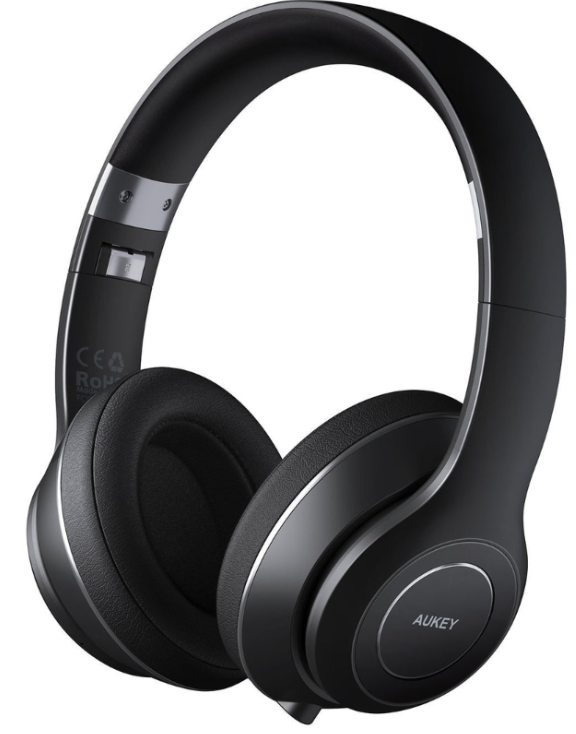
Aukey Foldable On-Ear Wireless Headphones
Introduction
The aukey Foldable On-Ear Wireless Headphones offer a compelling blend of portability, superior sound quality, and user-friendly wireless convenience. Designed for music lovers, remote workers, and commuters, these headphones are perfect for those seeking an immersive audio experience without the hassle of tangled cables. Their foldable design enhances portability, making them easy to carry in backpacks or bags, ideal for travel and daily use. The headphones are equipped with Bluetooth technology, providing seamless connectivity with smartphones, tablets, and laptops.
Key benefits include impressive battery life, rich and dynamic sound with deep bass, and comfortable on-ear cushioning that reduces ambient noise. Their multipoint connection feature allows pairing with two devices simultaneously, streamlining usage across multiple gadgets. Typically priced in the affordable range, around $50 to $70, these headphones offer excellent value for users looking for quality wireless audio without premium pricing. Availability is widespread through online retailers and major electronics stores, catering to a broad audience seeking foldable, wireless on-ear headphones with robust performance.
Package Contents
- Foldable On-Ear Wireless Headphones
- Micro-USB Cable
- 3.5mm Audio Cable
- Carrying Case
- User Manual
- Warranty Card
Specifications of aukey Foldable On-Ear Wireless Headphones
- Model: EP-B52
- Bluetooth Version: Bluetooth 5.0 for stable and fast wireless connectivity
- Driver Size: 40mm dynamic drivers delivering rich, deep audio
- Battery Life: Up to 18 hours playback on a single charge with 420 mAh lithium polymer battery
- Frequency Response: 20 Hz – 20,000 Hz, covering full audible range
- Impedance: 32 ohms for efficient power use and clear sound
- Sound Pressure Level (SPL): Approximately 98 dB ±3 dB for loud, clear audio
- Weight: Lightweight at 151 grams for comfortable extended wear
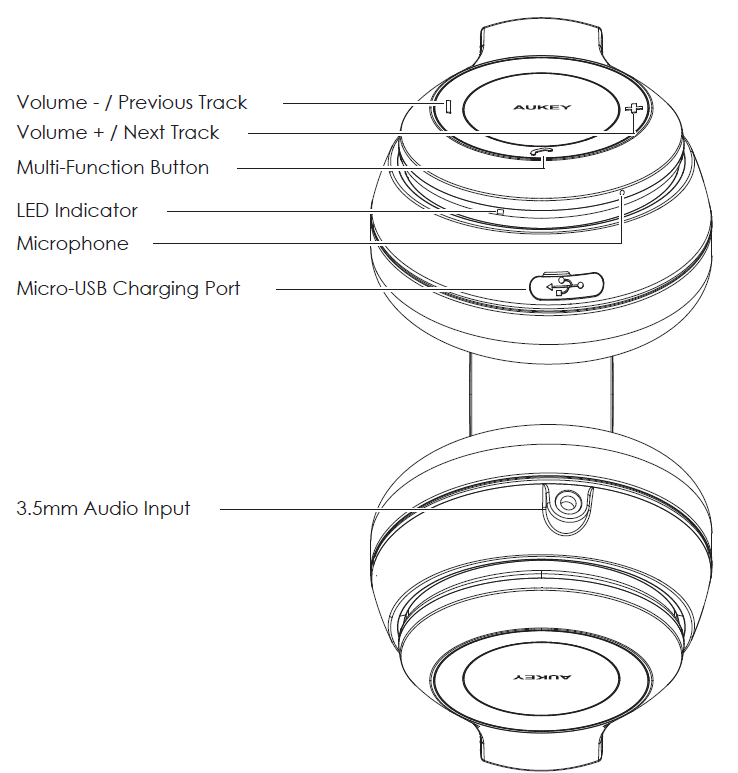
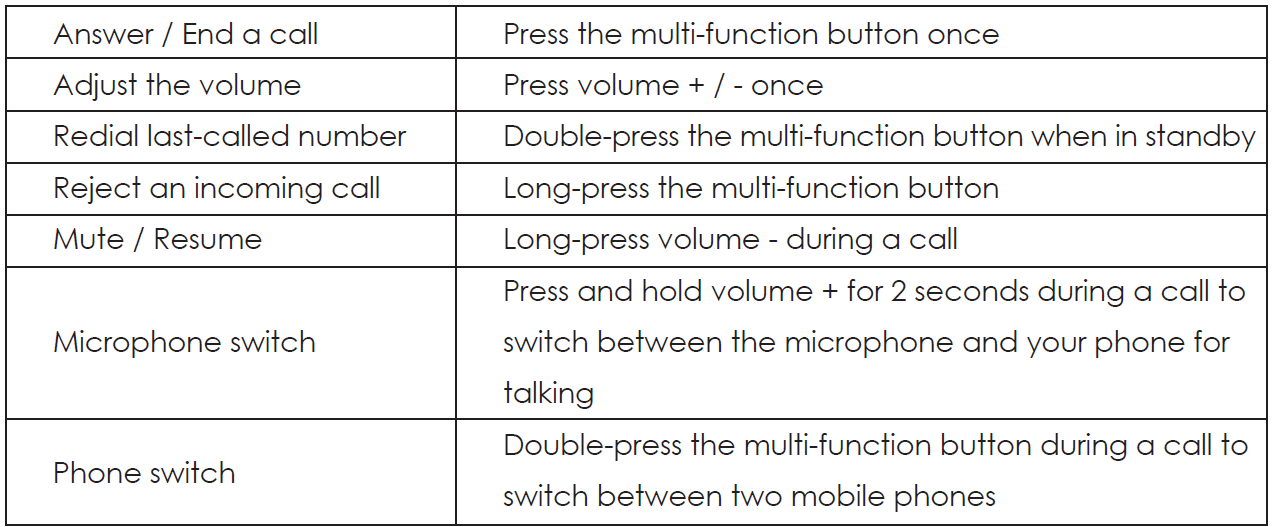
- Controls: On-ear buttons for volume, track control, call handling, and voice assistant access
- Multipoint Connection: Connects with two devices simultaneously for seamless switching
- Foldability: 90-degree rotating ear cups for compact storage and travel convenience
- Dimensions: 173 x 183 x 78mm / 6.81” x 7.2” x 3.08”
- Weight: 286g / 10.09oz
Compared to similar models like the aukey EP-B52 and EP-N12, these headphones prioritize portability with foldability and enhance user experience through multipoint connection, making them versatile for multitasking users.
Product Diagram
Getting Started
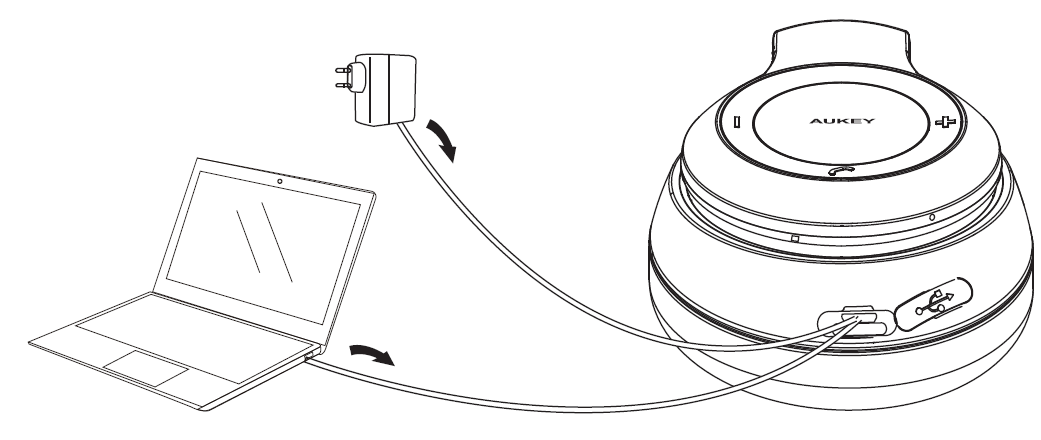
Fully charge your headphones before first use. To charge, simply connect one end of the included micro-USB cable to a USB charging port and the other end to the input port on the headphones. When the red charging indicator light turns off, your headphones are fully charged and ready for use. Charging takes around 3 hours.
Turning On / Off
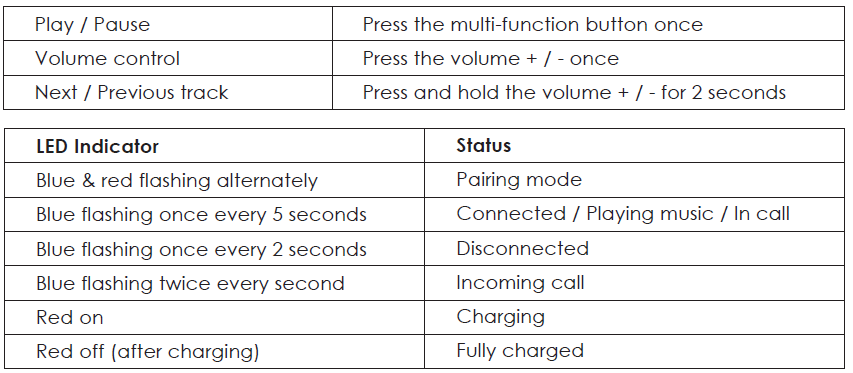
- To power on, press and hold the multi-function button for 1 second, and the LED indicator will flash blue 3 times
- To power off, press and hold the multi-function button for 3 seconds, and the LED indicator will flash red twice
Pairing
Starting with the headphones powered off:
- Press and hold the multi-function button for 1 second or until the LED flashes blue. The headphones will automatically enter pairing mode, with the LED flashing red and blue alternately, after a moment. To avoid automatic connection to a previously paired device, press and hold for 4 seconds to manually enter pairing mode instead
- Turn on the pairing function of the device you want to pair with the headphones
- In the list of available devices, find and select “AUKEY EP-B52”. When connected, the LED indicator will flash blue once every 5 seconds
- If a code or PIN is required for pairing, please enter “0000”
Simultaneous Connection with Two Devices
- Follow the instructions in the “Pairing” section to pair the headphones with Device A
- Once paired, disable wireless function on Device A
- Repeat steps 2 and 3 from the “Pairing” section to pair with Device B
- Once paired with Device B, reactivate wireless function on Device A and select “AUKEY EP-B52” in the list of paired devices
- You can now make and receive calls from either of the two paired devices
Notes
- To pair with a new phone when switching on the headphones, press and hold the multi-function button for 4 seconds or until the LED flashes red and blue alternately (if headphones are already on, just disconnect the currently connected device). Then repeat steps 2 and 3 from the “Pairing” section
- The headphones will automatically exit pairing mode after 5 minutes if no devices are paired. Then the LED indicator will flash blue once every 2 seconds and the headphones will automatically shut down after 5 minutes
- If your paired device is turned off or disconnected, the headphones will automatically enter pairing mode (with the LED indicator flashing red and blue alternately)
- If the headphones exceed the wireless operating range of 33ft, they will disconnect from your device and flash blue once every 2 seconds. The connection to the last successfully connected device will be re-established once you re-enter wireless range within 5 minutes. To connect to other devices, please repeat the previous “Pairing” steps
Playing Audio via Audio Input Connection
Connect the EP-B52 to your PC, laptop, or other device with audio output port using the included 3.5mm audio cable (with the microphone unit nearest the headphones). The volume +/- and the multi-function button on the headphones are disabled in this wired mode. Use the button on the cable microphone unit to play/pause or skip to the next track (and manage calls if connected to a phone). For other playback controls, use your device. Cable button doesn’t operate on PCs and laptops.
Controls & LED Indicators
Making Calls
Streaming Audio
Once paired, you can wirelessly stream audio from your device to the headphones. Music will automatically pause when you receive an incoming phone call, and resume once the call is ended.
Product Care & Use
- Keep away from liquids and extreme heat
- Do not use headphones at high volume for extended periods, as this may cause permanent hearing damage or loss
Troubleshooting aukey Foldable On-Ear Wireless Headphones
- Issue: Headphones not pairing with Bluetooth devices
Solution: Ensure headphones are in pairing mode by pressing and holding the power button until the LED flashes blue/red. Restart the device’s Bluetooth and try pairing again. - Issue: Audio cutting out or low sound quality
Solution: Keep devices within 10 meters and remove obstacles. Charge headphones fully and reset if needed by powering off and on. - Issue: Buttons unresponsive or multi-function confusion
Solution: Refer to the user manual to learn button holds for volume and track controls. Avoid rapid button presses and keep firmware updated if applicable. - Issue: Microphone problems during calls
Solution: Check device permissions for microphone access. Use headphones wirelessly rather than wired to maintain mic functionality.
Preventive measures include regular charging, avoiding moisture exposure, and storing the headphones folded in the protective case when not in use. aukey provides a limited warranty (usually 1-2 years) covering manufacturing defects. For support, contact aukey customer service via their official website or authorized retailer channels.
Warranty & Customer Support
For questions, support, or warranty claims, contact us at the address below that corresponds with your region. Please include your Amazon order number and product model number.
- Amazon US orders: support.us@aukey.com
- Amazon EU orders: support.eu@aukey.com
- Amazon CA orders: support.ca@aukey.com
- Amazon JP orders: support.jp@aukey.com
Pros & Cons of aukey Foldable On-Ear Wireless Headphones
- Pros:
- Compact foldable design perfect for travel and storage
- Strong 18-hour battery life suitable for all-day use
- Multipoint Bluetooth connection for seamless device switching
- Clear, bass-rich sound quality with 40mm drivers
- Comfortable on-ear fit with soft padding and noise isolation
- Affordable price point offering excellent value for money
- Cons:
- Higher frequencies may be less crisp compared to premium models
- Plastic build may feel less premium to some users
- Button controls require memorization due to multiple functions per button
- Microphone performance acceptable but not ideal in very noisy environments
Customer Reviews of aukey Foldable On-Ear Wireless Headphones
Users praise the aukey Foldable On-Ear Wireless Headphones for their impressive battery life and comfortable fit, often highlighting the convenience of the foldable design for travel. Many appreciate the clear, dynamic bass and ease of connecting to multiple devices. Typical star ratings average around 4 out of 5, reflecting strong satisfaction with performance relative to price.
Common complaints include occasional difficulty mastering the multifunction button controls and slightly diminished sound clarity in very high frequencies. Some users note the plastic construction feels less premium but acknowledge the balance between affordability and quality. Most reviewers recommend these headphones for daily use, commuting, and casual listening, emphasizing excellent value for money in the wireless on-ear headphone segment.
Faqs
How do I set up the aukey Foldable On-Ear Wireless Headphones for the first time?
What should I do if my aukey Foldable On-Ear Wireless Headphones won't connect to Bluetooth?
Can I use aukey Foldable On-Ear Wireless Headphones with both Android and iOS devices?
How do I optimize the audio performance of aukey Foldable On-Ear Wireless Headphones?
What features make aukey Foldable On-Ear Wireless Headphones stand out from other wireless headphones?
How do I troubleshoot audio problems like low volume or static with aukey Foldable On-Ear Wireless Headphones?
How do I properly clean and maintain my aukey Foldable On-Ear Wireless Headphones for longevity?
Are there any specific device requirements or limitations for using aukey Foldable On-Ear Wireless Headphones?
More aukey manuals
- How to Connect: Aukey AudioLink Wireless Speaker SK-A6 User Manual
- How to Connect: Aukey Eclipse Wireless Speaker User Manual
- How to: Aukey SoundTank Wireless Speaker User Manual
- How to Use: Aukey Portable Wireless Speaker User Manual
- Setup & Usage: Aukey 2-in-1 Wireless Transmitter & Receiver User Manual
- Pairing & Setup: Aukey Wireless Earbuds User Manual
Leave a Comment