
Setup: Aukey Mohawk Quadcopter User Manual
Content
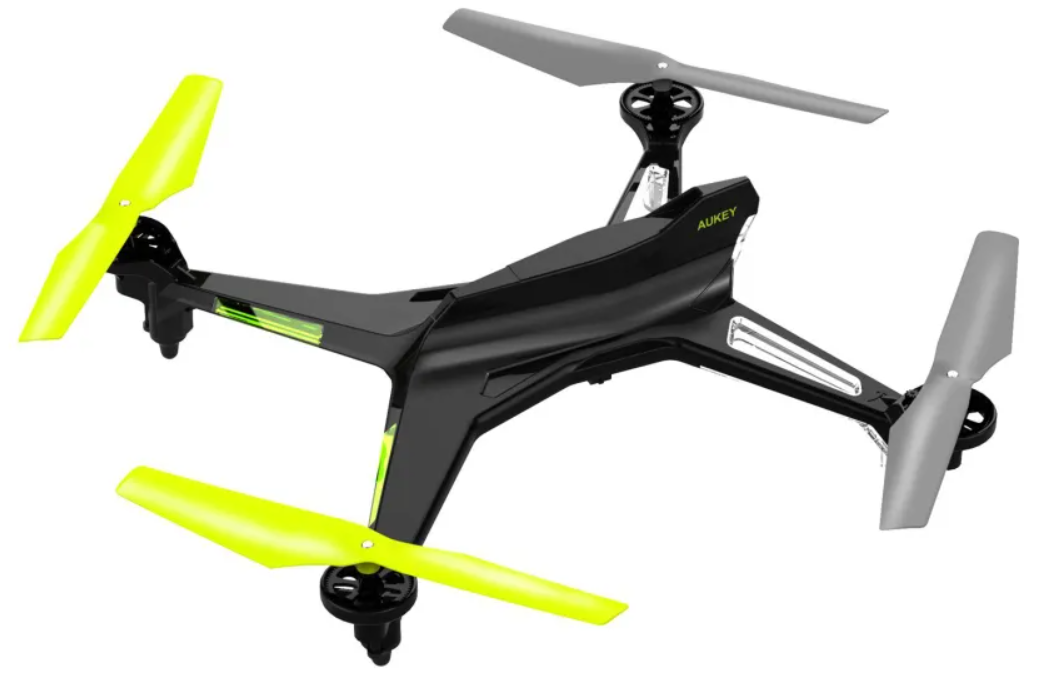
Aukey Mohawk Quadcopter
IntroAukeyon
The Aukey Mohawk Quadcopter is a versatile, budget-friendly drone designed for both beginners and hobbyists looking for an accessible yet feature-rich flying experience. This mid-sized quadcopter stands out with its intuitive controls, stable flight thanks to 6-axis gyroscope technology, and multiple one-touch commands such as return, flip, and headless mode, making it exceptionally easy to operate even for first-time pilots. Offering up to 10 minutes of flight time per charge and a remote control range of approximately 390 feet, it balances performance with convenience for casual outdoor and indoor use.
Ideal for drone enthusiasts exploring aerial photography, recreational flying, or educational purposes, the Aukey Mohawk Quadcopter is well-suited for users wanting a reliable entry-level drone without the steep learning curve or high price tag. Currently, it is available in the price range of around $35 to $4a a 0, often on discount compared to its original price near $65, making it an attractive option in the consumer drone market. Availability is primarily through online retailers and major e-commerce platforms, often bundled with essential accessories to help users get started right away.
Package Contents
- AUKEY UA-P02 Mohawk Quadcopter
- Charging Cable
- Four Extra Blades
- Handheld Remote Control
- Screwdriver
- Li-Po Battery (780 mAh)
- User Manual
SpecificatAukey of the aukey Mohawk Quadcopter
- Flight Time: Up to 10 minutes per full charge
- Control Range: Approximately 390 feet (120 meters)
- Remote Controller: 4-Channel 2.4 GHz for responsive maneuvering
- Stability System: 6-axis gyroscope for smooth and stable flight
- Flight Modes: Headless mode, one-key return, and flip functionality
- Weight: Around 1.95 pounds (0.88 kg)
- Accessories Included: Rechargeable 780mAh lithium battery, extra rotor blades, charging cable, screwdriver, user manual, and warranty card
- Build: Durable plastic frame designed for resilience during crashes
Compared to other entry-level the Aukey Mohawk provides competitive flight time and control range. Its 6-axis gyro offers superior stability over basic 4-axis models, and the inclusion of automated flight functions makes it more user-friendly for novices.
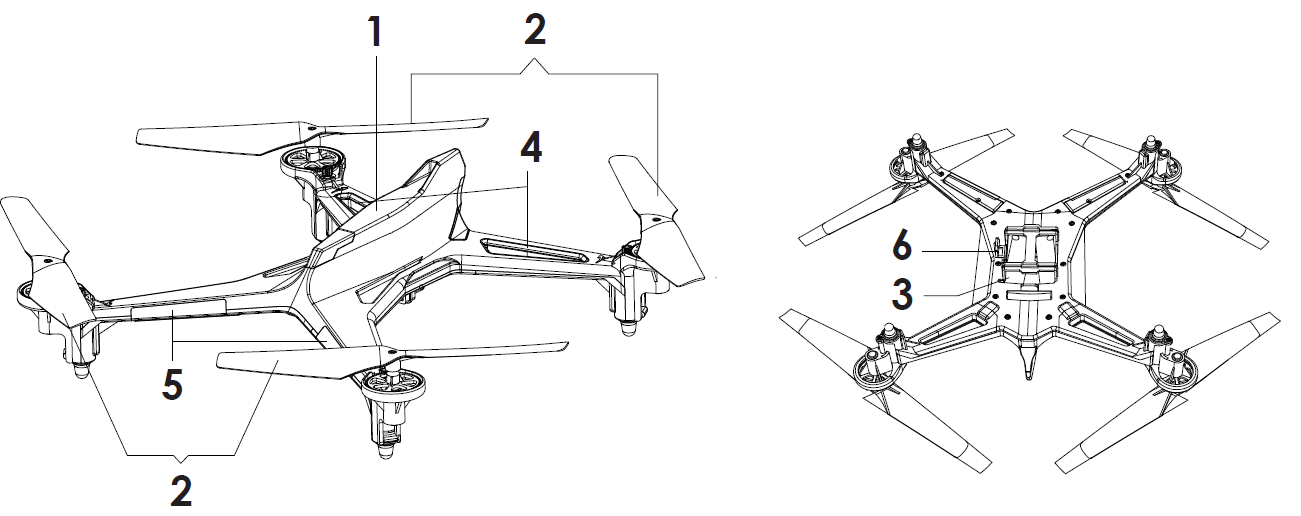
Product Diagram
- AUKEY UA-P02 Mohawk Quadcopter
- Rotor Blades
- Battery Jar
- Indication Light (Red)
- Indication Light (Orange)
- Video Port
Transmitter
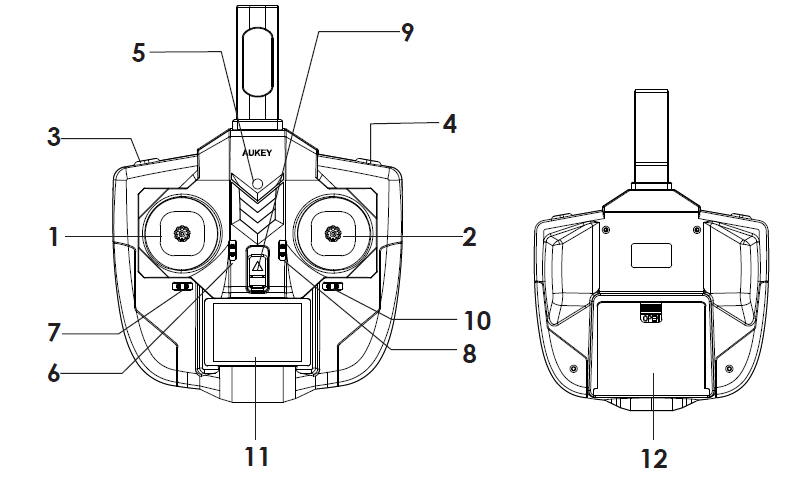
- Rocking Bar: Throttle / 360-degree rotational yaw / low-to-fast mode selection
- Rocking Bar: Forward / Backward (elevator); Left / Right (aileron); 3D flips and rolls
- One Touch Return / Headless Mode (CF Mode)
- Photograph & Video Function
- Power Indicator
- Throttle Trim
- Rudder Trim
- Front / Back Trim
- Power Switch
- ileron Trim
- LCD Display
- Battery Cover
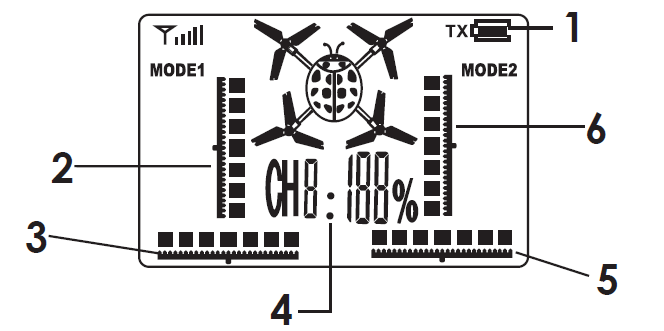
LCD Indicators
- Transmitter battery level
- Throttle Trim
- Left / Right Trim
- Channel and Rudder
- Left side / Right side Trim
- Front / Back Trim
Charging
To charge, make sure the power switch is in the “off” position, take out the battery from the UA-P02, and then plug the supplied power cable into the charging port and connect the cable to a USB power source. The USB plug will go out to indicate that the battery is charging. Once the red light turns on, the battery is fully charged.
Notice: Please use the included charger only. The input voltage of the Li-Po battery cannot exceed 3V. Recharge promptly when the battery is used up.
Flying Environment
- Before undertaking indoor flights, ensure that there’s plenty of open space. Make sure there are no obstacles, animals, or other people nearby.
- Please make sure the surrounding area is clear when operating the drone. Always keep the drone in your line of sight. Adult supervision is recommended for users under 18 years old.
Note before Use
- Please note that flying your quadcopter out of the recommended range (approximately 25 meters) may result in loss of control or cause the quadcopter to crash.
- Do not fly in strong winds as the quadcopter may fly out of range. Flight duration may be affected by the wind and battery voltage rate. If the flight time cannot exceed 1 minute, please recharge the battery.
- Not a toy. Despite being small in size, extreme caution should be exercised during use. Please follow the instructions and notices in this manual to prevent damage and injury. Any modification to this product, negligence, or misuse may lead to accidents.
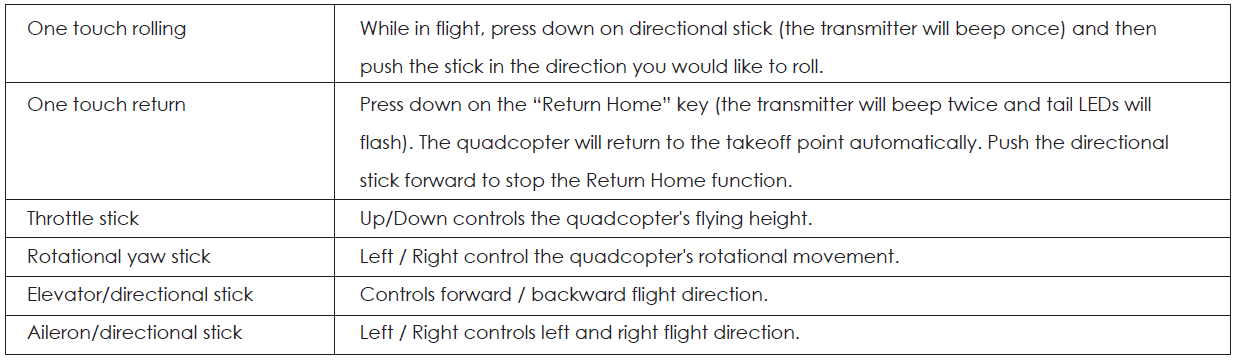
Operation and Control
Attention:
Avoid sharp movement of the controller sticks and maintain smooth movement of the controls. During the flight, the quadcopter's battery may lose some power. Therefore, adjust the throttle stick accordingly to maintain the quadcopter's height.
Binding of Radio Transmitter and Receiver
- Plug into and connect the Li-Po battery, and then put it on a flat level surface. The quadcopter’s indicator lights will start flashing.
- Turn the transmitter on ,,and it will beep once; move the throttle stick fully up , and then move the throttle stick down , and the transmitter will beep once. At this point , , it is successfully paired.
Headless Mode (CF Mode)
To fly the quadcopter in CF Mode, please press the “Headless Mode” key for 2 seconds. The transmitter will keep beeping,, indicating CF Mode. Then press the “Headless Mode” key for 2 seconds again,, and the quadcopter will exit CF Mode.
Notice:
- For safety reasons, please do not steer the quadcopter towards the pilot.
- You cannot do roll actions under Headless Mode.
- When flying during CF Mode, please make sure the quadcopter is positioned ahead of you correctly with the red LED lights in the front before binding.
Safety Guide for Li-Po Battery
- Do not leave the charger and battery unattended while in use.
- Only use the USB charging cable included with the package while charging the battery.
- Do not decompose or disassemble the battery.
- Do not keep or use the battery in high-temperature areas, near heat sources, or flammable products.
- Do not cover the battery or the charger. Ensure that the battery is charged in a well-ventilated and fire-resistant location.
- If the battery begins to smell or “puff” during charge, please unplug the battery from the charger and move the battery to a safe outdoor place to avoid combustion or explosion (then diappropriately dispose of the batterybattery..y
- Do not throw batteries into a fire or allow them to be heated.
- Do not connect metal objects to the plus and minus ends of the battery.
- Do not reverse the plus and minus polarities of the battery.
- Although highly unlikely, if by any accident battery fluid gets into your eyes,, do not rub your eyes and instead rinse your eyes with clean water.
- Store the battery in a cool and dry environment. Inappropriate charging of a lithium battery may cause fire, injury, or loss of property. Please, carefully read the safety guidance and instructions for charging before using this product.
- Keep the battery away from small children and pets. Adult supervision is recommended for users below 14 years old.
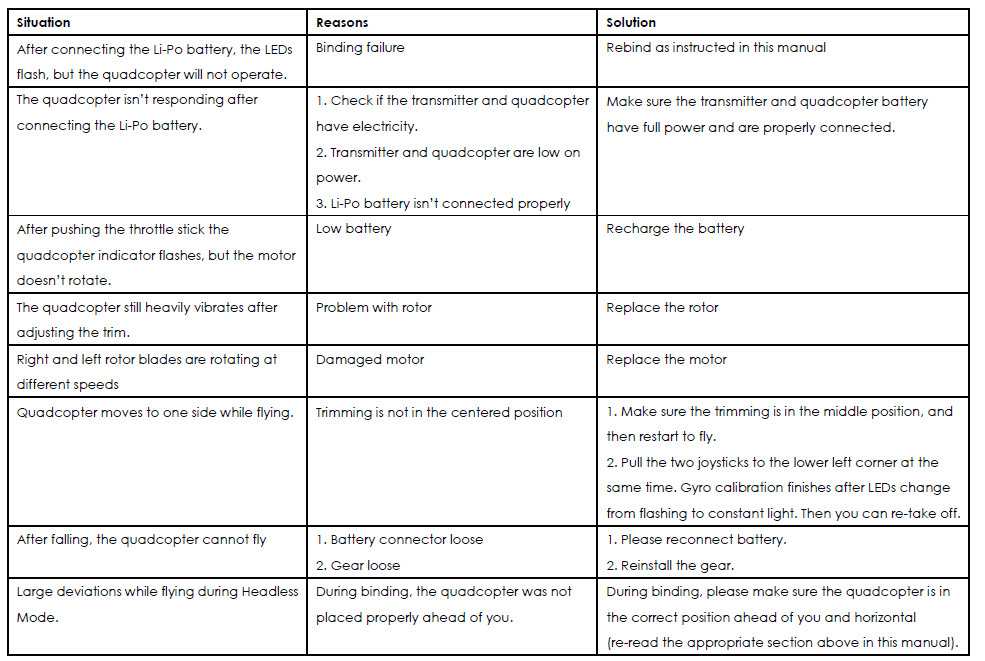
Troubleshooting
Warranty & Customer Support
For questions, assistance, support, or warranty claims, please contact us at the address below that corresponds with your region.
Please include your Amazon order number and product model number.
- Amazon US orders: support@aukey.com
- Amazon UK orders: support.uk@aukey.com
- Amazon CA orders: support.ca@aukey.com
Pros & Cons of the Aukey Mohawk Quadcopter
Pros
- Ease of use: One-key return, headless mode, and flip functions facilitate beginner-friendly operation.
- Stable flight: 6-axis gyroscope ensures balanced and smooth flying performance.
- Affordable pricing: Competitive cost around $35–$40 offers good value for entry-level pilots.
- Good flight time: Approximately 10 minutes per charge, suitable for short recreational sessions.
- Comprehensive package: Comes with extra blades , tools, and a battery, reducing the need for immediate accessory purchases.
Cons
- Limited camera features: No integrated camera, which limits aerial photography without modifications.
- Range: The 390-foot: 390 feet range may not satisfy advanced users seeking extended flight distance.
- Battery life: Flight time could be short for longer sessions, requiring spare batteries for extended use.
- Build quality: Plastic construction is durable but less robust compared to premium drones.
When compared with alternatives like entry-level DJI Aukeys, the Aukey Mohawk provides a budget-conscious option with fundamental drone features but lacks advanced photography and flight enhancements.
Customer Review of the Aukey Mohawk Quadcopter
Users generally appreciate the Aukey Mohawk Quadcopter for its ease of use and stable flight characteristics. Many beginners report a positive learning experience due to the intuitive controls and reliable stability, giving it an average rating of around 3.8 to 3.9 stars out of 5. Common praises mention the one-key return and headless modes as particularly helpful for novice pilots.
Frequent complaints include the short ,, battery life limiting fl,, flight duration, and the absence of an onboard camera, which some users expected at this price point. A few reviews note that the drone’s plastic frame, while fairly durable, can be prone to damage in harder crashes. Despite these issues, most purchasers recommend the Aukey Mohawk for its price, especially as a beginner’s drone or a fun hobbyist model.
Overall, customers find it a solid budget-friendly option that balances performance and value, with accessory kits that enhance immediate usability. It is frequently recommended for new pilots looking to gain confidence before upgrading to more advanced drones.
Faqs
How do I set up the aukey Mohawk Quadcopter for the first flight?
What should I do if the aukey Mohawk Quadcopter’s one-touch return function is not working?
Can I attach a camera to the aukey Mohawk Quadcopter, and how do I use the video function?
What are the main features that make the aukey Mohawk Quadcopter suitable for beginners?
How long is the flight time and what is the effective remote control range for the aukey Mohawk Quadcopter?
How can I maintain and care for my aukey Mohawk Quadcopter to ensure longevity?
Is the aukey Mohawk Quadcopter compatible with smartphones or tablets for control?
What troubleshooting steps should I take if the aukey Mohawk Quadcopter is unstable or difficult to control?
Tags
More aukey manuals
Leave a Comment