
Aukey Dashboard Camera DR01 User Manual
Content
AUKEY Dashboard Camera DR01 Product Manual and Buyer Guide
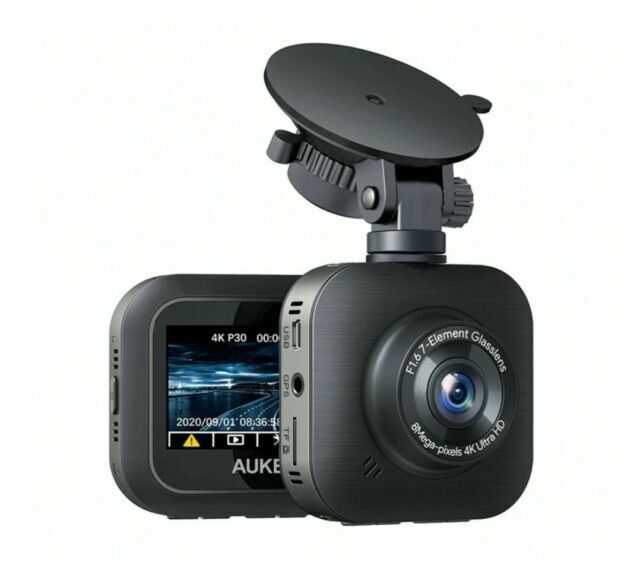
Introduction
The aukey Dashboard Camera DR01 is a budget-friendly dash cam built for drivers who want dependable Full HD recording without paying premium prices. It is designed to capture road events clearly, support insurance claims, and provide peace of mind during daily commuting, long-distance travel, rideshare driving, and parking-related incidents. With a 170-degree wide-angle lens, 1080p recording, loop recording, motion detection, emergency file protection, and an easy-to-read LCD screen, the DR01 focuses on practical everyday use rather than flashy extras. The included dual-port car charger and mini USB power setup make installation straightforward, while support for Class 10 microSD cards up to 128GB gives it flexible storage options for continuous recording. The optional external GPS antenna can add location and speed data to footage, which is useful for evidence in disputes. The aukey Dashboard Camera DR01 is especially appealing for drivers who want simple operation, compact size, and solid video quality at an affordable price point. Estimated pricing typically falls in the budget range, roughly between $50 and $90 depending on condition, seller, and region, with availability most commonly seen through online marketplaces and remaining stock from third-party retailers. For buyers seeking a reliable entry-level dashboard camera, the DR01 remains a strong value proposition.
Troubleshooting Common AUKEY DR01 Problems
If the camera will not power on, confirm that the car charger is firmly connected to the 12V socket and that the mini USB cable is inserted correctly. If recording does not start, check whether the microSD card has been formatted, is Class 10, and is within the supported 128GB limit. File errors, freezes, or missing clips often point to an incompatible or failing memory card, so reformat the card in the camera and replace it if problems continue. If the screen shows unusual behavior, perform a reset and reload the settings. While specific error codes are not commonly documented for this model, storage or card-read errors are usually fixed by formatting, updating setup options, or swapping the card. Preventive care is simple: format the card regularly, keep the lens clean, avoid extreme heat when the vehicle is parked, and use the correct power adapter. Warranty coverage may vary by seller, but the product has been marketed with an 18-month worry-free warranty in some regions. For support, contact the retailer, the manufacturer’s official support channels, or the seller listing where the unit was purchased. Keep your order number, serial details, and a short description of the issue ready when requesting help.
Pros and Cons of the AUKEY Dashboard Camera DR01
Pros
- Affordable Full HD dash cam with strong value for money for everyday drivers.
- 170-degree wide-angle coverage helps capture more lanes and roadside activity.
- Simple setup with loop recording, motion detection, and emergency recording.
- Compact design fits discreetly behind the rearview mirror in most vehicles.
- Class 10 microSD support up to 128GB provides practical storage for long trips.
- Optional GPS antenna adds useful location and speed data for incident review.
Cons
- No built-in battery, so it depends entirely on vehicle power.
- No internal storage, meaning a microSD card is required before use.
- 1080p recording is solid, but newer alternatives may offer sharper 2K or 4K footage.
- Night performance is acceptable, but not class-leading in low-light conditions.
- Some alternatives offer advanced driver-assistance alerts and Wi-Fi connectivity.
Overall, the aukey Dashboard Camera DR01 is a smart choice for budget-conscious buyers who want dependable daily recording rather than premium smart features. It competes well against other entry-level dash cams by offering easy operation, a wide field of view, and reliable basic protection.
Customer Reviews and Real-World Feedback
Customer feedback for the DR01 is generally positive, with many users giving it around 4 out of 5 stars for value, ease of use, and compact design. Drivers often praise the clear daytime footage, the wide-angle lens, and the straightforward installation process. One common testimonial theme is that it “does exactly what a dash cam should do” without unnecessary complexity. Frequent complaints usually focus on the lack of an included memory card, limited low-light performance compared with newer models, and the absence of a built-in battery. Buyers who want a dependable, low-cost recorder for commuting or insurance protection tend to recommend it, while users seeking advanced features may prefer newer competitors. For shoppers searching for an affordable dash cam under $100, the aukey Dashboard Camera DR01 remains a practical recommendation, especially if simple recording and strong everyday reliability matter most.
Faqs
How do I set up aukey Dashboard Camera DR01 for the first time?
What microSD card works best with aukey Dashboard Camera DR01?
Why does aukey Dashboard Camera DR01 keep overwriting old footage?
How do I fix aukey Dashboard Camera DR01 not turning on in my car?
Why is aukey Dashboard Camera DR01 recording shaky or blurry video?
How does the G-sensor emergency recording on aukey Dashboard Camera DR01 work?
Can aukey Dashboard Camera DR01 record while the car is parked?
How should I maintain aukey Dashboard Camera DR01 for long-term reliability?
Tags
More aukey manuals
Leave a Comment