
Setup: Beurer Blood Pressure Monitor BC-54 User Manual
Content
Introduction — beurer Blood Pressure Monitor BC-54 Overview
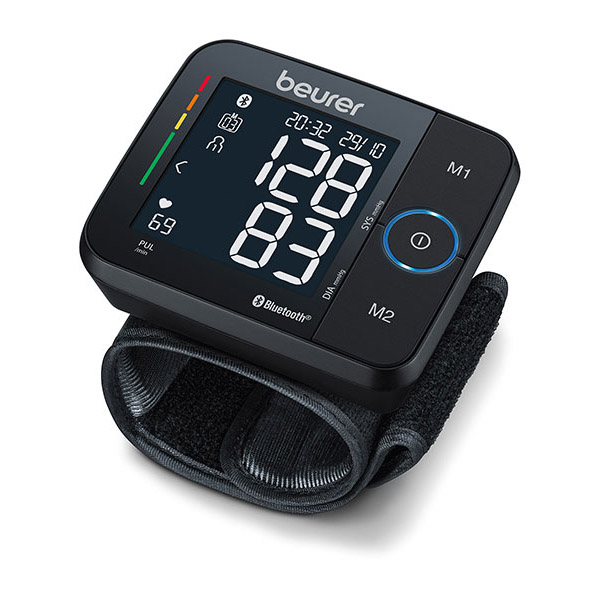
beurer Blood Pressure Monitor BC-54 is a compact, wrist-based digital blood pressure monitor designed for home self-measurement with Bluetooth data transfer to Beurer’s HealthManager Pro app. The BC-54 uses inflation measurement technology (measurement during inflation) to reduce measurement time and increase comfort while offering features such as arrhythmia detection, a coloured risk indicator and two-user memory storage for convenient everyday tracking of blood pressure and pulse rates.
Key benefits and unique selling points include rapid inflation-based measurement for faster readings, Bluetooth syncing for long-term tracking in the Beurer app, a clear risk indicator (colour scale) to quickly classify results, and arrhythmia detection to flag irregular heartbeats. The device is lightweight, comes with a storage case and a printed record sheet for manual logging, and supports wrist circumferences approximately 13.5–21.5 cm, making it suitable for many adult users.
The BC-54’s target audience is adults who need regular home blood pressure monitoring (hypertension management, preventive cardiovascular care, or health tracking), especially users who prefer a portable wrist device and smartphone integration for charting and sharing results with clinicians. Typical use cases include daily morning/evening checks, travel-friendly monitoring, and patient self-monitoring between clinic visits.
Estimated price range varies by retailer and region but typically sits in the mid-range for consumer wrist BP monitors (roughly USD/GBP/EUR ~€50–€120 depending on sales, retailer and included warranty). Availability is widespread in Europe through Beurer’s online store and major retailers; stock may vary by country and some marketplaces list it as discontinued or unavailable in new condition from time to time.
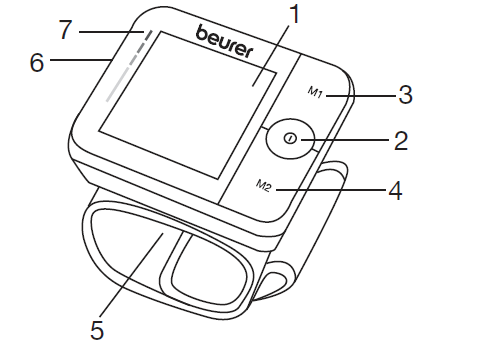
Parts
- Display
- START/STOP button
- Memory button M1
- Memory button M2
- Wrist cuff
- Battery compartment Lid
- Risk indicator
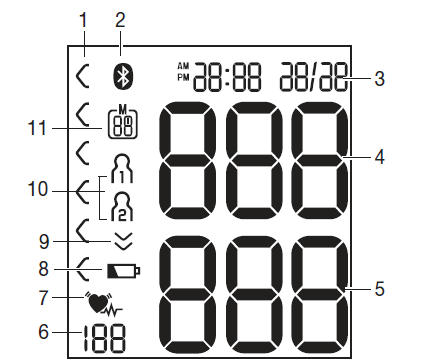
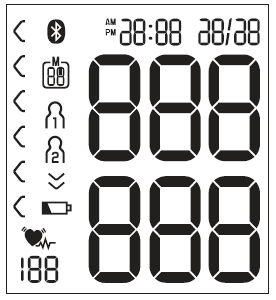
Information on the display
- Risk indicator
- Symbol for Bluetooth® transfer
- Time and date
- Systolic pressure
- Diastolic pressure
- Calculated pulse value
- Cardiac arrhythmia symbol / Pulse symbol
- Battery status indicator
- Release air
- User memory
- Memory space number / Memory display: Average value (A), Morning (AM), Evening (PM)
Specifications — Technical details and capabilities
- Measurement method: Oscillometric wrist measurement; measurement during inflation for increased comfort and faster readings.
- Functions: Systolic & diastolic blood pressure, pulse rate, arrhythmia detection, risk indicator with coloured classification, incorrect usage message.
- Memory & users: 2 user profiles, up to 60 measurements per user (120 total memory slots).
- Connectivity: Bluetooth to transfer data to the Beurer HealthManager Pro app for long-term tracking and export.
- Cuff/fit: Wrist cuff suitable for 13.5–21.5 cm wrist circumference.
- Power: 2 × 1.5 V AAA batteries; low-battery indicator; automatic switch-off.
- Display & design: Clear black display, compact lightweight housing, includes storage case and printed log sheet.
- Certifications & warranty: Marketed as a medical device; manufacturer warranty varies by retailer (often up to 3–5 years in certain markets).
- Dimensions & weight: Compact wrist form factor (manufacturer lists small footprint and ~0.1 kg package weight).
Proper use
Intended use
The blood pressure monitor is intended for the fully auto-matic, non-invasive measurement of arterial blood pres-sure and pulse values on the wrist.
Target group
It is designed for self-measurement by adults in the home environment and is suitable for users whose wrist circumference is within the range printed on the cuff.
Indication/clinical benefits
The user can record their blood pressure and pulse values quickly and easily using the device. The recorded values are classified according to internationally appli-cable guidelines and evaluated graphically. Furthermore, the device can detect any irregular heartbeats that occur during measurement and inform the user via a symbol in the display. The device saves the recorded measurements and can also output average values of previous measurements. Performance notes and benchmarks: inflation technology speeds measurement and may improve comfort but wrist monitors are generally more sensitive to positioning and movement compared with upper-arm devices; clinical validation references are limited in public registries for this specific model, so users who require the highest validated accuracy often consider upper-arm alternatives (e.g., Beurer upper-arm models or clinically validated Omron arm monitors) as comparison points.
Contraindications
- Do not use the blood pressure monitor on newborns, children or pets.
- People with restricted physical, sensory or mental skills should be supervised by a person responsible for their safety and receive instructions from this person on how to use the device.
- If you have any of the following conditions, you must consult your doctor before using the device: cardiac arrhythmia, circulatory problems, diabetes, pregnancy, pre-eclampsia, hypotension, chills or shaking.
- People with pacemakers or other electrical implants should consult their doctor before using the device.
- The blood pressure monitor must not be used in connection with a high-frequency surgical unit.
- Do not use the cuff on people who have undergone a mastectomy.
- Do not place the cuff over wounds, as this may cause further injury.
General warnings
- The measurements taken by you are for your information only – they are no substitute for a medical examination! Discuss the measured values with your doctor and never make your own medical decisions based on them (e.g. regarding dosages of medicines).
- The device is only intended for the purpose described in these instructions for use. The manufacturer is not liable for damage resulting from improper or incorrect use.
- Using the blood pressure monitor outside your home environment or whilst on the move (e.g. whilst travelling in a car, ambulance or helicopter, or whilst undertaking physical activity such as playing sport) can influence the measurement accuracy and cause incorrect measurements.
- Cardiovascular diseases may lead to incorrect measurements or have a detrimental effect on measurement accuracy.
General precautions
- The blood pressure monitor is made from precision and electronic components. The accuracy of the measurements and service life of the device depend on its careful handling.
- Protect the device from impacts, moisture, dirt, marked temperature fluctuations and direct sunlight.
- Ensure the device is at room temperature before measuring. If the measuring device has been stored close to the maximum or minimum storage and transport temperatures and is placed in an environment with a temperature of 20°C, it is recommended that you wait approximately 2 hours before using the measuring device.
- Do not drop the device.
- Do not use the device in the vicinity of strong electromagnetic fields and keep it away from radio systems or mobile telephones.
- We recommend that the batteries be removed if the device will not be used for a prolonged period of time.
Measures for handling batteries
- If your skin or eyes come into contact with battery fluid, rinse the affected areas with water and seek medical assistance.
- Choking hazard: Small children may swallow and choke on batteries. Therefore, store batteries out of the reach of small children.
- Risk of explosion: Do not throw batteries into a fire.
- If a battery has leaked, put on protective gloves and clean the battery compartment with a dry cloth.
Notes on electromagnetic compatibility
- The device is suitable for use in all environments listed in these instructions for use, including domestic environments.
- The use of the device may be limited in the presence of electromagnetic disturbances. This could result in issues such as error messages or the failure of the display/device.
- Avoid using this device directly next to other devices or stacked on top of other devices, as this could lead to faulty operation. If, however, it is necessary to use the device in the manner stated, this device as well as the other devices must be monitored to ensure they are working properly.
- The use of accessories other than those specified or provided by the manufacturer of this device can lead to an increase in electromagnetic emissions or a decrease in the device’s electromagnetic immunity; this can result in faulty operation.
- Failure to comply with the above can impair the performance of the device.
Initial use
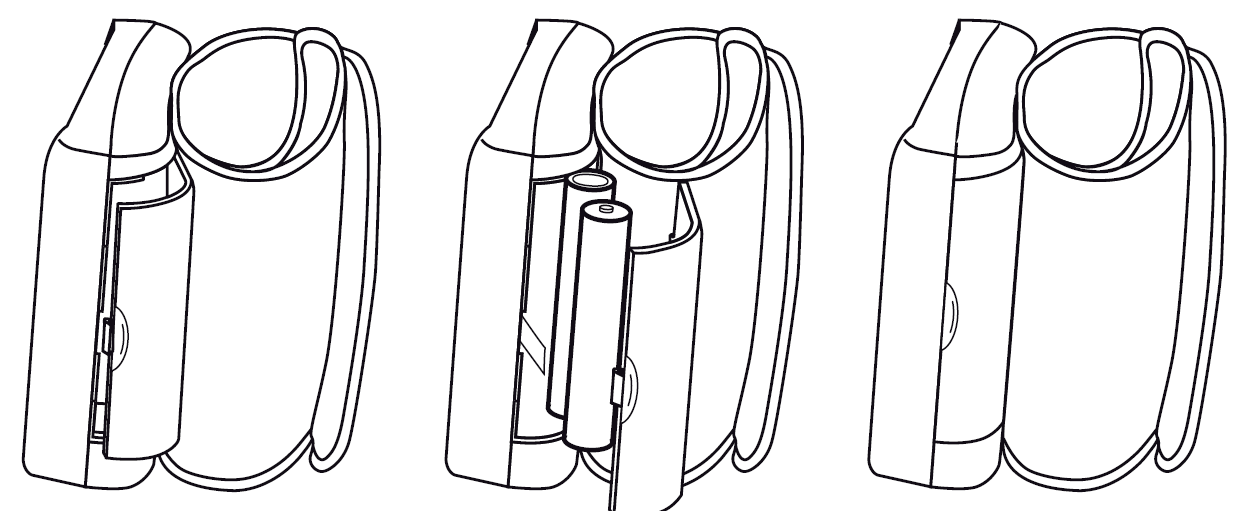
Inserting the batteries
- Remove the battery compartment lid on the left side of the device.
- Insert two 1.5 V AAA micro (alkaline type LR03) batteries. Make sure that the batteries are inserted the correct way round. Do not use rechargeable batteries.
- Close the battery compartment lid again carefully.
- Now set the date and time as described below.
If the battery change symbol is flashing and appears, no further measurements are possible and you must replace all batteries. Once the batteries have been removed from the device, the date and time must be set again. Any saved measured values are retained.
Making settings
You must make sure that the device has the correct set-tings before use in order to be able to make full use of all functions. Only by doing so can your measurements with associated date and time be saved and accessed later by you.
There are two different ways to access the menu from which you can adjust the settings:
- Before initial use and after each time you replace the battery: When inserting batteries into the device, you will be taken to the relevant menu automatically.
- If the batteries have already been inserted: Press and hold the START/STOP button on the device when switched off for approximately 5 seconds.
In this menu you can adjust the following settings in succession:

Hour format
The hour format now flashes on the display.
- Select the desired hour format using the memory button M1 or M2 and confirm with the START/STOP button.
Date
The year flashes on the display.
- Select the desired year using the memory button M1 or M2 and confirm with the START/STOP button.
The month flashes on the display.
- Select the desired month using the memory button M1 or M2 and confirm with the START/STOP button.
The day flashes on the display.
- Select the desired day using the memory button M1 or M2 and confirm with the START/STOP button.
- If the hour format is set to 12-hour format, the day/month display sequence is reversed.
Time
The hours flash on the display.
- Select the desired hour using the memory button M1 or M2 and confirm with the START/STOP button.
The minutes flash on the display.
- Select the desired minute using the memory button M1 or M2 and confirm with the START/STOP button
Bluetooth®:
The Bluetooth® symbol is shown on the display.
- Use the memory button M1 or M2 to select whether automatic Bluetooth® data transfer is activated (Bluetooth® symbol is displayed) or deactivated (Bluetooth® symbol is not shown).
- Confirm your selection with the START/STOP button.
Usage
- In order to generate as informative a profile of the progression of your blood pressure as possible and ensure that the measured values can be compared, you should measure your blood pressure regularly and always at the same times of day. It is recommended that you measure your blood pressure twice a day: once in the morning after getting up and once in the evening.
- You should always carry out the measurement when you are sufficiently physically rested. You should therefore avoid taking measurements during stressful periods.
- Do not take a measurement within 30 minutes of eating, drinking, smoking or exercising.
- Before the initial blood pressure measurement, always make sure to rest for about 5 minutes.
- Furthermore, if you want to take several measurements in succession, always make sure to wait for at least 1 minute between the individual measurements.
- Repeat the measurement if you are unsure of the measured value.
Attaching the cuff
- Fundamentally, blood pressure can be measured on both arms. Certain deviations between the measured blood pressure on the right arm and left arm are due to physiological causes and are completely normal. You should always perform the measurement on the arm with the highest blood pressure values. Before starting self-measurement, consult your doctor in this regard. From this point on, always take measurements on the same arm.
- The device may only be operated with the cuff attached when supplied. Before using the device, the user should check the fit of the cuff and, in doing so, ensure that their wrist circumference is within the range printed on the cuff.
- Uncover your wrist. Ensure that the circulation of the arm is not hindered by tight clothing or similar.
- Now place the cuff on the wrist so that the palm of your hand and the device display are facing upwards.
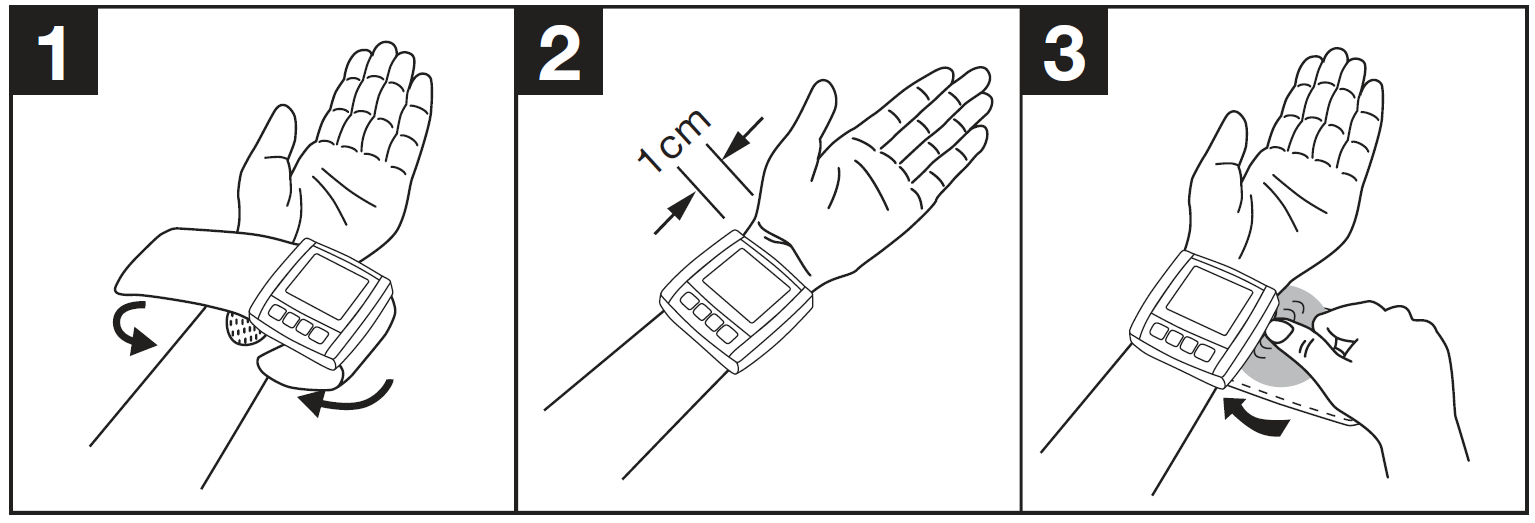
Adopting the correct posture
- To carry out a blood pressure measurement, make sure you are sitting upright and comfortably. Lean back and place your arm on a surface. Do not cross your legs. Place your feet next to each other flat on the floor.
- Always make sure that the device is at heart level during the measurement. Otherwise, significant measurement deviations can occur due to physiological causes.
- To do so, place your elbow on a table to support your arm. In order to make the measurement even more comfortable for you, you can place your lower arm on a suitable object (e.g. the storage box).
- Relax your arm and the palm of your hand.
To avoid distorting the measurement, you should remain as still as possible during the measurement and not speak.
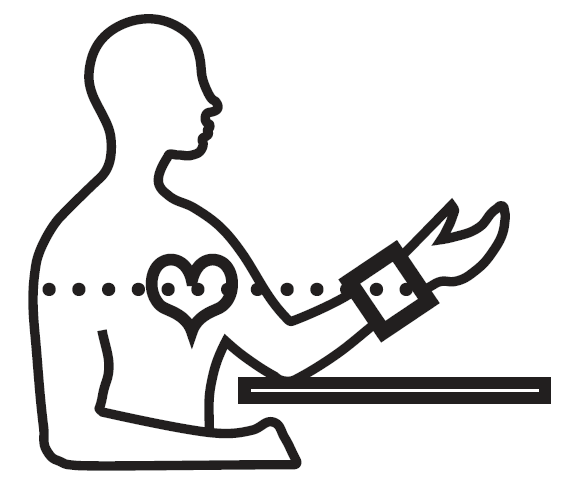
Selecting the user
You have 2 memories, each with 60 memory spaces, to enable the separate storage of measurements for 2 different people. To select the corresponding user memory, press the M1 memory button (for user ) or M2 (for user ) on the switched-off device. Confirm your selection by pressing the START/STOP button.
Performing the blood pressure measurement
- As described above, attach the cuff and adopt the posture in which you want to perform the measurement.
- Press the START/STOP button to start the blood pressure monitor. All displays will illuminate briefly.
- The blood pressure monitor will begin the measurement automatically after 5 seconds.
- The cuff automatically inflates. The measurement itself is taken during the inflation phase.
As soon as a pulse is found, the pulse symbol is displayed.
Evaluating the results
- Blood pressure is the force with which the bloodstream presses against the arterial walls. Arterial blood pressure constantly changes during a cardiac cycle.
- Blood pressure is always stated in the form of two values:
- Systolic Blood Pressure: The highest pressure in the cycle is called systolic blood pressure. This arises when the heart muscle contracts and blood is pumped into the blood vessels.
- Diastolic Blood Pressure: The lowest pressure is called diastolic blood pressure. This occurs when the heart muscle has completely relaxed and the heart fills with blood.
- Fluctuations in blood pressure are normal. Even during repeat measurements, considerable differences between measured values may occur.
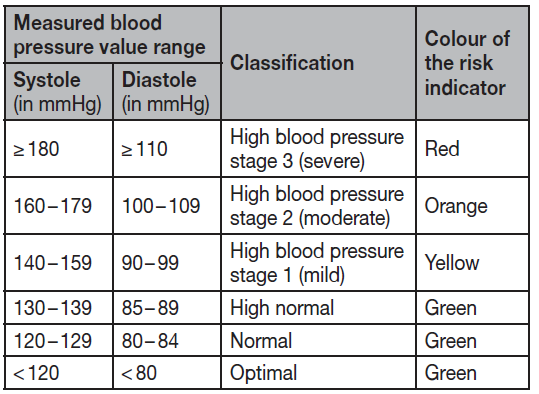
Risk indicator
The World Health Organization (WHO) has defined the internationally recognised classification for the evaluation of measured blood pressure values listed in the table below: between the measured values may occur. One-off or irregular measurements therefore do not provide reliable information about the actual blood pressure. Reliable assessment is only possible when you perform the measurement regularly under comparable conditions.
Cardiac arrhythmia
This device can identify any cardiac rhythm disturbances as part of the analysis of your recorded pulse signal during blood pressure measurement. In this case, after the measurement, the device will indicate any irregularities in your pulse by displaying the symbol in the display. This can be an indicator for arrhythmia. Arrhythmia is an illness in which the heart rhythm is abnormal because of flaws in the bioelectrical system that regulates the heartbeat. The symptoms (skipped or premature heartbeats, pulse being slow or too fast) can be caused by factors such as heart disease, age, physical disposition, excess alcohol and tobacco, stress or lack of sleep. If the symbol appears on the display after the measurement, the measurement must be repeated as the measurement accuracy may be impaired. To assess your blood pressure, only use the results that have been recorded without corresponding irregularities in your pulse. If the symbol appears frequently, please consult your doctor. Only they can establish the existence of an arrhythmia during a checkup, using their means of diagnosis.
Saving, displaying and deleting measured values
The results of every successful measurement are stored together with the date and time. The oldest measurement is overwritten in the event of more than 60 measurements.
Select User Memory
- To select the corresponding user memory, press the M1 memory button (for User 1) or M2 memory button (for User 2) on the switched-off device. Confirm your selection by pressing the START/STOP button.
- If Bluetooth® is activated (the Bluetooth® symbol flashes on the display), the blood pressure monitor attempts to connect to the app. The buttons are deactivated, and the symbol ceases to flash as soon as a connection is established and the data is transferred.
- If you press the memory button M1 or M2 in the meantime, the transfer is cancelled. The Bluetooth® symbol is no longer shown.
- A is displayed. The average value of all saved measured values in this user memory is displayed.
Average Values
- Press the memory button M1.
- AM is displayed.
- The average value of the morning measurements for the last 7 days is displayed (morning: 5:00 a.m. – 9:00 a.m.).
- Press the memory button M1 again.
- PM is displayed.
The average value of the evening measurements for the last 7 days is displayed (evening: 6:00 p.m. – 8:00 p.m.).
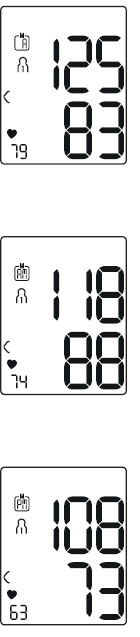
Individual Measured Values
- If you press the memory button M1 again, the last individual measurement is displayed (in this example, measurement 03).
- If you press the memory button M1 once more, you can view your individual measured values.
- To switch the device off again, press the START/STOP button.
You can exit the menu at any time by pressing the START/STOP button.
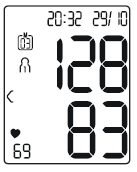
Delete the Measured Values
- To erase a user's memory, first select the user memory to be erased by pressing the M1 or M2 memory button on the switched-off device and confirm your selection by pressing the START/STOP button.
- The average value of all measurements appears on the display; at the same time, A lights up.
- Press and hold down both memory buttons M1 and M2 simultaneously for 5 seconds.
L 00 appears on the display. All the values in the selected user memory have now been deleted.
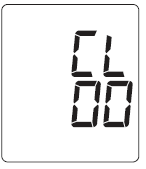
Transfer via Bluetooth
- Download the free “beurer HealthManager Pro” app from the Apple App Store or Google Play.
- Activate Bluetooth® in your smartphone’s settings.
- Start the app.
- Select BC 54 in the app and follow the instructions.
- A PIN code is displayed on the device when connecting for the first time. Enter the PIN code on the smartphone.
- After successfully entering the code, the device will be connected to your smartphone.
Cleaning and maintenance
- Clean the device and cuff carefully using a slightly damp cloth only.
- Do not use any cleaning agents or solvents.
- Under no circumstances hold the device and cuff under water, as this can cause liquid to enter and damage the device and cuff.
- If you store the device and cuff, do not place heavy objects on them. Remove the batteries.
Troubleshooting — Common problems, error messages and fixes
Problem: Device shows “incorrect usage” message or unstable reading.
Solution: Ensure wrist is at heart level during measurement, remain still and relaxed, sit with back supported and legs uncrossed, and keep cuff positioned according to the printed guide. Repeat measurement after a few minutes if needed.
Problem: No Bluetooth connection to Beurer HealthManager Pro app.
Solution: Confirm Bluetooth is enabled on your phone, close and reopen the app, delete and re-pair the device in the app settings, ensure the app has location/bluetooth permissions if required by your OS, and check the device has sufficient battery power.
Problem: Device displays low battery or won’t power on.
Solution: Replace the two AAA batteries with fresh alkaline batteries, observing correct polarity. Remove batteries if storing long-term.
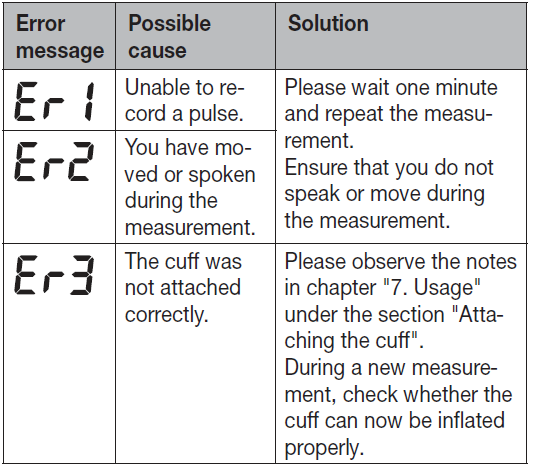
Error codes / alerts:
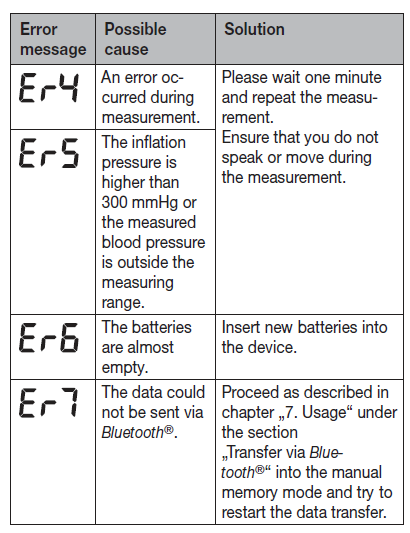
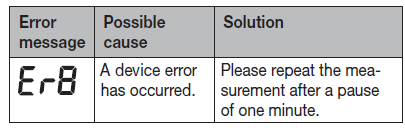
Typical wrist monitors use simple alerts (incorrect usage, low battery, irregular heartbeat flag). If an explicit error code appears, consult the official instruction manual for code-specific steps; if unresolved, contact Beurer support.
Preventive measures:
Store in supplied case, avoid extreme temperatures and moisture, replace batteries as recommended, calibrate your routine by taking duplicate readings and averaging, and follow wrist position guidance to reduce measurement variance.
Warranty & support:
Warranty duration may vary by country and retailer—many vendors list a manufacturer guarantee (commonly 3–5 years in some regions). For technical support or warranty claims contact Beurer customer service through the official Beurer website or your retailer’s support channel.
Pros & Cons — Balanced assessment of the beurer Blood Pressure Monitor BC-54
Pros — Convenience & features
Portable wrist design and fast inflation-based measurements make the BC-54 ideal for travel and quick home checks; Bluetooth app sync and 2-user memory enable easy tracking and sharing of long-term data.
Pros — Health-focused features
Built-in arrhythmia detection and a coloured risk indicator help users quickly interpret results and flag irregular heartbeats for follow-up.
Cons — Accuracy caveats
Wrist monitors are more sensitive to arm/wrist position and motion than upper-arm models; independent clinical validation data for the BC-54 is limited, so users requiring clinically validated precision may prefer validated upper-arm alternatives.
Cons — Build & longevity concerns
Some users report a lightweight, mostly-plastic feel and question long-term durability compared with higher-end models; reviews mention good short-term performance but cautious long-term expectations.
Value for money
For users prioritizing portability, Bluetooth syncing and comfort, the BC-54 represents reasonable value in the mid-price range; for strict clinical monitoring or patients advised to use validated devices, an upper-arm clinically validated monitor may be better value despite higher cost.
Customer Reviews — Real user feedback, ratings and recommendations
Average user sentiment for the beurer Blood Pressure Monitor BC-54 is generally positive for convenience, Bluetooth connectivity and ease of use, with many users praising fast readings and the app integration for tracking history. Typical ratings range from 4 to 4.5 stars on retailer sites where available, with individual reviews noting a clear display and straightforward pairing.
Common praises: quick inflation measurement, helpful risk indicator, and simple app synchronization for trend monitoring. Common complaints: sensitivity to wrist position and motion (a characteristic of wrist devices), perceived cheapness of the plastic case, and occasional concerns about long-term durability. Recommendation: Good for casual/home monitoring and travellers who need portability; if you need clinic-grade accuracy or have large wrists outside the cuff range, consider a validated upper-arm monitor instead.
Faqs
How do I set up my beurer Blood Pressure Monitor BC-54 for the first time?
What should I do if the beurer Blood Pressure Monitor BC-54 shows an error or ‘measurement not possible’ message?
How do I pair the beurer Blood Pressure Monitor BC-54 with the Beurer HealthManager Pro app (Bluetooth)?
Why are my beurer Blood Pressure Monitor BC-54 readings different from my doctor’s cuff, and how can I improve accuracy?
What are the BC-54’s memory and user features and how do I access saved measurements?
How should I care for and maintain my beurer Blood Pressure Monitor BC-54 to extend its lifespan?
Can the beurer Blood Pressure Monitor BC-54 detect irregular heartbeats and how should I respond if it flags arrhythmia?
What cuff size and wrist requirements does the beurer Blood Pressure Monitor BC-54 need, and is it compatible with tall/large wrists?
More beurer manuals
- Setup: Beurer Blood Pressure Monitor BM-85 User Manual
- Setup: Beurer Blood Pressure Monitor BM-58 User Manual
- Setup: Beurer Blood Pressure Monitor with ECG Function BM-96 Cardio User Manual
- How to Use: Beurer Upper Arm Blood Pressure Monitor BM-59 User Manual
- Setup: Beurer Blood Pressure Monitor BC 87 User Manual
- Beurer Digital Tens Device EM-44 User Manual
Leave a Comment