
Setup: Beurer Blood Pressure Monitor BM-85 User Manual
Content
Beurer Blood Pressure Monitor BM-85: Comprehensive Product Manual and Guide
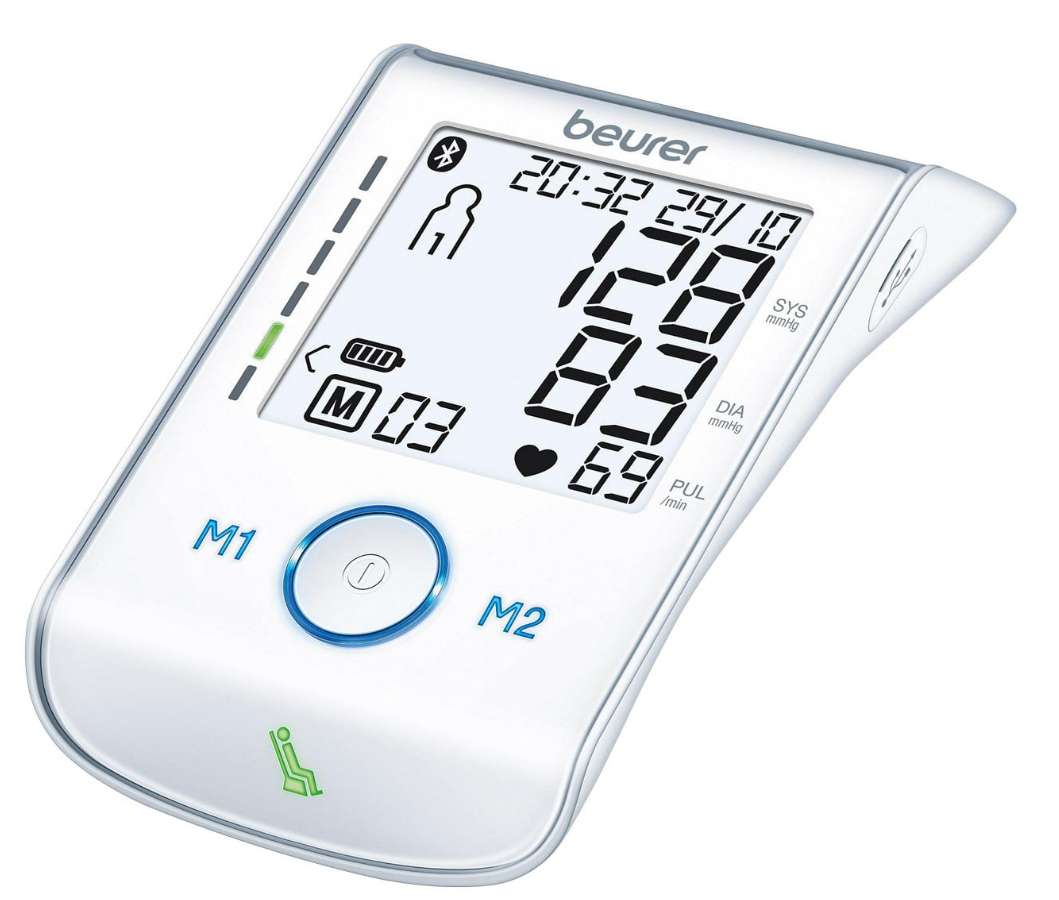
Introduction to the Beurer Blood Pressure Monitor BM-85
The Beurer Blood Pressure Monitor BM-85 is a premium upper arm blood pressure monitor designed for accurate home health monitoring. Featuring Bluetooth connectivity, patented resting indicator, and inflation technology, this device ensures fast, comfortable, and reliable blood pressure and pulse readings. Ideal for individuals managing hypertension, seniors, or anyone tracking cardiovascular health, the Beurer BM-85 offers seamless data transfer to the free beurer HealthManager Pro app for iOS and Android devices, allowing users to monitor trends anytime, anywhere.
Key benefits include arrhythmia detection to warn of irregular heartbeats, a risk indicator with colored LEDs for easy classification of readings, and an illuminated XL display for clear visibility. The integrated Li-ion rechargeable battery supports about 50 measurements per charge, with USB for PC connectivity or recharging. Its touch-sensor buttons and comfortable cuff (22-42 cm upper arm circumference) make it user-friendly for daily use.
Targeted at health-conscious adults, diabetics, and those with heart conditions, the Beurer Blood Pressure Monitor BM-85 excels in home blood pressure tracking, doctor visits, and long-term wellness apps. Estimated price range is $80-$120, widely available at medical supply stores, pharmacies, and online retailers. With a 5-year warranty, it provides exceptional value for precise, app-connected blood pressure monitoring solutions.
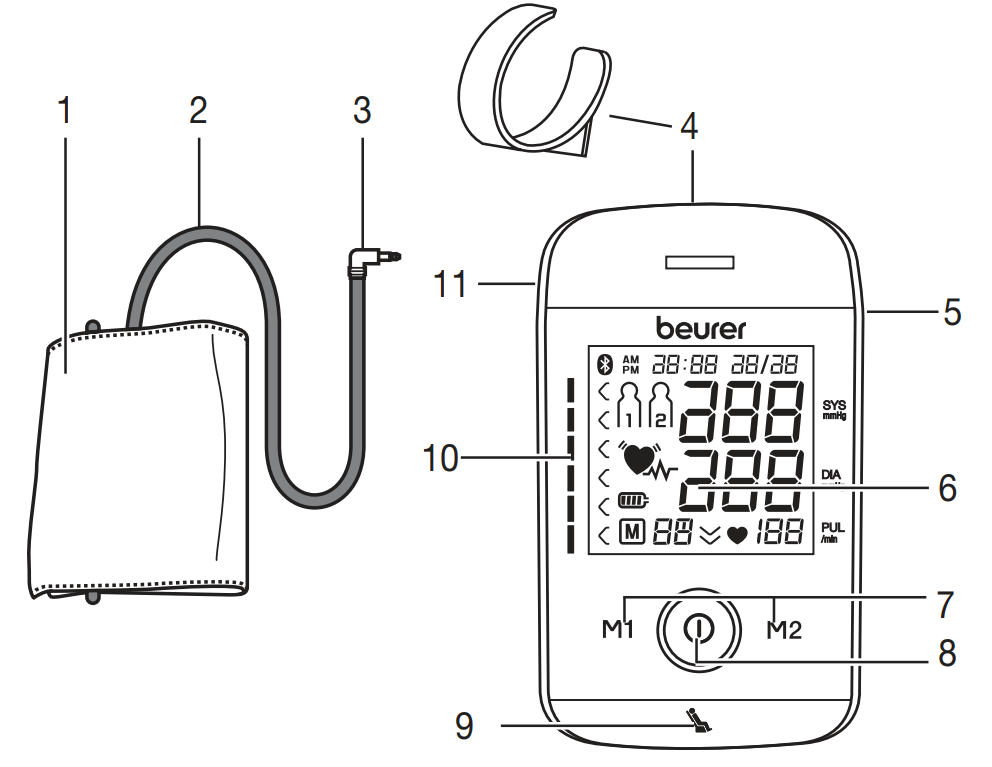
Parts
- Cuff
- Cuff line
- Cuff connector
- Cuff holder
- USB interface
- Display
- Memory buttons M1/M2
- START/STOP button
- Resting indicator display
- Risk indicator
- Connection for cuff connector (left-hand side)
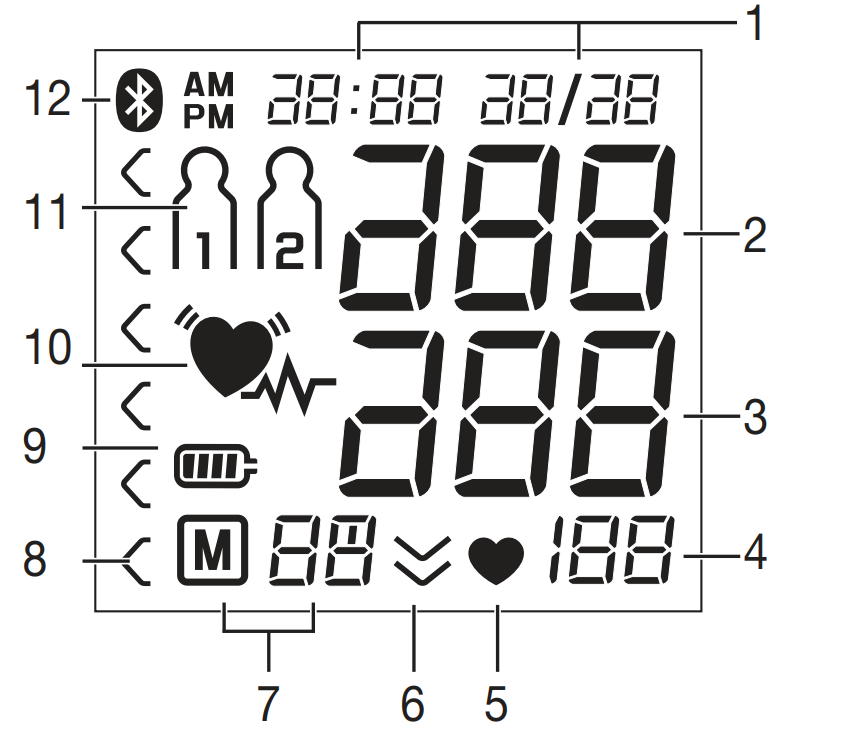
Information on the display
- Time/date
- Systolic pressure
- Diastolic pressure
- Calculated pulse value
- Pulse symbol
- Release air (arrow)
- Number of memory space/memory display: Average value, Morning, Evening
- Risk indicator
- Battery level symbol
- Cardiac arrhythmia symbol
- User memory
- Symbol for Bluetooth® transfer
Beurer Blood Pressure Monitor BM-85 Specifications and Key Features
The Beurer Blood Pressure Monitor BM-85 boasts advanced specs for professional-grade accuracy at home. Here's a detailed breakdown:
- Measurement Type: Fully automatic upper arm blood pressure and pulse via inflation technology (measurement during inflation for speed and comfort)
- Cuff Size: 22-42 cm upper arm circumference, includes cuff holder and storage bag
- Connectivity: Bluetooth Low Energy to beurer HealthManager Pro app (iOS 8.0+, Android 4.4+); USB interface for PC data transfer and recharging
- Display & Controls: Illuminated XL display, sensor touch buttons, risk indicator with colored LEDs
- Memory & Averages: 2 users x 60 measurements each; averages for all values, morning/evening over 7 days
- Sensors: Patented resting indicator (HSD) for precise readings in optimal state; arrhythmia detection
- Power: Rechargeable Li-ion battery (~50 measurements/charge), low battery indicator, auto-off after 3 minutes
- Dimensions & Weight: 18 x 9.9 x 4 cm, 456g; includes blood pressure record diary
- Other: Medical device certified, 5-year warranty
Compared to models like Omron M7 Intelli IT, the Beurer BM-85 stands out with its resting indicator and longer battery life, offering superior comfort and app integration for home blood pressure monitor users
Notes on use
- In order to ensure comparable values, always measure your blood pressure at the same time of day.
- Do not measure within 30 minutes of eating, drinking, smoking or exercising.
- Before the initial blood pressure measurement, always make sure to rest for about 5 minutes.
- Furthermore, if you want to take several measurements in succession, always make sure to wait for at least 1 minute between the individual measurements.
- Repeat the measurement if you are unsure of the measured value.
- The measurements taken by you are for your information only – they are no substitute for a medical examination! Discuss the measurements with your doctor and never base any medical decisions on them (e.g. medicines and their administration)!
- Using the blood pressure monitor outside your home environment or whilst on the move (e.g. whilst travelling in a car, ambulance or helicopter, or whilst undertaking physical activity such as playing sport) can influence the measurement accuracy and cause incorrect measurements.
- Do not use the blood pressure monitor on newborns or patients with preeclampsia. We recommend consulting a doctor before using the blood pressure monitor during pregnancy.
- Cardiovascular diseases may lead to incorrect measurements or have a detrimental effect on measurement accuracy. The same also applies to very low blood pressure, diabetes, circulatory disorders and arrhythmias, as well as chills or shaking.
- This device is not intended for use by people (including children) with restricted physical, sensory or mental skills or a lack of experience and/or a lack of knowledge, unless they are supervised by a person who is responsible for their safety or are instructed by such a person in how to use the device. Supervise children around the device to ensure they do not play with it.
- The blood pressure monitor must not be used in connection with a high-frequency surgical unit.
- Only use the unit on people who have the specified upper arm measurement for the unit.
- Please note that when inflating, the functions of the limb in question may be impaired.
- During the blood pressure measurement, blood circulation must not be stopped for an unnecessarily long time. If the device malfunctions, remove the cuff from the arm.
- Avoid any mechanical restriction, compression or bending of the cuff line.
- Do not allow sustained pressure in the cuff or frequent measurements. The resulting restriction of blood flow may cause injury.
Notes on handling rechargeable batteries
If your skin or eyes come into contact with fluid from the battery cell, flush out the affected areas with water and seek medical assistance
Choking hazard!:
Small children may swallow and choke on rechargeable batteries. Store rechargeable batteries out of the reach of small children.
- Observe the plus (+) and minus (-) polarity signs.
- If a battery has leaked, put on protective gloves and clean the battery compartment with a dry cloth.
- Protect batteries from excessive heat.
Risk of explosion! Never throw batteries into a fire.
- If the device is not to be used for a long period, take the rechargeable batteries out of the battery compartment.
- Always replace all rechargeable batteries at the same time.
- Do not disassemble, split or crush the rechargeable batteries.
- Only use chargers specified in the instructions for use.
- Batteries must be charged correctly before use. The instructions from the manufacturer and the specifications in these instructions for use regarding correct charging must be observed at all times.
Preparing for the measurement
Completely charge up the blood pressure monitor before taking your first measurement:
Using a PC
Insert the USB cable into the USB interface on the device and connect it directly to your PC.
Using the Mains Part
Insert the USB cable into the blood pressure monitor and connect it to the mains supply using the enclosed USB mains part.
Set the hour format, date, time and Bluetooth® settings
The following section describes the functions and settings available on the blood pressure monitor.

Hour Format
- The hour format now flashes on the display.
- Select the desired hour format using the M1/M2 memory buttons and confirm with the START/STOP button.
Date
- The year flashes on the display.
- Select the year using the M1/M2 memory buttons and confirm with the START/STOP button.
Time
- The hours flash on the display.
- Select the current hour using the M1/M2 memory buttons and confirm with the START/STOP button.
- The minutes flash on the display.
- Select the current minutes using the M1/M2 memory buttons and confirm with the START/STOP button.
Bluetooth® Settings
- The Bluetooth® symbol flashes on the display.
- Use the M1/M2 memory buttons to choose whether automatic Bluetooth® data transfer is activated (Bluetooth® symbol flashes) or deactivated (Bluetooth® symbol is not shown).
- Confirm your selection with the START/STOP button.
- Bluetooth® transfers will reduce the rechargeable battery capacity.
Measuring blood pressure
Please ensure the unit is at room temperature before measuring. The measurement can be performed on the left or right arm.
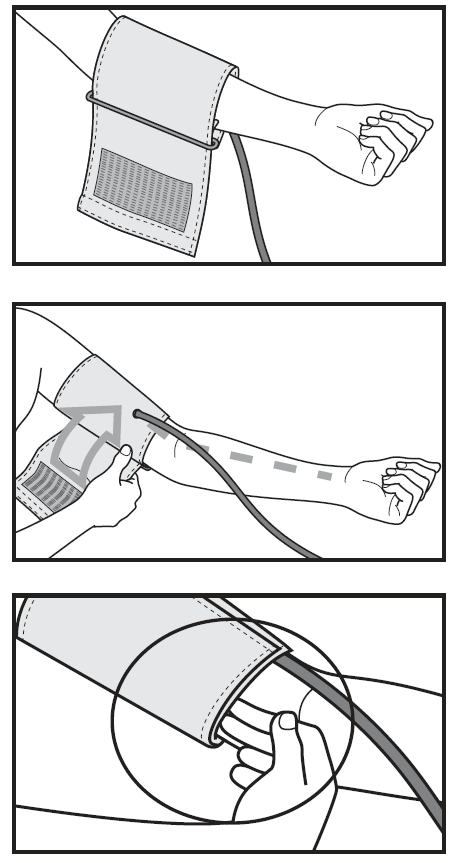
Attaching the cuff
- Place the cuff onto the bare upper arm. The circulation of the arm must not be hindered by tight clothing or similar.
- The cuff must be placed on the upper arm so that the bottom edge is positioned 2–3 cm above the elbow and over the artery. The line points to the centre of the palm.
- Now place the free end of the cuff snugly, but not too tightly, around the arm, and fix it with the hook-and-loop fastener. The cuff should be fitted tightly enough to allow just two fingers to fit beneath the cuff.
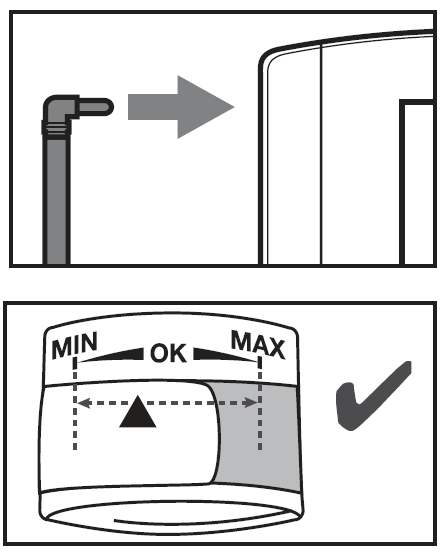
- Now insert the cuff line into the connection for the cuff connector.
- This cuff is suitable for you if the index mark (▼) is within the OK range after fitting the cuff on the upper arm
Adopting the correct posture
- Before the initial blood pressure measurement, always make sure to rest for about 5 minutes. Otherwise, deviations can occur.
- You can measure while sitting or lying down. Make sure that the cuff is at heart level.
- To take your blood pressure, make sure you are sitting comfortably with your arms and back supported. Do not cross your legs. Place your feet flat on the ground.
- To avoid falsifying the measurement, it is important to remain still during the measurement and not to speak.
Performing the blood pressure measurement
- As described above, attach the cuff and adopt the posture in which you want to perform the measurement.
- Press the START/STOP button to start the blood pressure monitor.
- All display elements are briefly displayed.
- The blood pressure monitor will begin the measurement automatically after 3 seconds.
- The measurement is taken during the inflation phase.
- You can cancel the measurement at any time by pressing the START/STOP button.
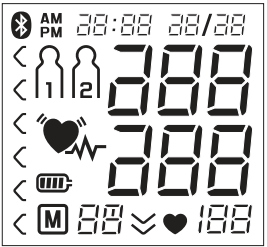
- As soon as a pulse is found, the pulse symbol is displayed.
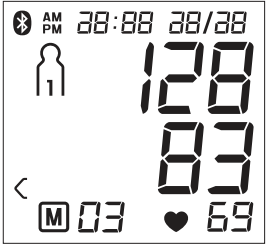
- Systolic pressure, diastolic pressure and pulse readings are displayed. The resting indicator display (see Section 6) illuminates in accordance with the positive or negative classification.
- An error message appears if the measurement could not be performed properly (see Section 10, “Error messages/troubleshooting”). Repeat the measurement.
Evaluating results
Cardiac arrhythmia
This unit can identify potential disruptions of the heart rhythm when measuring and if necessary, indicates this after the measurement with the symbol . This can be an indicator for arrhythmia. Arrhythmia is a condi-tion in which the heart rhythm is abnormal because of flaws in the bioelectrical system that regulates the heartbeat. The symptoms (skipped or premature heartbeats, pulse being slow or too fast) can be caused by factors such as heart disease, age, physical makeup, excess stimulants, stress, or lack of sleep. Arrhythmia can only be determined through an examination by your doctor. If the symbol is shown on the display after the measure-ment has been taken, it should be repeated. Please ensure that you rest for 5 minutes beforehand and do not speak or move during the measurement. If the symbol appears frequently, please consult your doctor.
Self-diagnosis and treatment based on the measurements can be dangerous. Always follow your GP’s instructions.
Risk indicator:
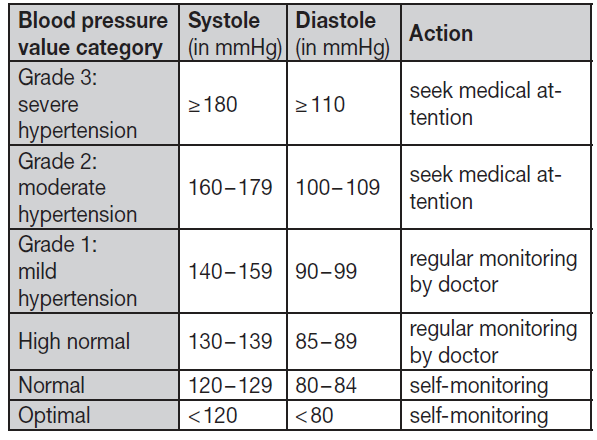
The measurements can be classified and evaluated in accordance with the following table. However, these standard values serve only as a general guideline, as the individual blood pressure varies in different people and different age groups etc. It is important to consult your doctor regularly for advice. Your doctor will tell you your individual values for normal blood pressure as well as the value above which your blood pressure is classified as dangerous. The classification on the display and the scale on the unit show which category the recorded blood pressure values fall into. If the values of systole and diastole fall into two different categories (e.g. systole in the “High normal” category and diastole in the “Normal” category), the graphical classification on the device always shows the higher category; for the example given, this would be “High normal”.
Measuring the resting indicator (using the HSD diagnosis)
The most frequent error made when measuring blood pressure is taking the measurement when not at rest (haemodynamic stability), which means that both the systolic and the diastolic blood pressures are distorted. While measuring the blood pressure, the device automatically determines whether you are at rest or not. If there is no indication that your circulatory system is not sufficiently at rest, the symbol (haemodynamic stability) lights up green and the measurement can be recorded as a reliable resting blood pressure value.
GREEN: Haemodynamic Stability
- Measurement of the systolic and diastolic pressure is more reliable when the circulatory system is sufficiently at rest and is a very reliable indicator of resting blood pressure.
- However, if there is an indication that the circulatory system is not sufficiently at rest (haemodynamic instability), the symbol lights up red.
- In this case, the measurement should be repeated after a period of physical and mental rest.
- The blood pressure measurement must be taken when the patient is physically and mentally rested, as it will be the basis for diagnosing the blood pressure level and regulating the patient’s medical treatment.
RED: Lack of Haemodynamic Stability
- It is very probable that the systolic and diastolic blood pressures have not been measured whilst the patient is at rest, and the resting blood pressure measurement has therefore been distorted.
- Repeat the measurement after a rest period of at least five minutes. Go to a sufficiently quiet and comfortable spot and remain there calmly; close your eyes, breathe deeply and evenly, and try to relax.
- If the next measurement also shows insufficient stability, you can repeat the measurement after another resting period.
- If the measurements continue to show some instability, identify these blood pressure measurements as having been taken when the circulatory system had not been sufficiently rested.
- In this case, nervousness or inner anxiety may be the cause, and this cannot be resolved by brief periods of rest. Existing cardiac arrhythmias may also prevent a stable blood pressure measurement.
- A lack of resting blood pressure can have various causes, such as physical or mental strain or distraction, speaking, or experiencing cardiac arrhythmias during the measurement.
- In an overwhelming number of cases, the HSD diagnosis will provide a very good indication of whether the circulatory system is rested when taking the measurement.
- Certain patients suffering from cardiac arrhythmia or chronic mental conditions can remain haemodynamically unstable in the long term, which may persist even after repeated periods of rest.
- The accuracy of the resting blood pressure results is reduced in these users.
- Like any medical measurement method, the precision of the HSD diagnosis is limited and can lead to incorrect results in some cases.
- Blood pressure measurements taken when the circulatory system is at rest represent particularly reliable results.
Transfer of measured values
Transfer via Bluetooth®
- Download the free “beurer HealthManager Pro” app from the Apple App Store or Google Play.
- Activate Bluetooth® in your smartphone’s settings.
- Start the app.
- Select BM 85 in the app and follow the instructions.
Transfer via USB
- You can also use the device to transfer your measured values via USB. You will need the “beurer HealthManager Pro” USB uploader to do so.
- Download it at the following link: connect.beurer.com/download/software
- You can then view your measurements in the “beurer HealthManager Pro” app and web view.
- System requirements: Refer to the system requirements for the “beurer HealthManager Pro USB-Uploader” PC software.
- “PC” is shown on the display.
- Begin the data transfer in the “beurer HealthManager Pro USB-Uploader” PC software.
- During the data transfer, an animation is shown on the display.
- If the data transfer is successful, the display appears as shown in Figure 1.
- If the data transfer is unsuccessful, an error message appears as shown in Figure 2.
- In this case, interrupt the PC connection and start the data transfer again.
Cleaning and storing the device and cuff
- Clean the device and cuff carefully using a slightly damp cloth only.
- Do not use any cleaning agents or solvents.
- Under no circumstances hold the device and cuff under water, as this can cause liquid to enter and damage the device and cuff.
- If you store the device and cuff, do not place heavy objects on them.
- Remove the batteries before storage.
- The cuff line should not be bent sharply.
Troubleshooting the Beurer Blood Pressure Monitor BM-85
Encounter common issues with your Beurer Blood Pressure Monitor BM-85? Follow these solutions for reliable performance in blood pressure monitoring.
- No Display/Power Issues: Ensure fully charged via USB; check low battery indicator. Hold START/STOP for 5 seconds to set time/date if needed.
- Erratic Readings/Arrhythmia Alert: Confirm resting state (use patented indicator); sit/relax 5 minutes, arm at heart level, bare upper arm. Recheck cuff fit (2-3 cm above elbow).
- Bluetooth Not Connecting: Activate Bluetooth on device/phone; pair via HealthManager app under "My Devices." App must be open for transfer.
- Error Codes (e.g., E1-E5): E1: Cuff issues—readjust; E2: Movement—stay still; E3: No inflation—check air hose; E5: Battery low—recharge (consult manual for full list).
- Data Not Saving: Select M1/M2 user within 3 seconds post-measurement.
Prevent issues by charging regularly, avoiding extreme temperatures, and following setup video guides. Beurer offers a 5-year warranty; contact support at beurer.com or local distributors for repairs/replacements.
Pros and Cons of the Beurer Blood Pressure Monitor BM-85
Pros
- Exceptional accuracy with resting indicator and inflation tech—faster, more comfortable than traditional deflation models
- Bluetooth app sync for trend tracking; beats basic monitors like Braun ExactFit 5.0 in connectivity.
- Rechargeable battery and 5-year warranty provide great value (~$100 price point).
- Large illuminated display and touch buttons ideal for elderly users.
- Arrhythmia/risk detection enhances safety for hypertension management.
Cons
- Cuff limited to 22-42 cm; may not fit very large/small arms (consider XL options elsewhere)
- App setup can be tricky for non-tech users initially
- Higher price than entry-level monitors without Bluetooth
Overall, the Beurer Blood Pressure Monitor BM-85 offers strong value for tech-savvy users seeking advanced home blood pressure tracking.
Customer Reviews: Beurer Blood Pressure Monitor BM-85 Feedback
Users praise the Beurer Blood Pressure Monitor BM-85 for its accuracy and ease, averaging 4.5/5 stars across sites like Praxisdienst and Essential Aids. "The resting indicator ensures reliable readings—perfect for my doctor's visits!" says one reviewer. Common praises: quick inflation technology, clear app graphs for blood pressure trends, and durable battery.
Complaints include occasional Bluetooth pairing glitches ("Fixed after app update") and cuff tightness for larger arms. Testimonials highlight arrhythmia alerts saving trips to ER. 85% recommend for home use, especially vs. pharmacy machines. Address issues by updating app firmware
Faqs
How do I set up the beurer Blood Pressure Monitor BM-85 for the first time?
How do I connect the beurer Blood Pressure Monitor BM-85 to my smartphone via Bluetooth?
What should I do if the beurer Blood Pressure Monitor BM-85 shows an error message during measurement?
How do I properly position the cuff on the beurer Blood Pressure Monitor BM-85 for accurate readings?
What does the resting indicator mean on the beurer Blood Pressure Monitor BM-85?
How do I view and manage stored measurements on the beurer Blood Pressure Monitor BM-85?
How do I charge and maintain the battery of the beurer Blood Pressure Monitor BM-85?
Is the beurer Blood Pressure Monitor BM-85 compatible with both iOS and Android devices?
More beurer manuals
- Setup: Beurer Blood Pressure Monitor with ECG Function BM-96 Cardio User Manual
- Setup: Beurer Blood Pressure Monitor BC-54 User Manual
- Setup: Beurer Blood Pressure Monitor BC 87 User Manual
- Setup: Beurer Blood Pressure Monitor BM-58 User Manual
- Setup: Beurer Upper Arm Blood Pressure Monitor BM-64 User Manual
- How to Use: Beurer Upper Arm Blood Pressure Monitor BM-59 User Manual
Leave a Comment