
Setup: Beurer Upper Arm Blood Pressure Monitor BM-64 User Manual
Content
Beurer Upper Arm Blood Pressure Monitor BM-64: Complete Product Manual and Guide
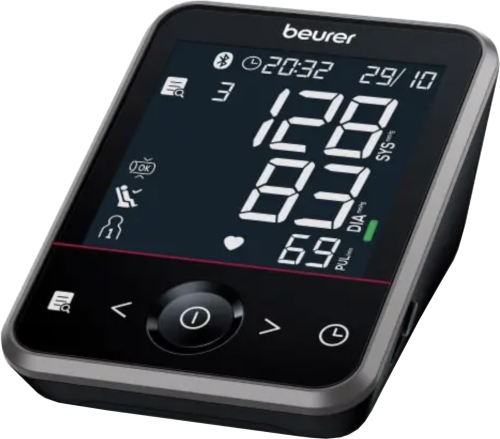
Introduction to the Beurer Upper Arm Blood Pressure Monitor BM 64
The Beurer Upper Arm Blood Pressure Monitor BM 64 is a fully automatic, Bluetooth-enabled device designed for precise home blood pressure monitoring. Featuring patented resting indicator technology, advanced arrhythmia detection including atrial fibrillation (AFib) and premature ventricular contractions (PVC), and inflation technology for faster, more comfortable measurements, this upper arm blood pressure monitor stands out for its reliability and user-friendly design.
Key benefits include an XL LCD display with backlight, touch-sensor buttons, cuff fit check, and risk indicator for easy classification of readings. It supports two users with 120 memory slots each, calculates averages for all readings and last 7 days' morning/evening values, and connects to the beurer HealthManager Pro app for seamless data tracking on smartphones. Ideal for adults monitoring hypertension, heart health, or daily wellness—especially those at risk of strokes—this Beurer BM 64 blood pressure monitor ensures medical-grade accuracy at home.
Perfect for seniors, families, or anyone needing reliable upper arm blood pressure monitoring, it includes a 22-42 cm cuff, storage bag, and blood pressure passport. Estimated price range is $80-$120, widely available online and in pharmacies. With a 5-year warranty, the Beurer Upper Arm Blood Pressure Monitor BM 64 offers peace of mind and proactive health management.
Technical Specifications and Key Features of Beurer BM 64
The Beurer Upper Arm Blood Pressure Monitor BM 64 delivers advanced performance with oscillometric measurement on the upper arm. Here's a detailed breakdown:
- Measurement Range: Blood pressure 50-280 mmHg, pulse 40-199 bpm.
- Cuff Size: 22-42 cm upper arm circumference, with cuff fit and position control.
- Display: XL LCD with backlight, risk indicator scale, low battery indicator.
- Memory: 2 users x 120 readings, averages for all, 7-day morning/evening.
- Connectivity: Bluetooth to beurer HealthManager Pro app.
- Detection: Arrhythmia, AFib + PVC, resting indicator (patent EP 1 673 009).
- Power: 4x AA batteries (included), auto switch-off, optional mains adapter.
- Dimensions/Weight: 143 x 105 x 60 mm, ~450g (without batteries, with cuff).
- Other: Triple measurement mode, inflation technology, date/time, storage bag, blood pressure passport.
Compared to rivals like basic Omron models, the Beurer BM 64 excels in app integration and AFib detection, though some lack clinical validation per Medaval. It's a medical device with CE certification.
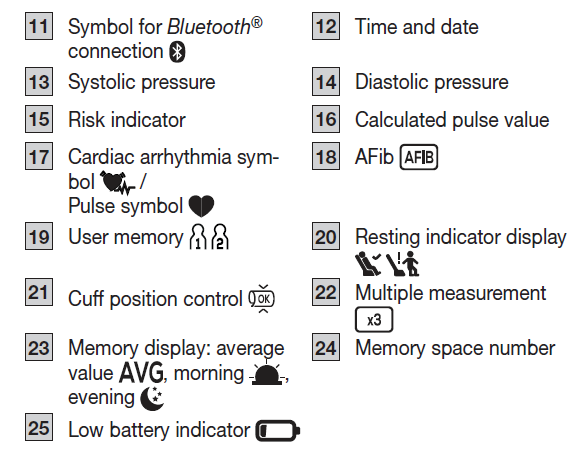
DEVICE DESCRIPTION
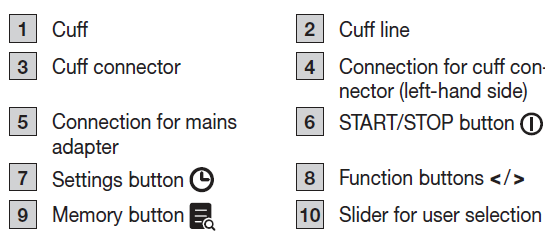
Information on the display
Intended purpose
The blood pressure monitor (hereinafter, device) is intended for the fully automatic, non-invasive measurement of arterial blood pressure and pulse values on the upper arm. It is designed for self-measurement by adults in a domestic en-vironment.
Intended users
The blood pressure measurement is suitable for adult users whose upper arm circumference is within the range printed on the cuff.
Clinical benefits
The user can record their blood pressure and pulse values quickly and easily using the device. The recorded values are classified according to internationally applicable guidelines and evaluated graphically. Furthermore, the device can detect any irregular heartbeats that occur during measurement and inform the user via a symbol in the display. The device saves the recorded measurements and can also output average values of previous measurements. The recorded data can provide healthcare service providers with support during the diagnosis and treatment of blood pressure problems, and therefore it plays a part in the long-term monitoring of the user’s health.
Indications
In the event of hypertension or hypotension, the user can independently monitor their blood pressure and pulse values at home. However, the user does not need to be suffering from hypertension or arrhythmia to use the device.
Contraindications
WARNING
- Do not use the blood pressure monitor on newborns, children, or pets.
- Persons with reduced physical, sensory, or mental capabilities should be supervised by a person responsible for their safety and receive instructions from that person on how to use the device.
- Do not use the device if you are using electrical implants, such as pacemakers.
- Do not use the device if you have metal implants.
- Do not use the cuff on people who have undergone a mastectomy or who have had their lymph nodes removed.
- Do not place the cuff over wounds, as this may cause further injury.
- Make sure that the cuff is not placed on an arm whose arteries or veins are undergoing medical treatment, such as intravascular access, intravascular therapy, or an arteriovenous (AV) shunt.
- Do not use the device on people with allergies or sensitive skin.
Undesirable side effects
- Skin irritation
- Negative impact on blood circulation
WARNINGS AND SAFETY NOTES
- The measurements you take are for your information only and are not a substitute for a medical examination.
- Discuss your measured values with your doctor and never make your own medical decisions based on them, such as medicine doses.
- The device is only intended for the purpose described in these instructions for use.
- The manufacturer is not liable for damage resulting from improper or incorrect use.
- Using the blood pressure monitor outside your home environment or while on the move, such as travelling in a car, ambulance, helicopter, or during physical activity, can affect measurement accuracy and cause incorrect measurements.
- Cardiovascular diseases may lead to incorrect measurements or adversely affect measurement accuracy.
- Do not use the device at the same time as other medical electrical devices (ME equipment). This could cause the measuring device to malfunction or produce inaccurate measurements.
- Do not use the device outside the specified storage and operating conditions, as this could lead to incorrect measurements.
- Only use the cuffs included in delivery or described in these instructions for use.
- Using a different cuff may lead to inaccurate measurements.
- When inflating the cuff, the functions of the affected limb may be temporarily impaired.
- Do not perform measurements more frequently than necessary.
- Due to restricted blood flow, some bruising may occur.
General precautions
- The blood pressure monitor is made from precision and electronic components. The accuracy of the measurements and service life of the device depend on careful handling.
- Protect the device and its mains adapter from impacts, humidity, dirt, significant temperature fluctuations, and direct sunlight.
- Ensure the device is at room temperature before taking a measurement.
- If the measuring device has been stored close to the maximum or minimum storage and transport temperatures and is then placed in an environment at 20 °C, wait approximately 2 hours before using it.
Notes on handling batteries
WARNING
- If your skin or eyes come into contact with battery fluid, rinse the affected areas with water and seek medical assistance.
- Choking hazard! Small children may swallow and choke on batteries. Therefore, store batteries out of the reach of small children.
- Seek medical attention immediately if a battery is swallowed.
- Risk of explosion! Do not throw batteries into a fire.
- If a battery has leaked, wear protective gloves and clean the battery compartment with a dry cloth.
- Do not disassemble, open, or crush the batteries.
- Observe the plus (+) and minus (-) polarity signs.
CAUTION
- Protect batteries from excessive heat.
- Do not charge or short-circuit the batteries.
- If the device is not going to be used for a long period of time, remove the batteries from the battery compartment.
- Use identical or equivalent battery types only.
Notes on electromagnetic compatibility
- The device is suitable for use in all environments listed in these instructions for use, including domestic environments.
- The device may not be fully usable in the presence of electromagnetic disturbances. This could result in issues such as error messages or failure of the display/device.
- Avoid using this device directly next to other devices or stacked on top of other devices, as this could lead to faulty operation.
- If it is necessary to use the device in this manner, monitor this device and the other devices to ensure they are working properly.
- The use of accessories and/or replacement parts other than those specified or provided by the manufacturer could increase electromagnetic emissions or reduce the device’s electromagnetic immunity, resulting in faulty operation.
- Keep portable RF communication devices, including peripheral equipment such as antenna cables or external antennas, at least 30 cm away from all device parts, including all supplied cables.
- Failure to comply with the above can impair the performance of the device.
USAGE
Inserting the batteries
- Remove the battery compartment cover on the back of the device.
- Insert the batteries, making sure the polarity is correct according to the label.
- Close the battery compartment cover.
If the symbol is displayed and does not disappear, measurement is no longer possible. Replace all the batteries. Once the batteries have been removed from the device, the date and time must be set again. Any saved measured values are retained.
Operation with the mains part
You can also operate this device with a mains part (not included in delivery). However, before connecting the device with the mains part, please ensure that you have removed the batteries from the device. During mains operation, there must not be any batteries in the battery compartment, as this could damage the device.
- To avoid potential damage, operate the device only with a mains part that meets the specifications described in the chapter “Technical specifications”.
- The mains part must only be connected to the mains voltage specified on the type plate.
- Insert the mains adapter into the connection provided on the rear side of the blood pressure monitor.
- Insert the mains plug of the mains part into the mains socket.
- After using the blood pressure monitor, unplug the mains part from the mains socket first, then disconnect it from the blood pressure monitor.
- When the mains part is unplugged, the blood pressure monitor loses the date and time setting, but the saved measured values are retained.
Adjusting the settings
Make sure that the device’s settings have been set correctly so you can make full use of all its functions. Otherwise, you will not be able to save your measured values with the date and time and access them later.
There are two different ways to access the settings menu:
- Before initial use and after each battery replacement, inserting the batteries will automatically open the relevant settings menu.
- If the batteries have already been inserted, switch on the device and press and hold for 3 seconds.
Set these settings in the order shown below:

Press  to confirm your selection each time.
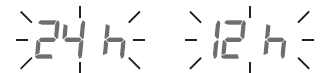
Time format
Time format flashes:
- Press </> to select the time format
Date
The year flashes:
- Press < / > to select the year.
- The month flashes.
- Press < / > to select the month.
- The day flashes.
- Press < / > to select the day.
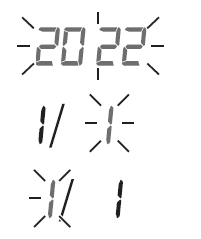
Time
The hour flashes:
- Press < / > to select the hour.
- The minutes flash.
- Press < / > to select the minutes.
- The Bluetooth® symbol flashes on the display.
- Press < / > to select whether automatic Bluetooth® data transfer is activated or deactivated.
- Confirm the setting by pressing the confirmation button.
General rules when measuring your own blood pressure
- To generate an informative profile of changes in your blood pressure for comparison, measure your blood pressure regularly and always at the same time of day.
- Measure your blood pressure twice a day: once in the morning after getting up and once in the evening.
- Always perform the measurement when you are sufficiently physically rested.
- Avoid taking measurements during stressful periods.
- Do not measure within 30 minutes of eating, drinking, smoking, or exercising.
- Before the initial blood pressure measurement, rest for about 5 minutes.
Attaching the cuff
You can measure your blood pressure on either arm. Some deviations between the values in the right and left arm are perfectly normal. Always measure the arm with the higher blood pressure values. Consult your doctor about this be-fore starting self-measurement.
- Expose your upper arm. The circulation of the arm must not be hindered by tight clothing or similar.
- Place the cuff with the bottom edge approx. 2–3 cm above your elbow. Adjust the device so that the mark▼and the cuff line are directly over the artery.
- The cuff should be fastened so that two fingers fit under the cuff when it is closed.
- Insert the cuff line into the connection for the cuff connector.
- The cuff is suitable for you if the index mark▼ is within the OK range after fitting the cuff.
Adopting the correct posture
- Place your arm on a surface.
- Place your feet flat on the ground next to one another.
- The cuff must be level with your heart.
- Stay as still as possible during the measurement and do not talk.
Selecting the user
This device has two users with 120 memory spaces each so that you can save measurements from two different people separately from each other. If multiple people are using the device, make sure that the correct user has been selected before each measurement:
- Use the slider 10 to set the desired user.
Taking a blood pressure measurement
- Press the button. All display elements are briefly displayed.
- The start screen welcomes you for the selected user. From this start screen, you can access all menu items, such as user memory.
- Press the button again to start the measurement. The cuff inflates automatically. The measurement process starts, and the pulse symbol is displayed as soon as a pulse is detected.
- To cancel the measurement, press the button.
- The systolic pressure, diastolic pressure, and pulse measurements are displayed.
- The cuff position control symbol is displayed throughout the entire measurement.
- If the cuff is too loose, the corresponding symbols are displayed. In this case, the measurement is cancelled after approx. 15 seconds and the device switches itself off.
Multiple measurement
- Press the button. All display elements are briefly displayed.
- The start screen welcomes you for the selected user. From this start screen, you can access all menu items, such as user memory.
- Select multiple measurement by pressing < or >. The corresponding symbol flashes on the display. Confirm with the button to start the measurement.
- The cuff inflates automatically, and the measurement starts.
- The device displays the first measurement cycle for 3 seconds and then performs a regular measurement that is repeated three times.
- During the second and third cycles, a 30-second countdown is displayed, indicating the waiting time until the next measurement.
- To cancel the measurement, press the button.
- After the third measurement, the average systolic pressure, diastolic pressure, and pulse are displayed with the corresponding average symbol.
- The cuff position control symbol is displayed throughout the entire measurement.
- If the cuff is too loose, the corresponding symbols are displayed. In this case, the measurement is cancelled after approx. 5 seconds and the device switches itself off.
Evaluating the results
General information about blood pressure
- Blood pressure is the force with which the bloodstream presses against the arterial walls. Arterial blood pressure constantly changes during a cardiac cycle.
- Blood pressure is always stated in the form of two values:
- The highest pressure is the systolic blood pressure. This occurs when the heart muscle contracts and blood is pumped into the blood vessels.
- The lowest pressure is the diastolic blood pressure. This occurs when the heart muscle has completely relaxed again, and the heart is filling with blood.
- Fluctuations in blood pressure are normal.
- Even during repeat measurements, there may be considerable differences between the measured values.
- One-off or irregular measurements therefore do not provide reliable information about the actual blood pressure.
- Reliable assessment is only possible when you perform the measurement regularly under comparable conditions.
Cardiac arrhythmia
The device can identify heart rhythm abnormalities during the blood pressure measurement. If the symbol  is displayed after the measurement, this indicates that an irregularity has been detected in your pulse. Repeat the measurement if the symbol is displayed.
When assessing your blood pressure, only use the results that have been recorded without any irregularities in your pulse. Consult your doctor if is displayed frequently. Only they can determine, through an examination, whether there is an abnormality.
Risk indicator
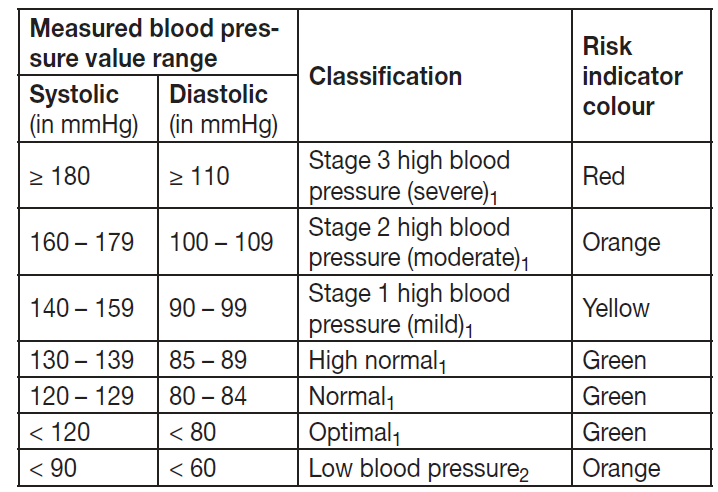
The risk indicator 15 indicates which category the recorded blood pressure values fall into. If the measured values are in two different categories (e.g. systolic pressure in the “high normal” range and diastolic pressure in the “normal” range), the risk indicator always indicates the higher range – “high normal” in the example described.
Please note that self-measurement at home usually results in values lower than those recorded at a doctor’s surgery. Consult your doctor at regular intervals. Only they can give you personal target values for controlled blood pressure, particularly if you are receiving medical therapy.
Low blood pressure
Low blood pressure (hypotension) can be a health hazard and cause dizziness or fainting. Blood pressure is considered low if systolic and diastolic pressure are below 90/60 mmHg (source: National Health Service, 2023).
Seek medical attention if you suddenly suffer from low blood pressure.
Atrial fibrillation
Atrial fibrillation is one of the most common forms of cardiac arrhythmia and is characterised by an irregular heartbeat associated with an increased risk of stroke, heart failure and other heart complications. While the final diagnosis of atrial fibrillation can only be made by a medical examination, the Beurer AFIB technology of this device enables it to be detected with a high level of accuracy. During the blood pressure measurement, possible atrial fibrillation is detected and displayed after the measurement with the symbol in combination with the symbol. If arrhythmias, such as atrial fibrillation, are present, the displayed blood pressure value may be incorrect. If the symbol is displayed after a blood pres-sure measurement, repeat the measurement. Rest for 5 minutes beforehand. Do not move or speak during the measurement. If the symbol appears for the first time and more frequently, please promptly consult your doctor. If you have previously been diagnosed with atrial fibrillation, follow your doctor’s instructions regarding what to do if AFIB is detected by the device. Do not perform self-diagnosis and self-treatment based on the measurements, but rather always follow the doctor’s instructions.
Resting indicator (using HSD diagnostics)
One of the most common errors made when taking a blood pres-sure measurement is not ensuring that the user’s circulatory sys-tem is sufficiently at rest when taking the measurement. In this case, the measured systolic and diastolic blood pressure values do not represent the blood pressure at rest. However, it is this blood pressure at rest that should be used to assess the measured values. This blood pressure monitor uses integrated haemodynamic stability diagnostics (HSD) to measure the user’s haemodynamic stability when taking the blood pressure measurement. This ena-bles it to indicate whether the blood pressure was taken when the user’s circulatory system was sufficiently at rest.
 The measured blood pressure value was obtained when the user’s circulatory system was sufficiently at rest and reliably represents the blood pressure at rest.
  Indicates that the value was obtained when the user’s circulatory system was not sufficiently at rest. The blood pressure values measured in this case generally do not represent the blood pressure at rest. The measurement should therefore be repeated after a period of physical and mental rest lasting at least 5 minutes.
No resting indicator symbol is displayed
During the measurement, it was not possible to determine whether the user’s circulatory system was sufficiently at rest. In this case too, the measurement should be repeated after a period of rest lasting at least 5 minutes. The user’s circulatory system not being sufficiently at rest can be the result of various factors, such as physical stress, mental strain/distraction, speaking, or experiencing cardiac arrhythmia during the measurement. In an overwhelming number of cases, HSD will give a very good guide as to whether the user’s circulatory system is rested when a blood pressure measurement is taken. However, certain patients suffering from cardiac arrhythmia or chronic mental conditions may remain haemodynamically unstable even in the long term, something which persists even after repeated periods of rest. The accuracy of the results for the blood pressure at rest is reduced in these users. Like any medical measurement method, the precision of HSD is limited, and it can lead to incorrect results in some cases. Nevertheless, the blood pressure measurements taken when the user’s circulatory system is sufficiently at rest represent particularly reliable results.
Displaying and deleting measured values
User
The results of every successful measurement are saved with the date and time. If there are more than 120 measurements, the oldest measurements are deleted. Press the symbol  on the start screen and select the desired user using the slider.
Average value
- Bluetooth® activated in the display: Measurement data is transferred automatically.
- AVG is displayed: The average value of all this user’s saved measured values is displayed.
Press >
 AVG is displayed:
The average value of the morning measurements for the last 7 days is displayed (morning: 5:00–9:00).
Press >
 AVG is displayed:
The average value of the evening measurements for the last 7 days is displayed (evening: 18:00–20:00).
Individual measured values
- Press > again to display the last individual measurement.
- Press < / > again to view the individual measured values.
- To switch the device off, press and hold the button for approx. 2 seconds.
- Press the button to exit the menu.
Deleting measured values
- Go to the respective user memory to delete all saved measured values for that user.
- The display shows the average value of all stored measured values for the selected user.
- Press and hold < and > for approx. 5 seconds.
- The delete indication appears on the display.
- All values of the selected user are deleted.
- The device switches off automatically.
Reset the device to factory settings
- Select the user memory to delete all saved measured values and settings.
- Press >. The corresponding indication symbol appears on the display.
- Press and hold < and > for approx. 15 seconds.
- The reset indication appears on the display.
- All data stored on the device is deleted, and the device is reset to factory settings.
- The device switches off automatically.
Transfer of measured values
Transfer via Bluetooth
- Activate Bluetooth® in your smartphone’s settings.
- Start the app.

- Select BM 64 in the app and follow the instructions.
- When connecting for the first time, a six-digit PIN code will be displayed on the device.
- Enter the PIN code on your smartphone.
- After the code has been successfully entered, the device will be connected to the smartphone.
CLEANING AND MAINTENANCE
- Clean the device and cuff carefully using only a slightly damp cloth.
- Do not use any cleaning solutions or solvents.
- Under no circumstances hold the device or cuff under water, as this can cause liquid to enter and damage the device and cuff.
- When storing the device and cuff, do not place heavy objects on them.
- Do not bend the cuff line sharply.
- Remove the batteries if the device is not going to be used for a long period of time.
Troubleshooting Common Issues with Beurer Upper Arm Blood Pressure Monitor BM 64
Encounter problems with your Beurer Upper Arm Blood Pressure Monitor BM 64? Most resolve easily. Consult the manual for error codes.
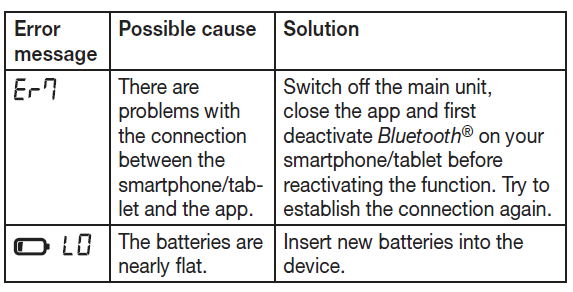
- No Display/Power Issue: Check batteries; replace if low indicator shows. Ensure correct polarity.
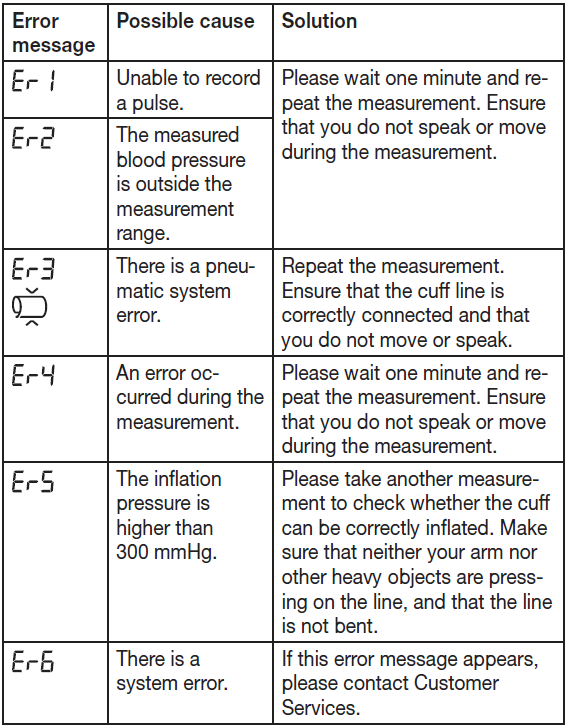
- Error Code (e.g., E1-E5): E1: No pulse detected—relax arm. E3: Irregular heartbeat—retry in resting state. E5: Cuff issues—reposition and follow the fit check.
- Inaccurate Readings: Use the resting indicator; ensure cuff is at heart level and rest your arm for 5 minutes. Avoid caffeine and movement before measurement.
- Bluetooth Pairing Fails: Enable app discovery, hold the Start button for “Pr”. Restart devices; app must run in foreground/background.
- Cuff Too Tight/Loose: Verify 22-42 cm fit; use the included cuff only.
Preventive Measures: Measure consistently, preferably morning and evening, and store the device in a dry place.
Warranty & Support: A 5-year warranty covers defects. Contact Beurer support via beurer.com or your local distributor. The package includes a manual and blood pressure passport for recording measurements.
Pros and Cons of the Beurer Upper Arm Blood Pressure Monitor BM 64
Pros
- Advanced AFib/PVC detection helps prevent strokes—superior to basic monitors.
- Bluetooth app sync for trend tracking; 2-user memory ideal for couples.
- User-friendly: Touch buttons, large backlight display, triple mode for accuracy.
- Comfortable inflation tech, resting indicator boosts precision.
- Great value at $80-$120 with a 5-year warranty vs. pricier clinically validated options.
Cons
- No peer-reviewed clinical validation found, per Medaval—not recommended for medical diagnosis alone.
- Batteries drain faster with Bluetooth; no rechargeable option included.
- Limited cuff size (22-42 cm)—may not fit very large/small arms.
- App setup tricky for non-tech users.
Overall, excellent for home use; outperforms budget alternatives in features, solid value for upper arm blood pressure monitor buyers.
Customer Reviews and Feedback on Beurer BM 64 Blood Pressure Monitor
Users praise the Beurer Upper Arm Blood Pressure Monitor BM 64 for ease and accuracy, averaging 4.5/5 stars across sites like Coolblue. "Love the app sync and AFib alert—peace of mind post-heart scare!" says one reviewer. Common praises: Large display, quick measurements, reliable averages
Complaints include occasional Bluetooth glitches ("Pairing took tries") and battery life ("Changes weekly"). Some note no validation: “Good for trends, consult doc.” 80% recommend for home monitoring, especially seniors valuing resting indicator. Addresses hypertension tracking perfectly—buy if app features matter.
Faqs
How do I set up the beurer Upper Arm Blood Pressure Monitor BM 64 for the first time?
What should I do if the beurer Upper Arm Blood Pressure Monitor BM 64 won't pair with my phone?
Why does the beurer Upper Arm Blood Pressure Monitor BM 64 show an error or cuff fit warning and how do I fix it?
How do I use the Triple Measurement feature on the beurer Upper Arm Blood Pressure Monitor BM 64 and why is it useful?
Can I use the beurer Upper Arm Blood Pressure Monitor BM 64 with two users and how are values stored?
What maintenance and care steps extend the life and accuracy of my beurer Upper Arm Blood Pressure Monitor BM 64?
How accurate is the beurer Upper Arm Blood Pressure Monitor BM 64 and how can I optimize measurement performance?
What do the advanced arrhythmia and AFib detection features of the beurer Upper Arm Blood Pressure Monitor BM 64 mean for home use?
More beurer manuals
- Setup: Beurer Upper Arm Blood Pressure Monitor BM 53 User Manual
- Setup: Beurer Blood Pressure Monitor BC 87 User Manual
- Setup: Beurer Upper Arm Blood Pressure Monitor BM 27+ User Manual
- Setup: Beurer Blood Pressure Monitor with ECG Function BM-96 Cardio User Manual
- Setup: Beurer Upper Arm Blood Pressure Monitor BM-81 EasyLock User Manual
- Setup: Beurer Blood Pressure Monitor BM-85 User Manual
Leave a Comment