
Setup: Beurer Blood Pressure Monitor BM-58 User Manual
Content
Introduction — beurer Blood Pressure Monitor BM-58 Overview
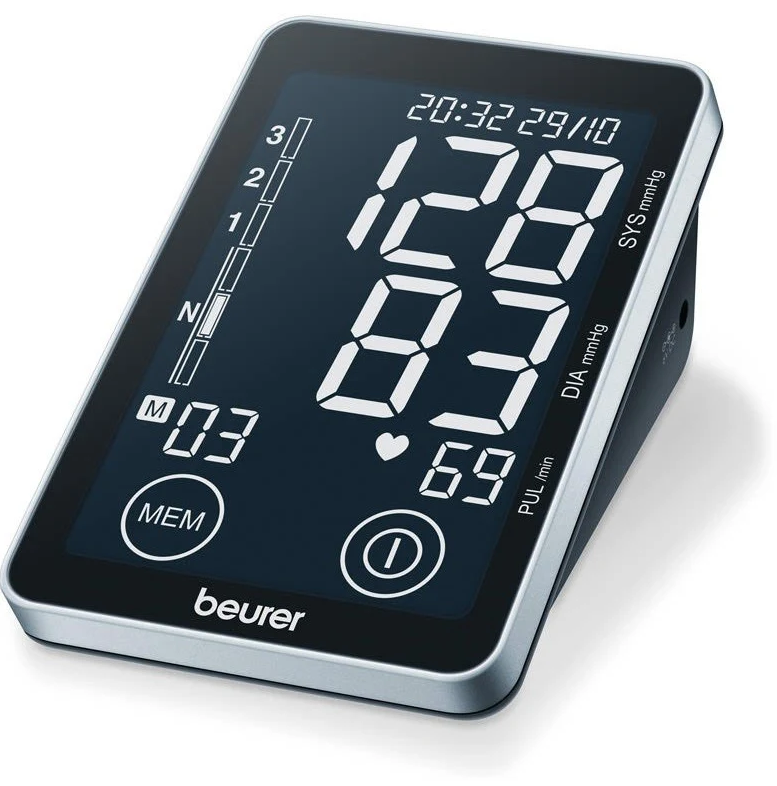
The beurer Blood Pressure Monitor BM-58 is a touchscreen-operated, fully automatic upper-arm blood pressure monitor designed for reliable home health monitoring and easy long-term tracking of cardiovascular data. It combines an extra-large, high-contrast display with touch-sensor buttons, WHO risk classification, arrhythmia detection and PC connectivity via the Beurer HealthManager software to help users and caregivers monitor trends and share data with clinicians.
Key benefits and unique selling points include fast, simultaneous systolic/diastolic and pulse measurement, visual risk indicator per WHO guidelines, arrhythmia warning, storage for two users (2 × 60 readings), and optional data management through Beurer’s HealthManager PC software using the supplied USB cable, making it a practical choice for adults managing hypertension, medication effects or general cardiovascular fitness.
Target audience and use cases: adults monitoring high blood pressure, patients tracking therapy effectiveness, caregivers supervising elderly relatives, and users who want a simple device with digital record-keeping for clinical appointments. Typical use cases are daily morning/evening readings, trend analysis over weeks, and exporting measurement logs for a clinician review.
Estimated price range and availability: retail prices typically range from an affordable mid-range bracket (approx. comparable to similar Beurer upper-arm models) and the BM-58 is widely available through medical supply retailers and online shops in many regions; some resellers list it in stock with included cuff, batteries and storage bag.
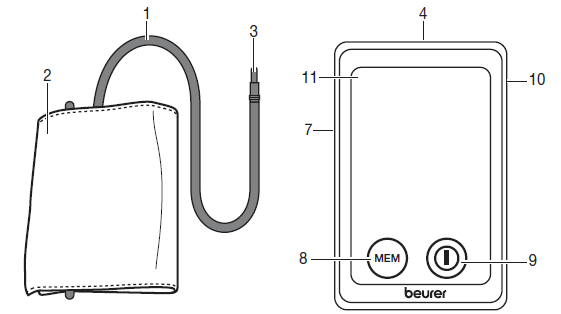
Parts
- Cuff tube
- Cuff
- Cuff connector
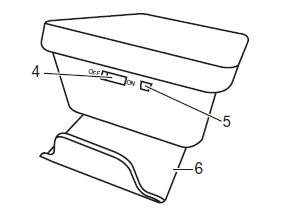
- Touch screen activation switch
- USB interface
- Cuff holder
- Cuff connector port (left side)
- Memory button MEM
- START/STOP button
- Mains part port
- Display
Specifications — Technical Details & Features
- Measurement type: Fully automatic upper-arm oscillometric measurement for systolic/diastolic pressure and pulse.
- Display: Extra-large illuminated black XL display for easy reading; touch-sensor buttons for operation.
- Accuracy & ranges: Systolic 60–260 mmHg, diastolic 40–199 mmHg, pulse 40–180 bpm; accuracy typically ±3 mmHg for pressure, ±5% for pulse as specified by vendor data.
- Cuff: Supplied upper-arm cuff for 22–30 cm circumference; XL cuff (30–42 cm) available as accessory.
- Memory & users: 2 user profiles × 60 readings each; averages for all stored measurements and morning/evening averages for the last 7 days.
- Special functions: WHO classification scale (risk indicator), arrhythmia detection, date/time, auto power-off, low battery indicator.
- Connectivity: USB/PC interface; compatible with Beurer HealthManager Pro software for data transfer and long-term tracking (USB cable often included).
- Power: 4 × AA (LR6) batteries; optional mains adapter available separately; battery life ~500 measurements (manufacturer guidance).
- Physical: Dimensions ~100 × 150 × 58 mm; weight ~364 g (device only).
- Operating conditions: Operating temperature approx. +5 °C to +40 °C, humidity <90% RH.
- Medical status: Marketed as a medical device for home use (check local regulatory labelling and declarations).
Advice on use
- In order to ensure comparable values, always measure your blood pressure at the same time of day.
- Do not measure within 30 minutes after eating, drinking, smoking or exercising.
- Before the initial blood pressure measurement, always make sure to rest for about 5 minutes.
- Furthermore, if you want to take several measurements in succession, always make sure to wait for at least 1 minute between the individual measurements.
- Repeat the measurement if you are unsure of the measured value.
- The measurements taken by you are for your information only – they are not a substitute for a medical examination! Discuss the measurements with your doctor, and never base any medical decisions on them (e.g. medicines and their administration)!
- Using the blood pressure monitor outside your home environment or whilst on the move (e.g. whilst travelling in a car, ambulance or helicopter, or whilst undertaking physical activity such as playing sport) can influence the measurement accuracy and cause incorrect measurements.
- Do not use the blood pressure monitor on newborns or patients with preeclampsia. We recommend consulting a doctor before using the blood pressure monitor during pregnancy.
- Cardiovascular diseases may lead to incorrect measurements or have a detrimental effect on measurement accuracy. The same also applies to very low blood pressure, diabetes, circulatory disorders and arrhythmias as well as chills or shaking.
- This device is not intended for use by people (including children) with restricted physical, sensory or mental skills or a lack of experience and/or a lack of knowledge, unless they are supervised by a person who is responsible for their safety or are instructed by such a person in how to use the device. Supervise children around the device to ensure they do not play with it.
- The blood pressure monitor must not be used in connection with a high-frequency surgical unit.
- Only use the device on people who have the specified upper arm measurement for the device.
- Please note that when inflating, the functions of the limb in question may be impaired.
- During the blood pressure measurement, blood circulation must not be stopped for an unnecessarily long time. If the device malfunctions, remove the cuff from the arm.
- Avoid any mechanical restriction, compression or bending of the cuff line.
- Do not allow sustained pressure in the cuff or frequent measurements. The resulting restriction of blood flow may cause injury.
- Ensure that the cuff is not placed on an arm in which the arteries or veins are undergoing medical treatment, e.g. intravascular access or therapy, or an arteriovenous (AV) shunt.
Storage and Care
- The blood pressure monitor is made up of precision electronic components. Accuracy of readings and the instrument’s service life depend on careful handling.
- You should protect the device from impact, moisture, dirt, major temperature fluctuations, and direct exposure to the sun’s rays.
- Never drop the device.
- Do not use near strong electromagnetic fields, i.e. keep it away from any radio systems and mobile phones.
- Only ever use the cuffs provided with the monitor or original replacement cuffs. Otherwise, erroneous results will be recorded.
- Do not press any buttons until the cuff is in position.
Notes on handling batteries
If your skin or eyes come into contact with battery fluid, rinse the affected areas with water and seek medical assistance.
Choking hazard!
- Small children may swallow and choke on batteries. Store the batteries out of the reach of small children.
- Observe the plus (+) and minus (-) polarity signs.
- If a battery has leaked, put on protective gloves and clean the battery compartment with a dry cloth.
- Protect batteries from excessive heat.
Risk of explosion
- Never throw batteries into a fire.
- Do not charge or short-circuit batteries.
- If the device is not to be used for a relatively long period, take the batteries out of the battery compartment.
- Use identical or equivalent battery types only.
- Always replace all batteries at the same time.
- Do not use rechargeable batteries.
- Do not disassemble, split or crush the batteries.
Notes on electromagnetic compatibility
- The device is suitable for use in all environments listed in these instructions for use, including domestic environments.
- The use of the device may be limited in the presence of electromagnetic disturbances. This could result in issues such as error messages or the failure of the display/device.
- Avoid using this device directly next to other devices or stacked on top of other devices, as this could lead to faulty operation. If, however, it is necessary to use the device in the manner stated, this device as well as the other devices must be monitored to ensure they are working properly.
- The use of accessories other than those specified or provided by the manufacturer of this device can lead to an increase in electromagnetic emissions or a decrease in the device’s electromagnetic immunity; this can result in faulty operation.
- Failure to comply with the above can impair the performance of the device.
Touch screen activation switch
The device features a touch screen display. To prevent the screen from being activated accidentally, keep the touch screen activation switch set to OFF when the device is not in use. To operate the device, move the touch screen activa-tion switch to ON. When the touch screen display is touched (START/STOP button or MEM button), a beep is output. Tip: You can switch off the device at any time by setting the touch screen activation switch to the OFF position.
Cuff holder
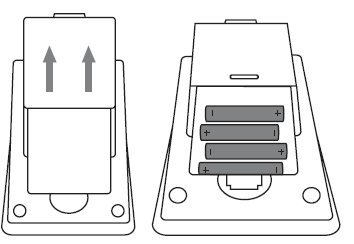
Thanks to the cuff holder on the underside of the device, you have the option of conveniently storing the cuff. To do so, push out the cuff holder with both thumbs until it locks into place (see also Chapter: Inserting battery).
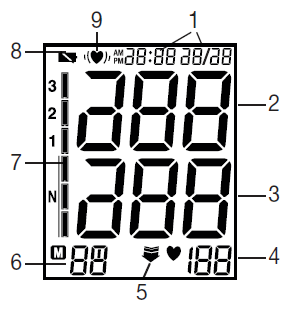
Icons in the display:
- Time and date
- Systolic pressure
- Diastolic pressure
- Measured pulse
- Release air (arrow)
- Memory display, average value, morning, evening
- Risk indicator
- “Change battery” icon

- Arrhythmia recognition
Transfer via USB
You can transfer your data using the “beurer HealthManager Pro USB-Uploader” PC software. This requires a USB cable (included in delivery). You can download the software free of charge at the follow-ing link: connect.beurer.com/download/software System requirements for the “beurer HealthManager Pro USB-Uploader” PC software.
“beurer HealthManager Pro” app
Once you have transferred the data using the PC software, you can view it in the “beurer HealthManager Pro” app and web view. The “beurer HealthManager Pro” app is available free of charge from the Apple App Store or Google Play.
Prepare measurement
Inserting battery
- Push the cuff holder upwards at the rear of the device until it locks into place.
- Open the battery compartment lid.
- Insert four AA 1.5 V alkaline batteries, making absolutely sure that you insert them with the correct polarity as marked. Never use rechargeable batteries.
- Replace the battery cover carefully.
If the battery change is continuously illuminated, measurement is no longer possible, and you must replace all the batteries. Once batteries have been removed from the device, the time must be reset. Used batteries do not belong in the household waste. You are legally obliged to dispose of the batteries. Dispose of them via your specialist electrical supplier or local collecting point for recyclable waste.
Operation with the mains part
You can also operate this device with a mains part. When doing so, there must not be any batteries in the battery compartment. The mains part can be obtained from specialist retailers or from the service address using order number 071.95.
- To prevent possible damage to the device, the blood pressure monitor must only be used with the mains part described here.
- Insert the mains part into the connection provided for this purpose on the right-hand side of the blood pressure monitor. The mains part must only be connected to the mains voltage that is specified on the type plate.
- Then insert the mains plug of the mains part into the mains socket.
- After using the blood pressure monitor, unplug the mains part from the mains socket first and then disconnect it from the blood pressure monitor. As soon as you unplug the mains part, the blood pressure monitor loses the date and time setting, but the saved measurements are retained.
Measuring blood pressure
Ensure the device is at room temperature before measuring. The measurement can be performed on the left or right arm.
Attaching the cuff
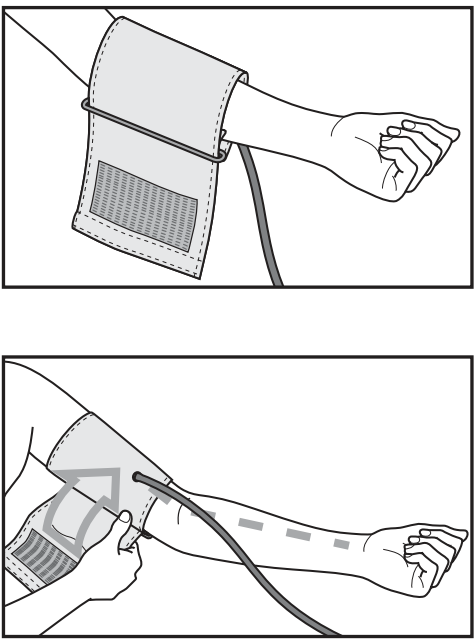
- Place the cuff onto the bare upper arm. The circulation of the arm must not be hindered by tight clothing or similar.
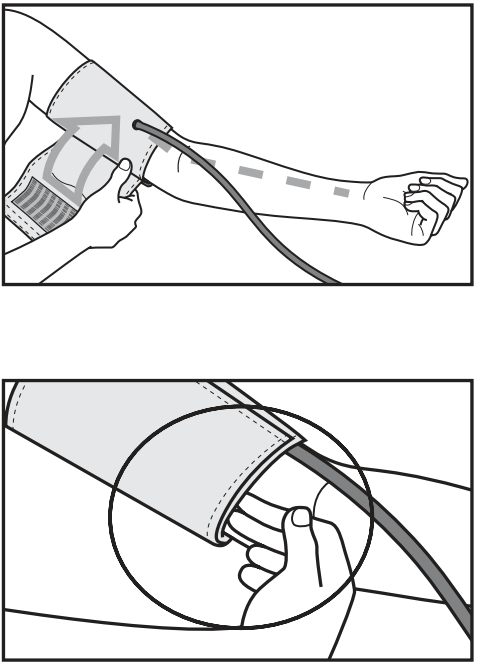
- The cuff must be placed on the upper arm so that the bottom edge is positioned 2–3 cm above the elbow and over the artery. The line should point to the centre of the palm.
- Now tighten the free end of the cuff, but make sure that it is not too tight around the arm, and close the hook-and-loop fastener. The cuff should be fastened so that two fingers can fit under the cuff.
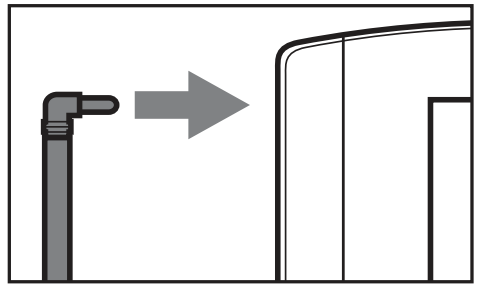
- Now insert the cuff line into the connection for the cuff connector.
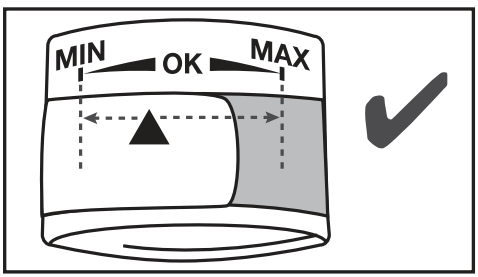
- This cuff is suitable for you if the index mark is within the OK range after fitting the cuff on the upper arm.
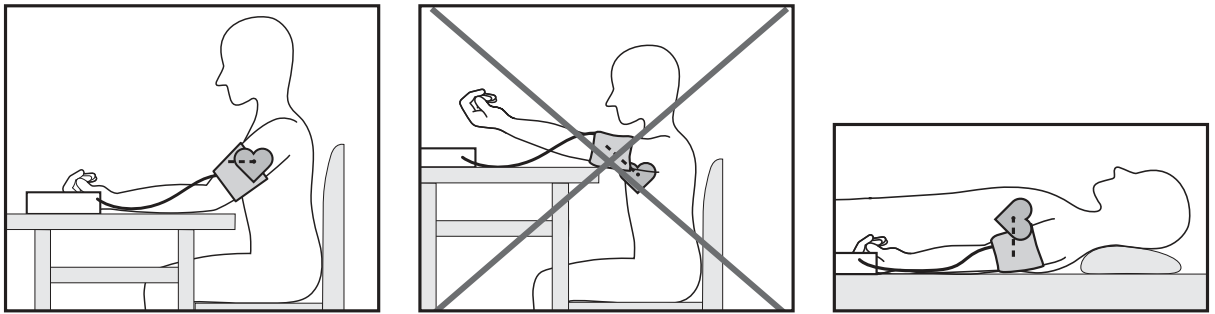
Correct posture
- Before the initial blood pressure measurement, always make sure to rest for about 5 minutes. Otherwise, there may be divergences.
- Furthermore, if you want to take several measurements in succession, always make sure to wait for at least 1 minute between the individual measurements.
- You can perform the measurement either sitting or lying down. Always make sure that the cuff is level with your heart.
- To carry out a blood pressure measurement, make sure you are sitting comfortably with your arms and back supported. Do not cross your legs. Place your feet flat on the ground.
In order not to distort the result, it is important to keep still during the measurement and not talk.
Measuring blood pressure
- Move the touch screen activation switch to the ON position. Put on the cuff as described previously and assume the position in which you want to carry out the measurement.
- Switch on the blood pressure monitor with the START/STOP button. After the full-screen display, the most recently used user memory appears. To change the user memory, press the MEM button and confirm your selection with the START/STOP button. If no button is pressed, the most recently used user memory is automatically used after 5 seconds.
- Before the measurement, the last saved test result is briefly displayed. If there is no measurement in the memory, the instrument displays the corresponding empty-memory indicator.
- The cuff automatically inflates. Cuff air pressure is released slowly. If a tendency towards high blood pressure is already detectable, the cuff is pumped up again and cuff pressure is increased further. As soon as a heart rate is detected, the heart rate symbol is displayed.
- Heart rate, systolic and diastolic blood pressure are displayed.
Evaluating results
Cardiac arrhythmia:
This instrument can identify possible cardiac arrhythmia disorders during measurement and if necessary, indicates the measurement with the flashing icon  . This may be an indicator for arrhythmia. Arrhythmia is a condition where the heart rhythm is abnormal as a result of defects in the bioelectrical system controlling the heartbeat. The symptoms (omitted or premature heartbeats, slow or excessively fast heart rate) may be caused, among other things, by heart disease, age, physical predisposition, excessive use of stimulants, stress, or lack of sleep. Arrhythmia can only be ascertained through examination by your doctor. Repeat the measurement if the flashing icon is displayed after the measurement. Please note that you should rest for 5 minutes between measurements and not talk or move during the measurement. If the icon appears often, please contact your doctor. Any self-diagnosis and treatment based on the test results may be dangerous. It is vital to follow your doctor’s instructions.
Risk indicator:
The measurements can be classified and evaluated in accordance with the following table. However, these standard values serve only as a general guideline, as the individual blood pressure varies in different people and different age groups, etc. It is important to consult your doctor regularly for advice. Your doctor will tell you your individual values for normal blood pressure as well as the value above which your blood pressure is classified as dangerous. The bar chart on the display and the scale on the unit show which category the recorded blood pressure values fall into. If the values of systole and diastole fall into two different categories (e.g. systole in the High normal category and diastole in the Normal category), the graphical classification on the device always shows the higher category; for the example given this would be High normal.
Saving, retrieving and deleting results
- The results of each successful measurement are stored together with the date and time. When more than 60 measured values are stored, the earliest measurements are deleted.
- Move the touch screen activation switch to the ON position.
- Make a selection with the MEM button, and then confirm the desired user memory with the START/STOP button.
- If you press the MEM button again, the average value of all the stored measured values in the user memory will be displayed.
- If you press the MEM button again, the average value of the last 7 days for the morning measurements will be displayed (Morning: 5 a.m. – 9 a.m.).
- If you press the MEM button again, the average value of the last 7 days for the evening measurements will be displayed (Evening: 6 p.m. – 8 p.m.).
- If you continue to press the MEM button, the most recent individual measured values with date and time are displayed in turn.
Transferring measurements
Connect the blood pressure monitor to your PC using the USB cable. No data transfer may be launched whilst performing a measurement. PC is shown on the display. Begin the data transfer in the “beurer HealthManager” PC software. During the data transfer, an animation is shown on the display. A successful data transfer is displayed as in Figure 1. If the data transfer is unsuccessful, an error message appears as in Figure 2. In this case, interrupt the PC connection and start the data transfer again. After 30 seconds of not being in use or if communication with the PC is interrupted, the blood pressure monitor switches itself off automatically.
Comparison with similar products:
Against other Beurer upper-arm monitors, the BM-58 stands out for its XL black display, touch-sensor operation, and PC interface — features usually found on higher-end home monitors; unlike some compact models, it includes arrhythmia detection and 2 × 60 memory storage comparable to peer devices in the mid-to-upper consumer range.
Troubleshooting — Common Problems & Fixes
- No power or blank display: Check and replace 4 × AA batteries; ensure correct polarity and press the touch sensor activation (on devices with on/off sensor) or connect the optional mains adapter if available.
- Erratic or no measurement: Ensure the cuff is fitted correctly on the upper arm (22–30 cm), in a relaxed posture, and no talking/movement during measurement; retake after 2–3 minutes if reading fails.
- Inaccurate or inconsistent readings: Measure at consistent times (morning/evening), same arm, avoid caffeine/smoking/exercise 30 minutes before measurement, and use the same body posture each time.
- Device shows arrhythmia icon: Arrhythmia detection flags irregular heartbeat during measurement — retake reading and consult a physician if irregularities persist; this is a screening indicator, not a diagnostic ECG.
- Error codes: Manufacturer literature and device manual list error messages (e.g., cuff not fitted, movement artefact, overpressure). If a persistent error appears, remove and reapply cuff, replace the batteries, and restart; consult the user manual for specific code definitions.
- USB/data transfer problems: Verify the USB cable is connected, install Beurer HealthManager Pro software and the correct drivers, and check that the device is switched on and recognized by PC; try a different USB port or reinstall the software if necessary.
Error messages may appear if:
- Systolic or diastolic pressure could not be measured: An error message appears on the display.
- Systolic or diastolic pressure was outside the measurement range: An error message or "Lo" appears on the display.
- The cuff is fastened too tightly or loosely: An error message appears on the display.
- The pump pressure is higher than 300 mmHg: An error message appears on the display.
- Pumping up takes longer than 160 seconds: An error message appears on the display.
- There is a system or device error: An error message appears on the display.
In the above cases, you must repeat the measurement.
- Make sure that the cuff tube is properly inserted and that you do not move or talk.
- Reinsert the batteries if necessary, or replace them.
Preventive measures: store the device and cuff in the supplied bag, avoid extreme temperatures, use disposable AA batteries (the manufacturer advises against rechargeable batteries for optimal measurement stability), calibrate or check periodically against clinical measurement.
Warranty & support: warranty and service terms vary by retailer and region — check your supplier’s warranty card and Beurer’s local support pages for repair/service instructions and authorized service centers. For technical support and software downloads, use Beurer’s official support/download pages or contact the retailer where you purchased the unit
Pros & Cons — Honest Assessment
Pros — Clear Strengths
- XL black illuminated display and touch-sensor controls make readings easy to read and operate, especially for older users.
- Arrhythmia detection and WHO risk indicator add clinical value for monitoring and triage at home.
- PC connectivity (Beurer HealthManager) helps users export and manage data for appointments — useful for chronic condition tracking.
- Two-user memory with averages supports family use and trend tracking over time.
Cons — Limitations & Considerations
- Cuff included fits 22–30 cm only; users with larger arms must buy XL cuff accessory separately, which adds cost.
- Some users report a learning curve with touch sensors versus physical buttons, particularly when wearing gloves or with limited dexterity.
- As with many consumer monitors, clinical verification against a healthcare professional is advised — the device flags arrhythmia but is not a substitute for ECG diagnosis.
Value for Money
- The BM-58 offers a strong feature set (touchscreen, XL display, arrhythmia detection, PC software) that positions it as good value in the mid-range home BP monitor market; cost-conscious buyers should compare prices and check whether an XL cuff or mains adapter is included.
Alternatives
- Simpler models from Beurer or other brands may be less expensive but lack the BM-58’s display or PC integration; higher-end models may offer Bluetooth and mobile app integration if wireless syncing is a priority.
Customer Reviews — User Feedback & Ratings
Typical user sentiment for the beurer Blood Pressure Monitor BM-58 is generally positive, with praise for the large illuminated display, intuitive touchscreen, and the convenience of PC data transfer; reviewers commonly highlight the clear WHO risk indicator and reliable memory function for two users.
Common complaints include the need to purchase an XL cuff for larger arms, occasional difficulty using touch sensors for some users, and the recommendation to verify readings clinically because home monitors can differ from clinic sphygmomanometers. Representative ratings: many retailers and resellers list favorable star‑rankings in the 4‑star range (out of 5) based on ease of use and features; purchasers who value data export and a legible display frequently recommend the BM‑58 for home monitoring, while users needing Bluetooth/mobile app sync may prefer other models.
Purchase recommendation
- Recommended for adults who want a reliable home monitor with a large display, PC data management, and arrhythmia alerting; check cuff size and consider an accessory cuff if needed.
Faqs
How do I set up the beurer Blood Pressure Monitor BM-58 for the first time?
How do I correctly position the cuff on the beurer Blood Pressure Monitor BM-58 for accurate readings?
What should I do if the beurer Blood Pressure Monitor BM-58 shows an error or incorrect usage message?
How do I transfer data from the beurer Blood Pressure Monitor BM-58 to my computer using Beurer HealthManager?
What does the arrhythmia detection feature mean on the beurer Blood Pressure Monitor BM-58?
How do I switch between users and view average readings on the beurer Blood Pressure Monitor BM-58?
What batteries does the beurer Blood Pressure Monitor BM-58 use, and how do I maintain its battery life?
How do I clean and maintain the beurer Blood Pressure Monitor BM-58 for long-term accuracy?
More beurer manuals
- Setup: Beurer Blood Pressure Monitor BC-54 User Manual
- How to Use: Beurer Upper Arm Blood Pressure Monitor BM-59 User Manual
- Setup: Beurer Blood Pressure Monitor BM-85 User Manual
- Beurer Digital Tens Device EM-44 User Manual
- Setup: Beurer Blood Pressure Monitor with ECG Function BM-96 Cardio User Manual
- How to Use: Beurer Hair removal IPL 10000 | Setup Guide
Leave a Comment