
Setup: Beurer Digital TENS/EMS Device EM-49 User Manual
Content
Introduction — Beurer Digital TENS/EMS Device EM 49: overview, benefits and who it’s for
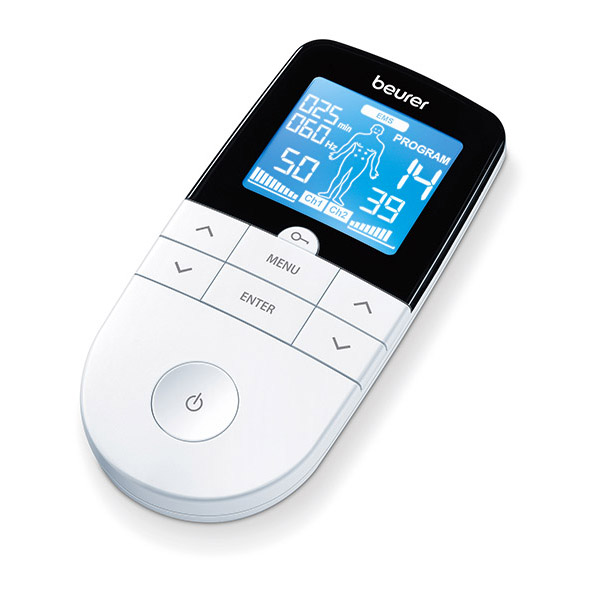
The beurer Digital TENS/EMS Device EM 49 is a compact, medically certified dual‑mode stimulator that combines TENS (transcutaneous electrical nerve stimulation) for drug‑free pain relief, EMS (electrical muscle stimulation) for muscle training and regeneration, plus soothing massage programs for relaxation. The unit ships with four self‑adhesive gel electrodes, two independent channels with individually adjustable intensity, an illuminated inverse LCD for clear program navigation, and a belt clip for portable use. The device includes a comprehensive set of pre‑programmed treatments—typically described as 15 TENS, 35 EMS and 20 massage programs (over 70 program options total) plus 6 fully customisable programs—allowing users to tailor frequency, pulse width and on/off times to their needs. The EM 49 is intended for adults seeking non‑pharmacological pain management (e.g., back, neck, shoulder, limb pain), sports recovery and targeted muscle activation, and is suitable for physiotherapy patients using electrical stimulation at home under professional guidance.
Key benefits and unique selling points include:
- Multi‑function 3‑in‑1 design — pain relief, muscle stimulation and massage in one device.
- Extensive preset library with program categories and an electrode position indicator for easy placement.
- Two independent channels for simultaneous, different intensity treatments on separate body areas.
- Customisable parameters (frequency 1–150 Hz; pulse width 50–450 µs) for personalized therapy sessions.
- Portable and user‑friendly — belt clip, illuminated display, timer and safety auto‑switch off features.
Estimated price range and availability: the EM 49 is positioned as a mid‑range consumer/medical device; typical retail pricing in major markets (online retailers and medical supply stores) has ranged from approximately USD/EUR 80–160 depending on promotions and included accessories. The product is widely available from Beurer’s official shop, medical suppliers and large electronics/health retailers.
Quick technical specifications
- Programs: 15 TENS / 35 EMS / 20 Massage (over 70 programs total) plus 6 customizable programs.
- Channels & electrodes: 2 independent channels; 4 self‑adhesive gel electrodes (45 × 45 mm included).
- Pulse frequency: 1–150 Hz; pulse width: 50–450 µs; biphasic rectangular pulse form.
- Output (typical): max ~100 Vpp (500 Ω), max ~200 mApp (500 Ω).
- Timer: adjustable 5–100 minutes; power: 3 × AAA batteries; display: inverse LCD with blue backlight.
DEVICE DESCRIPTION
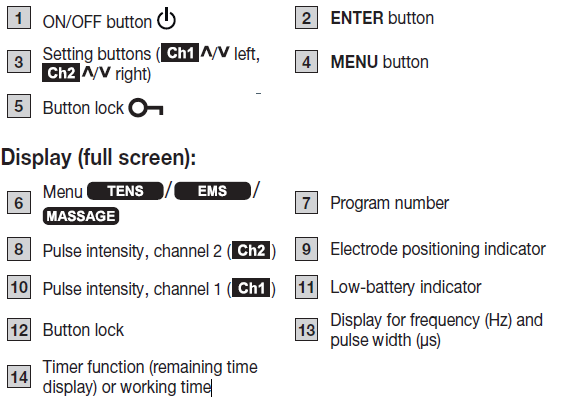
INTENDED USE
TENS/EMS purpose
The device is intended to treat pain using TENS technology (transcutaneous electrical nerve stimulation). For non-medical purposes, the device can also be used, with EMS technology (electrical muscle stimulation), to strengthen the muscles, and for regeneration and relaxing massages.
TENS/EMS target group
This device is intended for self-treatment in the home, and not in professional healthcare facilities. It is generally suitable for use by all adults where no contraindications exist.
Clinical benefits
Treatment of pain arising from various causes.
Non-clinical benefits
- Muscle training to increase endurance and/or
- Training to support the strengthening of specific muscles or muscle groups, and to achieve the desired changes to physical proportions.
- Acceleration of muscle regeneration after intense muscular output (e.g. after a marathon).
- Improving symptoms of muscular fatigue.
- Muscle relaxation for easing muscle tension.
Indications
- Back pain – pain at rest and on exertion.
- Joint pain – pain at rest and on exertion.
- Neuralgia, including phantom pain.
- Menstrual cramps.
- Pain due to circulatory disorders – pain at rest and on exertion.
- Headaches.
- Pain after musculoskeletal injuries – pain at rest and on exertion.
- Chronic pain due to various causes – pain at rest and on exertion.
Contraindications
- If you have implanted electrical devices (e.g. a pacemaker).
- If you have metal implants.
- If you use an insulin pump.
- If you have a high temperature (e.g. >39°C).
- If you have any known or acute cardiac arrhythmias or disorders of the heart’s impulse and conduction system.
- If you suffer from a seizure disorder (e.g. epilepsy).
- If the patient is pregnant.
- If the patient has cancer.
- After surgery, when severe muscle contractions may interfere with the healing process.
- Never use the device near the heart: the stimulation electrodes should not be placed on any part of the anterior chest (where the ribs and sternum are located), especially not on the two large pectoral muscles, as this may increase the risk of ventricular fibrillation and cause cardiac arrest.
- Do not use on the skeletal structure of the skull or around the mouth, throat or larynx.
- Do not use on the neck/carotid artery/carotid artery area.
- Do not use on the genital area.
- Do not use on acutely or chronically affected (by injury or irritation) skin (e.g. inflamed skin – whether painful or not; reddened skin; skin rashes, e.g. due to allergies; burns; bruising; swelling; open and healing wounds and post-operative scars where the healing process could be impaired).
- Do not use if you are connected to a high-frequency surgical device.
- Do not use if you have an acute or chronic disease of the gastrointestinal tract.
- Do not use in the event of a known allergy to the electrode material.
WARNING!
Undesirable side effects
- Skin irritation.
- Feeling of pressure at the electrode location.
- Slight redness, burning and pain of the skin after treatment.
- Paraesthesia.
- Discomfort.
- Sleepiness.
- Muscle vibrations.
- Tension.
- Headaches.
- Increased menstrual bleeding.
- Allergic inflammatory reactions to components.
GENERAL WARNINGS
WARNING
The device is not a substitute for medical consultation and treatment. Always consult your doctor first in the event of pain or illness. Before using the device, consult your doctor if any of the following apply to you:
- If you suffer from an acute medical condition, in particular if you suspect or have been diagnosed with high blood pressure, a blood coagulation disorder, propensity to thrombo-embolic conditions or recurrent malignant growths.
- If you have any skin conditions.
- If you have unexplained chronic pain in any part of the body.
- If you suffer from diabetes.
Only use this Digital TENS/EMS device:
- On people.
- For the intended purpose and as specified in these instructions for use. Any form of improper use can be dangerous.
- For external use only.
- With the original accessories supplied, which can be re-ordered. Failure to do so invalidates the warranty.
- In a private/domestic environment – the device is not intended for commercial use.
CAUTION
- This device is NOT intended for use by people with restricted physical, sensory or mental skills or a lack of experience and/or a lack of knowledge, unless they are supervised by a person who has responsibility for their safety or they receive instructions from this person on how to use the device.
- Not to be used after consumption of alcohol, drugs or medicines that impair awareness.
- Children must not play with the device.
- Do not use in humid environments (e.g. in the bathroom) or when bathing or showering.
Damage
- If the device is damaged, do not use it and contact your retailer or the specified Customer Services address.
- To ensure that the device functions effectively, do not drop it or dismantle it.
- Check the device for signs of wear and tear or damage. If there are such signs of wear and tear or damage or if the device was used improperly, it must be returned to the manufacturer or retailer before further use.
- Switch the device off immediately if it is faulty or not working properly.
- Never attempt to open and/or repair the device yourself. Repairs may only be carried out by Customer Services or authorised retailers. Failure to comply with this instruction will void the guarantee.
- The manufacturer is not liable for damage resulting from improper or incorrect use.
Measures for handling batteries
WARNING
- Risk of explosion! Risk of fire! Failure to comply with the following points can result in personal injury or cause overheating, leakage, venting, breakage, explosion, or fire on the battery.
- This device contains non-rechargeable batteries which must not be charged.
- Do not throw batteries into a fire.
- Never charge, forcibly discharge, heat, disassemble, open, crush, deform, encapsulate, or modify batteries.
- Never short-circuit batteries or battery compartment contacts.
- Protect the batteries from direct sunlight, rain, heat, and water.
- Exposure of batteries to an environment with extremely high temperatures or an extremely low air pressure may result in explosion or leakage of flammable liquids and gases.
- Dispose of defective and discharged batteries immediately and properly.
- Do not use modified or damaged batteries.
- Always select the correct battery type.
CAUTION
- Store batteries in a well-ventilated, dry, and cool place in a non-conductive container in which the batteries cannot be short-circuited to each other or by other metal objects.
- Keep batteries clean and dry.
- Keep batteries away from water.
- If the device is not going to be used for a long period of time, remove the batteries from the battery compartment.
INITIAL USE
- Remove the belt clip from the device, if it is attached.
- Press the battery compartment cover on the rear of the device and slide it downwards.
- Insert 3 alkaline AAA 1.5 V batteries. Make sure that the batteries are inserted the correct way round in accordance with the markings.
- Carefully close the battery compartment cover B1.
- Reattach the belt clip, if required.
- Attach the connection cable to the electrodes B2. The electrodes feature clip closures to make attachment particularly easy.
- Insert the connection cable plug into the socket on the top of the device B3.
- Do not pull, twist or sharply bend the cables B4.
Please note that when the batteries are replaced or removed, all settings are restored to the factory default settings.
USE
Notes on use
- The device switches itself off automatically if it is not used for one minute (automatic switch-off). When switched on again, the LCD screen of the menu selection appears with the most recently used menu flashing.
- A brief acoustic signal is output when a valid button is pressed. Two brief acoustic signals are output when an invalid button is pressed.
- You can pause the stimulation at any time by briefly pressing the ON/OFF button. To continue the stimulation, set your preferred pulse intensity again.
Starting use
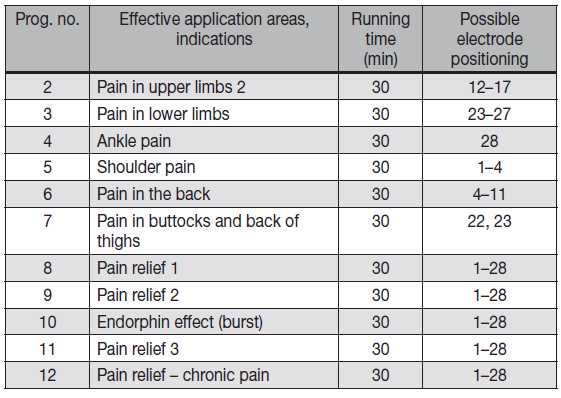
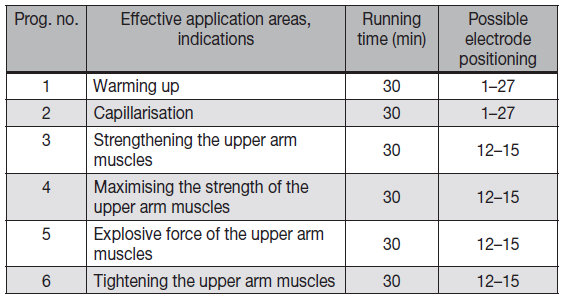
- Step 1: Find a suitable program in the program tables.
- Step 2: Place the electrodes on your chosen area (for positioning suggestions, see section “Information on electrode positioning”) and connect them to the device.
- Step 3: Press the ON/OFF button to switch the device on.
- Step 4: Press the MENU button to navigate through the TENS/EMS/MASSAGE menus and confirm your choice by pressing the ENTER button.
- Step 5: Use the setting buttons to select your preferred program number and press the ENTER button to confirm your selection. At the start of the stimulation treatment, the pulse intensity of both channels is set to 0 by default. No pulses are sent to the electrodes yet.
- Step 6: Use the left and right setting buttons as needed for the respective channels to select your preferred pulse intensity. The indicator for pulse intensity in the display changes accordingly.
TENS program table

EMS program table
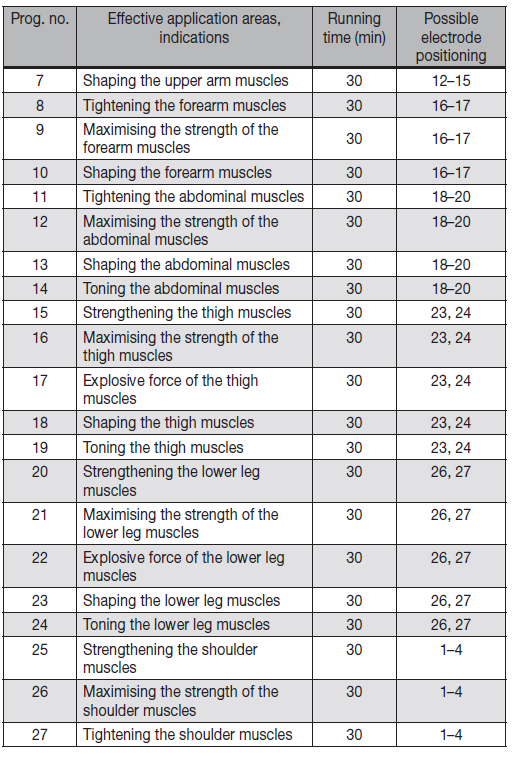
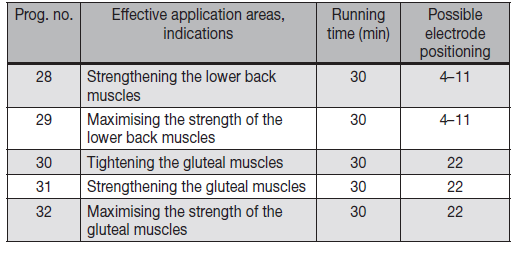
MASSAGE program table
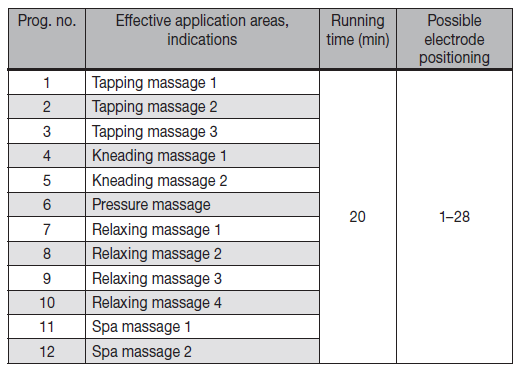
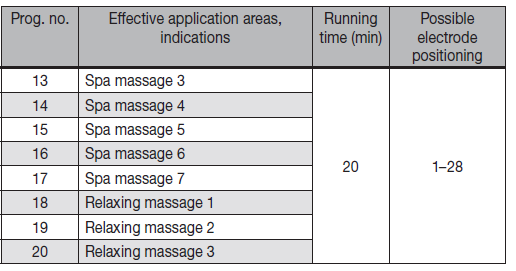
Information on electrode positioning
It is fundamental to the intended success of electrostimulation applications that electrodes are properly placed. We recommend that you consult your doctor to establish the ideal electrode positions for your intended application area. The figure on the display is intended as an initial aid to help you position the electrodes. The following applies to the selection of electrode positions:
Electrode spacing
The greater the distance between electrodes, the larger the volume of tissue stimulated. This applies to the area and depth of the tissue volume. At the same time, however, the stimulation intensity applied to the tissue decreases with more distance between electrodes. As a result, greater distances between electrodes mean a larger tissue volume is stimulated, but less intensively. As such, you must increase the pulse intensity to boost stimulation in this case.
The following guidelines apply when choosing the electrode distances:
- Effective spacing: approx. 5–15 cm.
- With spacing of less than 5 cm, the device will primarily apply strong stimulation to surface structures.
- With spacing in excess of 15 cm, large areas and deep structures will be very weakly stimulated.
Therapy memory
The EM49 records the treatment time. To access the therapy memory, switch the device on using the ON/OFF button and press and hold the button for 5 seconds. The elapsed treatment time appears in the display. The top two numbers represent the minutes; the hours are shown below. To reset the treatment time, press and hold the button for 5 seconds. When the batteries are replaced, the therapy memory is automatically reset. Press the MENU button to return to selecting a program, or switch the device off.
Info: The therapy memory cannot be accessed if the Doctor’s function is activated.
Electric current parameters
Electrostimulation devices operate with the following electric current settings, which may affect the stimulation results differently, depending on the setting:
Pulse shape
This describes the time function of the stimulating current. A distinction is made between monophasic and biphasic pulse currents. In monophasic pulse currents, the current flows in one direction, and in biphasic pulse currents, the electrical pulse alternates its direction. The Digital TENS/EMS device only provides biphasic pulse currents as these relieve muscles, cause little muscle fatigue, and offer safer use.
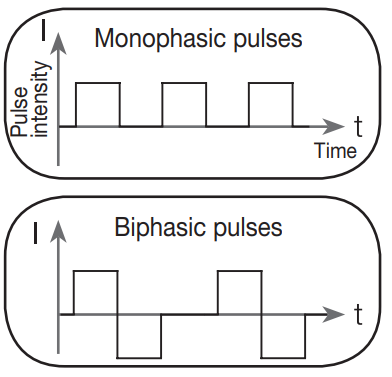
Pulse frequency
The frequency indicates the number of individual pulses per second and is displayed in Hz (Hertz). It can be calculated by determining the cyclic value for the time period. The relevant frequency determines which types of muscle fibres react most favourably. Slow-reaction fibres react more easily to lower pulse frequencies of up to 15 Hz, whereas rapid-reaction fibres only respond from approximately 35 Hz up. Pulses of approx. 45–70 Hz are linked with constant tension in the muscles and quicker fatigue. Higher pulse frequencies are therefore better to use for speed strength and maximum power training.
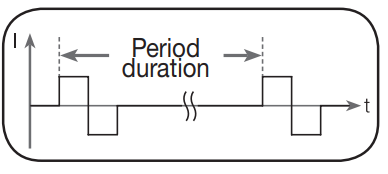
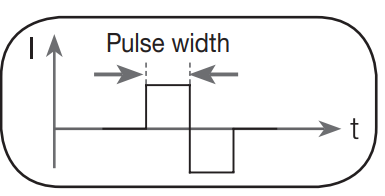
Pulse width
This indicates the duration of an individual pulse in microseconds. Among other aspects, the pulse width therefore determines the penetration depth of the electricity, where usually larger muscle mass requires a larger pulse width.
Pulse intensity
Adjusting the intensity level depends on the individual sensitivity of each user and is determined by a variety of variables, such as site of application, blood supply to the skin, skin thickness and the quality of the electrode contact. The settings should be effective but should never cause an unpleasant sensation, such as pain at the site of application. While a gentle tingling indicates sufficient stimulation energy levels, any setting that causes pain should be avoided. If using the device over an extended period, you may need to adjust the intensity level as your muscles start to adapt to the pulse intensity.
CLEANING AND MAINTENANCE
Adhesive electrodes
To ensure that the adhesive electrodes remain adhesive for as long as possible, clean them carefully with a damp, lint-free cloth or clean the underside of the electrodes under lukewarm running water and pat dry with a lint-free cloth. Before cleaning with water, remove the connection cables from the electrodes. Following treatment, stick the electrodes back onto the carrier foil.
Cleaning the device
- Always remove the batteries from the device before cleaning.
- The number of uses possible depends on the environmental conditions and skin qualities. If the electrodes no longer adhere to the skin properly during use, please replace them.
- Clean the device after use with a soft, slightly damp cloth. If it is very dirty, you can also moisten the cloth with a mild soapy solution.
- Do not use any chemical or abrasive cleaning agents for cleaning.
Ensure that no water enters the device.
Reuse of the device
Once it has been properly prepared, the device can be used again. Preparation includes replacement of the treatment electrodes as well as cleaning of the surface of the device using a cloth moistened with a mild soapy solution.
Storage
- Remove the batteries from the device if you will not be using it for a prolonged period of time. Leaking batteries may damage the device.
- Do not make sharp bends in the connection cables or the electrodes.
- Disconnect the connection cables from the electrodes.
- After use, stick the electrodes back onto the carrier foil.
- Store the device in a cool, well-ventilated location.
- Never place any heavy objects on the device.
Troubleshooting — common problems, error codes, fixes and support
- Common issue: No stimulation or very weak stimulation. Possible fixes: check electrode placement and skin contact, replace or rehydrate self‑adhesive gel pads, ensure cables are fully inserted, and verify battery level (device uses 3 × AAA batteries). If intensity shows low despite correct setup, replace electrodes and batteries and try both channels separately to isolate a faulty lead.
- Problem: Device won’t power on. Fixes: confirm fresh AAA batteries and correct polarity, check battery contacts for corrosion, and ensure battery compartment lid is properly closed; if the problem persists, contact Beurer support for service options.
- Error codes and behaviour: the EM 49 typically indicates low battery via a battery icon and uses an auto safety shut‑off for long idle periods; consult the instruction booklet for any specific display messages related to electrode connection or overload. If the device displays an unexpected symbol or freezes, remove batteries for 30 seconds and re‑insert them, then re‑start. If recurring, contact authorised service.
- Preventive measures: store electrodes on the original film, keep contacts clean, replace gel pads every few months or when adhesion/feeling degrades, avoid using on irritated or broken skin, and follow contraindications in the user manual (e.g., do not use with pacemakers, during pregnancy in certain areas, or over malignant tissue unless advised by a physician).
Warranty and support: Beurer typically provides a manufacturer warranty (varies by region; 2–5 years commonly reported). For repairs, replacement parts or technical help, contact Beurer customer service or the retailer where you purchased the unit—the official Beurer product page and authorised distributors provide warranty registration and local support channels.
Pros & Cons — balanced assessment of the EM 49
- Pros — Versatile therapy options: 3‑in‑1 TENS/EMS/massage capability and over 70 preset programs make the EM 49 suitable for pain relief, rehabilitation and fitness recovery use cases.
- Pros — Dual independent channels: allows simultaneous treatment of two areas with different intensities for targeted therapy (example: lower back + shoulder during one session).
- Pros — Customisation & doctor function: six user-programmable slots plus a “Doctor” function for storing clinician‑recommended settings improves continuity of care.
- Pros — Portability and usability: light weight, belt clip and illuminated inverse LCD make home and on‑the‑go use straightforward.
- Cons — Consumable cost: ongoing expense for replacement gel electrodes; quality and longevity vary by usage frequency.
- Cons — Batteries, not rechargeable: uses 3 × AAA cells rather than a built‑in rechargeable battery, which may be inconvenient for frequent users.
- Cons — Learning curve: wide range of programs and parameter settings may be confusing to new users; reading the manual or consulting a clinician is advised.
- Value for money: For users who need a medically certified, multi‑function stimulator, the EM 49 represents strong value compared with single‑function TENS units; alternatives with rechargeable batteries or proprietary electrode systems may offer lower long‑term consumable cost depending on usage.
Customer reviews, ratings and real‑world feedback
Typical user feedback for the beurer Digital TENS/EMS Device EM 49 highlights effective pain relief for chronic back and neck discomfort, useful muscle stimulation for post‑training recovery, and appreciation for the many preset programs and electrode position guide. Many reviewers rate the device between 4 and 5 stars for build quality and therapeutic flexibility.
Common praises include: clear display and easy program navigation, dual channels for multi‑site use, and the Doctor/ favourites function for quick recall of preferred settings. Frequent complaints center on the adhesive life of supplied gel pads (users often purchase replacement pads) and the fact that the device uses disposable AAA batteries rather than an internal rechargeable cell. Overall purchase recommendation: recommended for home users who want a medically certified, multi‑purpose stimulator; professionals may prefer clinic‑grade devices for higher output or rechargeable operation.
SEO & optimization: keywords and long‑tail headings for search visibility
Long‑tail heading: How to use beurer Digital TENS/EMS Device EM 49 for back pain relief
Use the device’s TENS programs targeted at the lumbar region and follow electrode placement diagrams in the manual; start at low intensity and increase until you feel a comfortable tingling but not pain. Typical session times are adjustable from 5 to 100 minutes depending on program and clinical advice.
Semantic keywords and related terms included
- beurer Digital TENS/EMS Device EM 49
- TENS unit, EMS stimulator, electrical muscle stimulation
- pain relief device, muscle recovery, physiotherapy at home
- pre‑programmed programs, customizable stimulation settings
- electrode pads, dual channel TENS, medical device for pain
When to consult a clinician and safety reminders
Do not use over implanted electronic devices (e.g., pacemakers), malignant tissue, the carotid sinus, or on the abdomen during pregnancy unless a clinician expressly permits it. If you have cardiovascular disease, epilepsy, or other serious medical conditions, consult your healthcare provider before using the device. Discontinue use and seek medical advice if stimulation causes pain, skin irritation, or unexpected symptoms.
Faqs
How do I set up the beurer Digital TENS/EMS Device EM 49 for the first time?
What should I do if the beurer Digital TENS/EMS Device EM 49 won't turn on?
How do I select and customize programs on the beurer Digital TENS/EMS Device EM 49?
Are the electrodes of the beurer Digital TENS/EMS Device EM 49 compatible with other TENS units?
How can I optimize performance for pain relief using beurer Digital TENS/EMS Device EM 49?
How do I properly maintain and care for the beurer Digital TENS/EMS Device EM 49?
Why is there no stimulation from my beurer Digital TENS/EMS Device EM 49 during treatment?
How do I use the doctor's function and favourites on beurer Digital TENS/EMS Device EM 49?
More beurer manuals
- Setup: Beurer Compression Leg Therapy FM-150 Pro Owner Manual
- Setup: Beurer Daylight Therapy Lamp TL-70 User Manual
- Setup: Beurer Digital TENS/EMS Unit EM 80 User Manual
- Setup: Beurer Daylight therapy lamp TL 100 User Manual
- Setup: Beurer Insect Bite Healer BR 90 User Manual
- Setup: Beurer Daylight Therapy Lamp TL 45 Perfect Day User Manual
Leave a Comment