
Setup: Beurer WL-65 Wake up+Charge User Manual
Content
Introduction — Overview of the beurer WL-65 Wake up+Charge
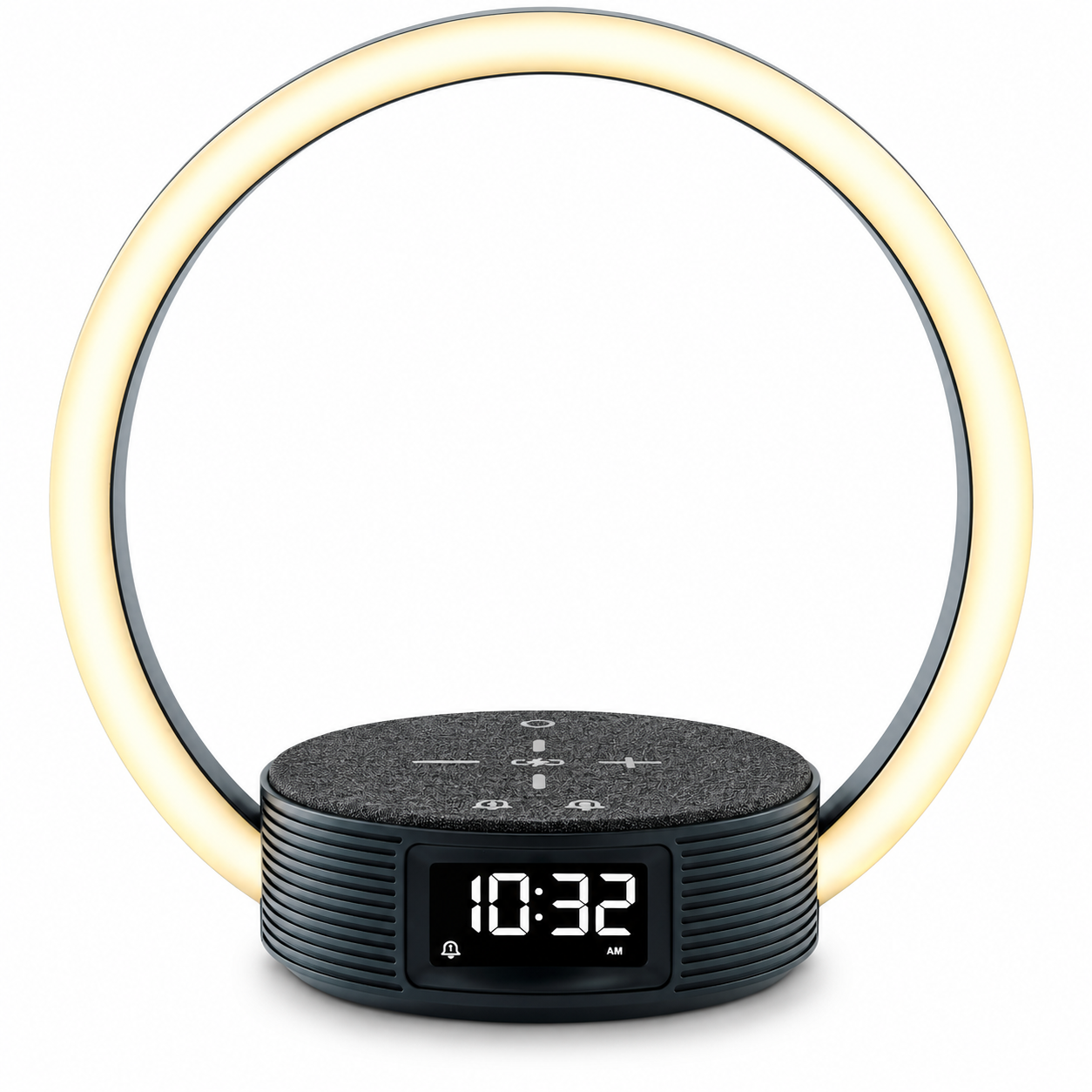
beurer WL 65 Wake up+Charge is a compact bedside hub that combines a sunrise-simulating wake-up light, adjustable reading lamp, and a 10W inductive fast-charging station for smartphones into a single bedside organizer designed to simplify mornings and evenings. The WL 65 uses a gradual sunrise simulation and selectable wake melodies to wake users gently, offers a sunset/fall‑asleep mode with soothing sounds to aid sleep onset, plus two programmable alarm times and a snooze option for shared bedrooms or varying schedules (two alarms, snooze 1–30 min).(beurer product descriptions, retailer listings)
Key benefits and unique selling points include: a daylight-style sunrise simulation to reduce abrupt awakenings, integrated inductive fast charging (10W) for compatible Qi phones so you don’t need a separate charger, energy-efficient design, and a compact bedside lamp function that doubles as a reading light and ambient mood light. (manufacturer and retailer specs)
The beurer WL 65 Wake up+Charge is aimed at busy professionals, couples with different schedules, students, and anyone who wants a gentler wake-up routine or a tidy bedside setup without multiple cables. Typical use cases: waking up naturally in winter months, bedside phone charging without fumbling for cables, reading with adjustable light before bed, and using sunset simulation to relax into sleep. (wake-up light benefits, product positioning)
Estimated price range and availability: launch listings and retail pages indicate the WL 65 is positioned in the mid-range wake-up light market; typical retail prices reported by European retailers place it broadly in the mid-price band for wake-up lights (expect regional variations and seasonal discounts). The WL 65 is available through Beurer’s online shop and common electronics/department retailers in Europe and online marketplaces (retailer pages and Beurer product page)
Specifications
- Model: WL 65
- Dimensions: 24 × 24 × 14 cm
- Weight: Approx. 542 g (excluding mains adapter)
- Light: LED technology
- LED Service Life: 50,000 hours
- Light Intensity (White Light): 700 lux (at a distance of approx. 10 cm)
- Mood Light: Automatic and manual RGB colour change
- Snooze Duration: 5–30 minutes (5-minute increments)
- Display Illumination: 100%, 50%, 25%, 1%, off
- Time Format: Adjustable to 12-hour or 24-hour format
- Alarm: 2 alarm times
- Average Efficiency During Operation: 86.63%
- Efficiency at Low Load (10%): 83.75%
- No-Load Power Consumption: 0.09 W
- Mains Adapter Protection Class: Protection Class VI
- Light Source Energy Efficiency Class: C
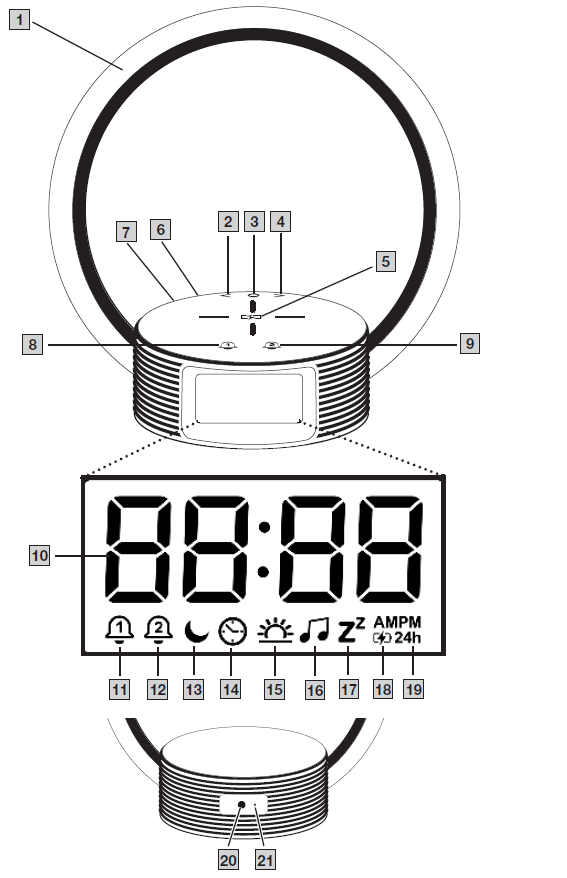
Device Description:
- Light ring
- < button
- O button
- > button
- Smartphone charging surface
- Mains adapter connection
- Reset button
- Alarm 1 button
- Alarm 2 button
- Time
- Alarm 1 icon
- Alarm 2 icon
- Sleep icon
- Clock icon
- Sunrise icon
- Music icon
- Snooze icon
- Charging icon for smartphone
- Hour format
- Mains adapter connection
- Reset button.
USAGE
Initial Use
- Remove the packaging material.
- Check that all parts listed are present.
- Check the device and mains cable for damage.
- Place the device on a firm, even surface.
- Place the device near an easily accessible socket.
- Connect the mains adapter to the mains adapter connection 6 on the back of the device.
- Insert the mains adapter into a suitable socket.
- The time “0:00” appears on the device display for two minutes, and “24h” flashes.
- Use the < / > buttons to set your preferred hour format (“24h” for 24-hour format or “AM/PM” for 12-hour format).
- Confirm by pressing the O button.
- The time in hours flashes on the display.
- 10. Use the < / > buttons to set the time in hours. Confirm by pressing the O button.
- The time in minutes flashes on the display.
- 11. Use the < / > buttons to set the time in minutes. Confirm by pressing the O button.
- “End” appears on the display. The time is now set, and the device is ready for operation.
- If it is not possible to set the time, refer to the “Setting the Time” section.
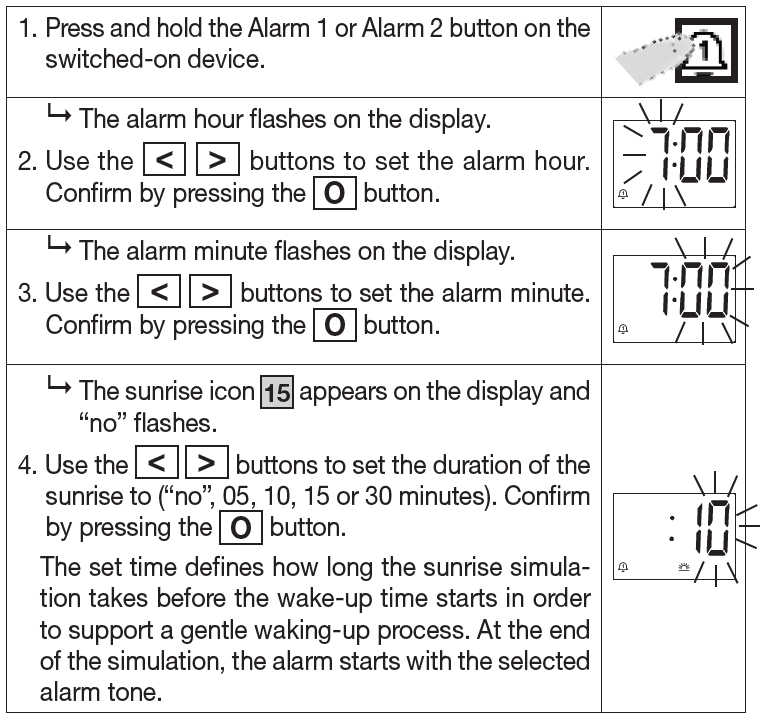
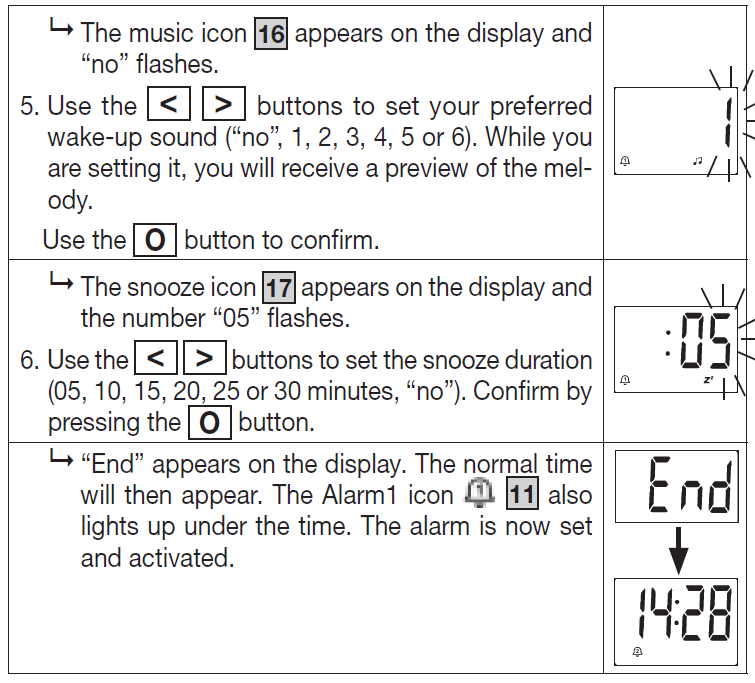
- Setting the Alarm (With Wake-Up Function and Sunrise)
- You can set a colour sunrise and an alarm tone for the alarm. If this is selected, the light ring 1 simulates the sun’s colour sunrise (red – orange – yellow – white light). In addition, an invigorating alarm tone can be selected (6 sounds available) for a gentle, energising start to the day.
- The device has two alarm memory spaces (Alarm 1 and Alarm 2), to which you can assign different alarm times.
Setting the alarm
You can set a colour sunrise and an alarm tone for the alarm. If this is selected, the light ring 1 simulates the sun’s colour sunrise (red– orange – yellow – white light). In addition, an invigorating alarm tone can be selected (6 sounds available) – for a gentle, energising start to the day.
Switching Off the Alarm
You can either snooze or turn off the sounding alarm.
- To snooze the alarm, briefly touch the light ring 1. The alarm then sounds again after the set snooze duration.
- To switch off the sounding alarm, touch the light ring 1 for three seconds. The set alarm will then only sound the next day again.
Activating/Deactivating the Alarm
To activate or deactivate a preset Alarm 1 or Alarm 2, briefly press the Alarm 1 button 8 or Alarm 2 button 9, depending on which alarm you want to select. The Alarm 1 or Alarm 2 icon disappears or appears on the display. The alarm is now activated or deactivated.
Sleep Function/Sunset
You can set a colour sunset on the device. If this is selected, the light ring 1 simulates the colours of sunset (white – yellow – orange – red light). In addition, a gentle sleep melody (5 sounds available) can be selected to help you relax as you fall asleep.
- Press the O button 3.
- The sleep symbol 13 appears on the display.
- Press the O button 3.
- “05” will start to flash on the display.
- Use the < / > buttons to set the duration of the sunset (5, 10, 15 or 30 minutes). Confirm by pressing the O button. The music icon 16 appears on the display, and the number “00” flashes.
- Use the < / > buttons to set your preferred sleep melody (00, 1, 2, 3, 4 or 5). Confirm by pressing the O button. “End” appears on the display. The sleep function is now activated, and the light ring 1 slowly becomes darker over the set time, simulating a sunset.
Setting the Time
- Press the O button 3 times and the right arrow button (>).
- The time symbol 14 appears on the display.
- Press the O button 3.
“24h” starts flashing on the display
- Use the < / > buttons to set your preferred hour format (“24h” for 24-hour format or “AM/PM” for 12-hour format).
- Confirm by pressing the O button.
The time in hours flashes on the display
- Use the < / > buttons to set the time in hours. Confirm by pressing the O button.
- The time in minutes flashes on the display.
- Use the < / > buttons to set the time in minutes. Confirm by pressing the O button.
- “End” appears on the display. The time is now set.
Setting the Display Brightness
The device has a total of 5 different display brightness levels (100%, 50%, 25%, 1%, off).
- Use the < / > buttons to set your preferred display brightness.
Lamp/Mood Light
The light ring 1 can also be used as a lamp/mood light. The device has nine different settings.
- To use the light ring 1 as a lamp/mood light, briefly tap on the light ring frame 1. The light ring 1 lights up in white.
- To switch between the nine different mood lights, briefly tap on the frame of the light ring 1.

- To increase or decrease the brightness of the mood light, press and hold the frame of the light ring 1. The light intensity first increases and then decreases. When the correct setting is reached, lift your finger off the illuminated ring. This setting is now retained.
- After 5 seconds in the selected setting, you can switch off the light ring by briefly tapping the light ring frame.
Charging a Smartphone
This device uses the official Qi standard for inductive charging. This ensures energy efficiency, interoperability and safety during inductive charging. For example, the 10 W fast charging station fully charges a 3000 mAh battery in approximately 2.5 hours.
CAUTION
- Risk of overheating! Never cover the device with objects or textiles when a smartphone is being charged inductively.
- Never place EC cards, credit cards, other cards with magnetic stripes or magnetically sensitive objects on the charging surface 5 of the device.
- Make sure that there are no parts that contain metal on the back of your smartphone (such as a magnetic holder). Inductive charging can cause the metal to heat up significantly and cause irreparable damage to the device and smartphone.
- Mobile phone cases or covers can slow down the charging process or prevent it completely.
To charge your smartphone on the wake-up light, your smartphone model must support inductive charging.
- To charge the smartphone, place it in the centre of the smartphone charging surface 5. The charging icon for the smartphone 18 appears on the display.
- The smartphone is now being inductively charged.
Resetting to Factory Settings
To reset the device to the factory settings, use a pointed object to press and hold the reset button for three seconds.
CLEANING AND MAINTENANCE
WARNING
- Clean the device with a dry cloth.
- Ensure that no water enters the device.
- If this does happen, only reuse the device once it has fully dried out.
- Never immerse the device or mains adapter plug in water or other liquids.
Troubleshooting the beurer WL 65 Wake up+Charge
Common problems and quick fixes
- Device won’t turn on: Ensure the power cable is plugged into a live outlet and firmly into the device; try a different outlet and check for visible cable damage. (basic electrical checks)
- Inductive charging not working: Confirm your phone supports Qi wireless charging and is positioned centrally on the charging pad; remove thick cases or metal attachments and ensure the phone supports 10W or compatible charging profiles. (Beurer charging specs, retailer notes).
- Light or sunrise simulation not bright enough: Check the light mode setting and brightness level; place the WL 65 on an unobstructed bedside surface to avoid blocking light output. (wake-up light guidance)
- Alarm sound not audible: Verify alarm volume settings and selected melody; check that alarms are enabled and that the device time is set correctly. (product manual practices).
Error codes and fixes
- No displayed error codes listed: The WL 65 does not typically present digital error codes on consumer listings—if the device shows unusual indicators or fails to boot, perform a power cycle (disconnect mains for 30 seconds, then reconnect) and consult official support if the issue persists. (retailer/manual references)
Preventive measures
- Use the supplied power adapter and a stable mains connection; avoid placing the device in very humid areas.
- Keep the charging surface and phone back clean to ensure reliable inductive coupling.
- Update usage habits: allow a natural sunset routine by setting fall‑asleep mode rather than using bright overhead lights before bed. (wake-up light best practices).
Warranty and support
- Beurer products typically include a manufacturer warranty—check the retailer or Beurer’s local site for the exact warranty length and terms in your region. (Beurer support pages).
- For help, contact Beurer customer support via the official regional Beurer website or the retailer where you purchased the unit; retailers (e.g., Digitec/Galaxus) also provide returns and after-sales support per their policies.(retailer pages, manufacturer site).
Pros & Cons — Balanced assessment of the beurer WL 65 Wake up+Charge
Pros
- All-in-one bedside organization: Combines wake-up light, bedside lamp, and 10W inductive charging—reduces cable clutter and simplifies bedside setup. (retailer/manufacturer specs).
- Gentle sunrise & sunset modes: Sunrise simulation and fall-asleep program improve wake/sleep routines versus abrupt alarms.(wake-up light research/Beurer category guidance).
- Two alarms & flexible snooze: Useful for couples or variable schedules—two alarm times and 1–30 minute snooze provide flexibility.(product listings).
Cons
- Limited smart connectivity: Unlike higher-end models (WL75 or app-enabled devices), WL 65 focuses on core functions and may lack Bluetooth app control or advanced color customization found in pricier alternatives. (Beurer model comparisons).
- Charging limitations: Inductive charging works only with Qi-compatible phones and may be slower with cases or misalignment; phones requiring >10W will be capped at the unit’s output.(charging tech constraints).
- Not a dedicated SAD lamp: While improving wake routines, the WL 65 is not a medical-grade light therapy box for Seasonal Affective Disorder; users requiring SAD therapy should choose a dedicated high-lux device. (telegraph coverage / wake-up light guidance).
Value for money and comparison
- The WL 65 represents a mid-range value proposition if you prioritize tidy bedside charging and a natural wake-up light; for advanced features such as app control, customizable color palettes, or higher lux (therapeutic) output, compare to Beurer WL75 or premium brands like Philips SmartSleep and Lumie. (Beurer product family and market comparisons).
Customer reviews, ratings and common user feedback for beurer WL 65 Wake up+Charge
Typical star ratings reported by retailers show generally positive user sentiment for functionality and design, with many users praising the combined fast-charging pad and the gentle wake-up light as convenient and effective bedside features.(retailer listings and review excerpts)
Common praises:
- “Convenient charging pad — no more nightly cable fuss.”
- “Sunrise simulation helps me wake less abruptly on dark mornings.”
Common complaints:
- “Wireless charging only works with compatible phones and sometimes needs case removal.”
- “Would prefer app control or more color customization—basic menus are fine but less flexible than higher-end models.”
Sample testimonial and rating: “4/5 — Great bedside organizer: solid build, pleasant wake light and reliable charging for my phone; wish it had Bluetooth.” Recommendation—recommended for users wanting an uncluttered bedside solution and a gentler alarm; choose a different model if you need advanced smart features or medical-grade light therapy. (synthesized from retailer reviews and product comparisons)
SEO & usage — Keywords and how to find this product
Primary keyword usage: the product name beurer WL 65 Wake up+Charge is used throughout to improve search relevance and match common queries. Relevant semantic keywords and long-tail phrases you might search for include: “beurer WL 65 review”, “WL 65 wake up light with wireless charging”, “best bedside charging wake-up light”, “10W inductive fast charging alarm clock”, and “sunrise simulation alarm clock with phone charger”. Include phrases such as wake-up light alarm clock, Qi wireless charging bedside lamp, and sunrise/sunset sleep mode when optimizing pages or product listings for featured snippets and voice search queries.
More beurer manuals
Leave a Comment