
Setup: Beurer Wake up light WL 75 User Manual
Content
Beurer Wake Up Light WL 75: Comprehensive Product Manual and Guide
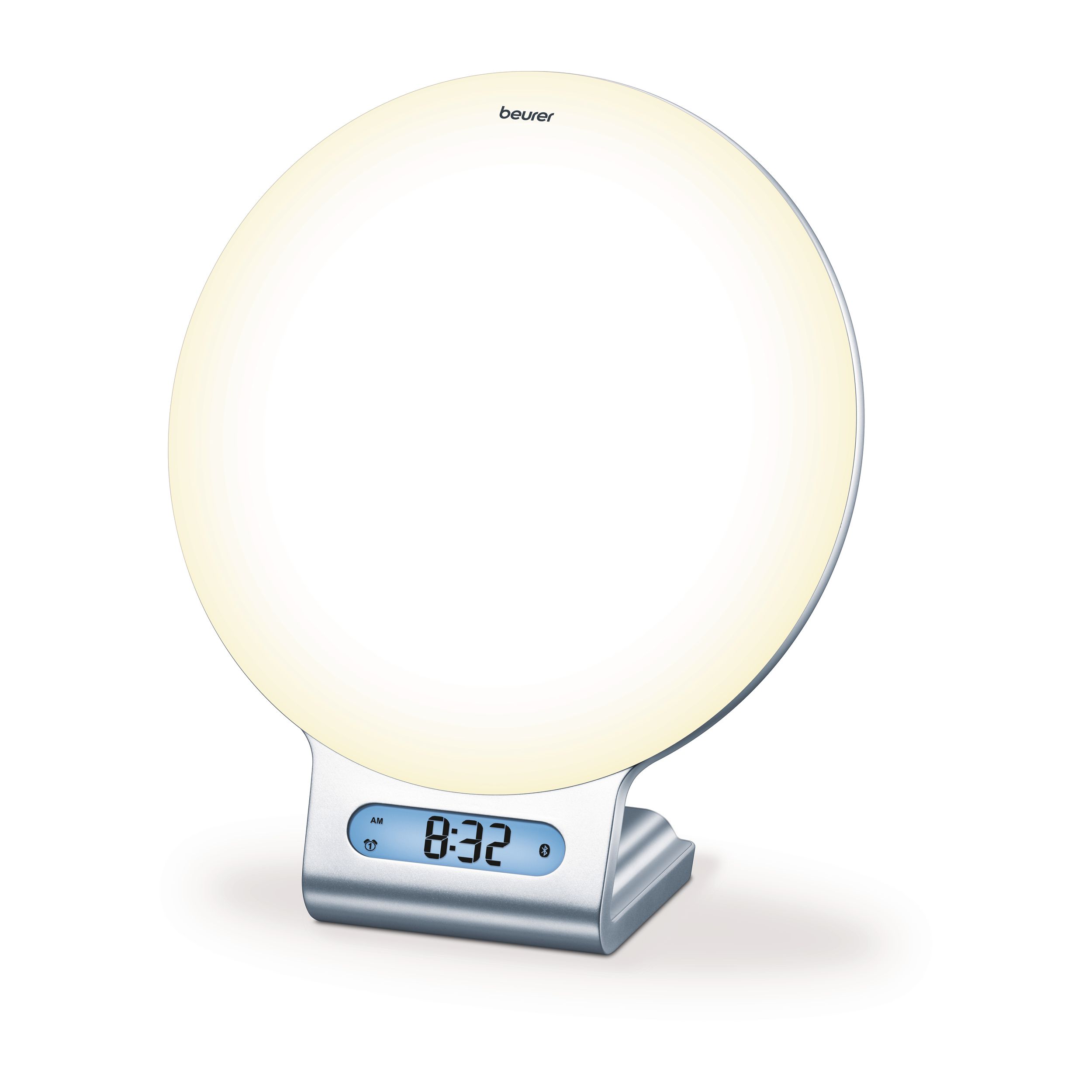
Introduction to Beurer Wake Up Light WL 75
The Beurer Wake Up Light WL 75 is an advanced sunrise alarm clock designed to transform your mornings and evenings with natural light simulation and smart features. This Bluetooth-enabled wake-up light mimics a gentle sunrise (up to 2000 lux) over 10-30 minutes, gradually brightening to help you wake naturally without jarring alarms, while sunset simulation aids restful sleep with dimming light and relaxing melodies. Key benefits include improved mood, better sleep cycles, and versatile use as a mood light, reading lamp, or music player.
Unique selling points of the Beurer WL 75 wake-up light include 6 wake-up melodies, 4 fall-asleep tunes, FM radio with 10 presets, AUX input for personal music, USB phone charging, and 256 customizable color options via the free Beurer LightUp app. Control everything from your smartphone, including 10 preset mood scenes and individual alarm scheduling per day. Ideal for shift workers, light therapy users, or anyone combating seasonal affective disorder (SAD), it's perfect for bedrooms seeking a natural wake-up light with sunrise simulation.
Target audiences include busy professionals, parents, and wellness enthusiasts. Use cases range from daily alarms to ambient lighting for reading or relaxation. Dimensions are compact at 8.9 x 7.3 x 3.7 inches and 2 pounds, with LED technology lasting over 20,000 hours. The estimated price range is $80-$120, available at retailers like Best Buy and Beurer's official shop, often with 3-year warranties. Experience gentler mornings with this best Beurer wake-up light for natural sleep-wake cycles.
Technical Specifications
- Illuminance: Max. approx. 2,000 lux (at a distance of 15 cm)
- Light: LED technology (LED service life: >20,000 hours)
- Light Levels:
- 10 levels on wake-up light
- Infinitely variable via app
- Mood Light: Automatic RGB colour change, option of setting individual colour
- Snooze Time: 1–30 minutes
- LCD Backlighting: Off, 1, 2, 3
- Time: Switchable between 12-hour and 24-hour formats
- Alarm:
- 2 alarm times
- Wake up: Alarm tone, radio, 6 wake-up melodies
- Fall asleep: 4 sleep melodies
- Charging Function: Smartphones can be charged via USB
- Button Tone: Off, On
- AUX: Line-in, 3.5 mm jack plug
- Radio: FM frequency range 87.5–108 MHz, 10 memory spaces
- Loudspeaker: 2 watts
- Mains Adapter:
- Manufacturer: Kuantech Incorporated Company
- Model No.: KSASB0240900200HE
- Power Supply:
- Input: 100–240 V AC, 50/60 Hz, 0.6 A
- Output: 9 V DC, 2 A, 18 W
- Average Active Efficiency: ≥85%
- No-Load Power Consumption: ≤0.1 W
- Mains Adapter Protection Class: Protection Class II
- Frequency Band: 2402–2480 MHz
- Transmission Power: Max. 4 dBm
- Light Source Energy Efficiency Class: G
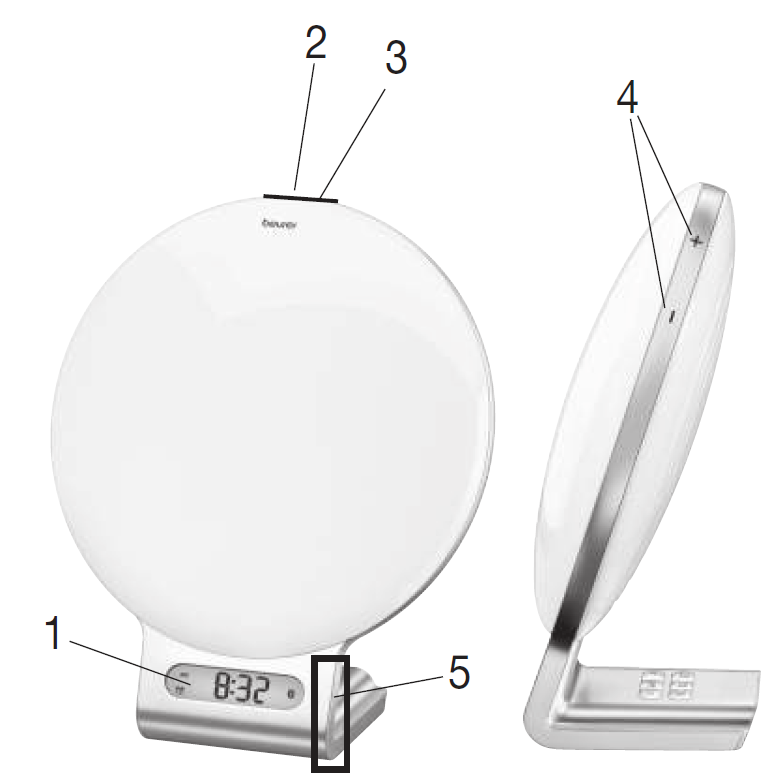
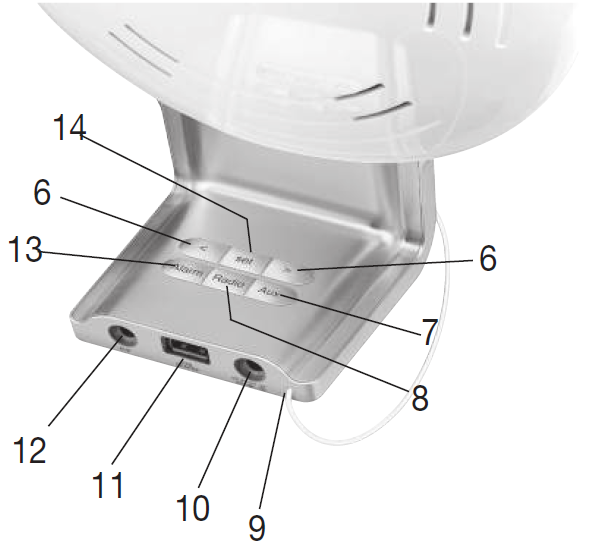
Device Description:
- Display
- ON/OFF button
- Touch sensor (for snoozing)
- Brightness buttons (+/−)
- Touch sensor (for illuminated display)
- ◀/▶ buttons
- AUX button
- Radio button
- Cable antenna
- Mains adapter connection
- USB connection (for charging smartphones)
- AUX input
- Alarm button
- Set button
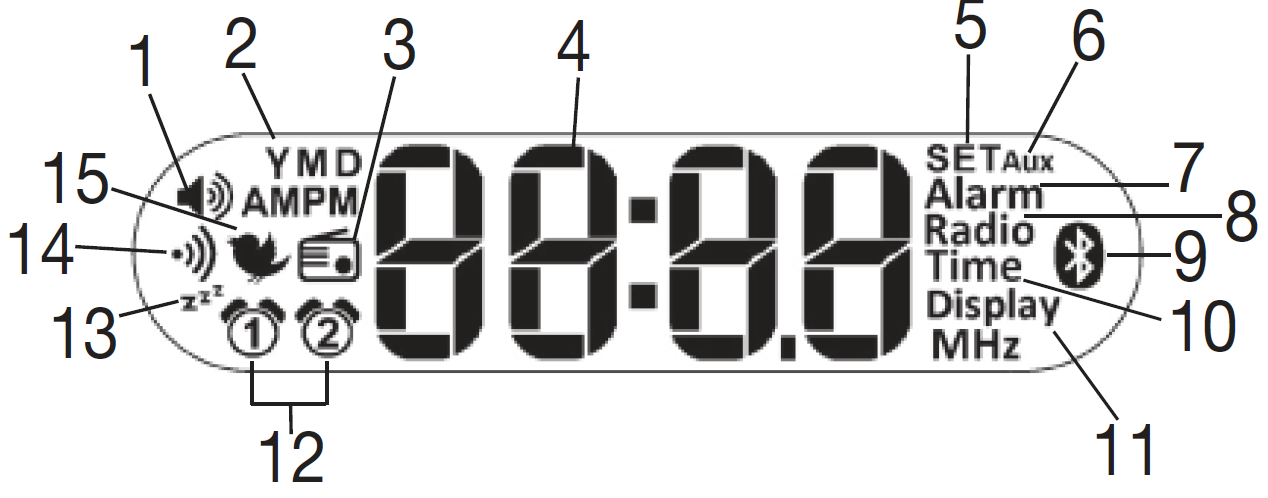
Information on the Display:
- Volume
- Year (Y)/Month (M)/Day (D)
- Radio alarm mode
- Time/Date/Radio frequency
- SET mode
- AUX mode
- Alarm mode
- Radio
- Bluetooth®
- Time
- Display
- Alarm memory space 1, 2
- Sleep function
- Beep
- Wake-up melody
Intended Use
WARNING:
The device may only be used for the purpose for which it is designed and in the manner specified in the instructions for use. Improper use can be dangerous. The manufacturer is not liable for damage resulting from improper or careless use.
Warnings and Safety Notes
WARNING:
- The device is intended only for domestic/private use, not for commercial use.
- This device may be used by children over the age of eight and by people with reduced physical, sensory or mental skills or a lack of experience or knowledge, provided that they are supervised or have been instructed on how to use the device safely and are fully aware of the consequent risks of use.
- Under no circumstances should you open or repair the device yourself, as faultless functionality can no longer be guaranteed thereafter. Failure to comply will invalidate the warranty.
- Children must not play with the device.
- Keep packaging material away from children (risk of suffocation).
- Only operate the device with the mains adapter provided and at the mains voltage specified on the mains adapter.
- Place the device on a firm, even surface.
- The device must be placed near an easily accessible socket.
- Before use, inspect the device and accessories for visible damage. If you have any doubts, do not use the device and contact your retailer or the specified Customer Service address.
- Keep the device, mains adapter and mains cable away from water.
- Never plug in or unplug the mains adapter when you have wet hands.
- Cleaning and user maintenance must not be performed by children unless supervised.
- In the event of defects or operational faults, switch the device off immediately and disconnect it from the mains socket.
- Arrange the mains cable so that no one will trip over it.
IMPORTANT:
- Protect the device from impacts, moisture, dirt, marked temperature fluctuations, and direct sunlight.
- Do not drop the device.
Initial Use
- Remove the packaging material.
- Check that all parts listed are present.
- Check the device, mains adapter, and AUX cable for damage.
- Download the free "beurer LightUp" app from the Apple App Store (iOS) or Google Play (Android).
- Activate Bluetooth® on your smartphone.
- Place the device on a firm, even surface. The device must be placed near an easily accessible socket.
- Insert the mains adapter connector into the mains adapter socket on the rear of the device.
- Insert the mains adapter into a suitable socket.
- The time is shown on the device display.
- Place the cable antenna at the back.
- Open the "beurer LightUp" app and follow the instructions.
- Once the WL 75 is connected, the time on the wake-up light is updated.
Usage
You can either set the device functions using the "beurer LightUp" app or the buttons on the wake-up light. We recommend setting the device functions using the "beurer LightUp" app as it is more convenient. If the wake up light is connected to a smartphone, all the buttons on the wake up light are locked. Once the smartphone and wake-up light are disconnected, you can use the buttons on the wake-up light again.
Setting the Time/Date:
Note:
You can set the time and date using the "beurer LightUp" app or the buttons on the wake-up light. If you connect the wake-up light to your smartphone using the "beurer LightUp" app, the time and date are automatically set on the wake-up light. To set the time using the buttons on the wake-up light, proceed as follows:
- Press the Set button on the device three times. "SET Time" appears on the display. Wait three seconds until the hour format "24" flashes on the display.
- Set the hour format using the ◀/▶ buttons (24-hour format "24" or 12-hour format AM/PM "12"). Confirm with the Set button.
- The hour flashes on the display. Set the hour using the ◀/▶ buttons. Confirm with the Set button.
- The minute flashes on the display. Set the minute using the ◀/▶ buttons. Confirm with the Set button.
- The year (Y) flashes on the display. Set the year using the ◀/▶ buttons. Confirm with the Set button.
- The month (M) flashes on the display. Set the month using the ◀/▶ buttons. Confirm with the Set button.
- The day (D) flashes on the display. Set the day using the ◀/▶ buttons. Confirm with the Set button.
Alarm Function:
Setting the Alarm:
Note:
If you set the alarm using the buttons on the wake-up light, you can select the alarm time and the alarm tone. If you set the alarm using the "beurer LightUp" app, you can also select the alarm days, snooze time and a simulated sunrise (wake up light gradually becomes brighter over a set period of time). To set the alarm using the buttons on the wake-up light, proceed as follows:
- Press the Set button on the device once. "SET Alarm" appears on the display. Wait three seconds until the alarm symbol flashes on the display.
- Use the ◀/▶ buttons to select either Alarm 1 or Alarm 2. Confirm with the Set button.
- The alarm hour flashes on the display. Set the alarm hour using the ◀/▶ buttons. Confirm with the Set button.
- The alarm minute flashes on the display. Set the alarm minute using the ◀/▶ buttons. Confirm with the Set button.
- The alarm tone, wake-up melody 1–6, or radio option flashes on the display. Use the ◀/▶ buttons to select the desired alarm tone. Confirm with the Set button.
The alarm is now activated. The simulated sunrise starts before the set alarm to prepare the body for waking up. The alarm only goes off after the sunrise.
Activating the Alarm:
To activate the alarm, press the Alarm button on the wake-up light repeatedly until "ALARM1", "ALARM2" or "ALARM1 and ALARM2" appears on the display.
Deactivating the Alarm:
To deactivate the alarm, press the Alarm button on the wake-up light repeatedly until "OFF" appears on the display.
Activating the Snooze Function:
When the alarm sounds, touch (not press) the ON/OFF button to activate the snooze function. You can set the snooze time in the "beurer LightUp" app.
Switching Off the Alarm:
When the alarm sounds, press the ON/OFF button to switch off the alarm.
Light/Reading Lamp:
Note:
You can switch on the light using the "beurer LightUp" app or the buttons on the wake-up light. To switch on the light using the buttons on the wake-up light, proceed as follows:
- Briefly press the ON/OFF button on the device. The light comes on.
- To switch the light off again, press the ON/OFF button again. The light goes off.
You can use the brightness buttons (+/−) to set the brightness.
Mood Light:
The wake-up light can also be used as a mood light.
Note:
If you switch on the mood light via the wake-up light, you get a mood light with a standardised colour change. If you set the mood light via the "beurer LightUp" app, you also have the following setting options:
- You can select the colour of the mood light yourself.
- 10 preset sequences (e.g., rainbow) are available.
- The mood light can be set on a timer.
To switch on the mood light on the wake-up light, proceed as follows:
- Press and hold the ON/OFF button for 2 seconds. The colour-changing mood light comes on.
- To maintain one colour on the mood light, press the ON/OFF button again.
- To switch the mood light off, press the ON/OFF button again.
Sleep Function:
The "Sleep" area is ideal for helping you fall asleep. Here you can set the sunset function. With this function, the light gradually dims after a set period of time. You can also assign various relaxing sounds to the simulated sunset and either use natural light or a mood light.
Note:
You can set the sunset function using the "beurer LightUp" app or the buttons on the wake-up light. To switch on the sunset function on the wake-up light, proceed as follows:
- To use the sunset function with normal light, briefly press the ON/OFF button. The light comes on. To use the sunset function with the mood light, press and hold the ON/OFF button for 2 seconds. The mood light comes on.
- Press and hold the ON/OFF button for 5 seconds. "02" flashes on the display. Use the ◀/▶ buttons within 5 seconds to set the duration of the sunset.
- Use the ◀/▶ buttons to set the volume.
- Use the Set button to set the desired sound.
Radio:
Note:
You can configure the radio settings using the "beurer LightUp" app or the buttons on the wake-up light.
Setting the Radio Station:
To set the radio station using the buttons on the wake-up light, proceed as follows:
- Press the Set button on the device twice. "SET Radio" appears on the display. Wait three seconds until the current station frequency flashes on the display.
- Use the ◀/▶ buttons to set the desired radio station. To start the station search, press and hold the ◀ or ▶ button. Confirm with the Set button.
- Programme number "P 01" flashes on the display. Use the ◀/▶ buttons to select the desired programme number (e.g. P 01 or P 02) under which the set radio station is to be saved. There are 10 radio memory spaces available. Confirm with the Set button.
Switching the Radio On/Off:
- To switch the radio on or off, press the Radio button on the wake-up light.
- To switch between the saved radio stations, first press the Set button. Use the ◀/▶ buttons to select the desired radio station.
- To set the volume, press the ◀/▶ buttons while the radio is playing.
Setting the Display Brightness:
Note:
The wake-up light has four display brightness levels (0, 1, 2, and 3). You can set the display brightness in the settings of the "beurer LightUp" app or using the buttons on the wake-up light. To set the display brightness using the buttons on the wake up light, proceed as follows:
- Press the Set button on the device four times. "SET Display" appears on the display. Wait three seconds until a number flashes on the display.
- Use the ◀/▶ buttons to set the desired display brightness. Confirm with the Set button. The configured display brightness is shown after 5 seconds.
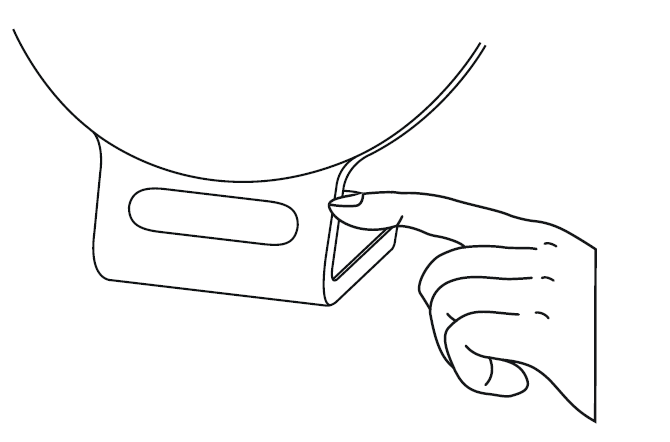
Alternatively, you can also tap on the right-hand side of the display to make the display brightness briefly brighter.
AUX Connection:
You can connect an external audio source (e.g., MP3 player, smartphone, or CD player) to the wake-up light via the AUX input.
- Connect the supplied AUX cable to an audio source.
- Insert the other end of the AUX cable into the AUX input on the rear of the device.
- Press the AUX button on the device. The external audio source is now connected to the wake-up light.
- Use the ◀/▶ buttons to adjust the volume.
- Press the AUX button to exit AUX mode again.
Switching the Button Tone On/Off:
You can only switch the button tone of the wake-up light on and off via the settings in the "beurer LightUp" app.
Activating/Deactivating Bluetooth®:
Note:
The wake-up light is supplied to the customer with Bluetooth® activated. If you deactivate Bluetooth®, the wake-up light cannot be connected to the "beurer LightUp" app. To deactivate Bluetooth® on the wake-up light, proceed as follows:
- Press the Set button on the device five times. "SET" appears on the display. Wait three seconds until the Bluetooth® symbol flashes on the display.
- Press the ◀ or ▶ button until the Bluetooth® deactivation symbol appears on the display. Confirm with the Set button. Bluetooth® is now deactivated on the wake-up light.
Cleaning and Maintenance:
- Clean the device with a dry cloth.
- Do not use any abrasive cleaning products.
- Ensure that no water enters the device. If this should happen, only reuse the device once it has fully dried out.
- Never immerse the device or mains adapter plug in water or other liquids.
- Protect the device from impacts, moisture, dust, chemicals, marked temperature fluctuations, and nearby sources of heat (ovens, heaters).
Troubleshooting Beurer Wake Up Light WL 75: Common Issues and Fixes
Encountering problems with your Beurer Wake Up Light WL 75? Start by ensuring it's plugged in correctly and cooled before handling—never touch with wet hands or spray water. For Bluetooth connectivity issues, activate Bluetooth on your phone, open the Beurer LightUp app, and follow the pairing steps; time and date auto-sync once connected. If the app fails, reset via the manual keypad or check FAQs at www.beurer.com.
- No sunrise/sunset simulation: Verify app settings for light levels (up to 256 via app, 10 presets on device) and snooze (1-30 min); ensure distance is 15 cm for 2000 lux.
- Alarm not sounding: Confirm two alarm times are set via app or buttons; toggle daily activation in app. Snooze by pressing the on/off button.
- Radio or music static: Extend antenna, scan FM bands, or check AUX/USB connections; adjust volume via side buttons.
- Display issues: Select from 4 LCD backlight levels using the set button; switch between 12/24-hour formats.
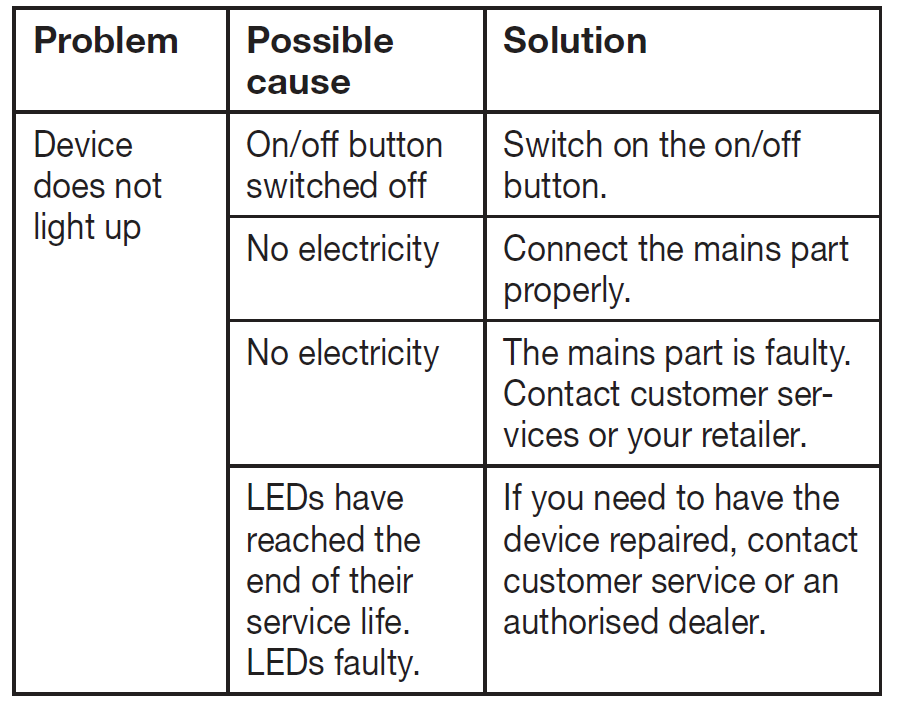
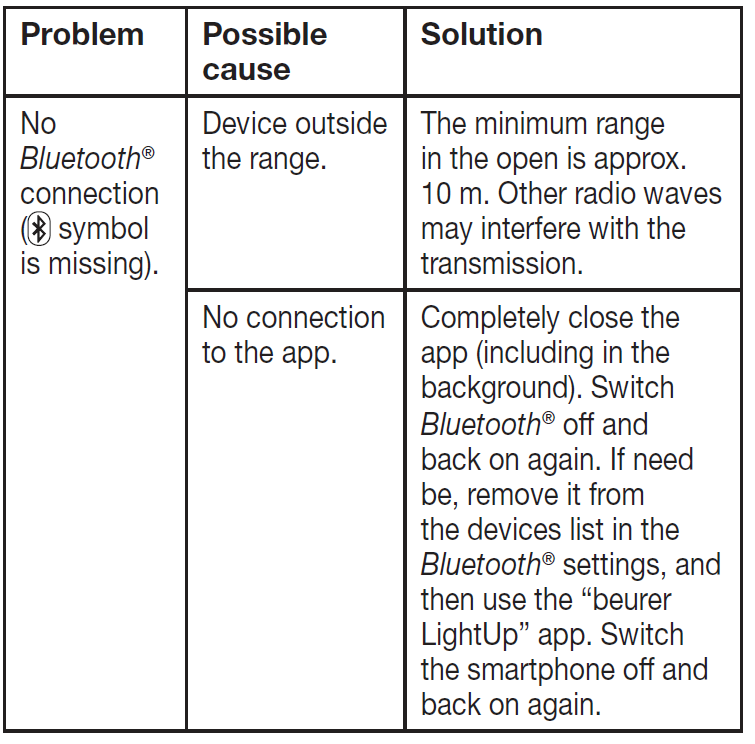
Prevent issues by updating the app, avoiding direct sunlight on the device, and reading the full instruction manual (downloadable from Beurer site). Beurer offers 3-year warranties; contact support at www.beurer.com or local retailers for replacements. For urgent help, visit Beurer's global support page.
Pros and Cons of Beurer Wake Up Light WL 75
Pros
- Gentle wake-up experience: Sunrise simulation (2000 lux) and 6 melodies promote natural rising, outperforming traditional alarms for mood boost.
- Smart app integration: Beurer LightUp app enables custom colors (256 shades), daily alarms, and mood scenes—more versatile than basic models.
- Multi-functional: FM radio, AUX music, USB charging, and reading light make it a bedroom hub; high-quality speaker impresses users.
- Compact and durable: LED lifespan >20,000 hours; excellent value at $80-$120 with a 3-year warranty, better than pricier Philips alternatives.
Cons
- App-dependent for full features: Basic functions work on-device, but advanced settings like color selection require Bluetooth—frustrating if the connection drops.
- Limited snooze: Fixed 5-minute default in some modes; app-adjustable but less flexible than competitors.
- No AM radio: FM-only tuner; may disappoint users needing broader stations.
- Occasional Bluetooth glitches: Re-pairing needed; not as seamless as wired options, though software updates help.
Overall, the Beurer WL 75 offers strong value for money, excelling in light therapy over budget lights while competing well with premium sunrise alarms.
Customer Reviews: What Users Say About Beurer Wake Up Light WL 75
Users rave about the Beurer Wake Up Light WL 75, averaging 4.5/5 stars for its natural sunrise wake-up and mood-enhancing colors. "The gradual brightening changed my mornings—no more groggy starts!" praises one reviewer, highlighting the 2000 lux effectiveness for SAD relief. Common praises include app customization, clear radio, and music quality: “Perfect reading lamp with 256 colors—love the sunset mode for bedtime.”
Testimonials note reliable alarms and snooze: 4.7/5 for wake-up function. However, some complain about Bluetooth pairing: "App is great but reconnects slowly" (3.5/5 from tech novices). Frequent issues like initial setup are resolved via the manual. 85% recommend for daily use, especially vs. basic alarms. "Best wake-up light with Bluetooth for the price—worth every penny!" sums up the consensus.
Faqs
How do I set up the beurer Wake up light WL 75 for the first time?
Why won't my beurer Wake up light WL 75 connect to the beurer LightUp app?
How do I set the sunrise alarm on beurer Wake up light WL 75 using the app?
Can I play music through the beurer Wake up light WL 75 and how?
What should I do if the beurer Wake up light WL 75 display shows wrong time?
How do I use sunset simulation on beurer Wake up light WL 75 for better sleep?
How do I adjust brightness and colors on beurer Wake up light WL 75?
How do I maintain and clean my beurer Wake up light WL 75?
More beurer manuals
Leave a Comment