
Black Decker 12-Cups Coffee Maker CM2046S User Manual
Content
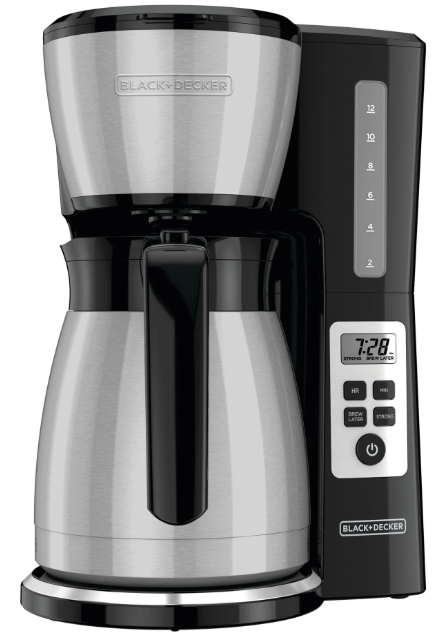
Black+Decker 12-Cups Coffee Maker CM2046S
Introduction
The Black+Decker 12-Cup Coffee Maker CM2046S is a versatile and efficient coffee brewing appliance designed to meet the daily coffee needs of households. Launched in recent years, this coffee maker has quickly gained popularity for its simplicity, functionality, and affordability. With an estimated price range of $20 to $40, it is an excellent choice for those looking for a reliable and budget-friendly coffee maker.
This coffee maker is intended for daily use, capable of brewing up to 12 cups of coffee at once. It features a compact design that fits well on most kitchen countertops, making it ideal for small kitchens, apartments, or offices. The CM2046S model is known for its easy-to-use interface and quick brewing time, ensuring that you can have a freshly brewed cup of coffee whenever you need it.
Specifications
The Black+Decker 12-Cups Coffee Maker CM2046S comes with several key features that enhance its performance and user experience. Here are some of the notable specifications:
- Brews up to 12 cups of coffee
- Compact design with a space-saving footprint
- Easy-to-use interface with one-touch operation
- Keep Warm function to maintain coffee temperature
- Dishwasher-safe parts for easy cleaning
- Affordable price point
FEATURES
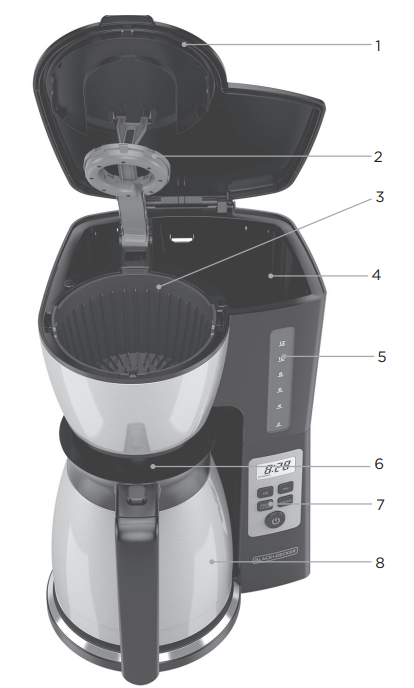
GETTING TO KNOW YOUR COFFEE MAKER
- Lid
- Vortex™ Showerhead
- Washable brew basket (Part # CM2046-01)
- Water reservoir
- Easy-view water window
- Carafe lid (Part # CM2046-03)
- Control panel
- 12-cup stainless steel thermal carafe (Part # CM2046-02)
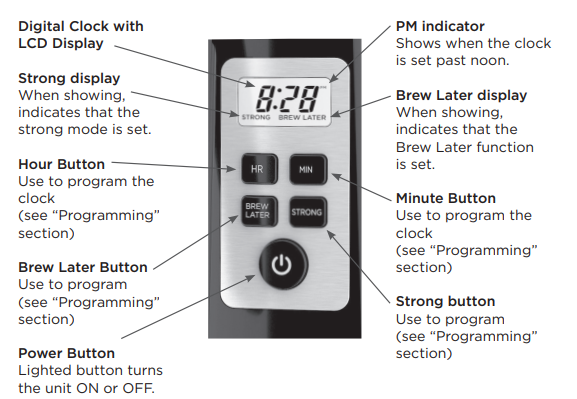
GETTING TO KNOW YOUR CONTROL PANEL
IMPORTANT SAFEGUARDS
When using electrical appliances, basic safety precautions should always be followed to reduce the risk of fire, electric shock, and/or injury, including the following:
- Read all instructions.
- Do not touch hot surfaces. Use handles or knobs.
- To protect against fire, electric shock, and injury to persons,s do not immerse the cord, plugs,, or appliance in water or other liquid.
- Close supervision is necessary when any appliance is used by or near children.
- Unplug from the outlet when either the appliance or display clock is not in use, and before cleaning. Allow to cool before putting on or taking off parts, and before cleaning the appliance.
- Do not operate any appliance with a damaged cord or plug, or after the appliance malfunctions or has been damaged in any manner. Contact Consumer Support at the number listed in this manual.
- The use of accessory attachments not recommended by the appliance manufacturer may result in fire, electric shock, or injury to persons.
- Do not use outdoors.
- Do not let the cord hang over the edge of the table or counter, or touch hot surfaces.
- Do not place on or near a hot gas or electric burner, or in a heated oven.
- To disconnect, turn the unit OFF, then remove the plug from the wall outlet.
- Do not use this appliance for anything other than its intended use.
- Keep the lid on the carafe when in use.
- Scalding may occur if the lid is removed during the brewing cycles.
- This appliance is not intended for use by persons (including children) with reduced physical, sensory, or mental capabilities, or a lack of experience and knowledge, unless they have been given supervision or instruction concerning use of the appliance by a person responsible for their safety.
- Children should be supervised to ensure that they do not play with the appliance.
- Never fill the water reservoir past the 12-Cup marking.
- The carafe is designed to hold 12 cups (60 ounces) of coffee. Do not overfill.
- The carafe should never be tilted backwards.
Setup Guide
Setting up and operating the Black+Decker 1212-Cupoffee Maker CM2046S is straightforward and easy. Here’s a step-by-step guide:
- Unbox the coffee maker and remove all packaging materials.
- Wash the carafe, filter basket, and other removable parts with warm soapy water to ensure cleanliness before first use.
- Assemble the parts by placing the filter basket into the machine and attaching the carafe to the base.
- Fill the water reservoir with fresh water to the desired level.
- Add coffee grounds to the filter basket according to your preference.
- Plug in the coffee maker and turn it on using the one-touch button.
- Once the brewing process is complete, use the Keep Warm function to maintain the coffee temperature.
DESCALING WITH THE AUTO CLEAN™ FUNCTION
With regular use, minerals and hard water can clog your coffee maker. A full cleaning with vinegar is recommended once a month. To notify you that it is time to descale with vinegar, after 60 brew cycles or when calcification is sensed, “CLEAN” should scroll across the display three times. The “CLEAN” word will continue to blink before each brew until the descaling process
is completed. If the machine is extremely calcifie,,d it may require multiple cleaning cycles to clear the “CLEAN” warning.
- Pour white vinegar into the water reservoir up to the 5-cup mark on the water window. Add cold water up to the 12-cup mark.
- Put a basket-shaped paper filter in the brew basket and close the cover. Set the empty carafe on the carafe plate.
- Press and hold the POWER button for 5 seconds to start the Auto Clean™ function. The entire cleaning process will take 45-60 minutes to complete.
- During the Auto Clean™ process, the coffee maker will:
- Brew 5 cups of the vinegar/water mixture first
- Pause for about 30 minutes
- After the pause, it will brew the remainder of the vinegar/water mixture
- Once the process is complete, empty the carafe and discard the paper filter.
- Fill the water reservoir with cold water to the 12-cup line: replace the empty carafe on the carafe plate and then turn ON the coffeemaker for a complete brewing cycle to flush out the remaining vinegar/water mixture. You may want to repeat this step to completely remove the vinegar smell and ta..ste
- Wash the brew basket and carafe as shown in CARE AND CLEANING.
- If your machine is heavily calcified, the “CLEAN” warning may remain activated after cleaning. In this case, repeat cleaning.
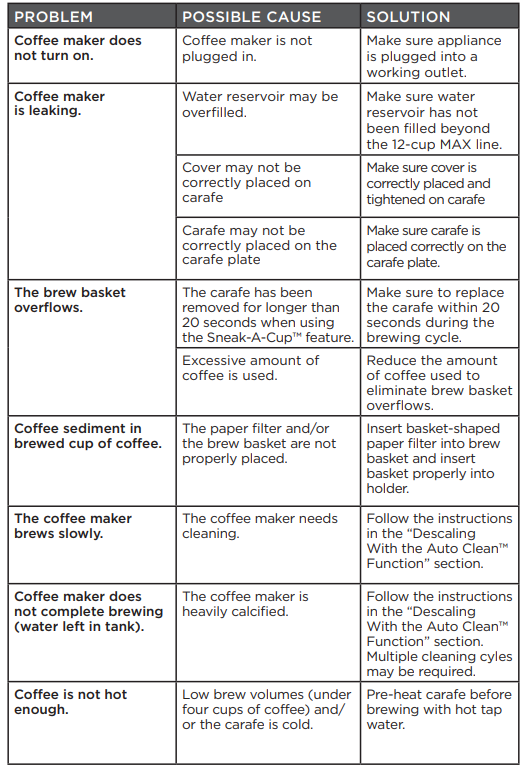
TROUBLESHOOTING
Pros & Cons
Pros:
- Affordable price point
- Compact and space-saving design
- Easy-to-use interface with one-touch operation
- Quick brewing time
- Dishwasher-safe parts for easy cleaning
- Keep Warm function to maintain coffee temperature
Cons:
- No programmable timer for scheduling brews
- No built-in grinder for fresh beans
- Non-stick carafe may require occasional cleaning to prevent buildup
- Some users report issues with the carafe's handle durability
Customer Reviews
Customers generally praise the Black+Decker 12-Cups Coffee Maker CM2046S for its simplicity, affordability, and efficient performance. Many users appreciate the compact design and easy-to-use interface, making it a great addition to their kitchens. However, some users have reported issues with the durability of the carafe's handle and the lack of advanced features like programmable timers.
Common complaints include occasional issues with the non-stick coating on the carafe and the need for frequent cleaning to prevent buildup.
Faqs
How many cups of coffee can the Black+Decker CM2046S brew at once?
Is the Black+Decker CM2046S easy to clean?
Does the Black+Decker CM2046S have a programmable timer?
What is the estimated price range of the Black+Decker CM2046S?
Is the coffee maker compact and space-saving?
Does the Black+Decker CM2046S come with any special features?
How do I set up and operate the Black+Decker CM2046S?
What materials are dishwasher-safe in the Black+Decker CM2046S?
Do users report any common issues with the Black+Decker CM2046S?
Is there a built-in grinder in the Black+Decker CM2046S?
More black decker manuals
- Black Decker RC650 Electric Rice Cooker User Manual
- Black Decker Window Inverter Air Conditioner BD14NWES User Guide
- Black Decker Portable Air Conditioner BPACT10WT User Guide
- Black Decker 20V MAX Leaf Blower BCBL700 User Guide
- Black Decker Digital Tower Fan BFTR36B User Guide
- Black Decker Hard Surface Sweeper LSW36 User Guide
Leave a Comment