
Setup: Bloody MR575 RGB Gaming Wireless Headset User Manual
Content
Bloody MR575 RGB Gaming Wireless Headset: Complete Product Manual and Guide
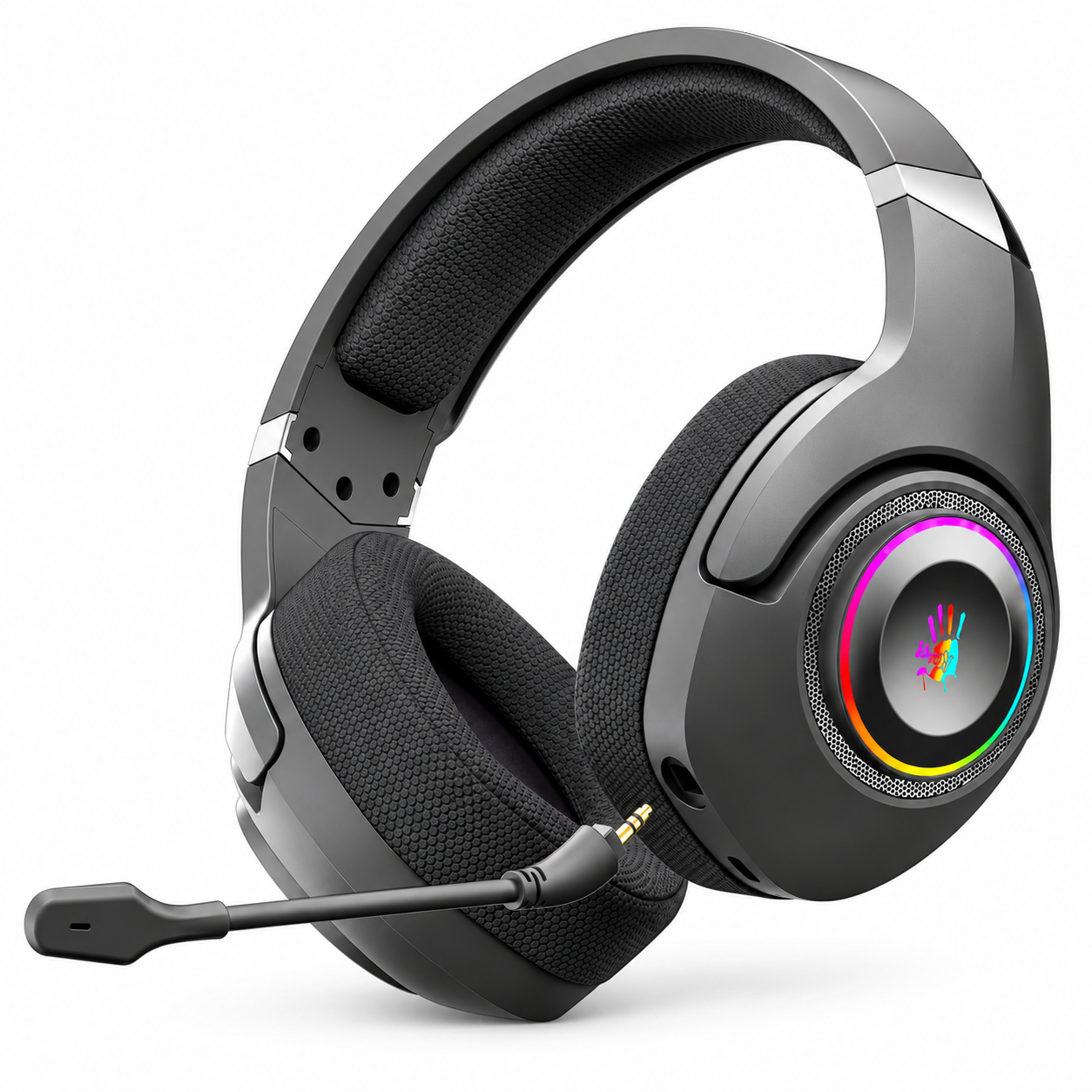
Introduction to the Bloody MR575 RGB Gaming Wireless Headset
The Bloody MR575 RGB Gaming Wireless Headset represents a premium gaming audio solution designed for competitive and casual gamers seeking immersive sound quality with versatile connectivity options. This advanced gaming headset combines cutting-edge audio technology with ergonomic design to deliver professional-grade performance during extended gaming sessions.
The MR575 features multiple connectivity modes including 2.4GHz wireless transmission, Bluetooth v5.2, and 3.5mm wired audio, making it compatible with PC, consoles, and mobile devices. The headset is equipped with M.O.C.I. Dome Technology—a hybrid diaphragm featuring mycelium and carbon fiber construction—that produces Bloody's signature sound with crisp trebles, rich midrange, and deep bass performance ideal for competitive gaming environments.
Key benefits of the Bloody MR575 RGB Gaming Wireless Headset include 7.1 virtual surround sound for precise enemy detection, a detachable noise-cancelling microphone for clear team communication, and up to 40 hours of battery life. The ergonomic flying wing headband and breathable microfiber mesh earpads ensure comfort during marathon gaming sessions. Dynamic RGB lighting and onboard audio controls add to the premium gaming experience.
Target audience includes competitive FPS and MOBA players, content creators, and gaming enthusiasts who prioritize audio quality and comfort. The Bloody MR575 RGB Gaming Wireless Headset is available globally through authorized retailers, with pricing typically ranging from $80-120 USD depending on region and retailer. This manual provides comprehensive guidance for setup, operation, and optimization of your gaming headset.
Technical Specifications and Performance Metrics
The Bloody MR575 RGB Gaming Wireless Headset delivers professional-grade audio performance with the following detailed specifications:
Connection and Wireless Performance
- Primary Connectivity: 2.4GHz wireless (gaming-grade transmission with extremely low latency, 8 times faster than standard Bluetooth)
- Secondary Wireless: Bluetooth v5.2 with steady connection and low input latency
- Wired Option: 3.5mm audio jack for zero-delay connectivity
- Operating Range: Up to 12 meters (40 feet) for wireless modes
- Anti-Interference Technology: Included extension dock to minimize signal obstruction
Audio Performance Specifications
- Speaker Size: 50mm drivers
- Audio Technology: M.O.C.I. Hybrid Diaphragm with mycelium and carbon fiber
- Frequency Response: 20Hz - 20kHz (full human hearing spectrum)
- Impedance: 16 ohms
- Sensitivity: 105dB
- Surround Sound: 7.1 virtual surround sound for directional audio cues
Microphone Specifications
- Type: Unidirectional with noise-cancellation
- Frequency Range: 100Hz - 10kHz
- Sensitivity: -42dB
- Design: Detachable for flexible use
Battery and Power
- Battery Capacity: 1050mAh Lithium-ion
- Playback Time: 40 hours (RGB lights off) / 20 hours (RGB lights on)
What's In The Box
- ALL-in-One Wireless Headset
- 2.4G Type -C Receiver
- Anti-interference Extension Dock
- USB Type-C Rechargeable Cable
- AUX 4-Pin 3.5mm Audio Cable
- User Manual
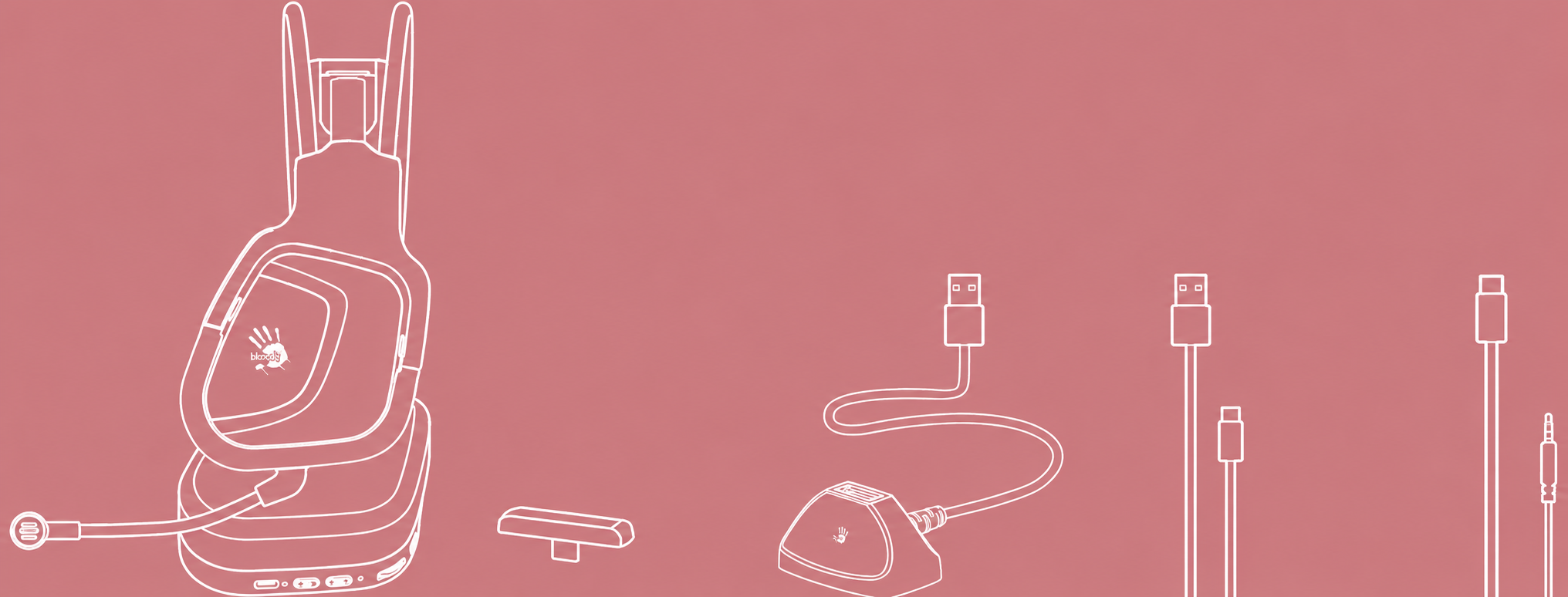

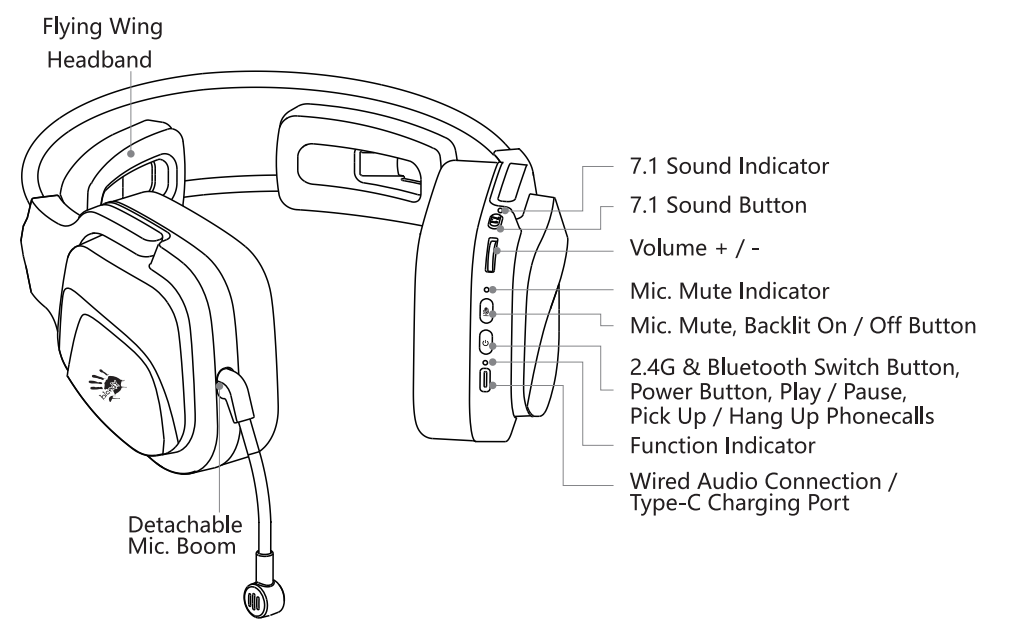
Know Your Product
Control on your fingers
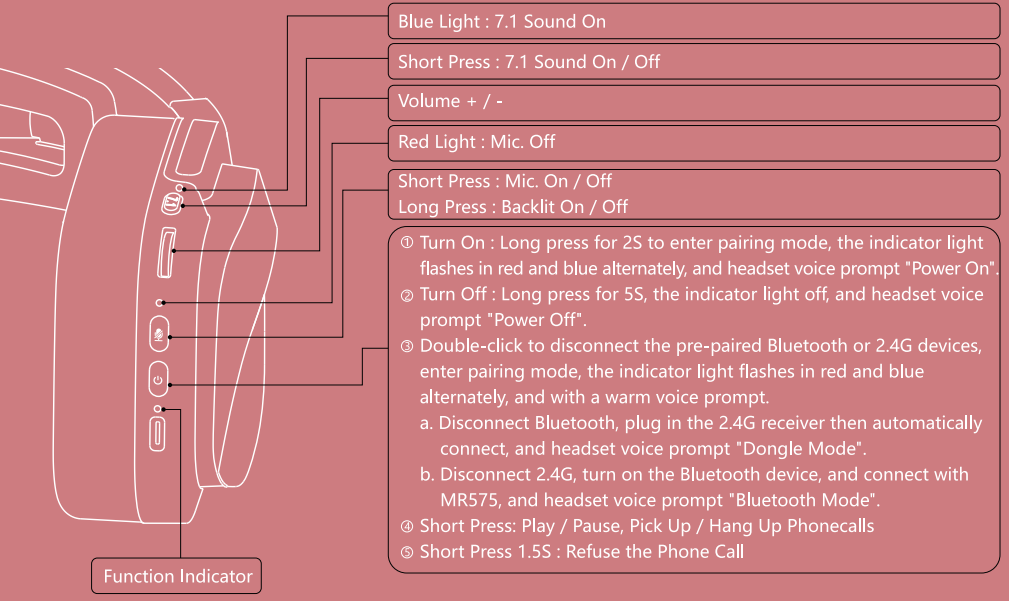
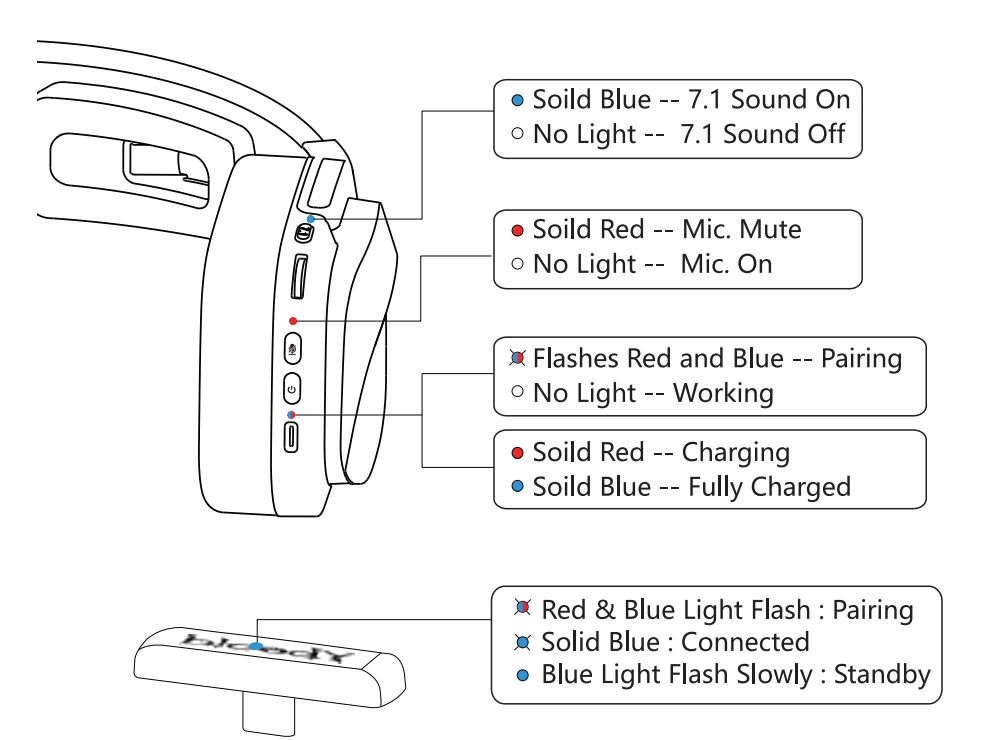
Led instruction
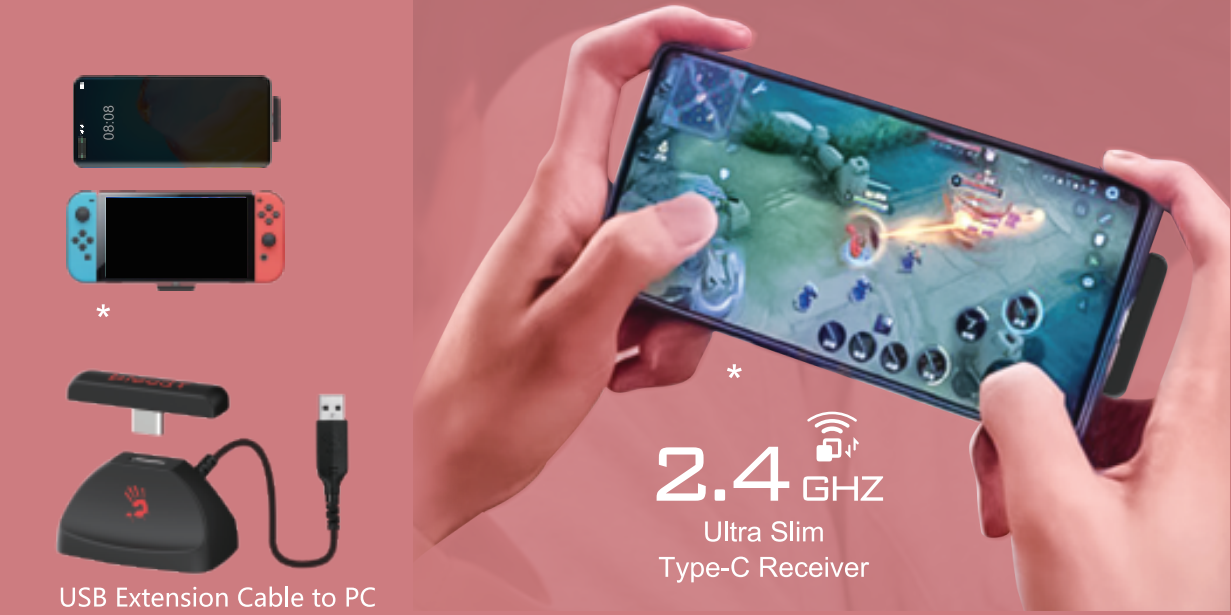
Ultra-slim 2.4 G Type-C receiver
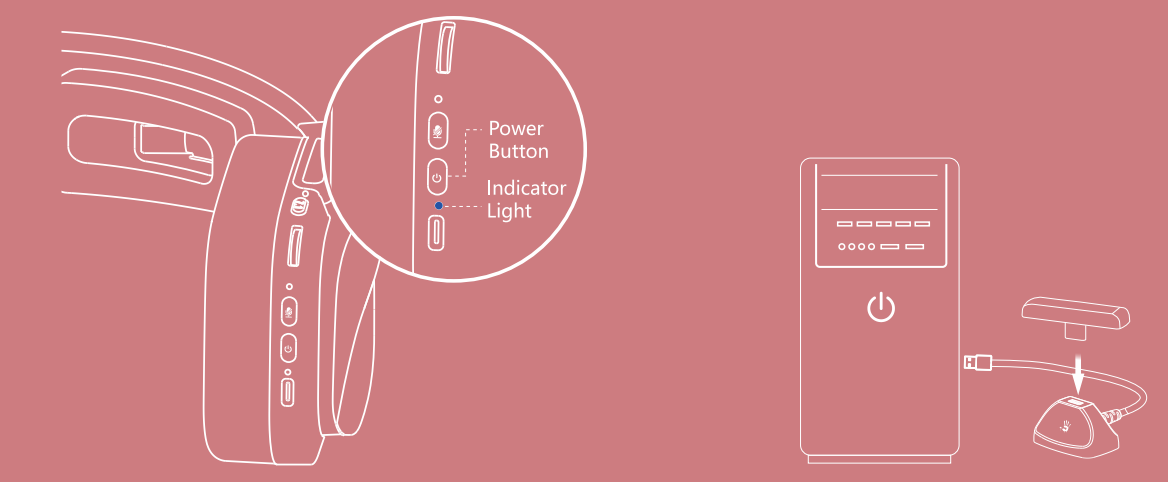
Connecting a 2.4G device
- Long-press the power button for 3 seconds. The indicator light flashes red and blue alternately during pairing.
- Plug the Type-C receiver into your mobile phone or other compatible device.
- The indicator light turns off after the headset is connected.
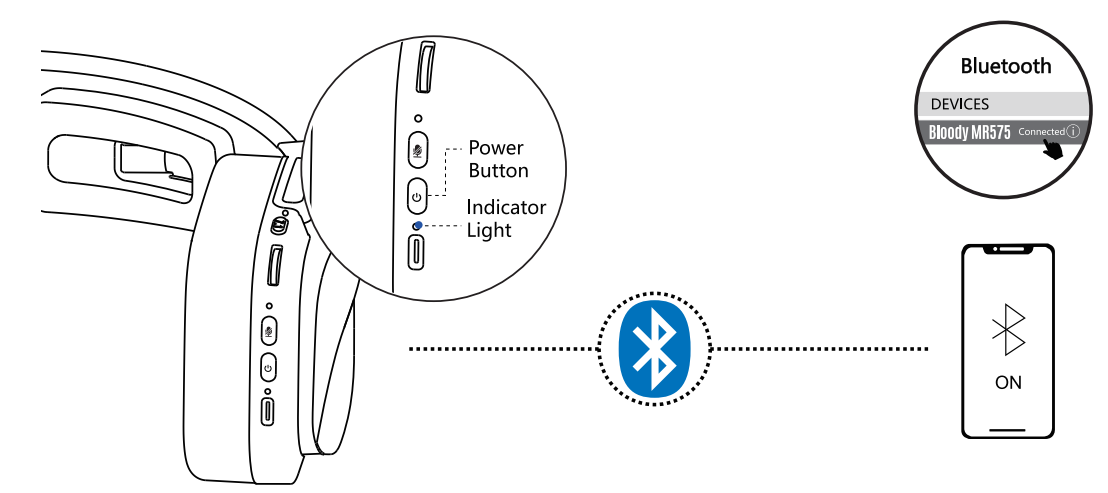
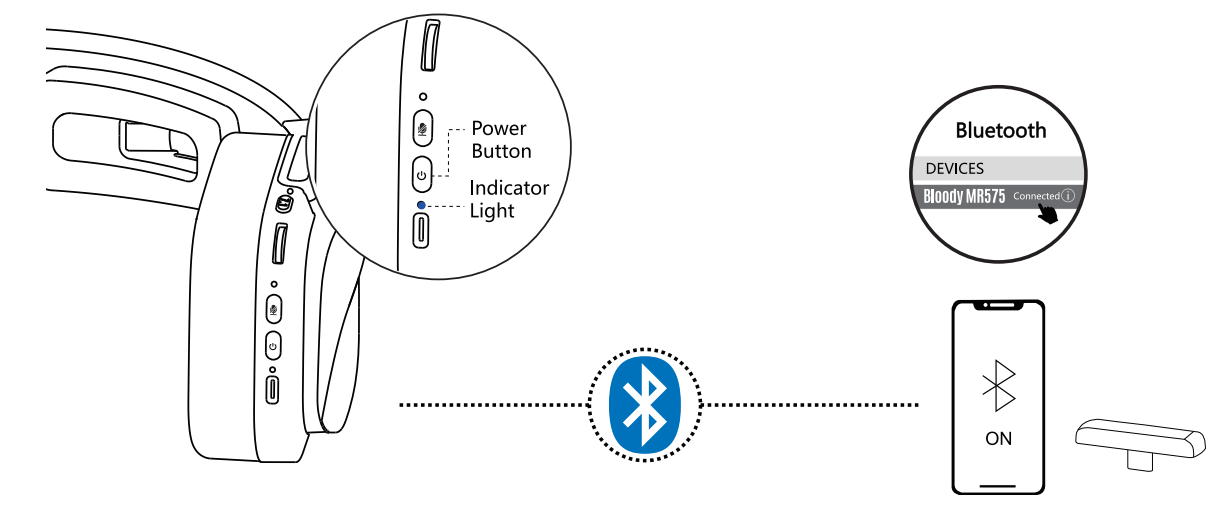
Connecting bluetooth device
- Long press the power button for 3 seconds. The indicator light flashes red and blue alternately during pairing.
- Select "Bloody MR575" from your Bluetooth device.
- The indicator light turns off after the headset is connected.
Connect 2.4G/bluetooth device
The device you connected last time will be remembered. Automatically connect back to the last device after power on.
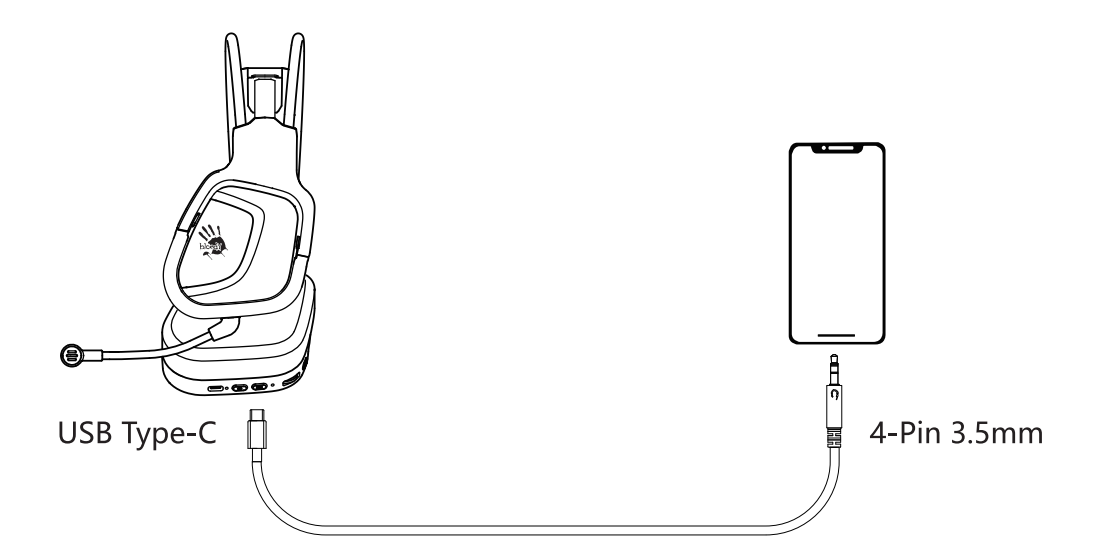
Connecting wired devices
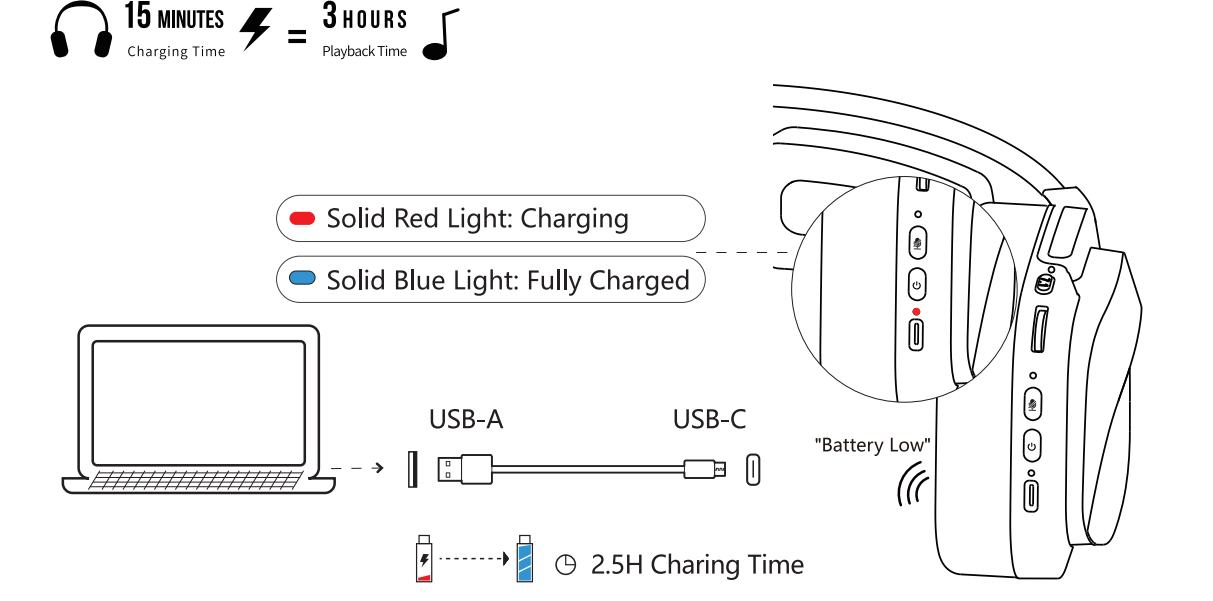
Charging/low battery indicator
Setup Guide and Configuration Instructions
Follow these comprehensive steps to properly set up your Bloody MR575 RGB Gaming Wireless Headset for optimal performance across different devices and gaming platforms.
Initial Setup and Charging
- Unbox the headset and verify all components: headset unit, USB-C charging cable, 2.4GHz wireless receiver, extension dock, and detachable microphone
- Connect the USB-C charging cable to the headset's charging port and plug into a power adapter
- Allow 2-3 hours for full battery charge before first use
- Power on the headset using the onboard power button located on the left earcup
2.4GHz Wireless Connection Setup
- Insert the 2.4GHz wireless receiver into an available USB port on your gaming PC or console
- Use the included extension dock if experiencing signal interference from obstacles
- The headset will automatically pair with the receiver within 12 meters of range
- LED indicator on the headset will turn solid blue when successfully connected
Bluetooth v5.2 Pairing
- Press and hold the Bluetooth pairing button (accessible via onboard controls) for 3-5 seconds until the LED flashes blue
- Open Bluetooth settings on your mobile device or secondary gaming device
- Select "Bloody MR575" from available devices and confirm pairing
- Connection will be established within 10 seconds
3.5mm Wired Audio Connection
- Connect the 3.5mm audio cable to the headset's audio jack
- Plug the opposite end into your device's headphone jack or audio output
- Adjust volume using the onboard volume controls or device settings
- No battery power required for wired mode operation
Microphone Configuration
- Attach the detachable noise-cancelling microphone to the designated port on the left earcup
- Adjust microphone position for optimal voice capture at 2-3 inches from mouth
- Test microphone input in your game's audio settings before competitive play
- Use the onboard mute button to quickly silence the microphone during gameplay
Audio Control Configuration
- Familiarize yourself with onboard controls: volume +/-, play/pause, power on/off, mic mute, 7.1 surround sound toggle, and RGB light control
- Enable 7.1 virtual surround sound for FPS and competitive gaming titles
- Customize RGB lighting patterns using the light on/off button on the earcup
Troubleshooting Common Issues
Address common problems with your Bloody MR575 RGB Gaming Wireless Headset using these proven solutions and preventive measures.
Connectivity Problems
- Issue: 2.4GHz receiver not detected — Restart your device, ensure the receiver is fully inserted into the USB port, update device drivers, and verify the headset is powered on
- Issue: Bluetooth connection drops frequently — Keep the headset within 12 meters of your device, remove physical obstacles, check for interference from other wireless devices, and re-pair the headset
- Issue: Poor wireless signal strength — Use the included extension dock to relocate the receiver away from obstacles and metal objects that cause signal interference
- Issue: 3.5mm audio not working — Check cable connections are fully inserted, test with alternate audio source, and verify device audio output settings
Audio Quality Issues
- Issue: Low volume output — Increase volume using onboard controls, check device volume settings, verify 7.1 surround sound is enabled, and clean the speaker grilles
- Issue: Distorted or crackling sound — Lower volume to prevent speaker distortion, disable 7.1 surround sound temporarily, update audio drivers, and try a different audio source
- Issue: No bass in audio — Ensure 7.1 virtual surround sound is activated, check EQ settings on your device, and verify the audio file format supports bass frequencies
Microphone Problems
- Issue: Microphone not detected — Firmly attach the microphone to the earcup port, restart your device, update audio drivers, and test microphone in system settings
- Issue: Background noise in microphone — Activate the noise-cancellation feature, position microphone 2-3 inches from mouth, reduce ambient noise in your environment, and lower microphone sensitivity in game settings
- Issue: Teammates cannot hear voice clearly — Increase microphone sensitivity in game settings, remove microphone obstruction, check for loud background noise, and test with alternate communication software
Battery and Power Issues
- Issue: Battery drains quickly — Turn off RGB lighting to extend battery life to 40 hours, reduce brightness settings, charge the headset fully before use, and avoid extreme temperatures
- Issue: Headset won't charge — Inspect USB-C port for debris, try alternate charging cable and power adapter, allow 10 minutes for charging to initiate, and contact support if issue persists
- Issue: Battery indicator not showing — Check LED indicator on the headset body, verify device is powered on, and restart the headset
Comfort and Physical Issues
- Issue: Headband too tight — Adjust the flying wing headband gradually over several wearing sessions for proper fit, ensure earcups are positioned correctly, and verify microfiber mesh earpads are properly attached
- Issue: Earpads causing discomfort — Rotate headset position periodically during long sessions, ensure breathable microfiber mesh is not obstructed, and consider taking breaks every 2-3 hours
Warranty and Support
- Warranty Coverage: Contact the retailer or visit bloody.com for warranty details and support options
- Preventive Measures: Store headset in cool, dry environment away from extreme temperatures, avoid excessive moisture exposure, and use the extension dock to prevent wireless interference
- Support Resources: Access the user manual from the official Bloody Gaming website, contact customer service through authorized retailers, and consult community forums for gaming-specific optimization tips
Advantages and Disadvantages Analysis
Strengths of the Bloody MR575 RGB Gaming Wireless Headset
- Triple Connectivity Options: 2.4GHz wireless, Bluetooth v5.2, and 3.5mm wired provide flexibility across PC, consoles, and mobile devices without compatibility limitations
- Extended Battery Life: 40 hours of continuous playtime with RGB lights off enables multi-day gaming marathons without frequent charging interruptions
- Professional Audio Technology: M.O.C.I. Hybrid Diaphragm with mycelium and carbon fiber delivers superior sound quality with competitive-grade audio precision for FPS gaming
- 7.1 Virtual Surround Sound: Accurate directional audio cues provide significant competitive advantage for detecting enemy positions in tactical shooters
- Ergonomic Design: Flying wing headband and breathable microfiber mesh earpads ensure comfort during extended 8+ hour gaming sessions
- Detachable Noise-Cancelling Microphone: Unidirectional design effectively filters background noise for crystal-clear team communication without requiring USB connection
- Affordable Premium Option: Price range of $80-120 provides excellent value compared to competing gaming headsets with similar feature sets
- Dynamic RGB Lighting: Customizable RGB patterns add aesthetic appeal and can be toggled on/off to preserve battery life
Weaknesses and Limitations
- Limited Surround Sound Implementation: 7.1 virtual surround sound is software-based rather than true multi-driver surround, which may not match dedicated surround sound headsets in positional accuracy
- Microphone Quality Constraints: Unidirectional microphone with -42dB sensitivity may struggle with very loud ambient noise in competitive gaming environments
- RGB Battery Drain: RGB lighting significantly reduces battery life from 40 hours to 20 hours, requiring more frequent charging for users who prefer illuminated aesthetics
- Build Material Concerns: Microfiber mesh earpads may accumulate dust and require regular cleaning for optimal comfort and audio isolation
- Limited Customization Software: No companion app for advanced audio profile customization or firmware updates beyond onboard controls
- Operating Range Limitations: 12-meter wireless range may be insufficient for larger gaming setups or homes with multiple rooms
- Potential Interference Issues: 2.4GHz frequency can experience interference from Wi-Fi routers and other wireless devices without proper extension dock placement
Value for Money Assessment
The Bloody MR575 RGB Gaming Wireless Headset delivers exceptional value in the $80-120 price range, offering professional audio quality, triple connectivity options, and extended battery life that justify the investment for serious gamers. Compared to alternatives, the combination of M.O.C.I. technology, 7.1 surround sound, and ergonomic design provides competitive advantages that outweigh the minor limitations in surround sound implementation and customization options. Best suited for competitive FPS players, content creators, and gamers seeking reliable wireless headset performance without premium pricing.
Customer Reviews and User Feedback
User feedback for the Bloody MR575 RGB Gaming Wireless Headset highlights consistently positive experiences with sound quality and wireless connectivity. A verified purchaser reported that the headset delivers immersive sound quality with clear audio and strong bass perfect for tracking in-game sounds, with stable wireless connection and clear microphone voice capture.
Common praise points include the effective 7.1 virtual surround sound implementation for competitive gaming, long battery life enabling extended play sessions, and comfortable ergonomic design for all-day wear. Users frequently mention the stable 2.4GHz wireless connection without lag or dropouts as a significant advantage over standard Bluetooth gaming headsets.
Frequently mentioned considerations include the need for regular earpads cleaning due to microfiber dust accumulation, occasional Bluetooth pairing issues requiring manual re-pairing, and the notable battery drain when RGB lighting is enabled. Some users note that the 12-meter operating range may require strategic placement of the extension dock in larger gaming spaces.
Overall customer satisfaction remains high, with users recommending the Bloody MR575 RGB Gaming Wireless Headset for competitive gamers prioritizing audio quality, wireless reliability, and comfort during extended sessions. The headset is particularly recommended for FPS and MOBA players seeking professional-grade directional sound without premium pricing, though users with large gaming spaces may want to verify the 12-meter wireless range meets their needs before purchase.
```
More bloody manuals
- Setup: Bloody GP30 USB Gaming Controller User Manual
- Setup: Bloody B950 RGB Gaming Keyboard User Manual
- Setup: Bloody S87 Naraka Hot-Swappable RGB Mechanical Gaming Keyboard User Manual
- Setup: Bloody MR590 Gaming Wireless Headset User Manual
- Setup: Bloody GR270 Wireless Gaming Headset User Manual
- Setup: Bloody MR595 All-in-One Headset User Manual
Leave a Comment