
Setup: Bloody MR590 Gaming Wireless Headset User Manual
Content
Bloody MR590 Gaming Wireless Headset: Comprehensive Product Manual and Review
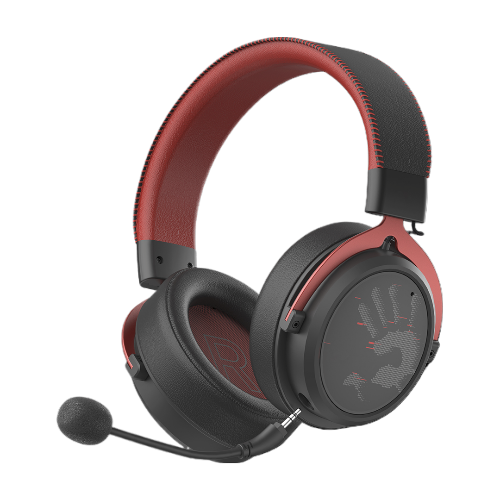
Introduction to Bloody MR590 Gaming Wireless Headset
The Bloody MR590 Gaming Wireless Headset stands out as a versatile, high-performance audio solution for gamers seeking immersive sound without compromising on comfort or connectivity. Featuring 7-color cycle RGB backlighting, gaming-grade 2.4GHz wireless transmission, Bluetooth v5.3, and 3.5mm wired audio options, this headset delivers ultra-low latency for competitive play and seamless multi-device switching. Its standout M.O.C.I. hybrid diaphragm technology combines mycelium and carbon fiber for superior 50mm drivers, producing crystal-clear audio across 20Hz-20kHz frequencies.
Key benefits include dual ENC noise-cancelling microphones for crisp team communication, 3D memory foam protein leather earpads for extended comfort during marathon sessions, and an impressive 1050mAh battery offering up to 60 hours playback (light off) or 35 hours (light on). Ideal for PC gamers, console enthusiasts on Nintendo Switch, mobile users, and cross-platform players, the Bloody MR590 excels in FPS titles, MOBAs, and music listening with its anti-interference extension dock ensuring a stable 20m range.
Targeted at budget-conscious gamers wanting premium features, it's perfect for eSports, streaming, or casual use. Estimated price range: $50-$80, widely available at gaming retailers like Bloody's official site and online stores. With remote controls for volume, mic mute, and pairing, this wireless gaming headset elevates your setup effortlessly.
Bloody MR590 Gaming Wireless Headset Specifications
Dive into the technical prowess of the Bloody MR590 Gaming Wireless Headset, packed with pro-grade specs for top-tier performance.
- Connection Modes: 2.4GHz wireless (ultra-low latency, 8x faster than Bluetooth), Bluetooth v5.3 (steady connection), 3.5mm wired audio (zero delay).
- Operating Range: Up to 20m with anti-interference extension dock and ultra-slim Type-C receiver (USB-C to USB-A adapter included).
- Battery: 1050mAh lithium, 60H playback (lights off)/35H (lights on).
- Headphone: 50mm M.O.C.I. hybrid diaphragm speakers, 20Hz-20kHz frequency, 16Ω impedance, 105dB sensitivity.
- Microphone: Dual ENC unidirectional, 100Hz-10kHz frequency, -42dB sensitivity for noise-free vocals.
- Design Features: 7-color RGB backlit, 3D memory foam protein leather earpads, remote controls (volume, mic mute, pairing, calls).
Compared to rivals like HyperX Cloud Alpha Wireless (shorter 20-30H battery) or SteelSeries Arctis Nova 7 (higher price), the Bloody MR590 offers better battery life and multi-mode versatility at a fraction of the cost, making it a value king for low-latency gaming.[2][5]
Setup Guide for Bloody MR590 Gaming Wireless Headset
Setting up your Bloody MR590 Gaming Wireless Headset is straightforward for instant gaming immersion. Follow these steps for 2.4GHz wireless, Bluetooth, or wired modes.
- Power On: Press the power button until the LED lights up (long press for Bluetooth pairing mode).
- 2.4GHz Pairing: Insert ultra-slim Type-C receiver into PC/console/smartphone USB port. Auto-pairs; use extension dock for obstacles. Compatible with USB-C to USB-A adapter.
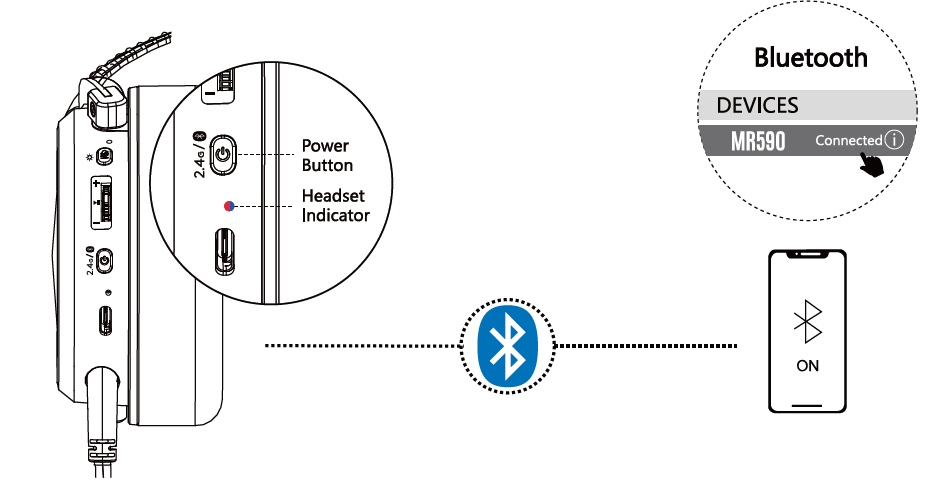
- Bluetooth v5.3: Long-press power + Bluetooth button; select "Bloody MR590" on device. Steady low-latency connection.
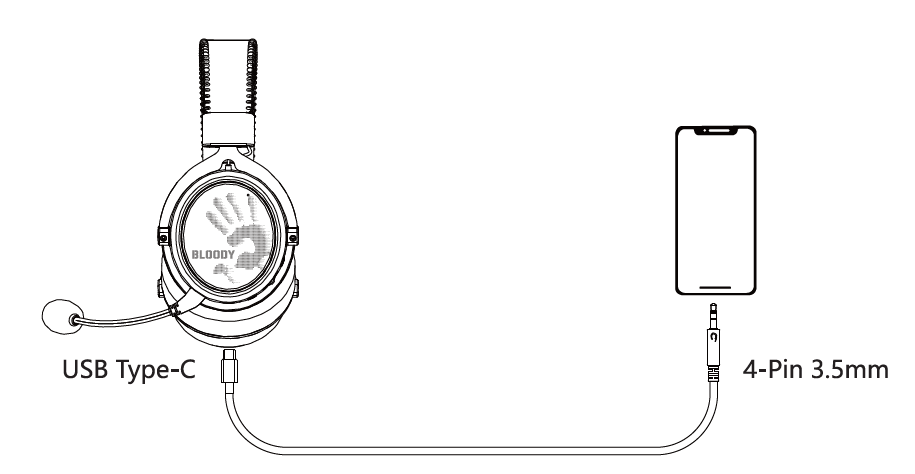
- Wired Mode: Plug 3.5mm jack into device for zero-delay audio.
- Customize: Use remote controls for RGB on/off, volume, mic mute, track skip. Adjust EQ via Bloody software if available.
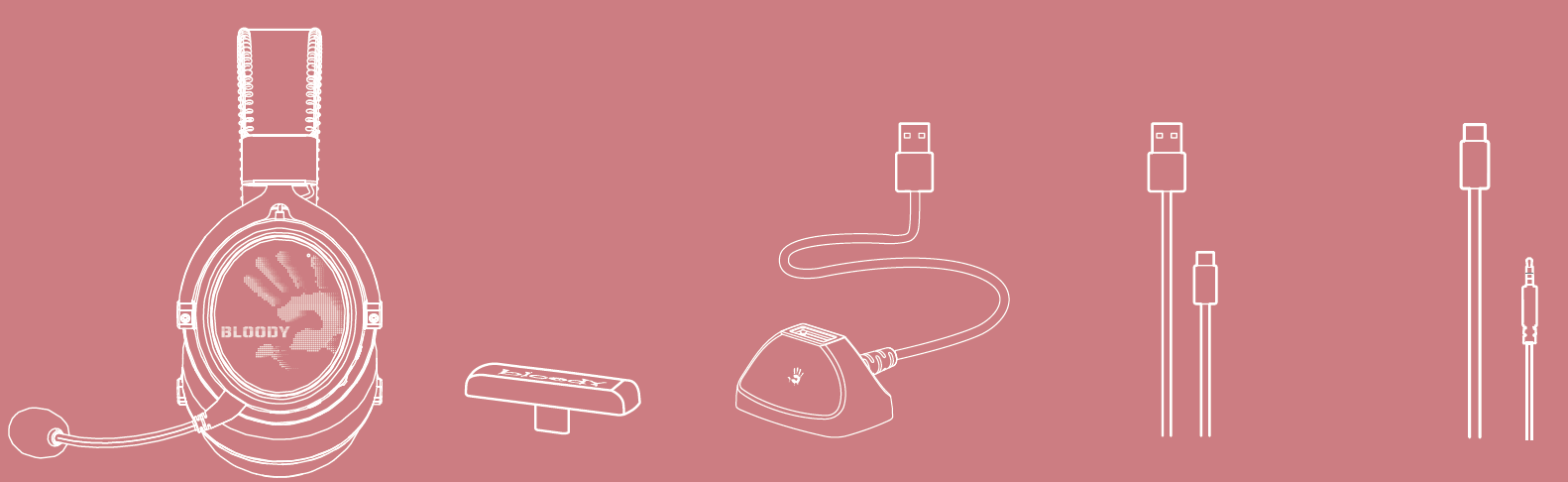
WHAT'S IN THE BOX
- ALL-in-One Wireless Headset
- 2.4G Type-C Reciver
- Anti-interference Extension Dock
- USB Type-C Rechargeable Cable
- AUX 4-Pin 3.5mm Audio Cable

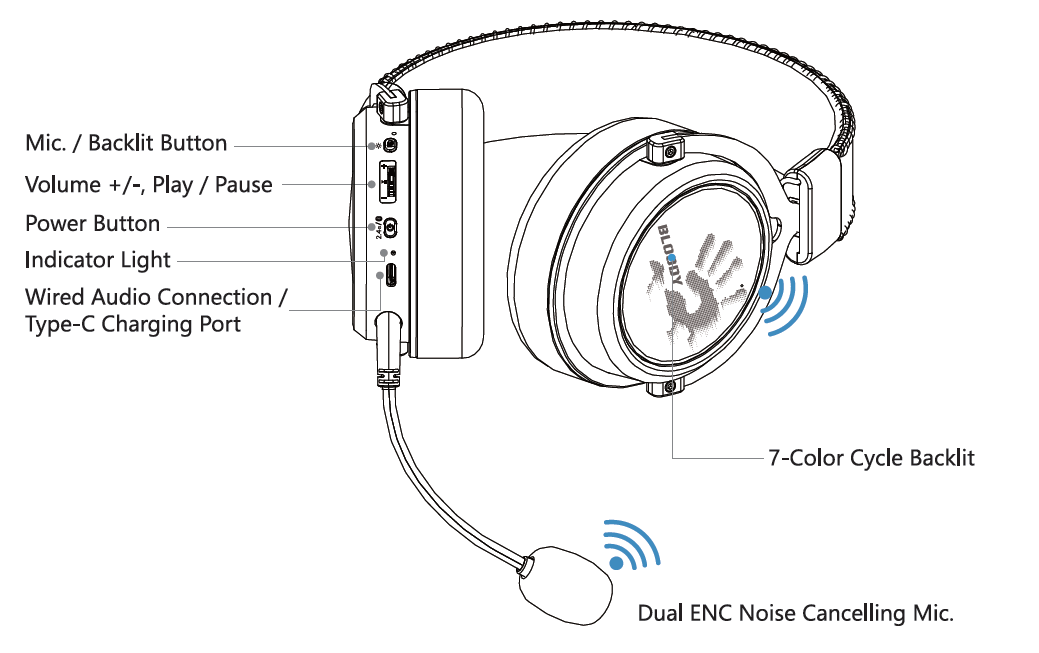
Know Your Product
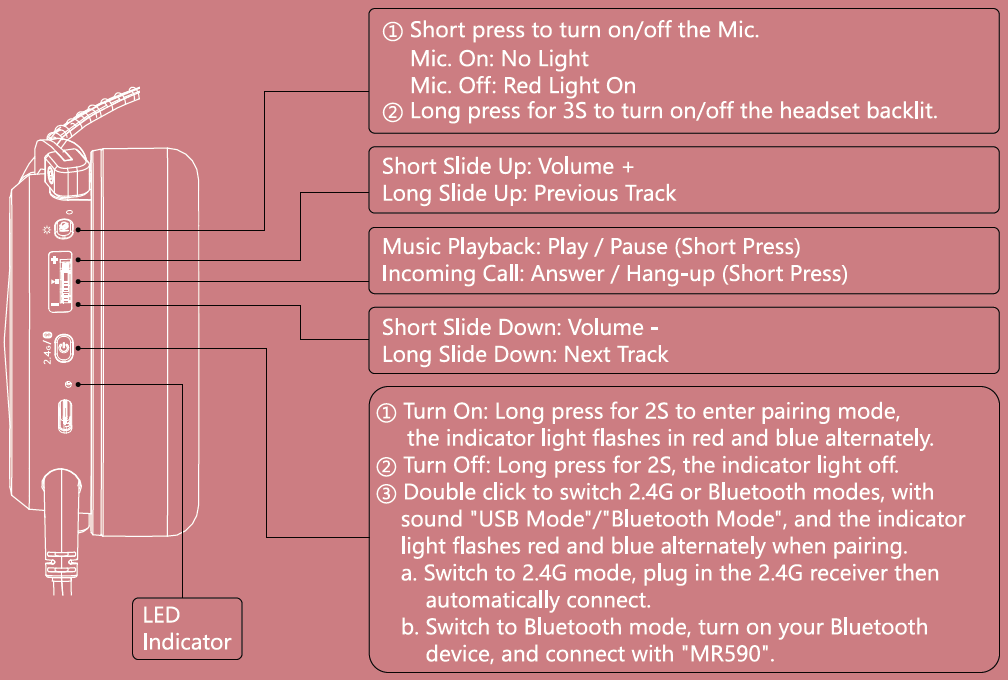
Control on your fingers
Led instruction
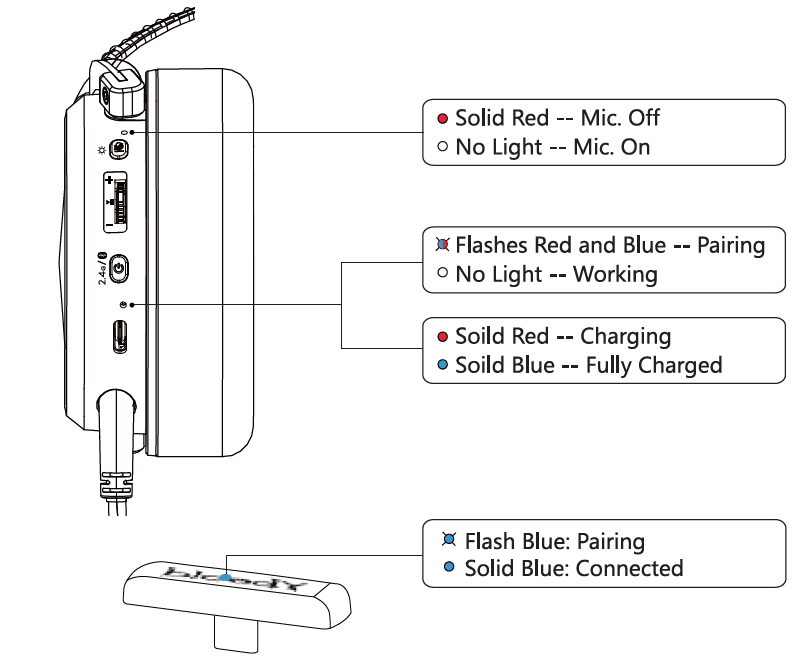
Ultra-slim 2.4g type-c receiver
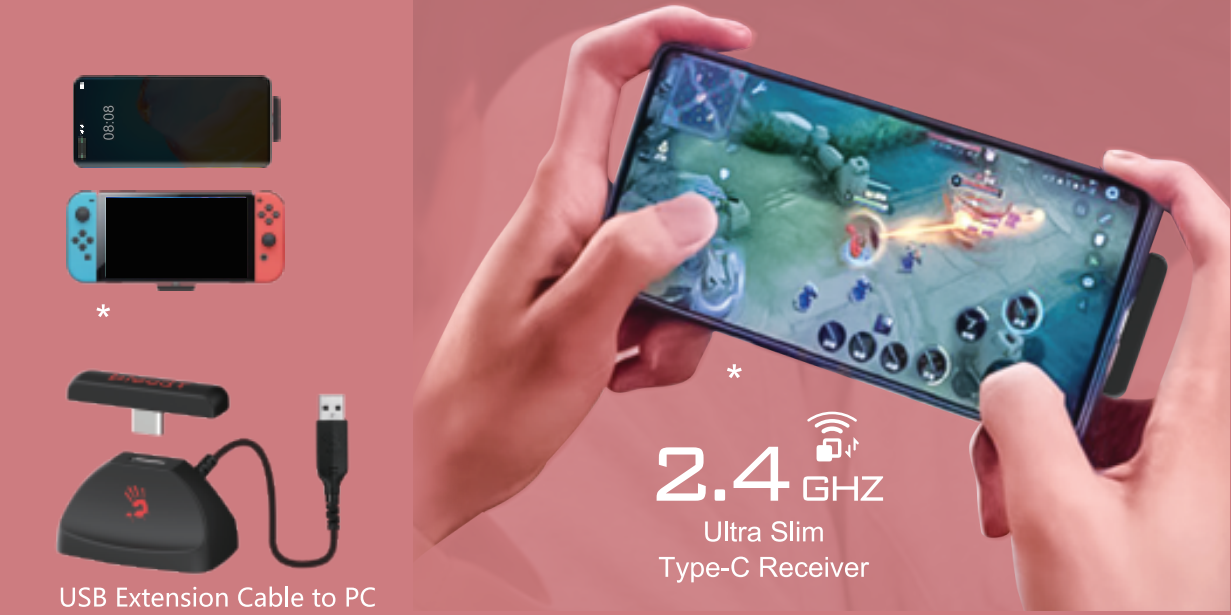
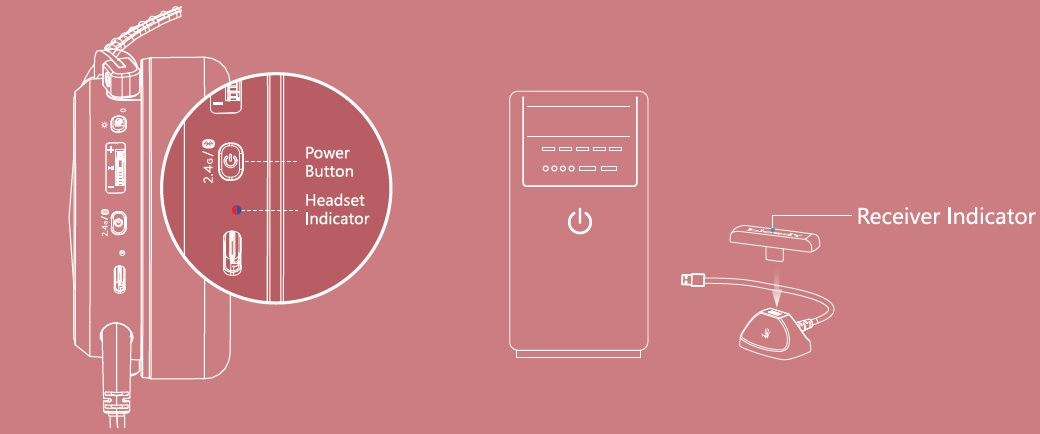
Connecting 2.4G device
- Long press the power button for 2 seconds. The indicator light flashes red and blue alternately during pairing.
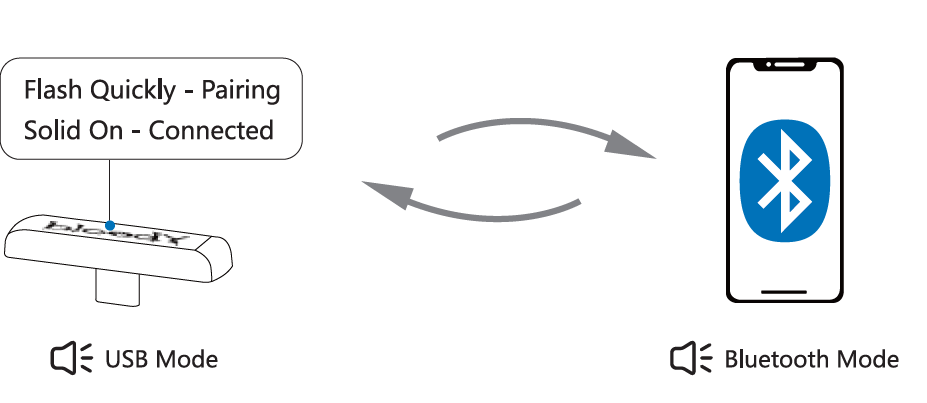
- Double-click the power button to switch to 2.4G mode. (Sound: USB Mode)
- Plug the Type-C receiver into your mobile phone or other compatible device.
- Once the headset is connected, the headset indicator light turns off, and the receiver indicator light remains solid blue.
Connecting bluetooth device
2.4G/bluetooth device switch
Connecting wired devices
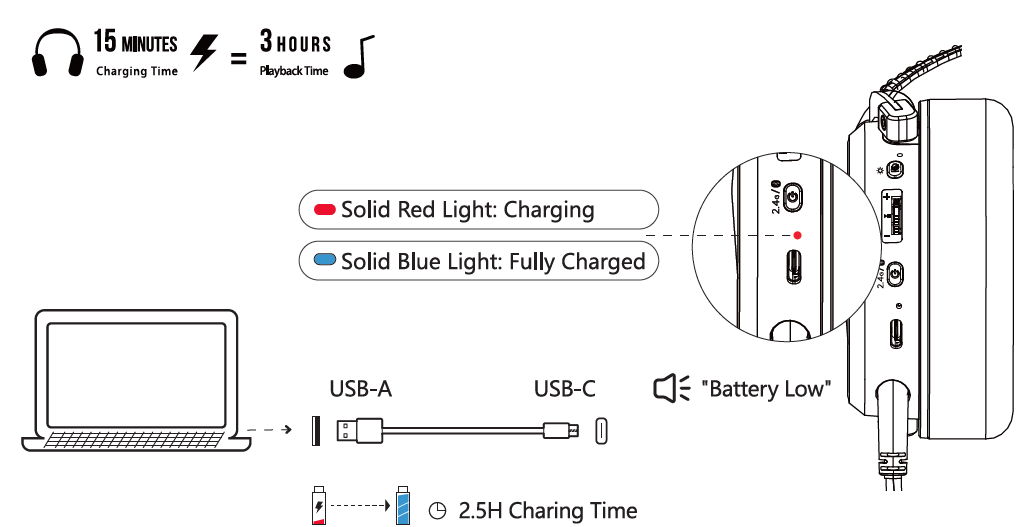
Charging/low battery indicator
Troubleshooting Bloody MR590 Gaming Wireless Headset Issues
Resolve common Bloody MR590 Gaming Wireless Headset problems quickly to minimize downtime.
- No Connection (2.4GHz): Reinsert Type-C receiver; reset by holding power 10s. Ensure no USB conflicts.
- Bluetooth Drops: Forget device, re-pair in pairing mode. Stay within 20m range.
- Poor Mic Quality: Enable ENC via remote mute toggle; test in apps. Clean mics if distorted.
- Low Battery/Short Playtime: Turn off RGB (35H vs 60H); charge 3-4H fully. LED blinks red when low.
- One-Sided Audio: Check balance settings; reseat drivers gently.
Prevent issues: Update firmware via Bloody site, store in case. Warranty: 1-2 years standard; contact Bloody support at bloody.com or retailer. Email support@bloody.com for RMA. Download manual from bloody.com/manuals.
Pros & Cons of Bloody MR590 Gaming Wireless Headset
Pros
- Exceptional 60H battery life outshines competitors like Razer BlackShark V2 (24H).
- Low-latency 2.4GHz + Bluetooth v5.3 for lag-free gaming across PC, Switch, mobile.
- Comfortable memory foam earpads and dual ENC mics praised for long sessions and clear comms.
- Affordable at $50-$80, excellent value vs pricier SteelSeries options.
- Versatile RGB, wired fallback, 20m range with dock.
Cons
- Bass-heavy sound may need EQ tweaks for balanced music (vs neutral Logitech G Pro X).
- Software limited; no advanced customization like Razer Synapse.
- Build feels plastic-y for heavy daily use, though durable.
- Rare pairing glitches on older devices; resolved by reset.
Overall, superior value for entry-level gamers; choose over pricier alternatives if battery/connectivity matter most.
Customer Reviews: Bloody MR590 Gaming Wireless Headset Feedback
Users rave about the Bloody MR590 Gaming Wireless Headset's battery and latency, averaging 4.5/5 stars across sites. "Insane 50+ hours on one charge—perfect for FPS marathons!" praises a PC gamer on Bloody forums. Common praises: Comfy earpads, clear ENC mics for Discord, easy multi-mode switching. Complaints: Occasional Bluetooth hiccups (fixed by dock) and RGB controls fiddly initially.
Testimonial: "Best budget wireless headset; 2.4GHz crushes Bluetooth lag in Valorant." (5/5, TechTitan reviewer). Frequently mentioned: Great for Switch portability. Recommendation: Buy for value-driven gamers; pair with software updates for perfection.
More bloody manuals
- Setup: Bloody B950 RGB Gaming Keyboard User Manual
- Setup: Bloody MR595 All-in-One Headset User Manual
- Setup: Bloody MR575 RGB Gaming Wireless Headset User Manual
- Setup: Bloody GPW50 2.4G Wireless & USB Gaming Controller User Manual
- Setup: Bloody GP30 USB Gaming Controller User Manual
- Setup: Bloody MR720 Naraka RGB Gaming Wireless Headset User Manual
Leave a Comment