
Setup: Bloody MR595 All-in-One Headset User Manual
Content
Bloody MR595 All-In-One Headset: Complete Product Manual and Guide
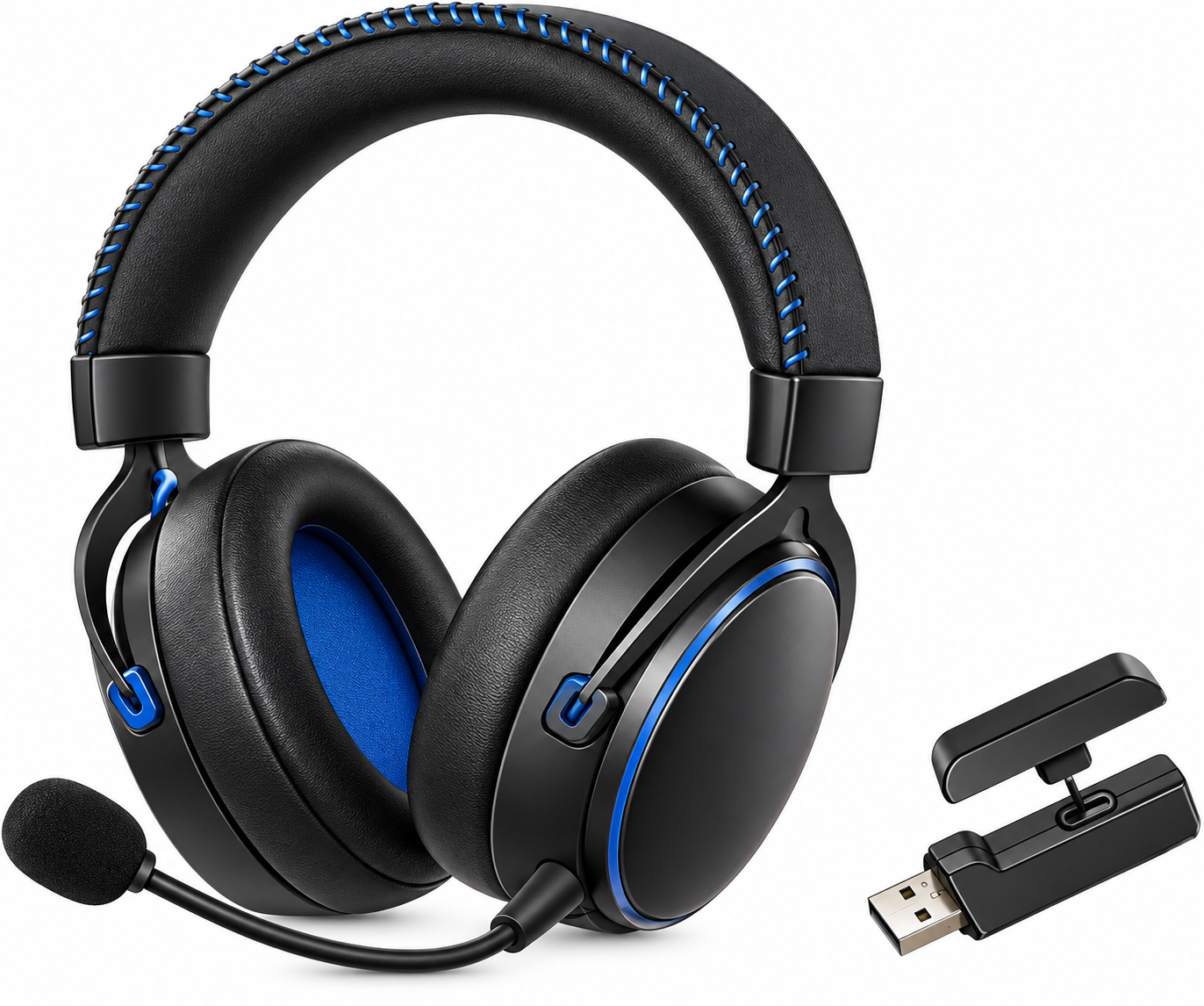
Introduction to the Bloody MR595 Gaming Headset
The Bloody MR595 All-In-One Headset represents a breakthrough in wireless gaming audio technology, combining exceptional battery longevity with versatile multi-mode connectivity. This gaming-grade wireless headset is engineered for competitive gamers, content creators, and audio enthusiasts who demand premium sound quality without the constraint of frequent charging.
Featuring a BL5900 wireless gaming chipset and premium 50mm HybridCore drivers, the MR595 delivers immersive audio across gaming, music, and communication applications. The headset's standout feature is its extraordinary 135-hour battery life when the RGB lighting is disabled, making it one of the longest-lasting wireless headsets available.
The Bloody MR595 is ideal for gamers seeking reliable performance across multiple platforms, including PC, PS4/PS5, Nintendo Switch, laptops, and mobile devices[3]. Its detachable noise-canceling microphone and FPS mode button provide tactical advantages during competitive gameplay. The headset typically retails in the mid-to-premium gaming headset category, with competitive pricing compared to similarly-featured alternatives. Availability spans major online retailers and authorized Bloody dealers globally.
What's In The Box
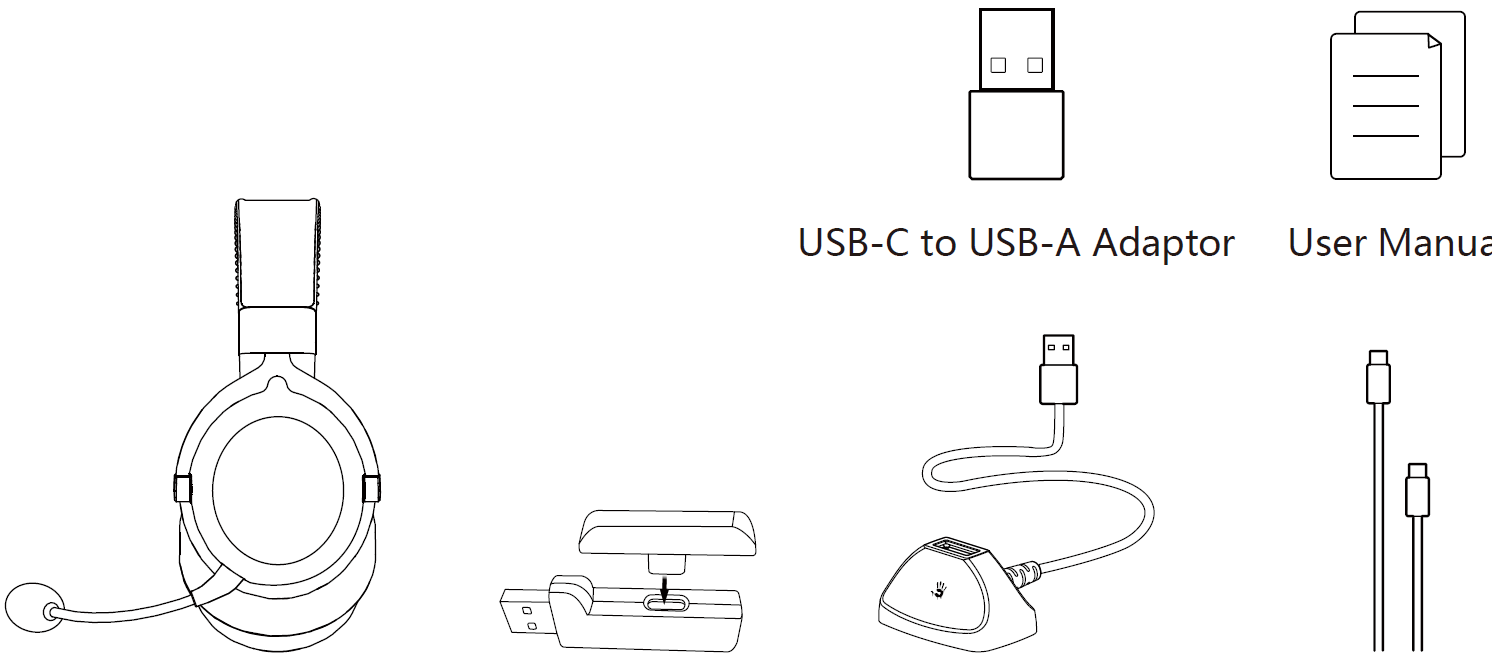
- All-in-One Wireless Headset
- 2-in-One USB-C to USB-A 2.4G Receiver
- Anti-Interference Extension Dock
- USB Type-C Rechargeable Cable
Know Your Product
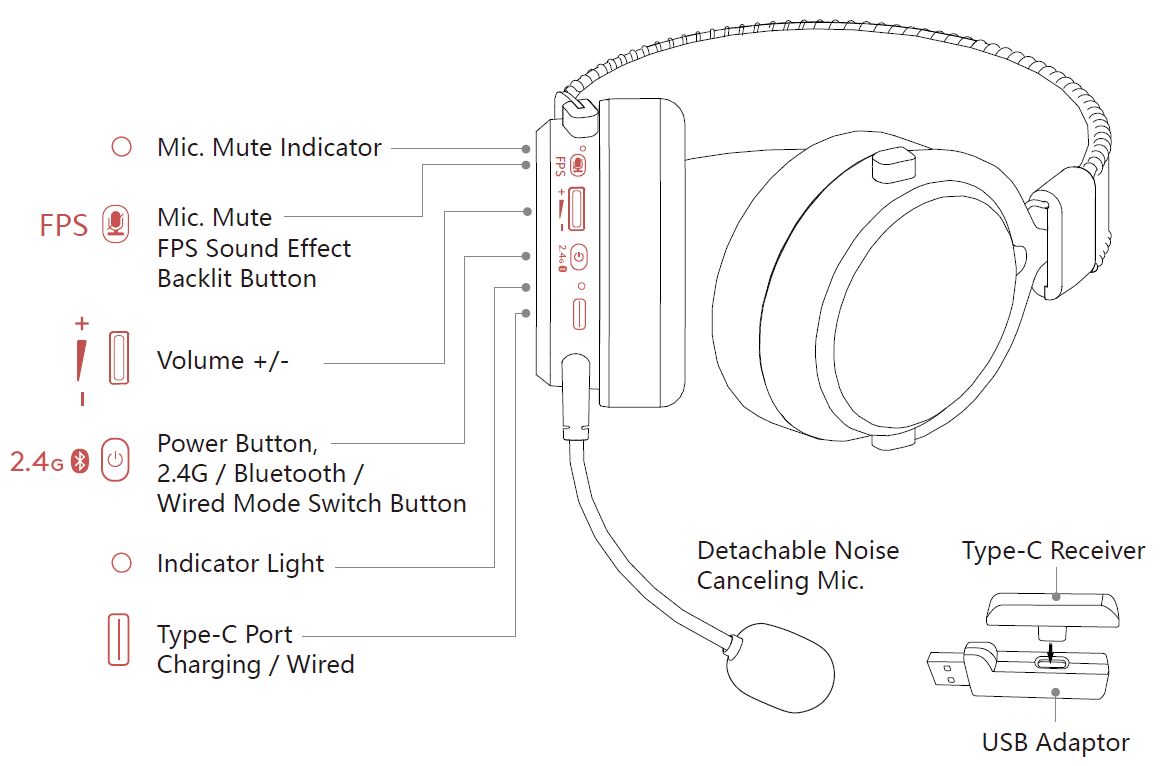
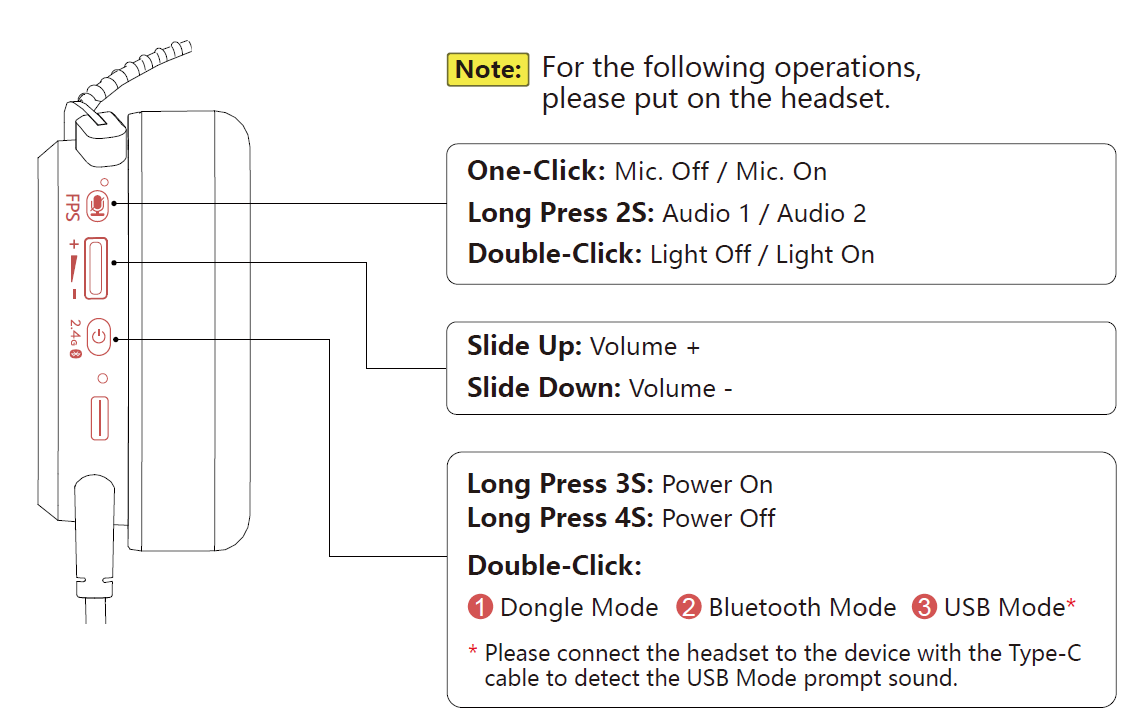
Control On Your Fingers
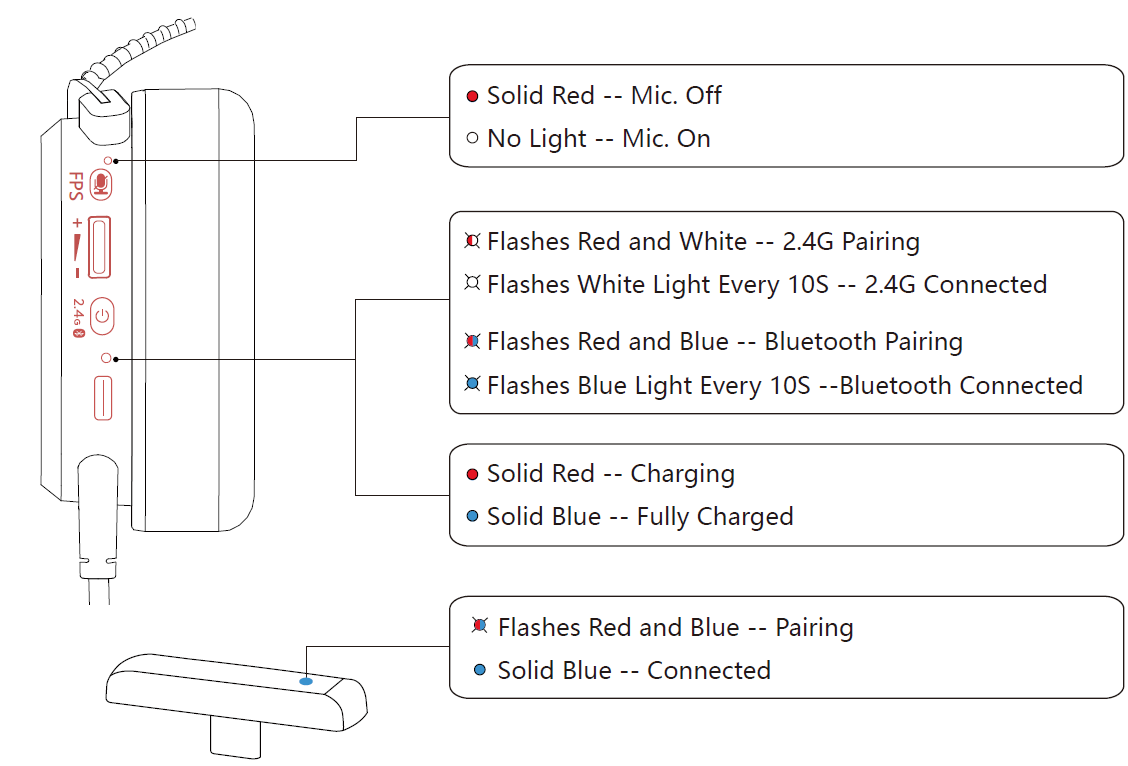
LED INSTRUCTION
Wide Compatibility
You may only choose one mode to connect at the same time.
- 2.4GHz Wireless
Type-C Connect

USB Connect

Bluetooth v5.3

- Wired Connection
Type-C Connect

USB Connect

CONNECTING 2.4G Device: USB Reciever
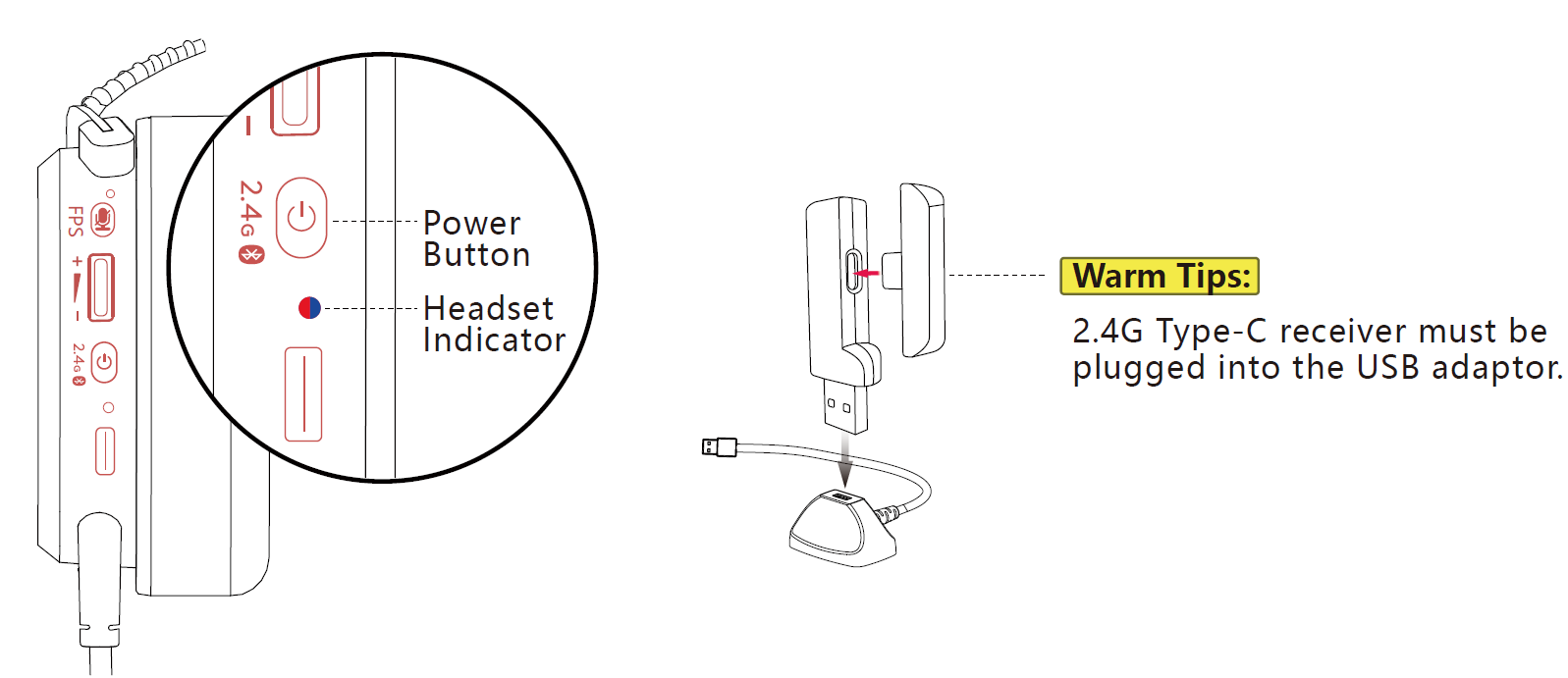
- Long-press the power button for 3S; the indicator light flashes in red and white alternately, entering 2.4G pairing mode. (Sound: Dongle Mode)
- Plug the USB receiver into your laptop, or use an anti-interference extension dock to connect to a laptop or other devices.
- After connecting the headset, the headset indicator flashes white light every 10S, and the Type-C receiver lights solid blue.
Connecting 2.4G Device: Type-C Receiver:
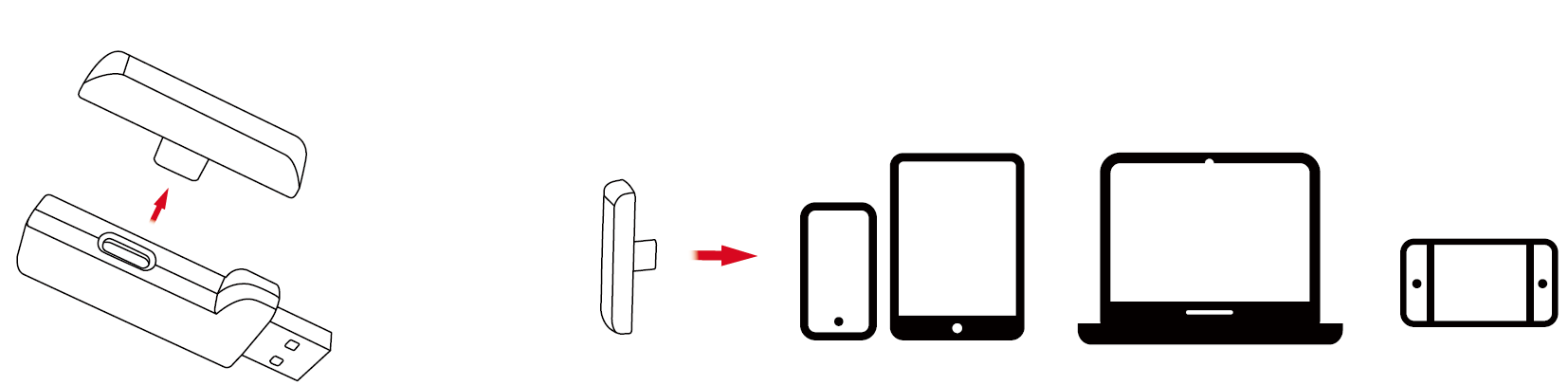
Remove the Type-C receiver from the USB adaptor.
Mobile | iPad | Laptop | Switch
- press the power button for 3S; the indicator light flashes in red and white alternately, entering 2.4G pairing mode. (Sound: Dongle Mode)
- Remove the Type-C receiver from the USB adaptor, and plug it into a Type-C device such as a Mobile, iPad, Laptop, Switch, or other devices.
- After connecting the headset, the headset indicator flashes white light every 10S, and the Type-C receiver lights solid blue.
Connecting Bluetooth Device
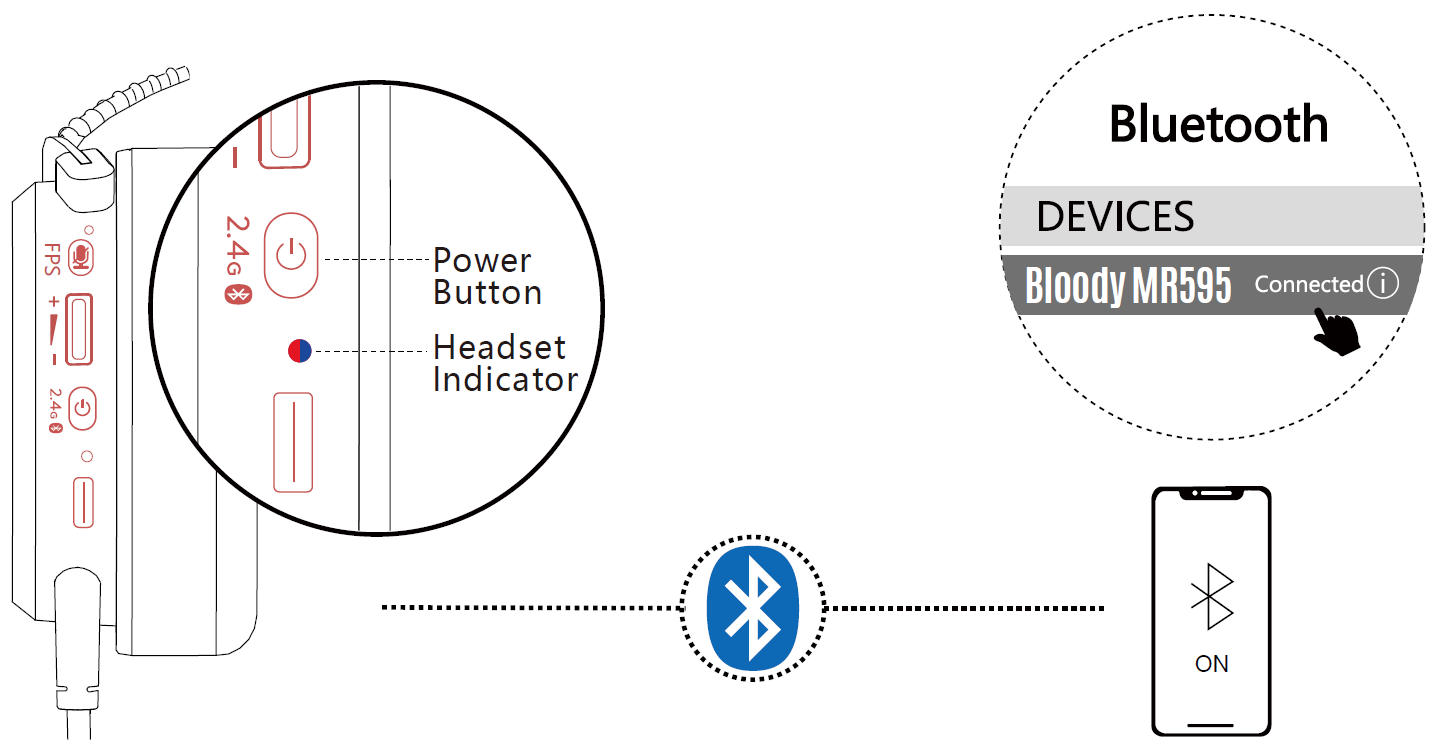
- press the power button for 3S, and the indicator light flashes in red or blue alternately, entering Bluetooth pairing mode. (Sound: Bluetooth Mode)
- Choose "Bloody MR595" from your Bluetooth device.
- After connecting the headset, the headset indicator flashes blue light every 10S. (Sound: Connected)
Type-C / USB Devices Wired Connection
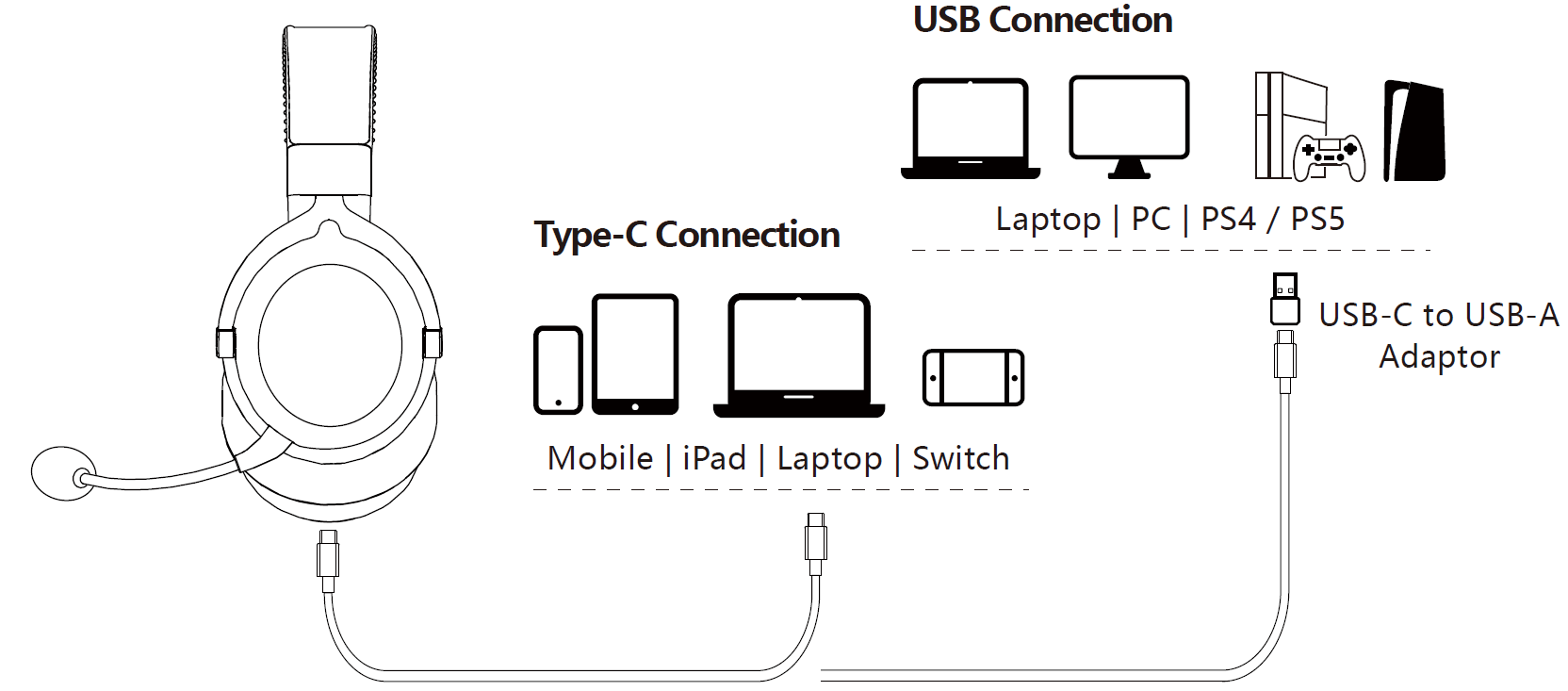
- The headset must be turned on while using a wired connection device.
- The headset can be used while charging with a USB-C charging cable, and you may choose a mode between "2.4G / Bluetooth / Wired USB
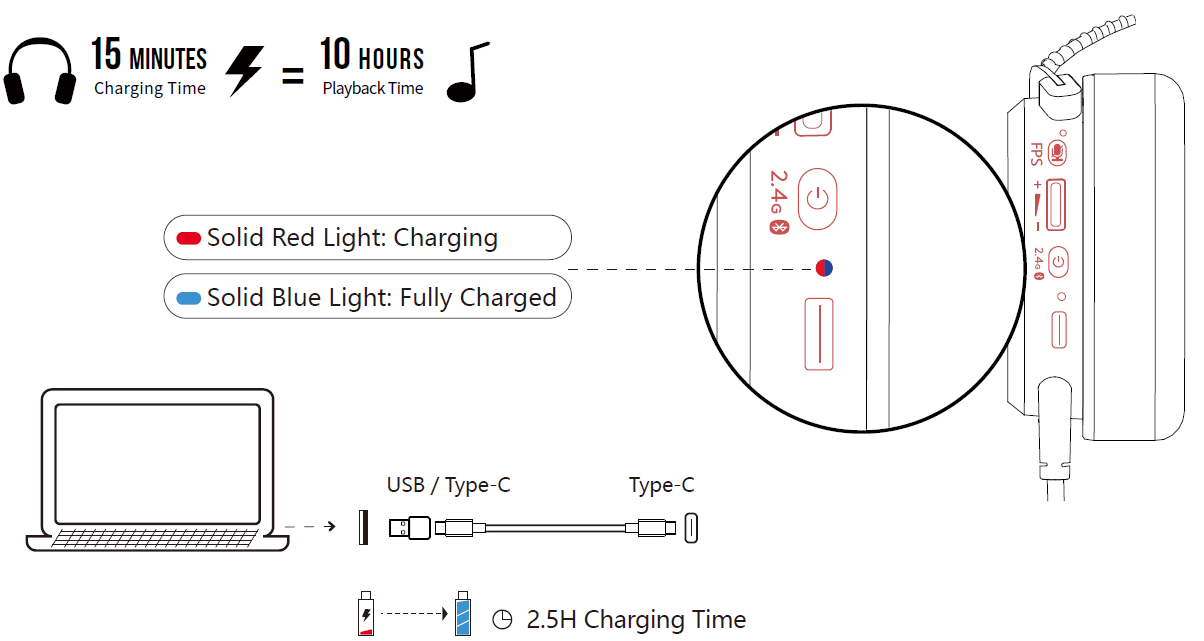
Charging/Low Battery Indicator
Technical Specifications and Performance Metrics
Audio Performance:
- Speaker Unit: 50mm HybridCore Diaphragm[1]
- Frequency Response: 20 Hz – 20 KHz[1]
- Sensitivity: 105 dB[1]
- Impedance: 32 ohm[1]
Microphone Specifications:
- Mic Type: 10mm Unidirectional Noise-Canceling[1][3]
- Mic Frequency Response: 100 Hz – 10 KHz[1]
- Mic Sensitivity: -38 dB[1]
Connectivity and Battery:
- Wireless Modes: 2.4GHz and Bluetooth v5.3[3]
- Wired Connection: USB Type-C and USB-A compatible[3]
- Built-in Battery: 1050mAh Lithium[1]
- Playback Time: 135 hours (Light Off, 50% volume) / 80 hours (Light On, 50% volume)[1][3]
- Charging Time: 2.5 hours[3]
- Operating Range: Up to 10 meters[1]
Physical Specifications:
- Weight: 305 grams[3]
- Product Dimensions: 150mm (L) × 103mm (W) × 200mm (H)[4]
- Charging Cable Length: 200 cm[3]
- Extension Dock Cable Length: 130 cm[3]
Key Features:
- FPS Sound Effect Backlit Button for tactical audio enhancement[3]
- Mic Mute Indicator with visual feedback[3]
- Gaming and Music audio modes[5]
- RGB lighting with adjustable brightness[3]
- Anti-Interference Extension Dock included[4]
Getting Started: Connection and Setup Guide
Bluetooth Connection (First-Time Setup):
- Long press the power button for 3 seconds to enter Bluetooth pairing mode (indicator flashes red or blue)[3]
- Select "Bloody MR595" from your device's Bluetooth settings[3]
- Once connected, the headset indicator flashes blue light every 10 seconds[3]
2.4GHz Wireless Dongle Connection:
- Plug the 2-in-One USB-C to USB-A receiver into your device[4]
- Use the anti-interference extension dock for optimal signal quality[3]
- The Type-C receiver lights solid blue when properly connected[7]
Wired Connection:
- For laptops and PCs: Use USB connection with included USB-C to USB-A adaptor[3]
- For mobile devices and iPad: Connect via Type-C connection[3]
- For PS4/PS5: Use USB connection with provided adaptor[3]
Control Guide and Button Functions
Power and Mode Controls:
- Long Press 3 seconds: Power On[7]
- Long Press 4 seconds: Power Off[7]
- Power Button with Mode Switch: Toggle between 2.4G, Bluetooth, and Wired modes[7]
Audio and Microphone Controls:
- Double-Click: Microphone On/Off with mute indicator[7]
- Slide Up: Volume Increase[7]
- Slide Down: Volume Decrease[7]
- Long Press 2 seconds: Switch between Audio Mode 1 and Audio Mode 2[7]
Lighting and Display Controls:
- Double-Click (alternate): Turn RGB Lighting Off/On[7]
- FPS Sound Effect Button: Activate tactical audio mode for competitive gaming[7]
Troubleshooting Common Issues
Connectivity Problems:
- Headset won't connect via Bluetooth: Ensure the headset is in pairing mode (long press power button 3 seconds until indicator flashes), then select "Bloody MR595" from device settings. If previously paired, forget the device and re-pair[3]
- 2.4GHz connection drops: Use the provided anti-interference extension dock to improve signal stability. Keep the receiver within 10 meters of the headset[3]
- Wired mode not recognized: Confirm the USB-C cable is properly inserted and the device has detected the headset as an audio input device. Try connecting to a different USB port[3]
Audio Quality Issues:
- Low volume output: Adjust both headset volume (slide controls) and device volume settings. Verify the FPS mode button isn't affecting audio levels[7]
- Microphone not working: Check the mic mute indicator—double-click to toggle microphone on. Ensure the detachable microphone is properly connected to the headset[7]
- Audio cutting out: Move closer to the wireless receiver (within 10m range) and remove potential interference sources. Try switching between 2.4GHz and Bluetooth modes[1]
Battery and Charging:
- Battery drains quickly: Disable RGB lighting to extend battery life to 135 hours. Reduce volume levels and close unnecessary background applications[3]
- Headset won't charge: Verify the USB-C charging cable is undamaged and properly connected. Clean the Type-C port of any debris. Charging should complete in 2.5 hours[3]
- LED indicator not illuminating during charge: Ensure the power button is activated and the device is receiving power from the USB source[3]
Warranty and Support:
- Contact Bloody customer support through their official website at bloody.com for warranty claims and technical assistance[2]
- Refer to the included user manual PDF for detailed troubleshooting steps[7]
- Register your product for extended warranty coverage where applicable[4]
Advantages and Disadvantages
Pros:
- Exceptional Battery Life: The 135-hour playback time (with lighting off) eliminates frequent charging concerns, making this ideal for travel and extended gaming sessions[1][5]
- Versatile Connectivity: Multi-mode support for 2.4GHz wireless, Bluetooth 5.3, and wired connections ensures compatibility across PC, PS4/PS5, Switch, and mobile devices[3]
- Premium Audio Quality: 50mm HybridCore drivers deliver immersive sound with clear frequency response (20 Hz – 20 KHz) suitable for both gaming and music[1]
- Detachable Noise-Canceling Microphone: The 10mm unidirectional mic with mute indicator provides crystal-clear communication in competitive environments[3]
- Gaming-Focused Features: FPS mode button and gaming audio modes give competitive advantages with tactical sound enhancement[5]
- Excellent Value Proposition: Premium features at competitive pricing compared to similarly-spec'd gaming headsets[2]
Cons:
- RGB Lighting Battery Impact: Enabling RGB lighting reduces battery life to 80 hours, a significant 41% reduction that may disappoint users wanting both features[3]
- Limited Active Noise Cancellation: The microphone is noise-canceling but the headset lacks active noise cancellation (ANC) for incoming audio[3]
- Heavier Weight: At 305 grams, the headset is relatively heavy compared to some ultra-lightweight competitors, potentially causing fatigue during extended wear[3]
- Wireless Range Limitation: The 10-meter operating range may be restrictive for some users in larger spaces or outdoor settings[1]
- Setup Complexity: Multiple connectivity modes and included adapters require careful setup for first-time users unfamiliar with multi-mode headsets[4]
Customer Reviews and User Feedback
The Bloody MR595 All-In-One Headset receives consistently positive feedback from gaming communities and audio enthusiasts. Users frequently praise the exceptional battery longevity, with many reporting that the 135-hour playback time significantly exceeds competitor offerings and reduces charging frequency to weekly or bi-weekly intervals[1][5].
Gamers particularly appreciate the multi-mode connectivity flexibility, noting that seamless switching between 2.4GHz wireless, Bluetooth, and wired modes accommodates diverse gaming platforms without requiring multiple headsets[3]. The audio quality receives strong endorsements, with users highlighting the clarity of the 50mm HybridCore drivers for both competitive FPS gaming and casual music listening[5].
Common praise includes the detachable microphone quality for team communication and the FPS mode button providing tactical audio advantages. Users value the included anti-interference extension dock for stable wireless connectivity[3][4].
Frequently mentioned concerns include the weight during extended gaming sessions and the significant battery life reduction when RGB lighting is enabled[3]. Some users note the setup process requires attention to detail with multiple adapters and connection modes[4].
Recommended For: Competitive gamers, content creators, multi-platform users, and anyone prioritizing battery life and audio quality over lightweight design. The Bloody MR595 represents excellent value for serious gamers seeking reliable, feature-rich wireless audio without premium pricing[2][5].
```
More bloody manuals
- Setup: Bloody MR590 Gaming Wireless Headset User Manual
- Setup: Bloody GPW50 2.4G Wireless & USB Gaming Controller User Manual
- Setup: Bloody B950 RGB Gaming Keyboard User Manual
- Setup: Bloody MR720 Naraka RGB Gaming Wireless Headset User Manual
- Setup: Bloody MR575 RGB Gaming Wireless Headset User Manual
- Setup: Bloody S3 Carry Portable Waterproof Speaker User Manual
Leave a Comment