
Setup: Bloody MR710 RGB Wireless Gaming Headset User Manual
Content
Bloody MR710 RGB Wireless Gaming Headset: Complete User Manual & Guide
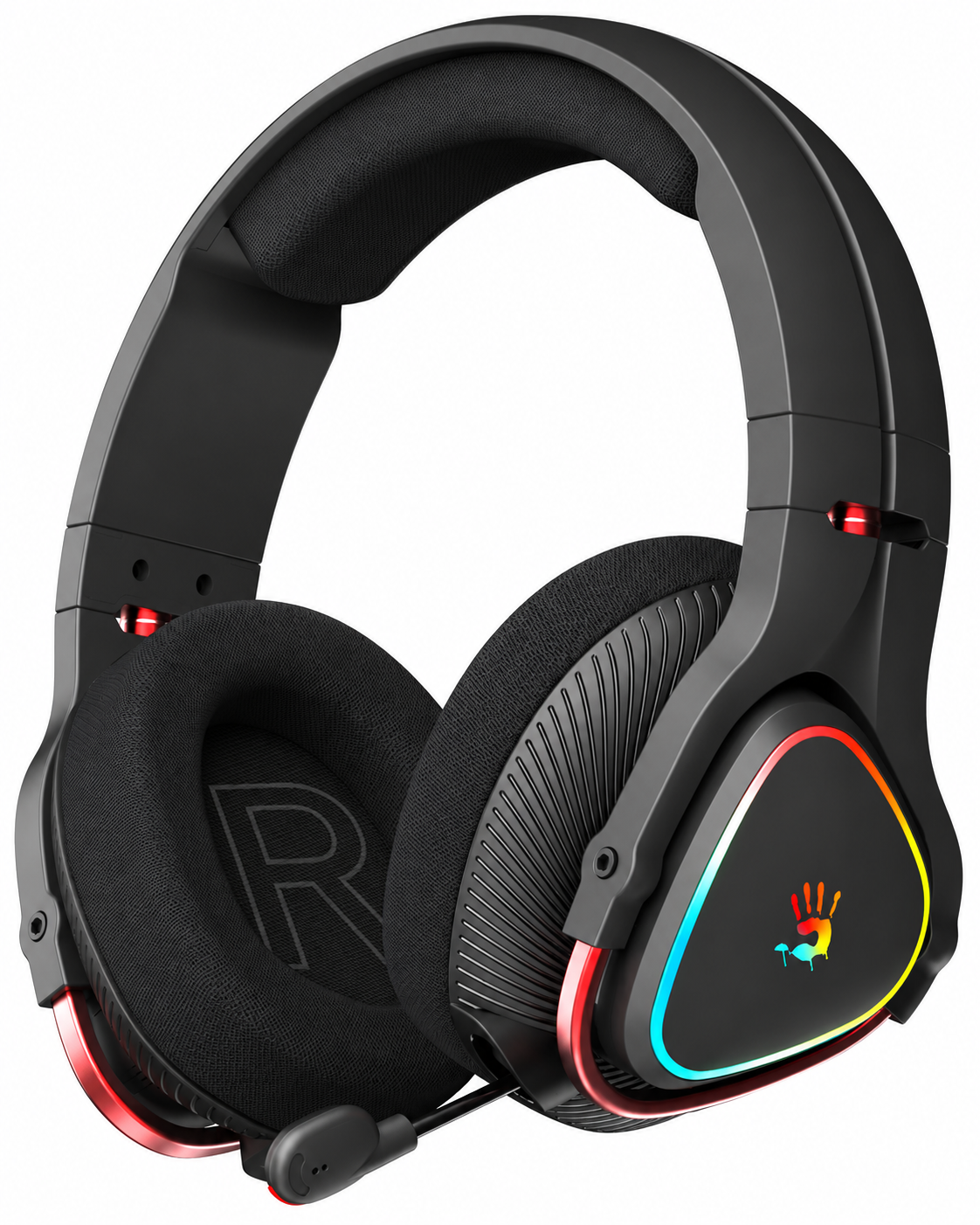
Introduction to the Bloody MR710 RGB Wireless Gaming Headset
The Bloody MR710 RGB Wireless Gaming Headset represents a premium audio solution designed specifically for competitive gamers and content creators who demand professional-grade performance without compromise. This all-in-one wireless headset combines cutting-edge audio technology with versatile connectivity options, making it an exceptional choice for gamers across multiple platforms.
The Bloody MR710 excels as a multi-platform gaming headset, delivering immersive audio experiences across PC, MAC, PlayStation 4, PlayStation 5, Nintendo Switch, and Xbox One. Whether you're engaged in fast-paced competitive gaming, streaming gameplay, or enjoying narrative-driven titles, this headset provides the audio clarity and responsiveness that separates casual players from serious competitors.
Key benefits include ultra-low latency wireless connectivity (up to 20ms), extended battery life reaching 65 hours with RGB lights off, and advanced noise-cancellation microphone technology for crystal-clear team communication. The headset's signature sound profile emphasizes crisp trebles and midrange frequencies with deep, satisfying bass, providing the competitive audio advantage gamers need in high-pressure situations.
The Bloody MR710 is ideal for esports enthusiasts, professional streamers, casual gamers, and anyone requiring reliable multi-device audio connectivity. With a typical price range of $80-120 USD depending on region and retailer, the Bloody MR710 offers exceptional value for the features and performance delivered. The headset is readily available through authorized retailers worldwide, with a 1-year manufacturer warranty included.
Technical Specifications of the Bloody MR710
Connectivity & Wireless Performance:
- Triple-mode connection: 2.4GHz wireless, Bluetooth v5.3, and 3.5mm wired audio.
- Operating range: Up to 12 meters (40 feet) for wireless connectivity.
- Ultra-low latency: 20ms wireless transmission for competitive gaming.
- Gaming-grade 2.4GHz transmission with minimal interference.
Audio Performance Specifications:
- Speaker size: 50mm driver unit.
- Driver technology: M.O.C.I. (Mycelium Of Carbon IT) Dome Tech with hybrid diaphragm.
- Frequency response: 20Hz - 20KHz.
- Speaker impedance: 16 ohms.
- Speaker sensitivity: 105dB.
- Audio output: RGB 7.1 surround sound capability.
Microphone Specifications:
- Microphone type: Unidirectional noise-cancelling.
- Microphone frequency response: 100Hz - 10KHz.
- Microphone sensitivity: -42dB.
- Designed for clear communication during gameplay.
Battery & Power:
- Battery capacity: 1200mAh Lithium Battery.
- Playback time (RGB lights off): 65 hours.
- Playback time (RGB lights on): 35 hours.
- Charging time: 15 minutes provides 3 hours playback.
- Charging cable: USB-C Type-C (80cm).
Physical Specifications:
- Color options: Black and White.
- Design: Flat 90-degree foldable construction.
- Weight: 335 grams (with battery).
- Audio cable: 3.5mm jack (150cm length).
- RGB backlighting with customizable flow effects.
Platform Compatibility:
- PC and MAC operating systems.
- PlayStation 4 and PlayStation 5.
- Nintendo Switch.
- Xbox One.
- Mobile devices with Bluetooth support.
- Tablets and Android devices.
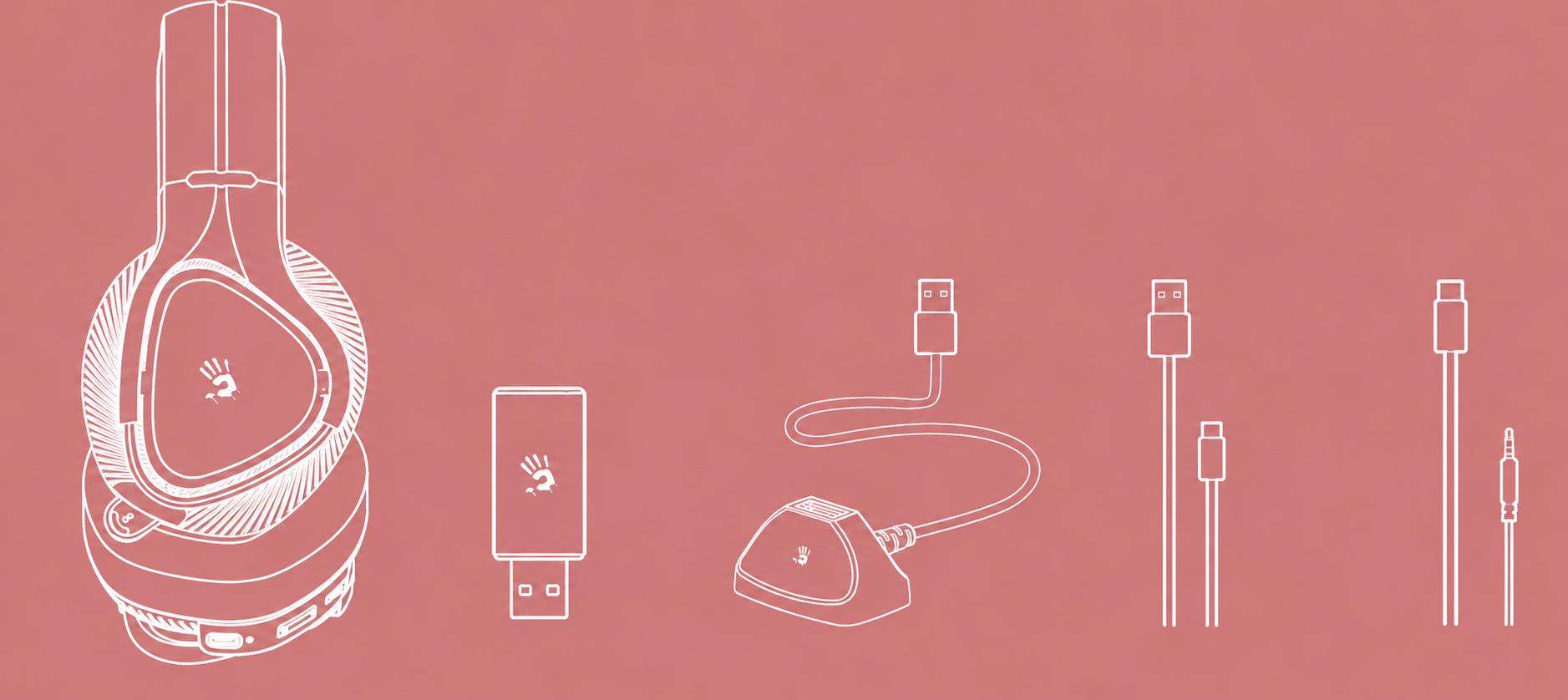
What's in the box
- All-in-one wireless headset
- 2.4G USB receiver
- Anti-interference extension dock
- USB Type-C rechargeable cable
- AUX 4-pin 3.5mm audio cable
- User manual
- Travel pouch

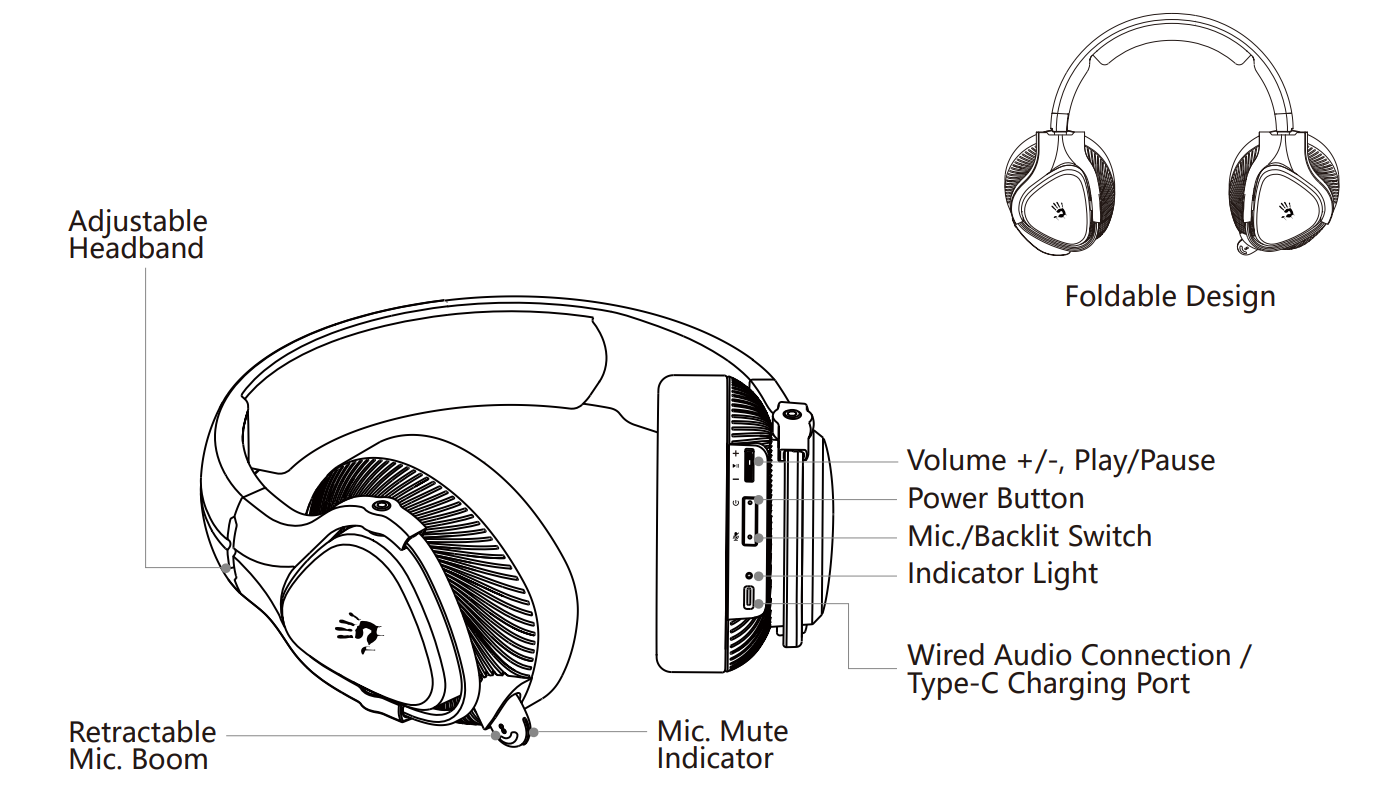
Know your product
Setup Guide for the Bloody MR710 RGB Wireless Gaming Headset
Initial Unboxing & Preparation:
- Remove the Bloody MR710 headset from packaging carefully.
- Locate the included USB-C charging cable and 3.5mm audio cable.
- Charge the headset fully before first use (approximately 2-3 hours recommended).
- Ensure the power button is accessible on the left ear cup.
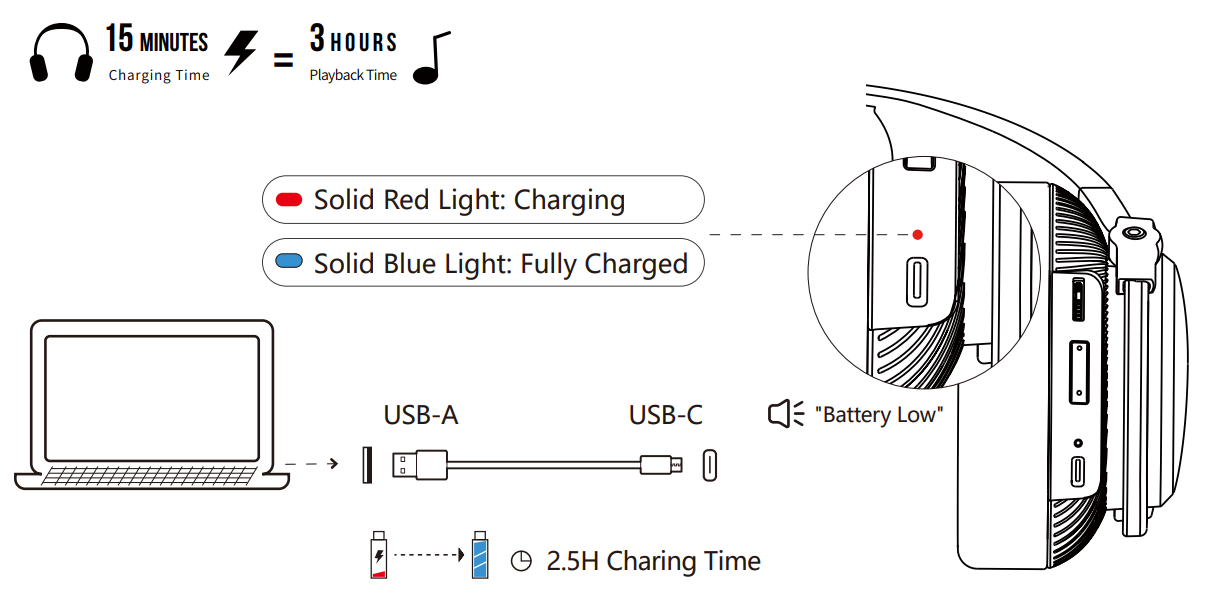
Charging Instructions:
- Connect the included USB-C charging cable to the headset's charging port.
- Connect the opposite end to a USB power adapter (5V recommended).
- LED indicator will display charging status during the process.
- Full charge provides up to 65 hours of usage (RGB lights off) or 35 hours (RGB lights on).
- The headset can operate after 15 minutes of charging for 3 hours of playback.
2.4GHz Wireless Connection Setup:
- Power on the headset using the dedicated power button.
- Insert the included 2.4GHz USB dongle into your PC, PlayStation, Xbox, or Nintendo Switch USB port.
- The headset will automatically detect and pair with the dongle within seconds.
- LED indicator on the headset will confirm successful connection.
- Maintain line-of-sight within 12 meters (40 feet) for optimal performance.
Bluetooth Pairing Instructions:
- Power on the headset and ensure Bluetooth mode is active.
- Press and hold the Bluetooth pairing button (typically 3-5 seconds) until LED flashes.
- Open Bluetooth settings on your mobile device, tablet, or computer.
- Select "Bloody MR710" from available Bluetooth devices.
- Confirm pairing when prompted on your device.
- Once paired, the headset will automatically reconnect to previously paired devices.
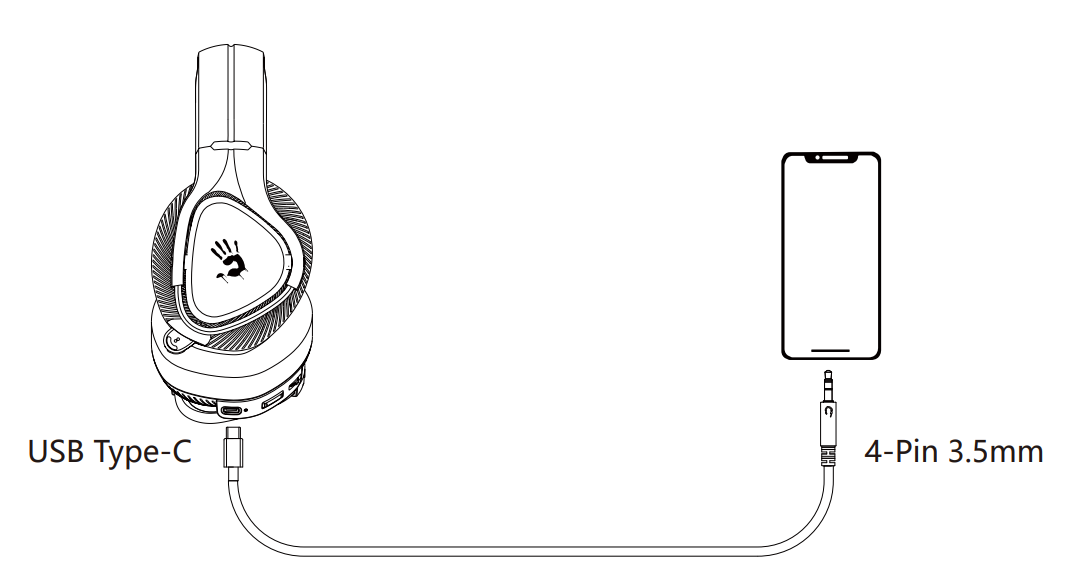
3.5mm Wired Audio Connection:
- Connect the 3.5mm audio cable to the headset's audio jack.
- Connect the opposite end to your device's headphone jack or audio output.
- No charging or pairing required for wired mode operation.
- Wired mode provides zero-delay audio transmission.
RGB Lighting Configuration:
- RGB lights activate automatically when the headset powers on.
- Press the RGB control button to cycle through lighting effects
- Disable RGB lights to extend battery life to maximum 65 hours.
- RGB lighting effects enhance immersion during gaming sessions.
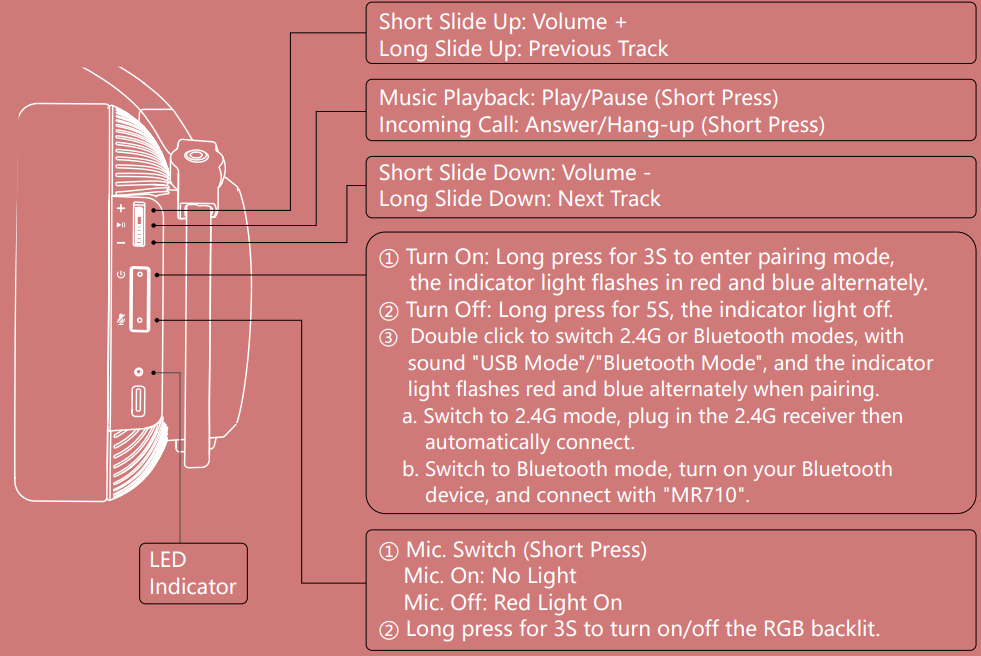
Control on your fingers
Led instruction
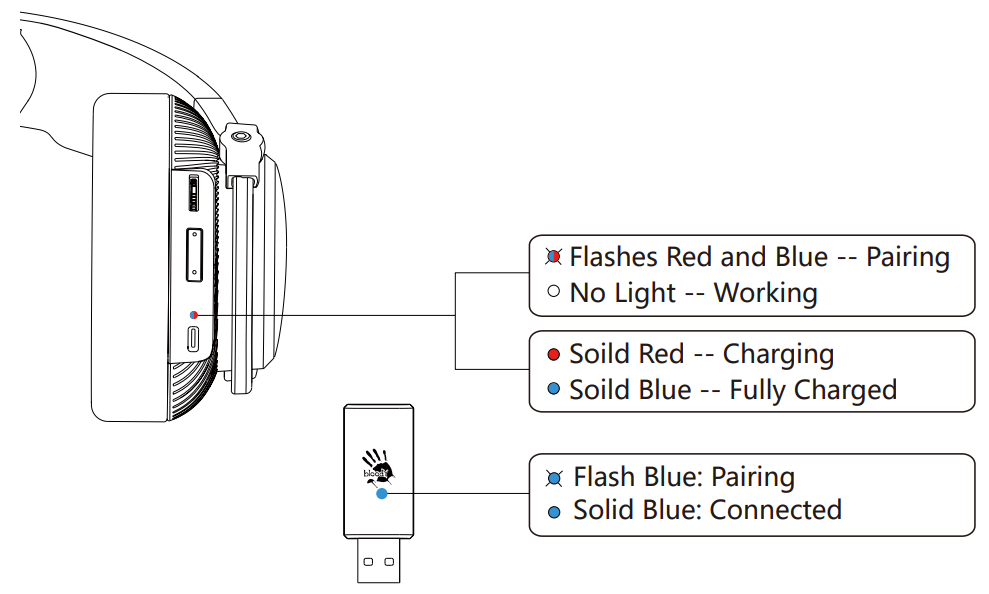
Connecting 2.4 GHz device
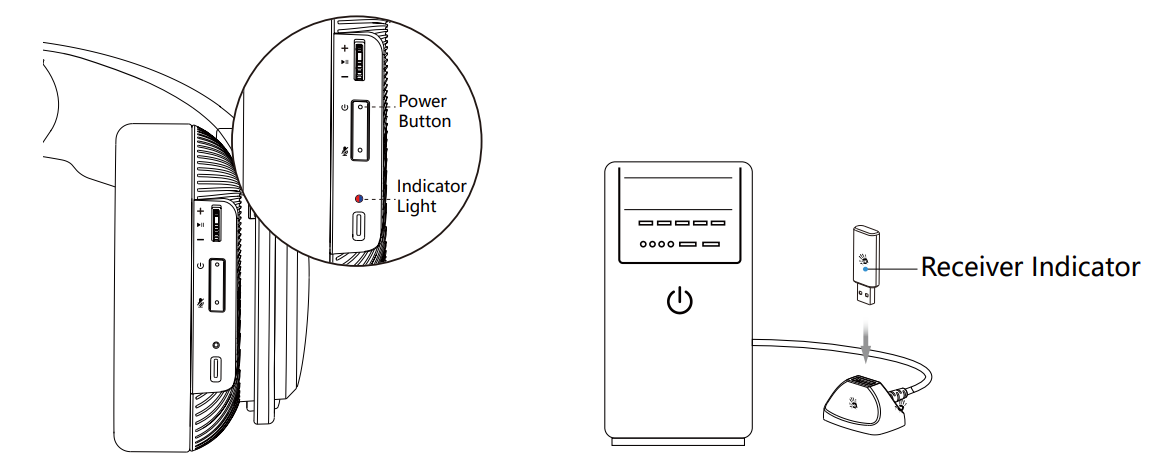
- Long-press the power button for 2 seconds. The indicator light flashes red and blue alternately when pairing.
- Double-click the power button to switch to 2.4G mode. (Sound: USB mode)
- Plug the 2.4G USB receiver into your computer.
- After the headset is connected, the headset indicator light turns off, and the receiver indicator remains solid blue.
Connecting bluetooth device
- Long press the power button for 2 seconds. The indicator light flashes red and blue alternately when pairing.
- Double-click the power button to switch to Bluetooth mode. (Sound: Bluetooth mode)
- Choose "MR710" from your Bluetooth device.
- The indicator light turns off after the headset is connected.
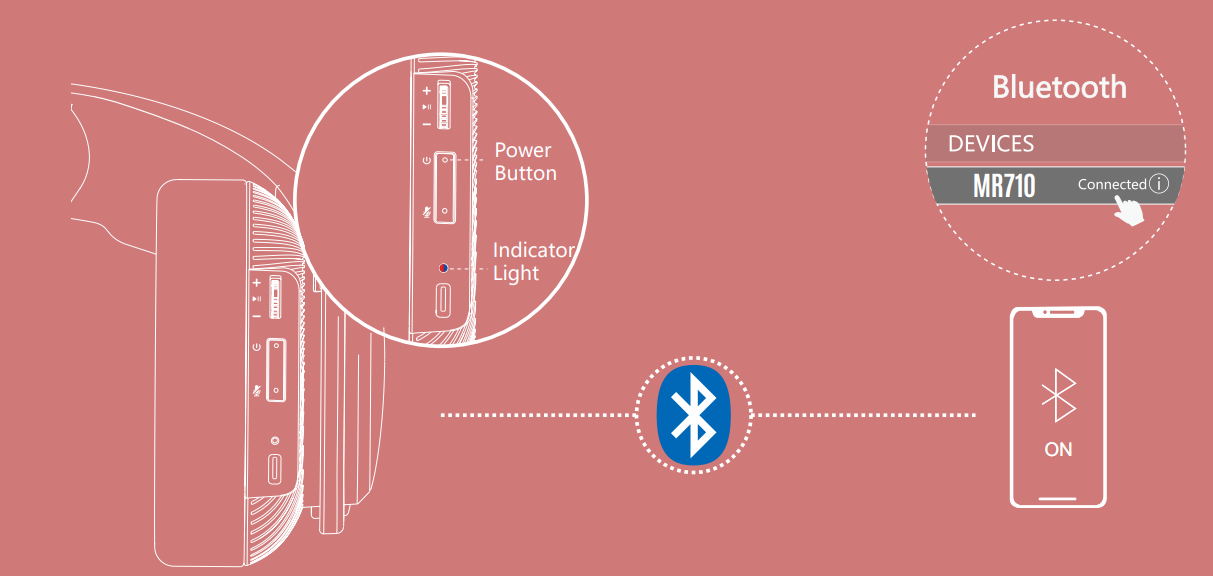
Connect 2.4g/bluetooth device
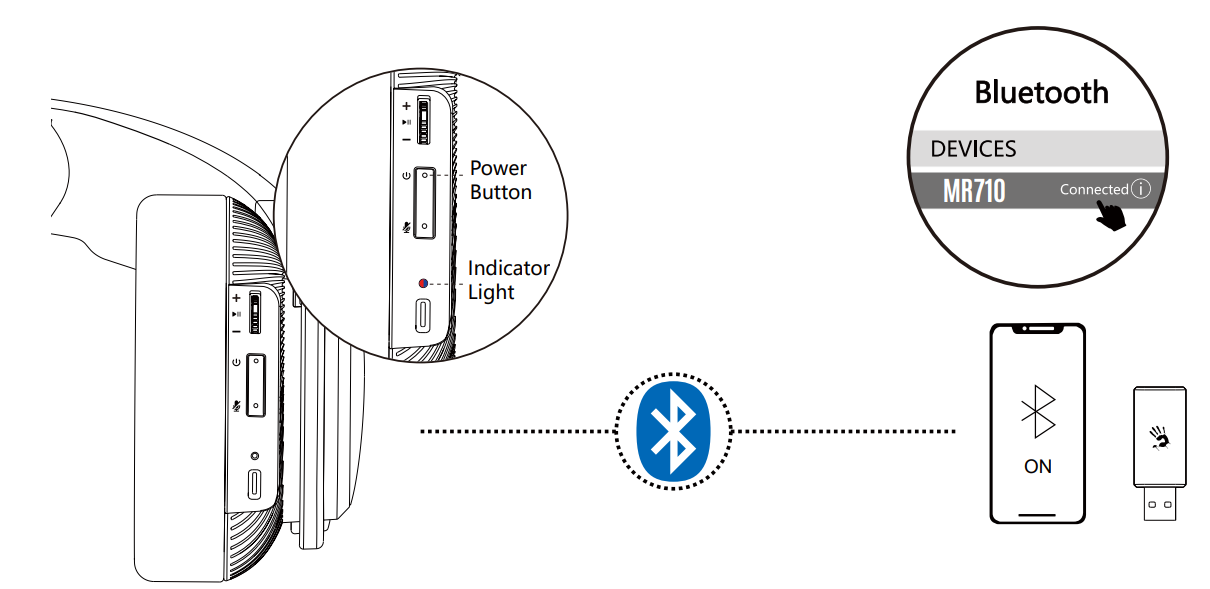
Connecting wired devices
Charging/low battery indicator
Troubleshooting Common Issues with the Bloody MR710
Connectivity Problems:
- Headset not connecting to 2.4GHz dongle: Ensure the USB dongle is fully inserted into the port. Power cycle both the headset and the dongle. Try a different USB port if available.
- Bluetooth pairing fails: Clear previously paired devices from the headset memory. Restart Bluetooth on your device and attempt pairing again. Ensure no other devices are actively paired.
- Intermittent connection drops: Move closer to the wireless source (within 12 meters). Remove physical obstacles between the headset and receiver. Check for interference from other wireless devices.
- Wired connection producing no audio: Verify the 3.5mm cable is fully inserted into both the headset and device. Test the cable with another device to confirm functionality.
Audio Quality Issues:
- Low volume output: Check device volume settings and increase to desired level. Verify the headset volume control is not muted or set too low. Ensure no audio limiter software is active on your device.
- Distorted or crackling sound: Move away from sources of wireless interference (microwaves, routers). Reduce RGB lighting effects, which may cause minor interference. Test with wired connection to isolate wireless issues.
- Microphone not picking up voice: Ensure the unidirectional microphone is positioned correctly near your mouth. Check device microphone settings and permissions. Test the microphone with another application.
- One ear cup silent: Check device audio balance settings. Verify the audio cable connection if using wired mode. Test with different connection modes to identify the issue source.
Battery & Power Issues:
- Headset not charging: Inspect the USB-C charging port for debris or damage. Try a different USB power adapter (5V recommended). Ensure the charging cable is fully connected.
- Battery draining quickly: Disable RGB lighting to extend battery life significantly. Reduce wireless transmission distance. Use wired mode for extended sessions without battery concerns.
- Headset powers off unexpectedly: Fully charge the headset before use. Check for automatic power-off settings in device configuration. Reduce usage of power-intensive features like RGB lighting.
Warranty & Support:
- The Bloody MR710 includes a 1-year manufacturer warranty covering hardware defects.
- Contact the official Bloody Gaming support team for technical assistance.
- Provide proof of purchase and a detailed issue description for warranty claims.
- Authorized retailers typically handle warranty processing and replacements.
Advantages and Disadvantages of the Bloody MR710 RGB Wireless Gaming Headset
Pros - Why Gamers Choose the Bloody MR710:
- Triple-mode connectivity: The combination of 2.4GHz wireless, Bluetooth v5.3, and 3.5mm wired options provides unmatched flexibility across gaming platforms and devices.
- Exceptional battery life: Up to 65 hours of playback with RGB lights off delivers several weeks of casual gaming between charges.
- Ultra-low latency: 20ms wireless transmission ensures responsive audio during competitive gaming without noticeable delay.
- Advanced audio technology: M.O.C.I. hybrid diaphragm technology with 50mm drivers delivers crisp trebles, clear midrange, and deep bass.
- Effective noise-cancellation microphone: Unidirectional microphone with -42dB sensitivity enables clear team communication during intense gameplay.
- Wide platform compatibility: Works seamlessly with PC, MAC, PlayStation 4/5, Nintendo Switch, Xbox One, and mobile devices.
- Comfortable design: 90-degree foldable construction and lightweight 335-gram design suit extended gaming sessions.
- RGB customization: Flow backlighting effects with multiple modes enhance immersion and aesthetic appeal.
- Excellent value proposition: Premium features at an $80-120 USD price point compete favorably with more expensive alternatives.
Cons - Areas for Improvement:
- RGB lighting impact on battery: RGB lights reduce battery life from 65 hours to 35 hours, requiring users to choose between customization and longevity.
- Limited active noise cancellation: While the microphone features noise cancellation, the headphones themselves lack active noise cancellation for external sounds.
- Wired audio cable length: The 150cm audio cable may be restrictive for some desktop setups or stationary use cases.
- Charging cable length: The 80cm USB-C charging cable limits flexibility when charging while gaming.
- No wireless audio codec options: Limited customization of Bluetooth audio codec selection for advanced audiophiles.
- RGB control options: Limited documentation on extensive RGB customization features and effect options.
Customer Reviews and Real-World Feedback for the Bloody MR710
Users consistently praise the Bloody MR710 RGB Wireless Gaming Headset for its exceptional versatility and reliable performance across multiple gaming platforms. Gamers particularly appreciate the triple-mode connectivity, noting that the ability to seamlessly switch between 2.4GHz wireless, Bluetooth, and wired connections eliminates the need for multiple headsets.
The battery life receives outstanding feedback, with users reporting that 65 hours of continuous playback between charges exceeds expectations for wireless gaming headsets. Competitive gamers specifically highlight the ultra-low 20ms latency, confirming that wireless performance matches or exceeds wired alternatives for esports and fast-paced titles.
Audio quality consistently earns positive assessments, with users noting that the M.O.C.I. hybrid diaphragm technology delivers impressive sound clarity, particularly for directional audio cues critical in competitive gaming. The microphone receives praise for effective noise cancellation, enabling clear communication during team-based multiplayer sessions.
Common praise points include the comfortable 90-degree foldable design for extended wear, customizable RGB backlighting effects that enhance gaming atmosphere, and reliable connectivity across PC, console, and mobile platforms. Users frequently recommend the Bloody MR710 to other gamers seeking an all-in-one wireless solution without platform limitations.
Minor complaints typically involve RGB lighting's impact on battery life and requests for more extensive RGB customization options. Some users note that the included cables could benefit from greater length for specific setup configurations. Overall, customer satisfaction remains high, with the Bloody MR710 recommended for both casual and competitive gamers seeking versatile, reliable wireless audio.
```
More bloody manuals
- Setup: Bloody GR370 Wireless Gaming Headset User Manual
- Setup: Bloody S5 Lock portable Waterproof Speaker User Manual
- Setup: Bloody S10 Bluetooth RGB Gaming Soundbar User Manual
- Setup: Bloody GR270 Wireless Gaming Headset User Manual
- Setup: Bloody GM50 Pro RGB USB Streaming Microphone User Manual
- Setup: Bloody S87 Naraka Hot-Swappable RGB Mechanical Gaming Keyboard User Manual
Leave a Comment