
Setup: Bloody GM50 Pro RGB USB Streaming Microphone User Manual
Content
Bloody GM50 Pro RGB USB Streaming Microphone: Complete Product Manual & Guide
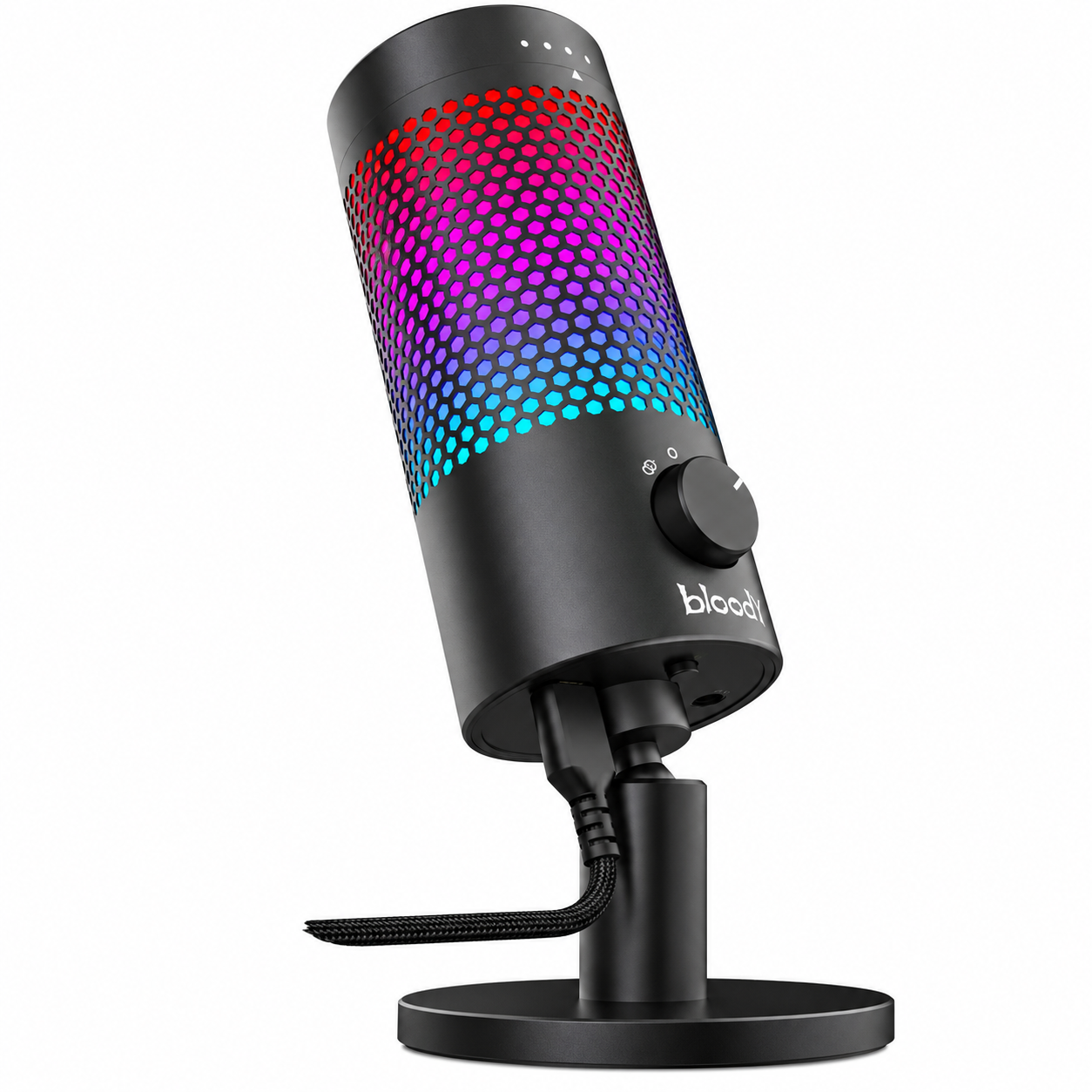
Introduction: Professional Streaming Audio Made Accessible
The Bloody GM50 Pro RGB USB Streaming Microphone represents a professional-grade audio solution designed for content creators, streamers, podcasters, and gaming enthusiasts who demand studio-quality sound without complexity. This USB condenser microphone combines high-resolution audio capture with intuitive controls and eye-catching RGB lighting effects, making it an ideal choice for anyone serious about their streaming or recording setup.
The Bloody GM50 Pro delivers exceptional audio clarity with support for up to 192 kHz sample rates and 32-bit depth, ensuring crystal-clear sound reproduction for every detail of your voice. Whether you're broadcasting live gameplay, recording podcasts, conducting online interviews, or participating in conference calls, this microphone adapts to your needs through its four selectable polar patterns. The device is engineered for seamless multi-device compatibility, working effortlessly with PCs, Macs, PlayStation 4, and PlayStation 5 consoles.
Target audiences include live streamers, content creators, podcasters, esports enthusiasts, and professional broadcasters seeking reliable audio equipment. The microphone is widely available through major retailers and online platforms, with pricing typically ranging from $80-$150 USD depending on region and retailer. The Bloody GM50 Pro stands out in the mid-range microphone market by combining professional specifications with user-friendly features and aesthetic appeal, making it accessible to both beginners and experienced audio professionals.
Technical Specifications: Professional-Grade Audio Performance
Audio Performance Specifications:
- Sample Rates: Up to 192 kHz for high-resolution audio capture.
- Bit Depth: 32-bit resolution for pristine sound quality.
- Frequency Response: 20 Hz - 20 kHz, covering the full human hearing spectrum.
- Sensitivity: -37 ± 3 dB for reliable signal capture.
- Signal-to-Noise Ratio: Greater than 95 dB for clean audio without background interference.
- Total Harmonic Distortion (THD): Less than 0.1%, ensuring distortion-free recordings.
Microphone Hardware Specifications:
- Capsule Type: Three 14 mm Electret Condenser Microphones for superior sound capture.
- Polar Patterns: Four selectable modes - Cardioid, Omnidirectional, Stereo, and Bidirectional.
- Built-in Pop Filter: Reduces plosive sounds and breath noise for cleaner recordings.
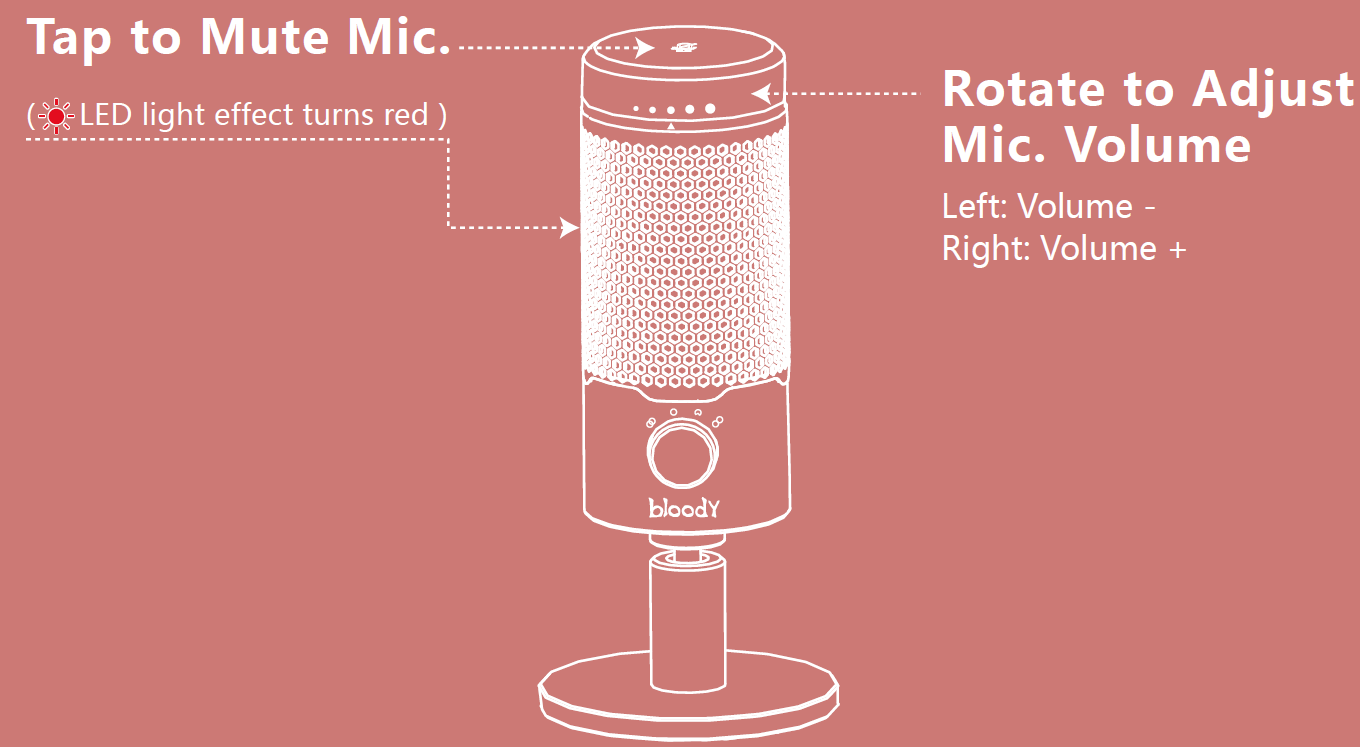
- Tap-to-Mute Sensor: One-touch mute functionality with LED status indicator.
- Adjustable Volume Control: Rotate mechanism for comfortable volume adjustment during recording.
Connectivity and Power Specifications:
- Connection Type: USB Type-C with braided cable.
- Cable Length: 2.5 meters (250 cm) for flexible microphone placement.
- Power Consumption: 5V at 500 mA via USB connection.
- Multi-Device Compatibility: Works with PC, Mac, PS4, and PS5.
Aesthetic and Control Features:
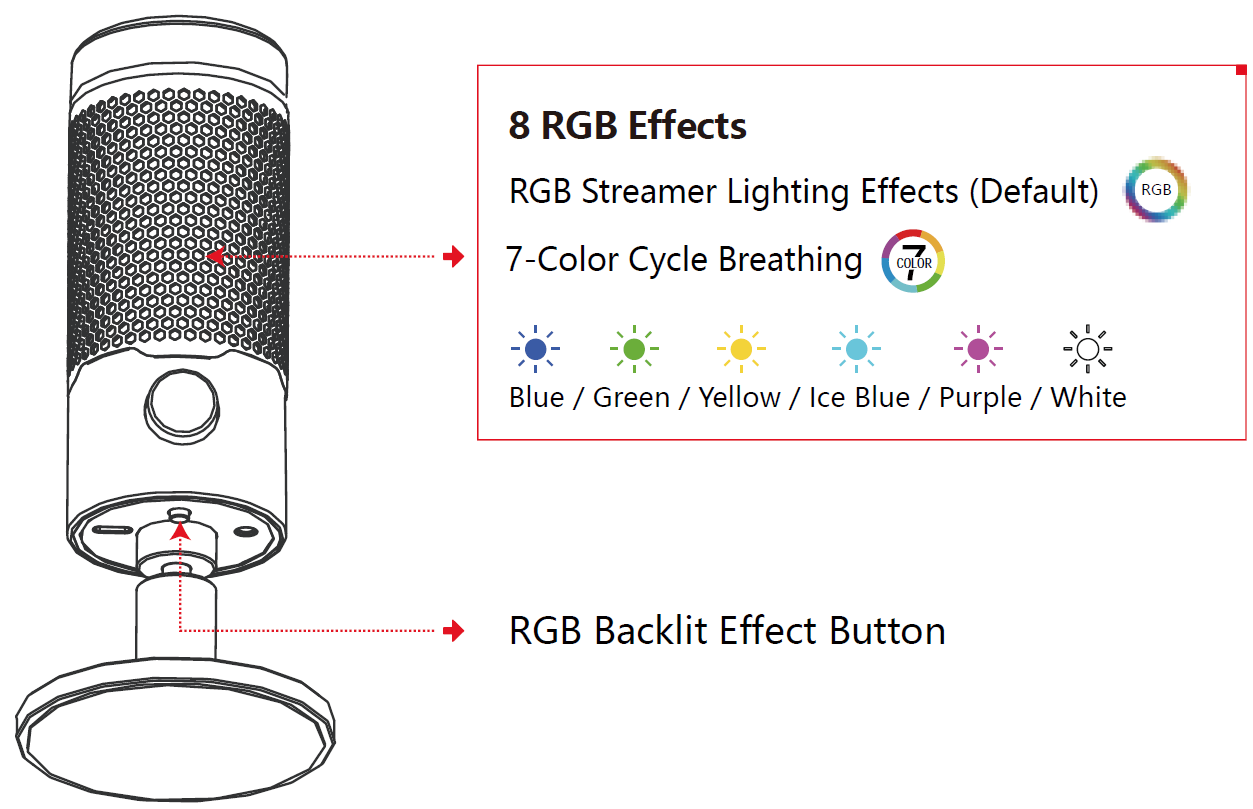
- RGB Lighting Effects: Eight selectable lighting modes for enhanced streaming aesthetics.
- LED Status Indicator: Built-in light shows microphone working status.
- Button Controls: Easy-access buttons for polar pattern and lighting effect selection.
What's in the box
- Microphone
- USB Type-C Cable
- User Manual

Know your product
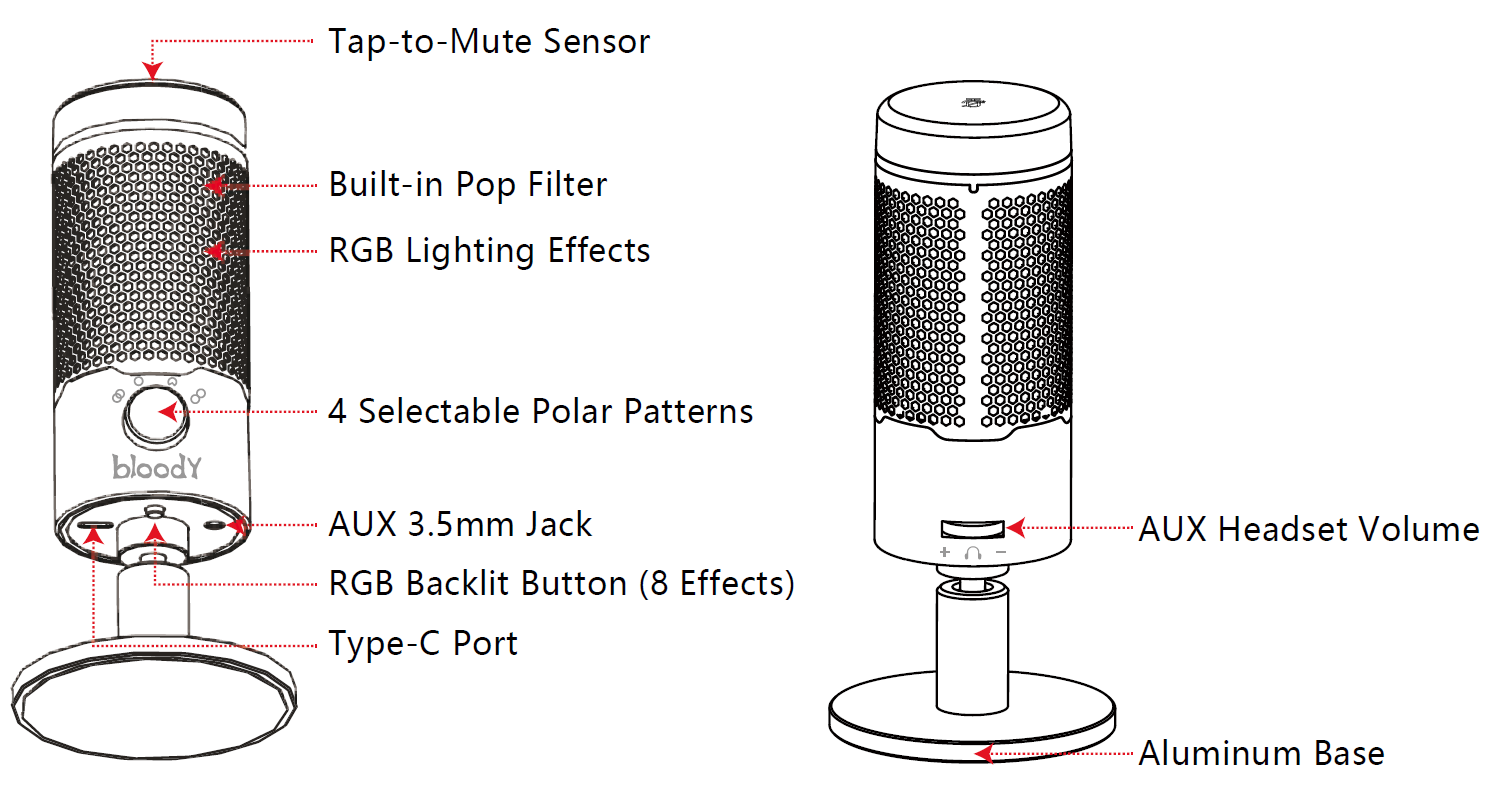
Setup Guide: Getting Started with Your Microphone
Initial Setup Instructions:
- Unbox and Inspect: Remove the Bloody GM50 Pro RGB USB Streaming Microphone from packaging and inspect all components for damage. Ensure the USB Type-C braided cable is included.
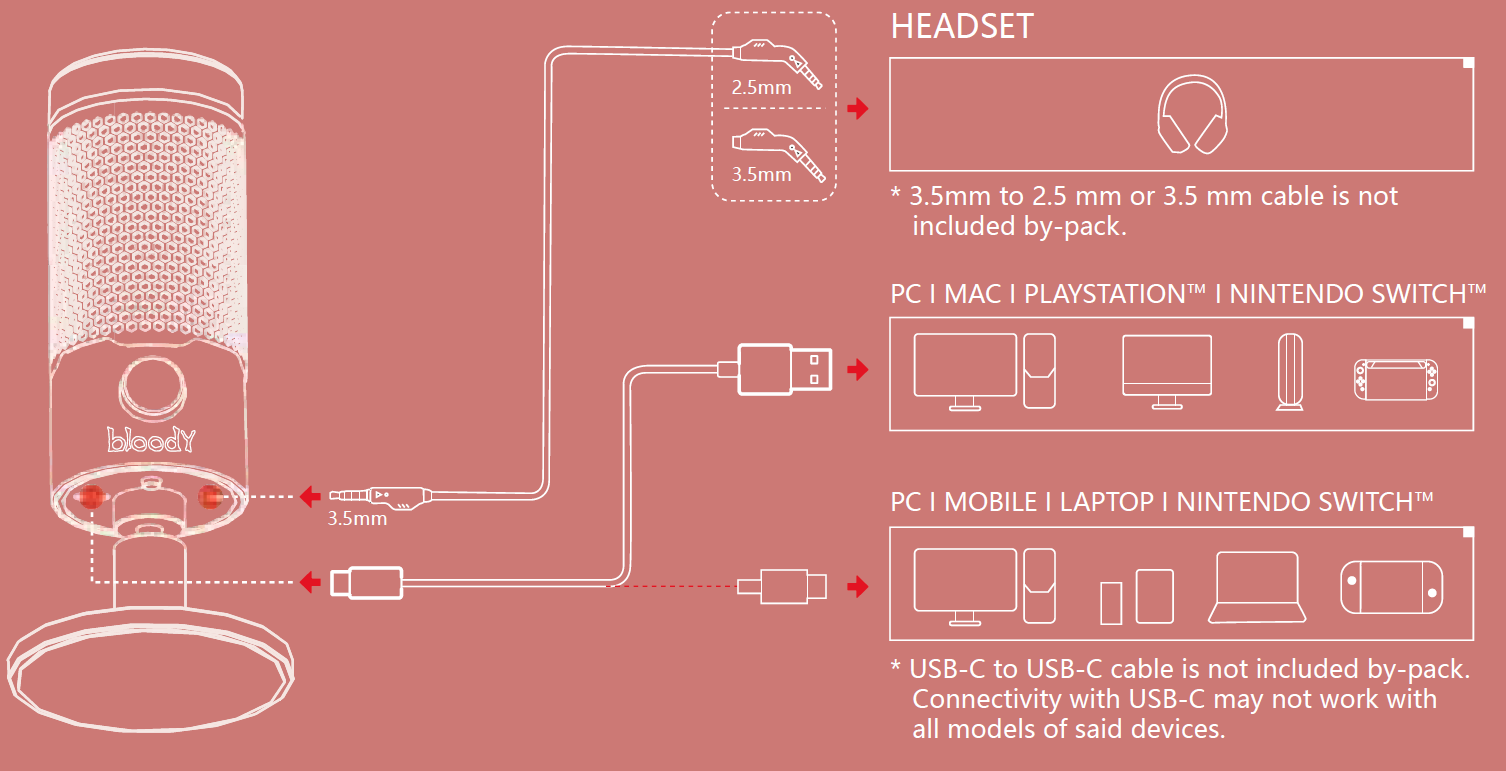
- Connect USB Cable: Attach the 2.5-meter USB Type-C cable to the microphone's USB port. Position the microphone on your desk or mount it on a microphone stand within reach of your recording area.
- Connect to Device: Plug the USB-C cable into your computer, Mac, or gaming console. The device will automatically install necessary drivers on most systems. Note that USB-C connectivity may not work with all device models.
- Power On: The microphone powers on automatically when connected via USB. The LED indicator light will illuminate, confirming proper power supply.
Configuration and Polar Pattern Selection:
The Bloody GM50 Pro offers four polar patterns for different recording scenarios. Press the polar pattern button to cycle through modes: Cardioid (single speaker, focused sound), Omnidirectional (360-degree pickup for multi-person podcasts and conferences), Stereo (dual-channel recording), and Bidirectional (front and back pickup for face-to-face interviews). Select the pattern matching your recording environment for optimal audio quality.
RGB Lighting Configuration:
Press the RGB button to cycle through eight different lighting effects. Choose effects that complement your streaming setup or gaming environment. The soft, coordinated lighting effects enhance visual appeal during live broadcasts and video gaming sessions.
Volume Adjustment:
Rotate the microphone's volume control dial to adjust recording levels. Set appropriate volume levels before recording to prevent audio distortion or weak signals. Use your device's audio settings for additional fine-tuning.
Connection
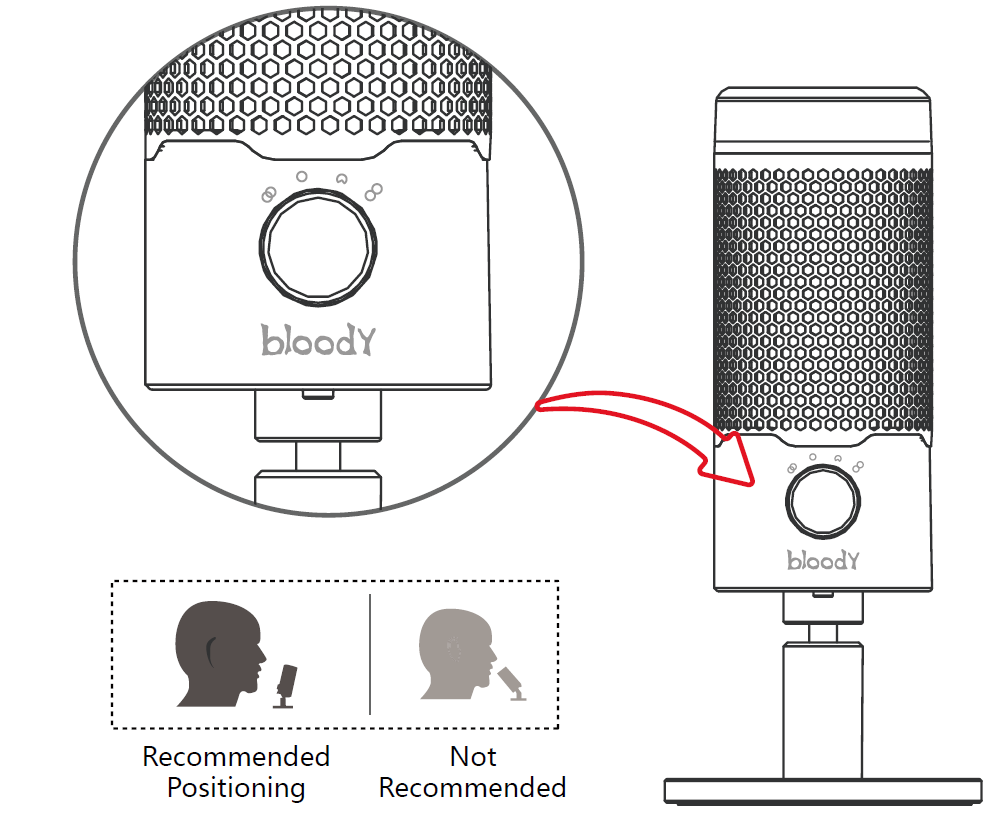
4 selectable polar patterns
- Stereo: Vocals, Instruments
- Omnidirectional: Multi-Person Podcasts, Conference Calls
- Cardioid: Podcasts, Streaming, Voiceovers, Instruments
- Bidirectional: Face-to-Face Interviews
Microphone volume adjustable
RGB backlit effect
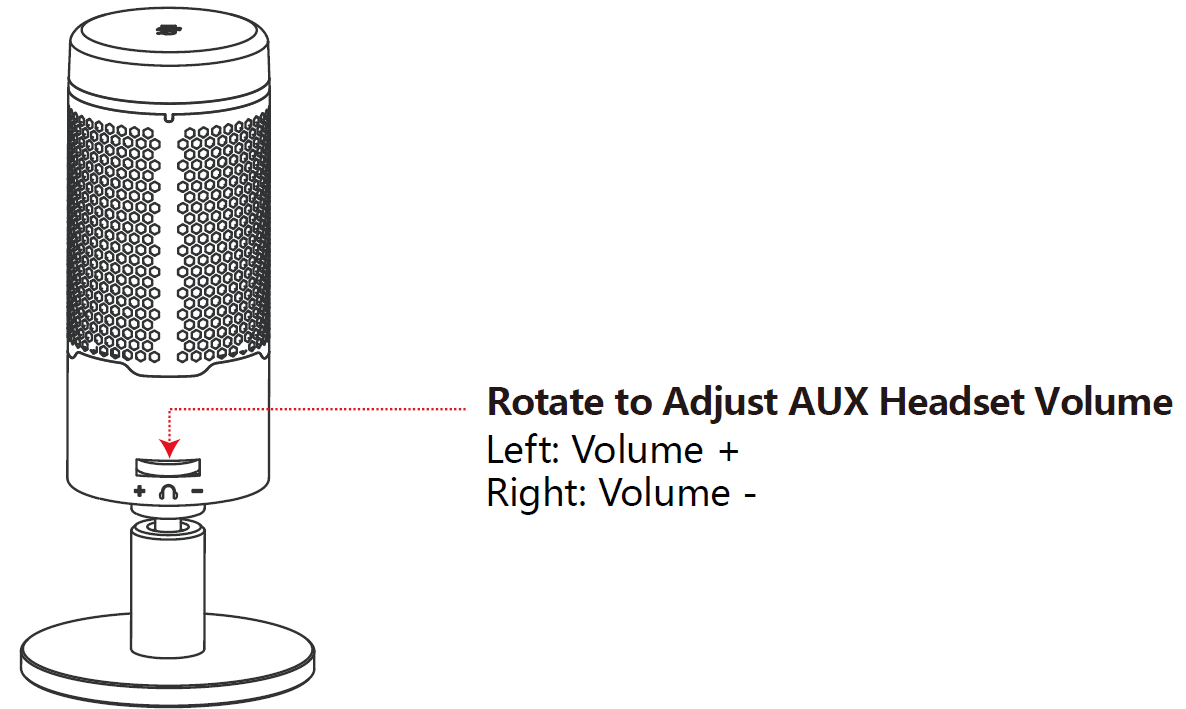
AUX headset volume adjustable
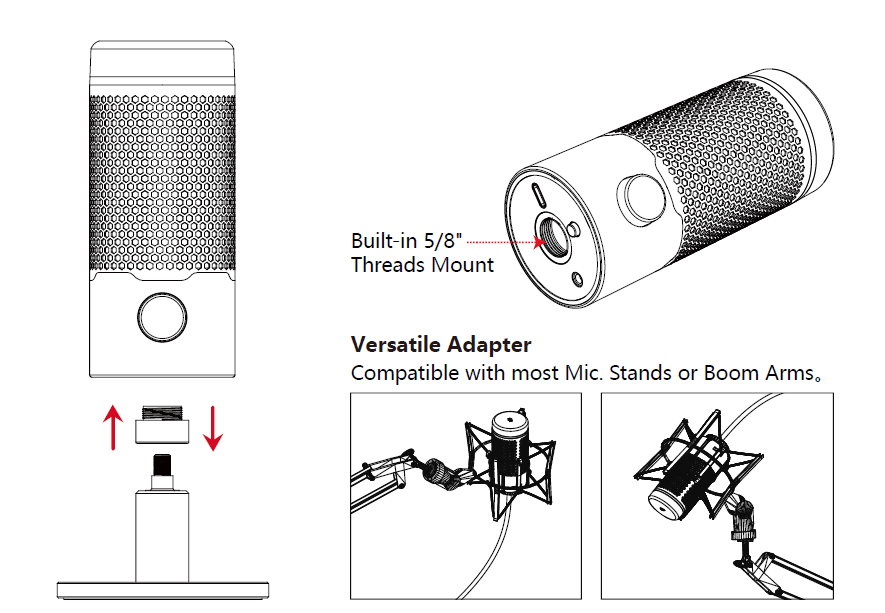
Other Installation
Troubleshooting Guide: Common Issues and Solutions
Microphone Not Recognized by Computer:
- Verify the USB-C cable is completely inserted into both the microphone and computer port.
- Try connecting to a different USB port, preferably a USB 3.0 port for better power delivery.
- Restart your computer to trigger automatic driver installation.
- Check your device's audio settings to ensure the Bloody GM50 Pro is selected as the default input device.
- Update your operating system and audio drivers to the latest versions.
Audio Quality Issues:
- Weak or Low Signal: Rotate the volume control dial to increase microphone sensitivity. Adjust input levels in your recording software or operating system settings.
- Distorted Audio: Lower the microphone volume to prevent clipping. Ensure you're not speaking directly into the microphone at extremely close range.
- Background Noise: Switch to a cardioid polar pattern to reduce ambient sound pickup. Verify the built-in pop filter is functioning properly and that the microphone is positioned away from noise sources.
- Inconsistent Audio Levels: Check that the USB cable is securely connected and not damaged. Avoid using the microphone near wireless devices that may cause interference.
Connectivity Problems:
- USB-C connectivity may not work with all device models; consult your device manual for USB compatibility.
- If using an adapter, ensure it's a high-quality USB-C adapter rated for audio devices.
- Keep the microphone at least 3 feet away from wireless routers and mobile phones to minimize interference.
- Unplug and reconnect the USB cable after 30 seconds if the microphone becomes unresponsive.
LED and RGB Lighting Issues:
- If the LED status indicator doesn't illuminate, verify the microphone is receiving power via USB.
- If RGB effects won't cycle, ensure the RGB button is being pressed fully and held for one second.
- Restart the microphone by disconnecting and reconnecting the USB cable to reset lighting settings.
Warranty and Support:
The Bloody GM50 Pro RGB USB Streaming Microphone typically includes a standard manufacturer's warranty covering hardware defects. For technical support, contact your retailer or Bloody's official customer service. Keep your purchase receipt and product documentation for warranty claims. Most retailers offer 30-day return policies for defective units.
Advantages and Disadvantages: Honest Assessment
Advantages:
- Professional Audio Quality: 192 kHz sample rate and 32-bit depth deliver studio-grade sound comparable to microphones costing significantly more.
- Versatile Polar Patterns: Four selectable patterns (Cardioid, Omnidirectional, Stereo, Bidirectional) adapt to any recording scenario from solo streaming to multi-person interviews.
- Multi-Device Compatibility: Works seamlessly with PC, Mac, PS4, and PS5, eliminating compatibility concerns for diverse user setups.
- Aesthetic RGB Lighting: Eight customizable lighting effects add visual appeal to streaming setups without being intrusive.
- User-Friendly Controls: Tap-to-mute sensor, adjustable volume dial, and intuitive button controls make operation straightforward for beginners.
- Built-in Pop Filter: Internal pop filter reduces plosive sounds, improving recording quality without requiring additional accessories.
- Excellent Signal-to-Noise Ratio: Greater than 95 dB ratio ensures clean audio with minimal background interference.
- Affordable Professional Solution: Offers premium specifications at mid-range pricing, delivering exceptional value for content creators and streamers
Disadvantages:
- USB-C Only Connection: Some older devices may not support USB-C, requiring adapters that can compromise audio quality.
- Power Consumption Dependency: Requires 500 mA power draw, which may strain certain USB hubs or older computers with limited power delivery.
- No Headphone Monitoring: The microphone lacks built-in headphone output for real-time monitoring during recording sessions.
- RGB Lighting Complexity: While visually appealing, the eight lighting effects may be excessive for users preferring minimalist aesthetics.
- Cable Length Considerations: The 2.5-meter cable may be insufficient for some studio setups, though standard extension cables can address this.
- Desktop-Oriented Design: Best suited for stationary recording; portability is limited compared to smaller condenser microphones.
- Learning Curve for Polar Patterns: Users unfamiliar with microphone polar patterns may require time to optimize settings for their specific recording environment.
Value for Money Assessment:
The Bloody GM50 Pro RGB USB Streaming Microphone delivers exceptional value in the $80-$150 price range. The combination of professional-grade specifications (192 kHz/32-bit), multiple polar patterns, and multi-device compatibility positions it as a superior alternative to entry-level microphones. For streamers, podcasters, and content creators seeking affordable professional audio without compromising quality, this microphone represents an intelligent investment that competes favorably with premium alternatives costing twice as much.
Customer Reviews and User Feedback: Real-World Performance
Users consistently praise the Bloody GM50 Pro RGB USB Streaming Microphone for delivering professional audio quality at an accessible price point. Content creators highlight the versatility of the four polar patterns, noting that Cardioid mode effectively isolates their voice during solo streams while Omnidirectional mode captures multiple speakers clearly during podcast recordings and interviews.
Streamers appreciate the RGB lighting effects, with many reporting that the coordinated lighting significantly enhances their broadcast aesthetics and viewer engagement. The tap-to-mute sensor receives consistent praise for its responsiveness and convenience, allowing quick audio control without interrupting broadcasts.
Common user recommendations include: selecting Cardioid mode for most streaming applications, positioning the microphone 6-8 inches from your mouth for optimal sound capture, and using the internal pop filter by maintaining appropriate microphone distance. Users frequently mention that the microphone delivers clean, professional-sounding audio that rivals microphones at double the price.
Some users note that initial setup requires attention to USB port selection and driver installation, though most report straightforward configuration on modern computers and gaming consoles. The adjustable volume control receives particular appreciation for its intuitive operation during live sessions.
Overall Assessment: The Bloody GM50 Pro RGB USB Streaming Microphone comes highly recommended for content creators, streamers, and podcasters seeking professional audio quality without premium pricing. Its combination of high-resolution specifications, versatile recording modes, and user-friendly controls makes it an excellent choice for anyone serious about improving their streaming or recording setup.
```
More bloody manuals
- Setup: Bloody GPW70 2.4G Wireless RGB Gaming Controller User Manual
- Setup: Bloody S10 Bluetooth RGB Gaming Soundbar User Manual
- Setup: Bloody M30 TWS True Wireless Earbuds User Manual
- Setup: Bloody GR370 Wireless Gaming Headset User Manual
- Setup: Bloody M90 True Wireless Gaming Earphones Owner Manual
- Setup: Bloody MR710 RGB Wireless Gaming Headset User Manual
Leave a Comment