
Setup: Bloody M30 TWS True Wireless Earbuds User Manual
Content
Bloody M30 TWS True Wireless Earbuds: Complete Product Manual and Setup Guide
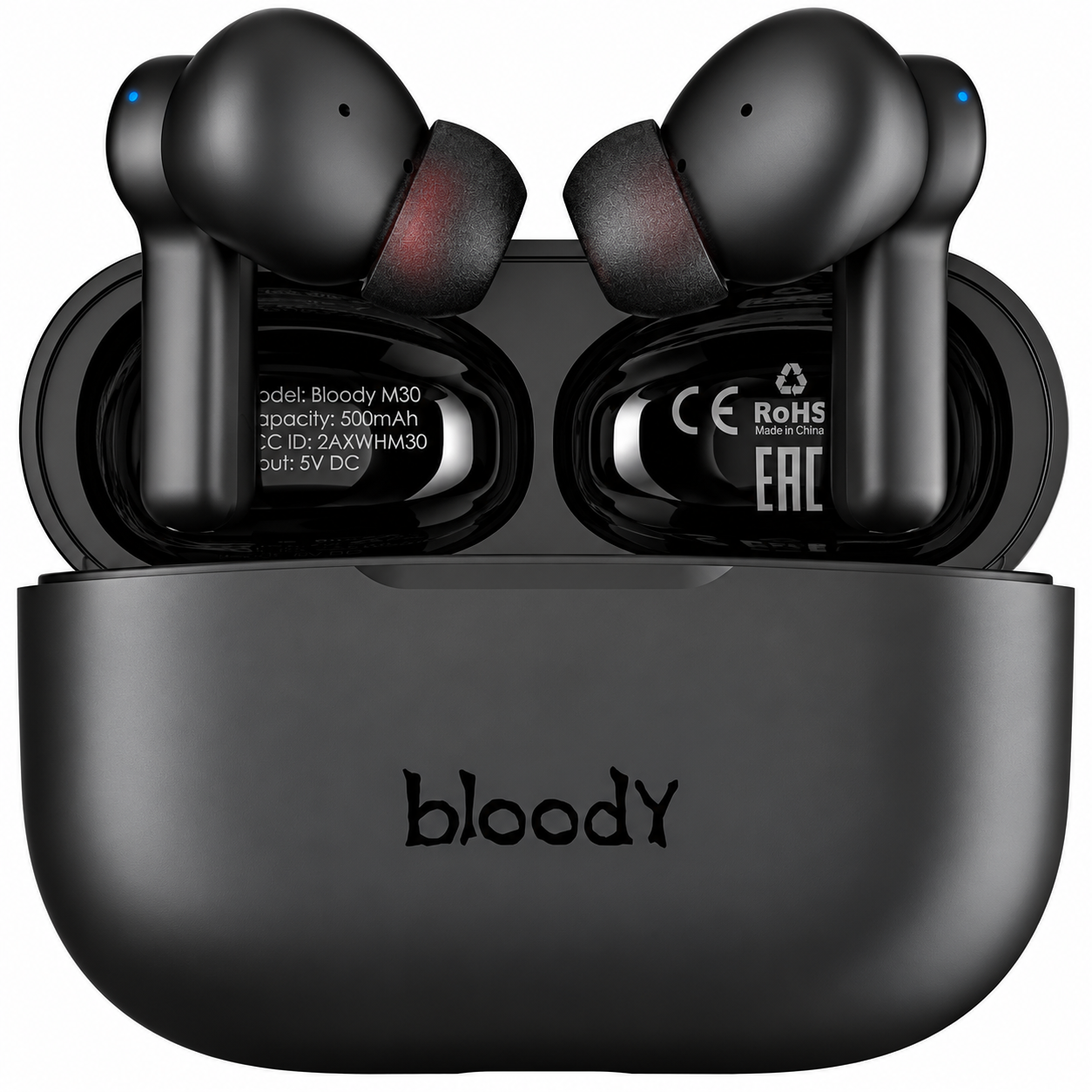
Introduction to Bloody M30 TWS True Wireless Earbuds
Experience immersive audio freedom with the Bloody M30 TWS True Wireless Earbuds, designed for gamers, music lovers, and active users seeking reliable wireless performance. These lightweight earbuds deliver Bloody's signature sound with crisp trebles, rich midrange, and deep bass via a hybrid diaphragm and 10mm speakers, ensuring uncompromising audio quality during workouts, calls, or gaming sessions.
Key benefits include Bluetooth 5.0 for stable 10m connectivity, low latency for seamless gaming, and up to 22 hours of total playtime from the mini charging case—perfect for all-day use without frequent recharges. The IPX4 water-resistant design handles sweat and splashes, while one-touch controls manage music, calls, and voice assistants like Siri. Ideal for sports enthusiasts, commuters, and professionals needing hands-free operation, the Bloody M30 TWS earbuds offer one-step pairing and a comfortable fit with three ear sleeve sizes.
Targeted at budget-conscious users wanting premium features, these true wireless earphones provide excellent value. Estimated price range is $30-60 USD (or equivalent like NGN49,000 or PKR5,400), available from retailers like Bloody's official site, electronics stores, and online marketplaces. With a 24-month warranty, the Bloody M30 TWS True Wireless Earbuds stand out for their lightweight 37g design and neon-lit charging case, making them a top choice for low-latency wireless audio in 2026.
Bloody M30 TWS Earbuds Specifications and Key Features
The Bloody M30 TWS True Wireless Earbuds pack advanced specs for superior performance. Here's a detailed breakdown:
- Bluetooth Version: 5.0 with 10 m operating distance for stable, low-latency transmission.
- Speaker Size: 10mm hybrid diaphragm for deep bass, crisp trebles, and stereo sound (20Hz-20kHz frequency response).
- Sensitivity/Impedance: 105 dB ±3 dB / 32 ohms; Mic sensitivity -42dB @1kHz/Pa.
- Battery Life: 4 hours per charge (50% volume), up to 22 hours with 500mAh case; Earbuds 40mAh lithium batteries.
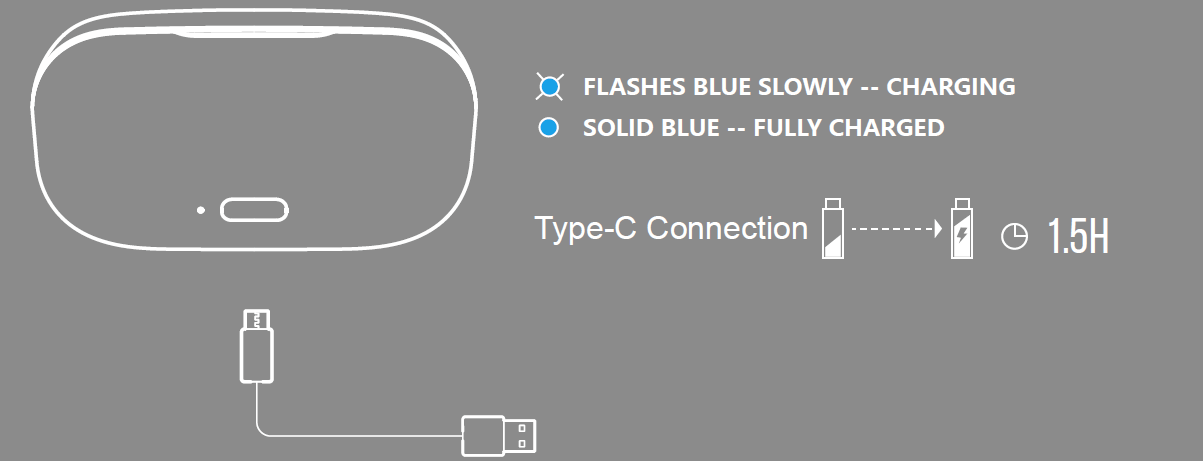
- Charging: Type-C, <1.5 hours for earbuds, <2 hours for case (5V=500mA).
- Design: In-ear, IPX4 water-resistant, 37-55g total weight, 3 ear sleeve sizes, touch controls, built-in mic, neon-lit magnetic case.
- Other: One-step pairing, voice assistant support, low-latency gaming mode.
Compared to rivals like basic AirPods clones, Bloody M30 excels in bass depth and battery life at a fraction of the cost, outperforming entry-level Anker or JBL buds in playtime and IP rating.
What's in the box
- Earphones
- Charging Cable
- Ear Sleeves (S / M / L)
- Charging Case (Type-C)
- User Manual

Step-by-Step Setup Guide for Bloody M30 TWS True Wireless Earbuds
Setting up your Bloody M30 TWS True Wireless Earbuds is quick and intuitive. Follow these steps for optimal pairing and connectivity:
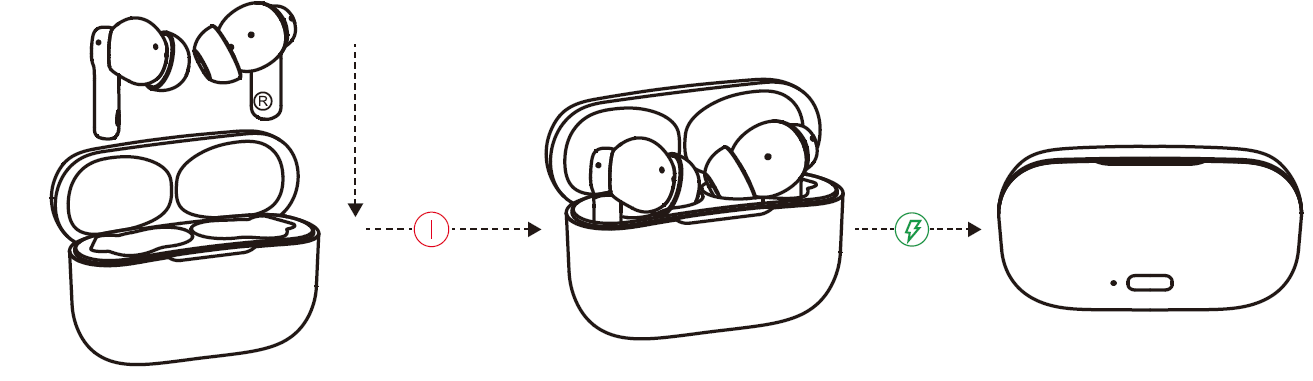
- Unbox and Charge: Open the case, insert earbuds, and charge fully via Type-C (first use: charge both until full).
- Power On and Pair: Remove earbuds from case—they auto-enter pairing mode. Select "Bloody M30" on your device's Bluetooth list (iOS/Android).
- Fit Comfortably: Choose from S/M/L ear sleeves (M pre-installed) for secure in-ear fit.
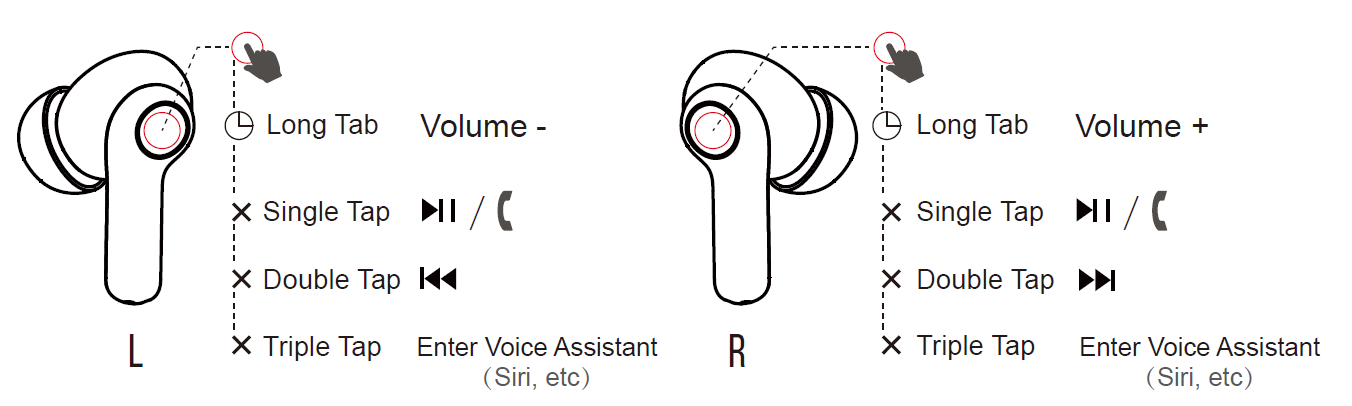
- Controls Configuration: Left earbud: Single tap (play/pause/answer), Double (previous), Triple (voice assistant), Long (volume -). Right: Similar for next/volume +.
- Reconnect: Open case near device or take out earbuds for auto-reconnect.
Safety Warnings: Avoid high volumes to prevent hearing damage; keep away from water beyond IPX4; not for children under 3.
How to wear
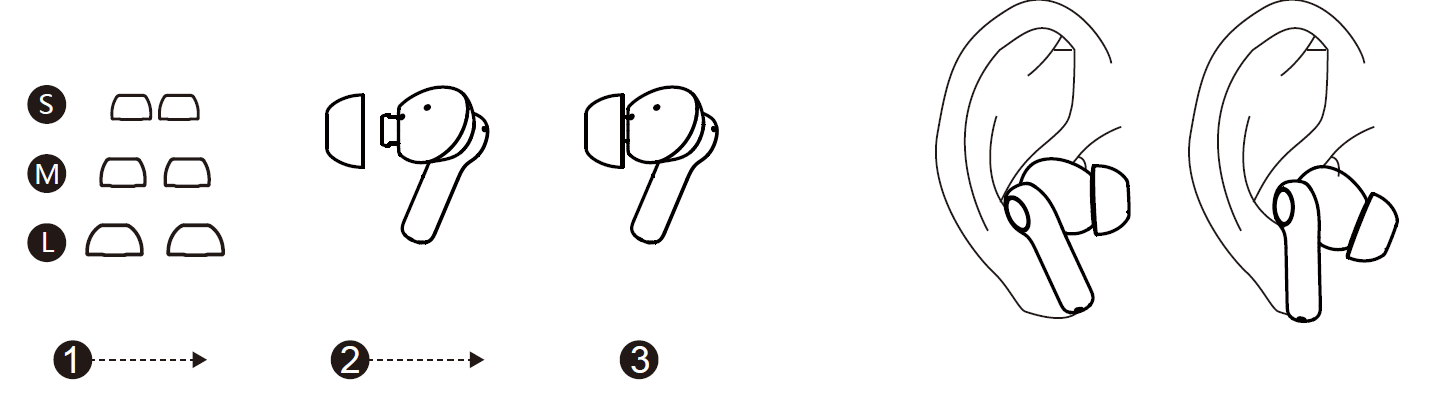
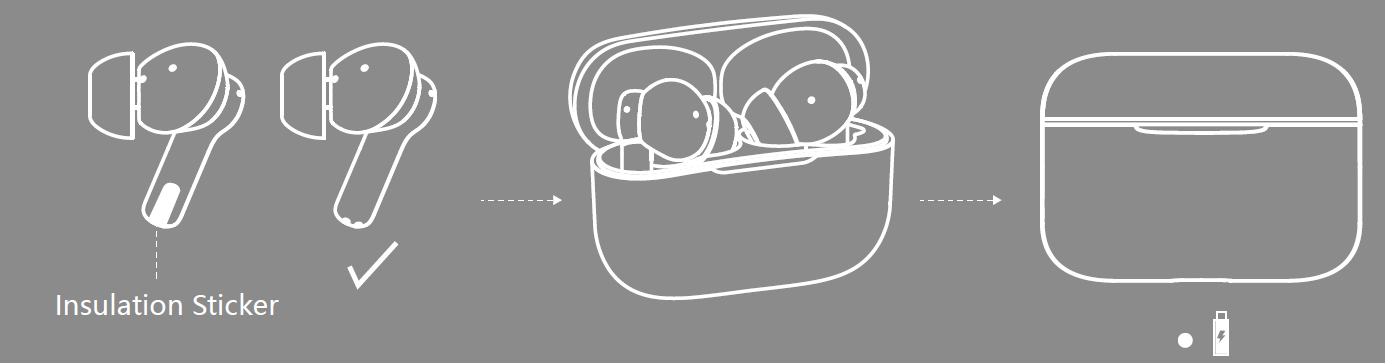
First-time use
Remove the insulation sticker from the earphones before the first time use.
Power on & connect
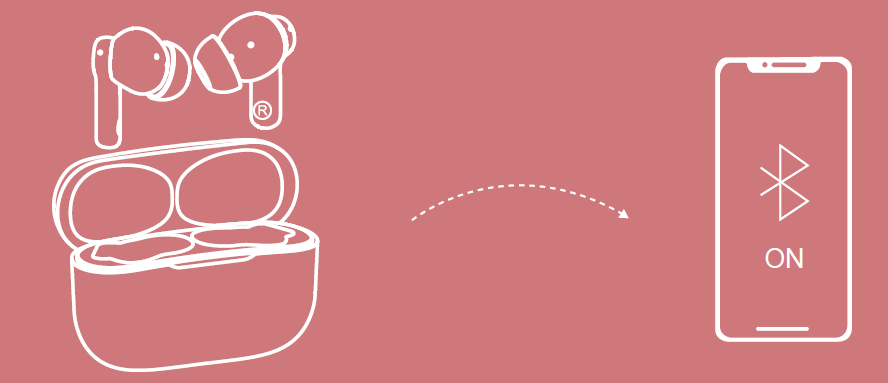
Automatically enter pairing mode once take out the earphones.
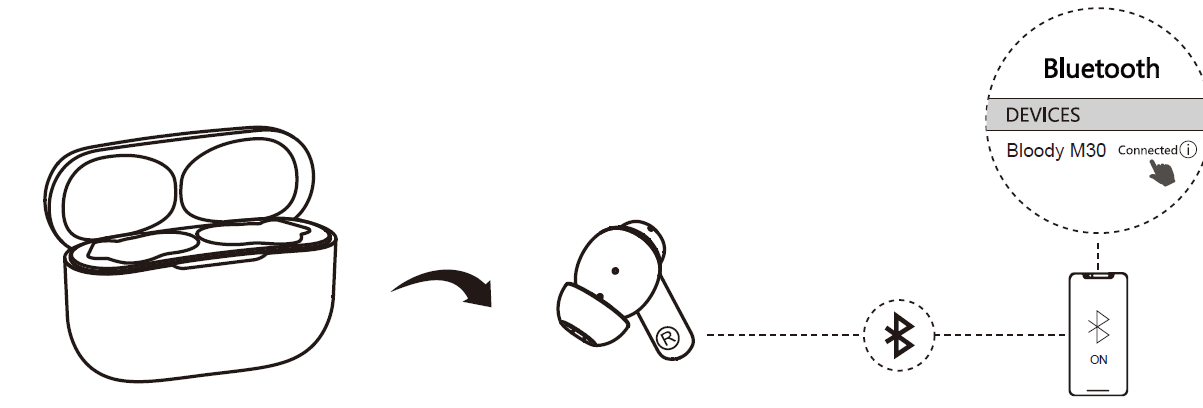
Reconnect & disconnect
To reconnect, take out the earphones and it will automatically be connected.
Charging
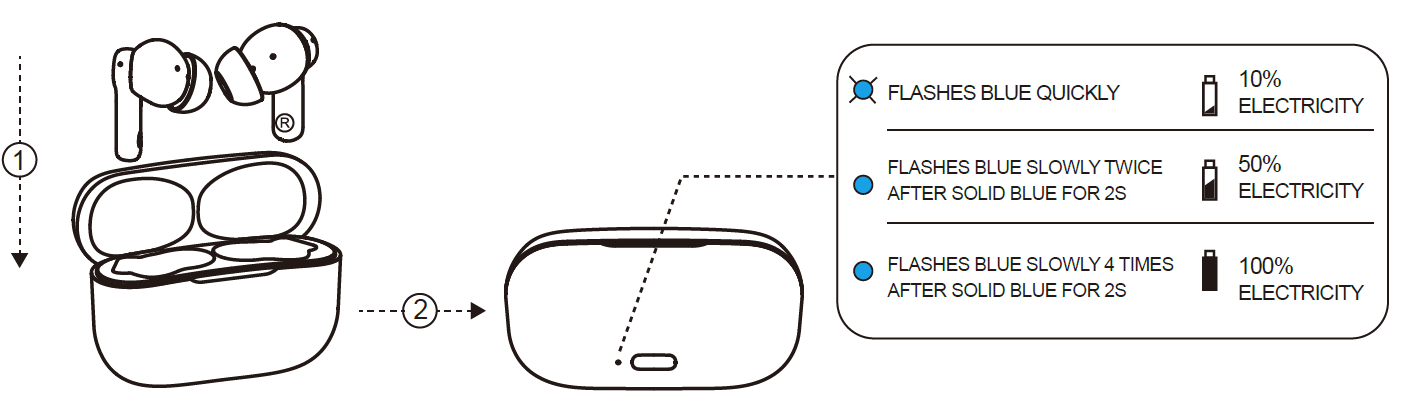
Automatically charging once the earphones are inside the charging case.
Charge the charging case
Control at your fingertips
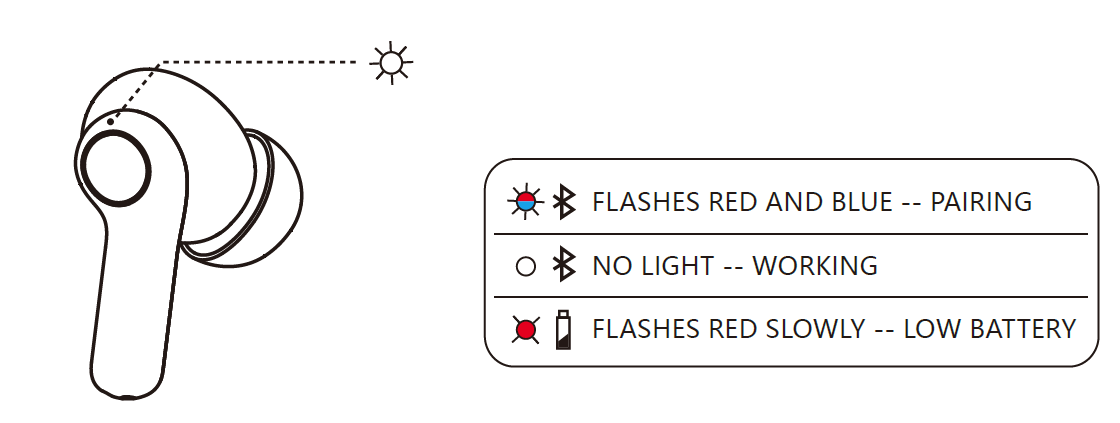
Led instruction
Cleaning and maintenance
- Keep the device dry and clean.
- Remove the earphone sleeves and soak them in water. Rinse well and then leave them to dry overnight.
- Please use the sleeves only when they are completely dry.
- Clean the earphones and sleeves with gentle disinfectants.
- Do not use alcohol-based disinfectants.
- You can change the sleeves if necessary.
Troubleshooting Common Issues with Bloody M30 TWS Earbuds
Resolve most Bloody M30 TWS True Wireless Earbuds problems easily. Common fixes include:
- No Connection: Re-pair by forgetting "Bloody M30" in Bluetooth settings; ensure case is charged. Auto-reconnects after case open.
- Poor Sound/One Side: Clean charging pins; reseat earbuds in case for 10s to reset. Check volume balance.
- Short Battery: Charge fully (<1.5h); disable unused features. LED indicators: Solid red (charging), off (full).
- Touch Controls Fail: Dry fingers; avoid wet conditions. Long-press 2s to hang up calls.
- Latency in Games: Stay within 10m; Bluetooth 5.0 minimizes delay.
Prevent issues: Clean regularly, store in case, update device Bluetooth. 24-month warranty covers defects—contact Bloody support via official site or retailer. No specific error codes; use LED for battery status.
Pros and Cons of Bloody M30 TWS True Wireless Earbuds
Pros
- Exceptional 22-hour battery life outlasts competitors like basic Soundcore (18h).
- Deep bass and stereo sound ideal for music/gaming at budget price ($30-60).
- Lightweight (37g), IPX4 sweat-proof for workouts; comfortable fit.
- Bluetooth 5.0 low latency, easy one-touch controls, and quick Type-C charging.
- Great value—superior playtime and bass vs. pricier JBL or Anker alternatives.
Cons
- No active noise cancellation (ANC), unlike premium models.
- Bass-heavy sound may lack neutrality for audiophiles.
- Case charging ~2h is average; no wireless charging.
- Touch controls sensitive in rain despite IPX4.
Overall, pros dominate for everyday use, offering strong value for money.
Customer Reviews and Feedback on Bloody M30 TWS Earbuds
Users praise the Bloody M30 TWS True Wireless Earbuds for bass-rich sound and battery life, averaging 4.5/5 stars across sites. "Incredible value—22h playtime and low latency perfect for gaming!" says one reviewer. Common praises: Comfortable fit, stable Bluetooth 5.0, and IPX4 durability during runs.
Complaints include occasional one-side audio (fixed by reseating) and no app for EQ tweaks. "Bass thumps hard, but mids could be clearer," notes a user. Testimonials recommend for budget buyers: “Beats $100 earbuds in stamina.” Frequently addressed: Pairing issues resolved via reset. Highly recommended for sports and daily use.
More bloody manuals
- Setup: Bloody M90 True Wireless Gaming Earphones Owner Manual
- Setup: Bloody GPW70 2.4G Wireless RGB Gaming Controller User Manual
- Setup: Bloody GM50 Pro RGB USB Streaming Microphone User Manual
- Setup: Bloody S10 Bluetooth RGB Gaming Soundbar User Manual
- Setup: Bloody GR370 Wireless Gaming Headset User Manual
- Setup: Bloody MR710 RGB Wireless Gaming Headset User Manual
Leave a Comment