
Pairing & Setup: Boat Airdopes 171 Twin Wireless Earbuds User Manual
Content
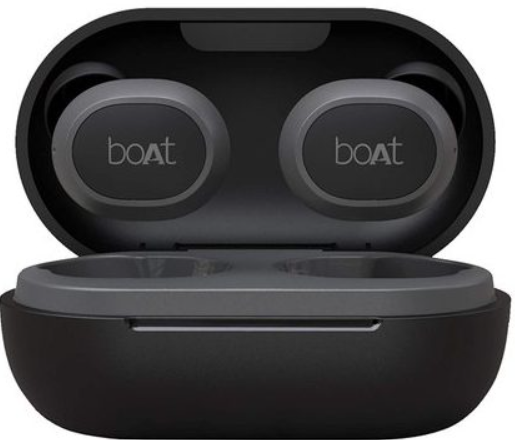
Boat Airdopes 171 Twin Wireless Earbuds
Introduction
The boAt Airdopes 171 Twin Wireless Earbuds offer a seamless true wireless audio experience, designed for music lovers and active users seeking comfort and durability. Featuring powerful 6mm drivers, these earbuds deliver immersive sound with clear highs and balanced mids, making them ideal for daily commutes, workouts, and casual listening. Equipped with the latest Bluetooth v5.0 technology, users enjoy instant connectivity with a stable 10-meter range, ensuring uninterrupted music and calls.
These earbuds stand out with their IPX4 water resistance rating, providing reliable protection against sweat and splashes, perfect for gym sessions and outdoor activities. The lightweight design (approximately 4 grams per earbud) offers extended comfort, while the dual-tone finish gives a stylish edge. With up to 3 hours of playback on a single charge and an additional 10 hours provided by the compact charging case, the boAt Airdopes 171 ensures you stay powered throughout the day.
Targeted at fitness enthusiasts, students, and professionals who value portability and high-quality sound, these earbuds strike a balance between performance and affordability. Available at an estimated price range of ₹1,500 to ₹1,700, the boAt Airdopes 171 Twin Wireless Earbuds are widely available across online marketplaces and retail outlets, offering excellent value for money in the budget true wireless segment.
In the box
- 1x pair of Ear-Buds
- 1x Charging Cable
- 1x Charging Case
- 1x User Manual
- 2x Pairs of Ear Caps
Specifications of boAt Airdopes 171 Twin Wireless Earbuds
- Bluetooth Version: V5.0
- Water Resistance: IPX4
- Standby Time: 70 Hours
- Transmission Range: 10m
- Driver Size: 6mm
- Bluetooth Profile: HSP/ HFP/ A2DP/ AVRCP
- Frequency: 20Hz-20kHz
- Battery Earbuds: 43mAh x2
- Battery Charging Case: 380mAh
- Charging Time: 2 Hours
- Talk Time/ Music Playtime: Up to 3 Hours per Charge and an Additional 10H with Case.
- Charging Technology: ASAP Fast Charge Technology
In comparison to similar products in the budget TWS category, the boAt Airdopes 171 offers competitive battery life, robust water resistance, and reliable Bluetooth 5.0 connectivity, outperforming many rivals that lack either fast charging or sufficient playback duration.
Product Overview

LED Indicators / Functionalities
Charging The Earbuds
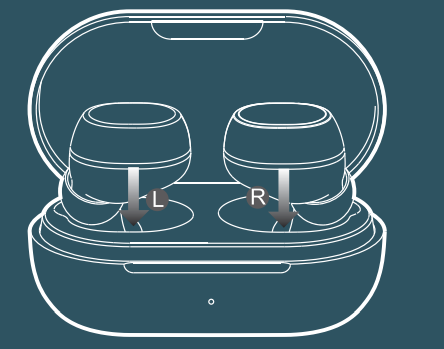
- Step 1: Please insert the earbuds back inside the charging case in the correct orientation.
- Step 2: Red LEDs in the case indicate that the earbuds are being charged. Once fully charged,, the LED turns into green for 1 minute.
- Step 3: Once the earbuds are fully charged, the charging case automatically switches off to save power.
Note:
Before using the earbuds for the first time, it is recommended to fully charge the earbuds.. Also, please keep the lid of the charging case closed while charging and use a 5V/2A adaptor.
Charge The Case
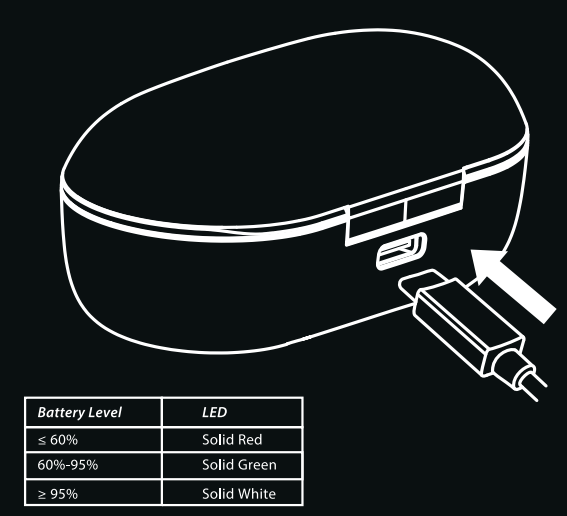
- Step 1: To charge the case, plug one end of the charging cable into the case and the other end into a USB port.
- Step 2: Red LED lights indicate that the charging case is being charged.
Once the charging case gets fully charged, the LEDs turn into white.
Note: The LED lights located on the charging case indicate the battery status of the case.
Basic Functions
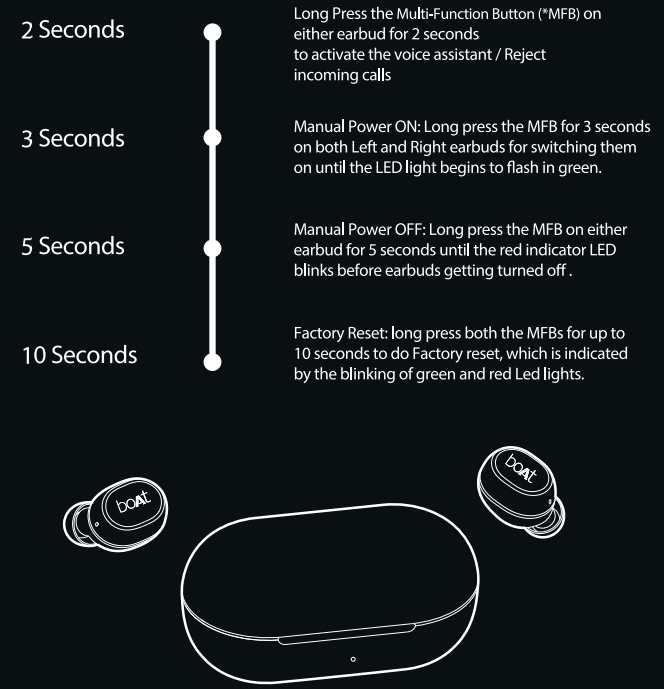
- Voice Assistant: Long-press the Multi-Function Button (*MFB) on either earbud for 2 seconds to activate the voice assistant
- Answer/Hang Up Call: Single-press the Mufti-function Button (*MFB) on either earbud to answer an incoming call and once again to hang up an ongoing call
- Reject Call: Long-press the Multi-Function Button ("MFB) on either earbud for 2 seconds to reject an incoming call.
- Play/Pause Music: Single-press the Multi-Function Button (*MFB) on either earbud to play a song or to pause one.
- Next Track: When playing music, double-press the right earbud's Multi-Function Button (*MFB) to skip to the next song on the playlist
- Previous Track: When playing music, double-press the left earbud's Multi-Function Button (*MFB) to return to the previous song in the playlist
- Three-Way Calling: Double-press the MFB to switch between active call and held call (when a call is received during an ongoing call, the initial call gets on hold)
- Crystal Mode: Airdopes 171 offers Crystal Mode for the ambient sound near you.
You can hear the ambient sound clearly even while listening to the earbuds. Tap the right earbud's MFB three times to turn on Crystal Mode, and again to turn it off.
Note: Volume cannot be controlled via earbuds and can only be adjusted via phone/media device.
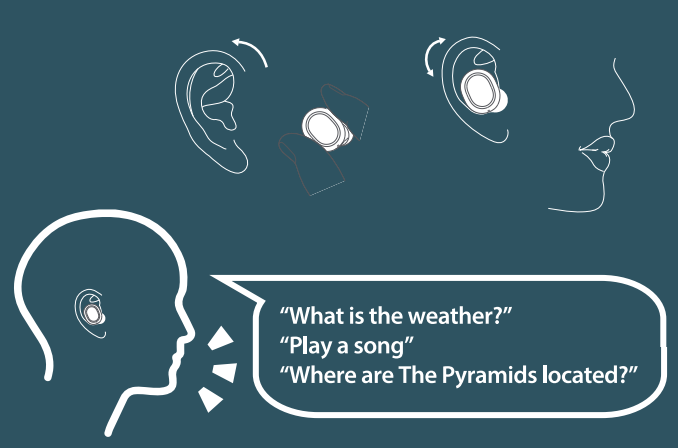
Voice Assistant
- Step 1: Long-press the Multi-Function Button (*MFB) on either earbud for 2 seconds to activate the voice assistant
- Step 2: The respective voice assistant screen pops up,, and you may place your commands at ease
Tips: You may try the following commands,
- What is the weather?
- Play a song
- Where are the Pyramids located?
Factory Reset
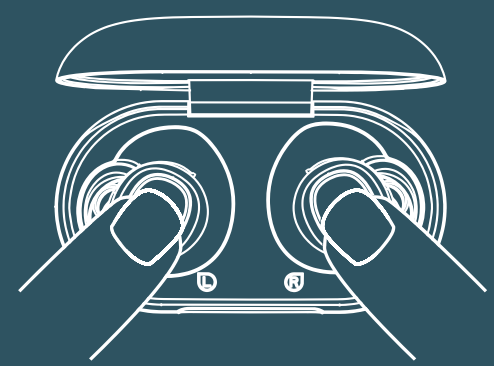
Perform the Factory Reset in case you face any difficulty while operating your Airdopes 1 71
- Step 1: Please remove the pairing record of Airdopes 1 71 from your phone or media device.
- Step 2: Power off the earbuds, long-press both the MFBs for up to 10 seconds or until LEDs blink red and green thrice.
- Step 3: Keep the earbuds back inside the case in the correct orientation and close the lid.
Congratulations! Your Airdopes 171 have reset and are ready to connect again.
Common Problems with Solutions
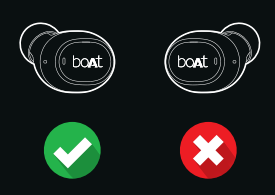
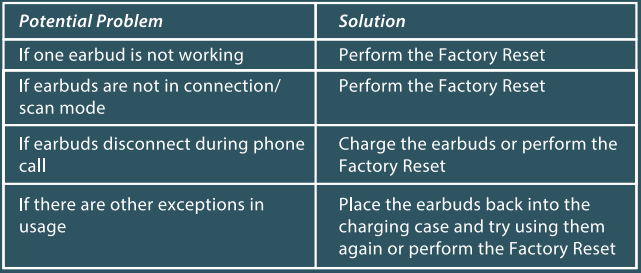
If only one earbud is functioning:
If only one earbud is functioning: Simply insert the earbuds back into the case and take them out,, or perform the Factory Reset
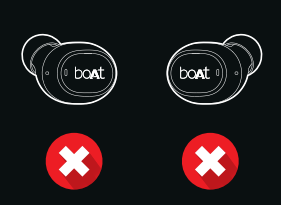
If earbuds are not in scan mode :
If earbuds are not in scan mode: Simply insert the earbuds back into the case and take them o,,u t or perform the Factory
Troubleshooting boAt Airdopes 171 Wireless Earbuds
- Earbuds not pairing: Ensure Bluetooth is enabled on your device; reset earbuds by placing them in the case and pressing the multifunction button until the LED flashes; reconnect via Bluetooth settings.
- One earbud not working: Charge both earbuds fully; clean the charging contacts; reset the earbuds as described above.
- Audio distortion or low volume: Lower the volume on the source device; clean the earbud mesh to remove debris; ensure the earbuds fit properly in the ears.
- Battery drains quickly: Avoid charging with input power above 5V/2A; keep earbuds away from extreme temperatures and moisture; use volume below maximum to extend battery life.
- Error codes or LED indicators: Refer to the user manual for specific blinking patterns; typically indicate low battery or pairing mode.
Preventive measures include charging only with recommended chargers, avoiding exposure to water beyond IPX4 splash resistance, and not disassembling the device. The boAt Airdopes 171 come with a one-month warranty covering manufacturing defects. For support, users can contact boAt customer care through their official website or authorized service centers.
Pros & Cons of boAt Airdopes 171 Twin Wireless Earbuds
Pros
- Affordable pricing delivering excellent value for money.
- Lightweight design ensures comfort during extended use.
- IPX4 water resistance is suitable for sweat and light rain protection.
- Good connectivity with Bluetooth 5.0 and a stable 10m range.
- Fast charge capability delivers quick playback time boosts.
- Decent sound quality with clear mids and highs, suitable for casual listening.
Cons
- Limited bass response compared to higher-end models.
- Volume may be lower at maximum levels for some users.
- No active noise cancellation (ANC) feature.
- Battery life of 3 hours per charge is modest compared to premium earbuds.
- Charging case capacity is average; some competitors offer larger cases with longer backup.
Overall, the boAt Airdopes 171 Twin Wireless Earbuds provide a balanced package for budget-conscious buyers prioritizing essential wireless features over advanced audio enhancements.
Customer Reviews of boAt Airdopes 171 Twin Wireless Earbuds
Users frequently praise the boAt Airdopes 171 Twin Wireless Earbuds for their reliable Bluetooth connectivity, comfortable fit, and stylish dual-tone design. Many reviews highlight the impressive sound clarity at this price point, especially the well-defined mids and highs. Positive feedback also points to the convenience of fast charging and the compact charging case,, offering extended usage.
Common complaints involve the relatively lower volume output, which some users find insufficient in noisy environments, and the limited bass performance compared to more expensive models. A few customers noted occasional issues with battery level indicators and recommended careful handling to maximize battery life.
With an average rating f g around 4 out of 5 stars, the earbuds are recommended for users seeking affordable, durable, and easy-to-use wireless earbuds for everyday use, including workouts and commuting.
Faqs
How do I pair my boat Airdopes 171 Twin Wireless Earbuds with a new device for the first time?
Why is the battery life on my boat Airdopes 171 Twin Wireless Earbuds shorter than advertised?
Can I use only one earbud of the boat Airdopes 171 Twin Wireless Earbuds at a time for calls or music?
How do I clean and maintain my boat Airdopes 171 Twin Wireless Earbuds to ensure longevity?
What should I do if my boat Airdopes 171 Twin Wireless Earbuds are not charging properly?
Are boat Airdopes 171 Twin Wireless Earbuds compatible with both Android and iOS devices?
How can I improve the audio quality and reduce connectivity issues with my boat Airdopes 171 Twin Wireless Earbuds?
What features differentiate boat Airdopes 171 Twin Wireless Earbuds from other budget TWS earbuds?
More boat manuals
- Setup & Pairing: Boat Airdopes Flex 454 ANC User Manual
- Boat 281 Airdopes Twin Earbuds Instruction Guide
- Boat Wireless Earbuds Airdopes-201 User Guide | Setup
- Boat Wireless Airdopes 121 User Guide | Earbuds Specs & Features
- Boat Bluetooth Headsets Airdopes-311 Setup Guide
- Boat Rockerz 400 On-Ear Hadphones Instruction Manual
Leave a Comment