
Setup: Bose Soundlink Wireless Headphones II User Manual
Content
Bose SoundLink Wireless Headphones II
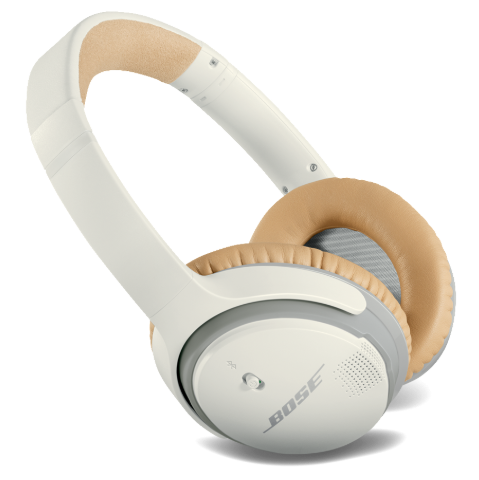
Introduction to Bose SoundLink Wireless Headphones II
The Bose SoundLink Wireless Headphones II deliver premium wireless audio in a sleek, comfortable design. These around-ear headphones are engineered for users who want true wireless freedom, long battery life, and seamless connectivity. With up to 15 hours of playtime on a single charge and a quick 15-minute charge for two hours of use, the Bose SoundLink Wireless Headphones II are perfect for travel, work, or everyday listening. Their advanced microphone system, HD voice, and adaptive audio adjustment ensure clear calls, even in noisy environments.
Designed for both music lovers and professionals, these headphones support multi-point Bluetooth, allowing you to stay connected to two devices at once—ideal for switching between your phone and tablet. The intuitive controls and voice prompts in 11 languages make navigation effortless. Whether you're commuting, working remotely, or relaxing at home, the Bose SoundLink Wireless Headphones II offer a balanced, clean sound profile and reliable performance. Priced around $229, they are widely available through Bose’s official website and major electronics retailers.
Specifications: Bose SoundLink Wireless Headphones II
- Bluetooth Version: 4.0 (supports Bluetooth 2.1 and later)
- Profiles Supported: A2DP, Hands-Free, Headset
- Battery Life: Up to 15 hours (25% more than industry standard)
- Quick Charge: 15 minutes for up to 2 hours of playtime
- Charging Time: 3 hours for a full charge
- Weight: 200g (7.1 oz)
- Dimensions: 19.1 x 15.2 x 3.8 cm
- Multi-Point Connectivity: Simultaneous connection to two devices
- NFC Pairing: Tap-to-pair for compatible devices
- Microphone System: Advanced HD voice with adaptive audio adjustment
- Controls: Volume, multifunction button for playback/calls
- Accessories: USB cable, stereo audio cable, carry bag
- Frequency Response: 10Hz–20kHz (excellent bass and balanced mids)
Compared to similar models like the Bose QuietComfort 35 II, the SoundLink II offers a lighter build, a lower price, and similar comfort, but lacks active noise cancellation.
Technical information
- Battery: Rechargeable, non-replaceable lithium-ion polymer
- Charging time: 3 hours for a full charge
- Operating time: Up to 15 hours
- Operating range: Up to 30 feet (9 m) from the device
Features
- Unlock the full potential of your headphones.
- Free app compatible with most Apple and Android™ systems.
- Easily connect and switch between multiple Bluetooth® devices with a single swipe.
- Keep your headphones up-to-date with the latest software.
- Customize headphone settings, like voice prompt language and hibernation mode.
Unpacking
Check the carton for: headphones, carry case, USB charging cable, and backup audio cable. Be sure to save all packing materials. They provide the safest means for any necessary shipping or transporting.
If any part of the product appears to be damaged, do not attempt to use it.
Contact your authorized Bose dealer immediately or call Bose Customer Service. For contact information, see page 22.
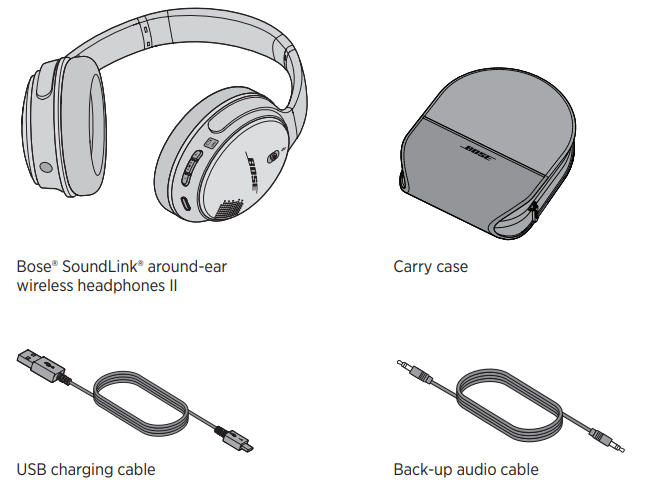
Headphone components
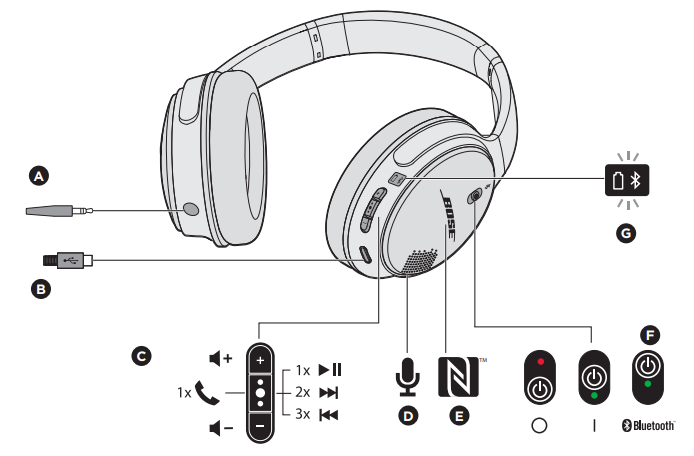
- Back-up audio cable connector
- USB charging connector
- Headphone controls
- Microphone
- Near Field Communication (NFC) touchpoint
- Power/Bluetooth® button (three-position)
- Bluetooth and battery indicators
Charging the battery
- Plug the small end of the USB cable into the micro-USB connector on the right earcup.
- Plug the other end into a USB wall charger or computer that is powered on. Allow up to three hours to fully charge the battery. A full charge will power the headphones for up to 15 hours.
A 15-minute partial charge will power the headphones for 2 hours.
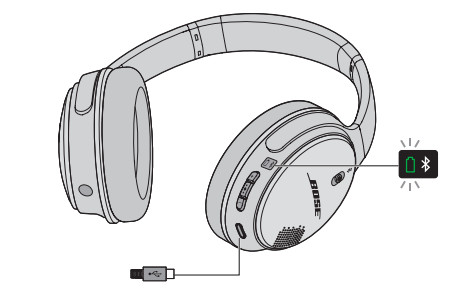
Note: The headphones will not play while charging.
Battery indicator
The battery indicator is located on the right earcup. While the battery is charging, the battery indicator glows amber. When the battery is fully charged, the indicator glows green.
Note: While the headphones are in use, the battery indicator will blink red when the battery needs charging. See “Headphone status indicators” on page 17.
Pairing with NFC
If your device supports Near Field Communication (NFC), you can easily pair it with the headphones.
- Turn the headphones' power on.
Tap the NFC touchpoint on your mobile device to the center of the right earcup. Your device may ask you to accept pairing.
Note: Before tapping your mobile device, make sure your device is unlocked and When the headphones are successfully connected, you will hear, “Connected to <device name>” or you will see the Bluetooth indicator glow solid white.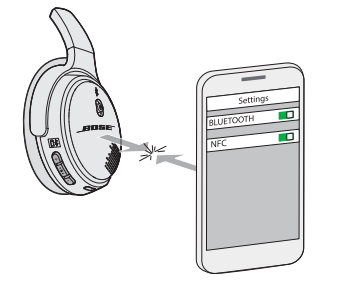
- Repeat these steps to pair another device.
CARE AND MAINTENANCE
Battery care
- Be sure to turn off the headphones when not in use.
- Before storing the headphones for more than a few months, be sure the battery is fully charged.
- If the battery indicator begins to blink red while in use, the battery is low a, and you must charge the headphones now.
Troubleshooting Bose SoundLink Wireless Headphones II
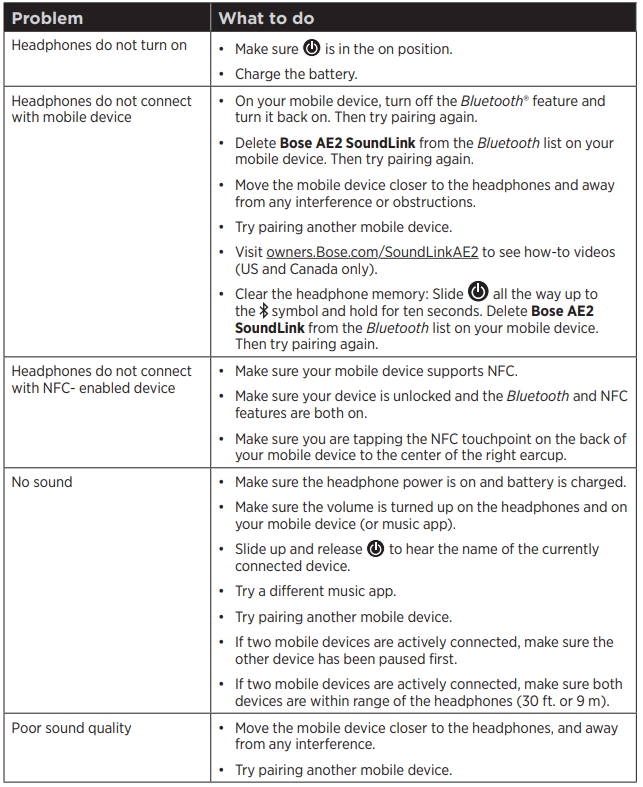
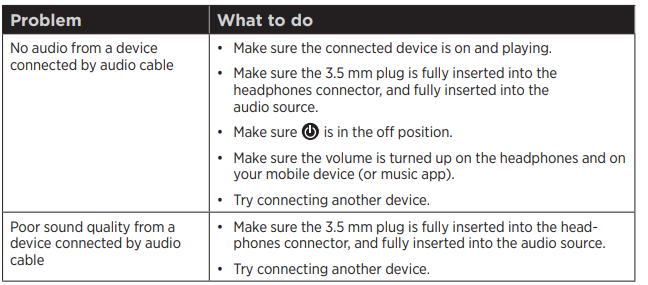
Common issues with the Bose SoundLink Wireless Headphones II include pairing problems, low battery, and audio dropouts. If the headphones won’t pair, ensure Bluetooth is enabled and the device is within range. For persistent issues, reset the headphones by holding the power button for 10 seconds. If battery life is shorter than expected, avoid extreme temperatures and fully charge before use.
For error codes, consult the Bose support website or user manual. Preventive measures include regular cleaning of ear cushions and firmware updates. Bose offers a 1-year limited warranty and support via phone, email, or live chat. For help, visit Bose Support or call 1-800-444-2673.
Limited Warranty
Your headphones are covered by a limited warranty. Visit our website at global.Bose.com/warranty for details of the limited warranty.
To register your product, visit global.Bose.com/regjster for instructions. Failure to register will not affect your limited warranty rights.
Pros and Cons of Bose SoundLink Wireless Headphones II
Pros
- Excellent battery life (up to 15 hours)
- Multi-point Bluetooth for dual-device connectivity
- Comfortable, lightweight design
- Clear call quality with HD voice and adaptive audio
- Easy NFC and Bluetooth pairing
- Intuitive controls and voice prompts
Cons
- No active noise cancellation
- Latency may be high on some devices
- Ear cushions may wear out over time
- Not ideal for gaming or movie watching due to audio delay
The Bose SoundLink Wireless Headphones II offer great value for money, especially for those prioritizing comfort and battery life over noise cancellation.
Customer Reviews: Bose SoundLink Wireless Headphones II
Users consistently rate the Bose SoundLink Wireless Headphones II 4.5/5 stars, praising their comfort, sound quality, and battery life. Many appreciate the easy pairing and clear call performance. Common complaints include occasional Bluetooth dropouts and the lack of noise cancellation. Customers recommend these headphones for daily use, travel, and office environments. Frequent issues mentioned are ear cushion durability and minor latency during video playback. Overall, buyers find the Bose SoundLink Wireless Headphones II to be a reliable, well-balanced choice for wireless audio.
Faqs
How do I set up bose Soundlink Wireless Headphones II for the first time?
What should I do if my bose Soundlink Wireless Headphones II won't connect to Bluetooth devices?
Can I connect my bose Soundlink Wireless Headphones II to multiple devices simultaneously?
How do I maintain and care for my bose Soundlink Wireless Headphones II to ensure long-lasting performance?
What are the key features of bose Soundlink Wireless Headphones II that enhance user experience?
How can I optimize sound quality and battery life on my bose Soundlink Wireless Headphones II?
Are bose Soundlink Wireless Headphones II compatible with both Android and Windows devices?
How do I reset or clear paired devices from bose Soundlink Wireless Headphones II memory?
More bose manuals
- Pairing & Setup: Bose QuietComfort Ultra Earbuds 2ND GEN User Manual
- Bose SoundLink Around-Ear Wireless Headphones II User Guide
- Setup & Pairing: Bose Soundlink Micro Portable Speaker (2ND Gen) User Manual
- Bose T8S ToneMatch Audio Mixer Owners Manual | System Setup
- Pairing: Bose Soundlink Home Bluetooth Speaker User Manual
- Setup & Features: Bose SoundTouch 30 Series III Speaker
Leave a Comment