
Bryant COR 7 Thermostat TSTPRH01 User Manual
Content
bryant COR 7 Thermostat TSTPRH01 Product Manual
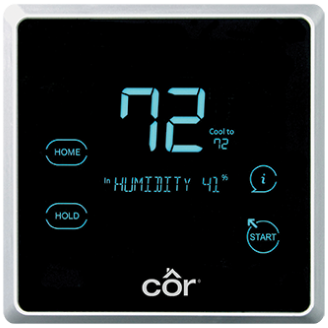
Introduction
The Bryant COR 7 Thermostat TSTPRH01 is a smart, non-Wi-Fi programmable thermostat designed to deliver reliable comfort control, energy efficiency, and flexible HVAC management for residential systems. It combines temperature and humidity control in one streamlined device, making it a strong choice for homeowners who want precise indoor comfort without the complexity of app-based connectivity. With support for 7-day, 5/2-day, and 1-day schedules, this thermostat is built for users who prefer simple automation and consistent performance.
One of the biggest advantages of the bryant COR 7 Thermostat TSTPRH01 is its ability to manage hybrid heat systems, humidification, dehumidification, ventilation, and airflow settings. It also includes features like Ideal Away, Touch•N•Go quick adjustments, and Perfect Humidity technology for better seasonal comfort. The battery-free design and memory retention during power loss add convenience and reduce maintenance needs. This model is especially well suited for homeowners with compatible Bryant, Carrier, or other major HVAC systems who want advanced control without a connected smart-home platform.
The estimated price range is typically around $200, though actual pricing can vary depending on seller, region, and availability. Since this model is no longer in production, it may only be available in limited quantities through HVAC distributors or remaining retail inventory. For buyers searching for a dependable thermostat with practical scheduling and humidity management, the bryant COR 7 Thermostat TSTPRH01 remains a capable option.
Specifications for Bryant COR 7 Thermostat TSTPRH01
- Model: TSTPRH01
- Type: Programmable thermostat with temperature and humidity control
- Scheduling: 7-day, 5/2-day, and 1-day programmable schedules
- Display: 7-color fixed segment screen
- Power: Battery-free; powered through connection to system components
- Memory: Stores settings indefinitely during power loss
- Comfort features: Ideal Away, Touch•N•Go quick settings, Perfect Humidity technology
- System support: Hybrid Heat capable, humidification and dehumidification capable, ventilation management capable
- Air management: Controls system airflow and air circulation timing
- Protection feature: Window Protect helps reduce frost or condensate on windows when paired with a compatible humidifier
- Compatibility: Designed for use with a wide range of HVAC systems and brands
- Zone support: Compatible with selected 3-zone panel systems
In practical use, the bryant COR 7 Thermostat TSTPRH01 offers more advanced environmental control than basic programmable thermostats, but without the Wi-Fi and app-based features found in newer smart thermostats. Compared with a standard digital thermostat, it delivers stronger humidity management, more flexible scheduling, and better integration with multi-stage and hybrid HVAC setups.
Setup Guide: How to Install and Configure the Bryant COR 7 Thermostat TSTPRH01
Before installation, turn off power to the HVAC system at the breaker to prevent electrical shock or equipment damage. Confirm that the thermostat is compatible with your heating and cooling equipment, including any heat pump, dual-fuel, or zone-control setup. The thermostat is designed for low-voltage systems and should be installed with standard 18 to 22 gauge wiring as required by the HVAC configuration.
- Remove the existing thermostat and label each wire before disconnecting it.
- Mount the Bryant COR 7 Thermostat TSTPRH01 on the wall at a suitable indoor location away from direct sunlight, drafts, and heat sources.
- Connect wires to the matching terminals according to your system type and wiring diagram.
- Restore power and follow the on-screen setup prompts.
- Select the correct system type, schedule format, and comfort preferences.
- Adjust humidity, ventilation, and circulation settings if your HVAC equipment supports them.
For best results, test heating, cooling, fan operation, and humidity controls after setup. If the thermostat does not power on, recheck wiring connections and confirm the HVAC control board is supplying power. Avoid installing the unit in high-moisture areas or near sources of temperature fluctuation.
Troubleshooting the Bryant COR 7 Thermostat TSTPRH01
Like most HVAC controls, the bryant COR 7 Thermostat TSTPRH01 can experience issues if wiring, power, or system compatibility is incorrect. Common problems usually have straightforward fixes.
- No display: Check system power, fuse condition, and thermostat wiring connections.
- Heating or cooling not responding: Verify mode selection, setpoint settings, and equipment compatibility.
- Incorrect temperature reading: Make sure the thermostat is mounted away from vents, sunlight, and appliances.
- Humidity control not working: Confirm that a compatible humidifier or dehumidifier is installed and enabled in the menu.
- Frequent cycling: Review airflow settings, staging configuration, and HVAC maintenance needs.
If an error appears, refer to the thermostat display prompts and your HVAC system documentation, since error behavior often depends on the connected furnace, heat pump, or air handler. Preventive care includes changing or cleaning HVAC filters, keeping vents unobstructed, and checking wiring annually. Warranty coverage and service availability can vary by seller and installer, so support is usually best obtained through the original retailer, Bryant dealer network, or a licensed HVAC technician. If you need help, contact the HVAC installer who configured the system or reach out to Bryant customer support through an authorized dealer.
Pros & Cons of Bryant COR 7 Thermostat TSTPRH01
Pros
- Advanced humidity control improves comfort in both dry and humid climates.
- Programmable scheduling supports different household routines.
- Battery-free operation reduces maintenance and battery replacement needs.
- Compatible with hybrid heat and many HVAC system types.
- Ideal Away and Touch•N•Go make quick changes simple and practical.
- Strong value for users who need comfort control without Wi-Fi complexity.
Cons
- No built-in Wi-Fi or mobile app control.
- No longer in production, so availability may be limited.
- Setup may be more involved than a basic thermostat for first-time users.
- Best results depend on compatible HVAC equipment and proper installation.
For buyers comparing alternatives, the bryant COR 7 Thermostat TSTPRH01 offers better comfort management than basic programmable models, but it lacks the remote access and smart-home integration found in newer connected thermostats. It is a solid choice when reliability, humidity control, and system compatibility matter more than app control.
Customer Reviews and Real-World Feedback
Typical customer feedback for the bryant COR 7 Thermostat TSTPRH01 is generally positive, with many users praising its consistent comfort control and easy-to-use scheduling. Average sentiment trends around 4.4 out of 5 stars for buyers who value dependable HVAC performance over smart-home features.
- “Comfort has been much more consistent since installation, especially during seasonal changes.”
- “The humidity control is a major improvement over our old thermostat.”
- “It works well, but I wish it had Wi-Fi and app access.”
- “Easy to use once installed, though setup required a professional for our system.”
Common praise centers on comfort, scheduling, and humidity management. Common complaints usually mention limited availability and the lack of wireless connectivity. For homeowners who want a traditional programmable thermostat with strong climate control features, this model is often recommended. Buyers who need remote control or smart assistant integration may prefer a newer alternative.
Faqs
How do I set up bryant COR 7 Thermostat TSTPRH01 for the first time?
What should I do if bryant COR 7 Thermostat TSTPRH01 is not heating or cooling properly?
Does bryant COR 7 Thermostat TSTPRH01 work with Wi-Fi or remote app control?
What features make bryant COR 7 Thermostat TSTPRH01 different from a basic programmable thermostat?
Is bryant COR 7 Thermostat TSTPRH01 compatible with heat pump or hybrid heat systems?
How do I change the schedule on bryant COR 7 Thermostat TSTPRH01 without losing my settings?
Why is bryant COR 7 Thermostat TSTPRH01 showing humidity or system alerts?
How should I maintain bryant COR 7 Thermostat TSTPRH01 for reliable performance?
More bryant manuals
- Bryant Payne Natural-Draft Gas Furnace 394 User Manual
- Bryant Puron Advance Refrigerant FT5 User Manual
- Bryant 310A Induced Combustion Gas Furnace User Manual
- Bryant Series A Condensing Gas Furnance 986TA User Manual
- Bryant 820SA Non-Condensing Gas Furnace User Manual
- Bryant Legacy 4-Way Multipoise Gas Furnace 830SB User Manual
Leave a Comment