
Carrier SYSTXCCITC01-B Infinity System Control User Manual
Content
Carrier SYSTXCCITC01-B Infinity System Control Overview
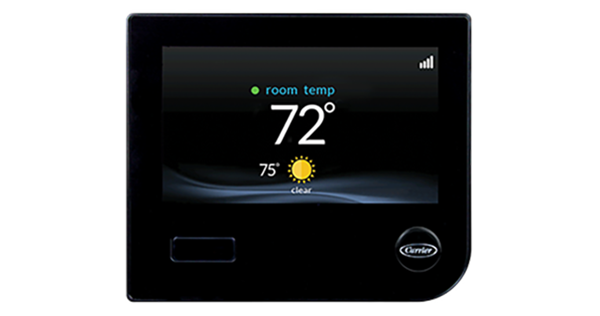
The Carrier SYSTXCCITC01-B Infinity System Control is a premium smart thermostat and whole-home comfort interface designed for Carrier Infinity systems. It goes well beyond basic temperature control by managing humidity, airflow, ventilation, indoor air quality, and up to 8 zones from a single touchscreen interface. For homeowners who want precise comfort control and a cleaner, more connected HVAC experience, this model stands out as a high-end solution with Wi-Fi remote access capability and advanced system integration.
This control is ideal for users with compatible Carrier Infinity equipment, including those who want centralized control over heating and cooling plus enhanced automation features. It is especially useful in larger homes, zoned systems, and households that value indoor air quality and energy-conscious comfort management. Typical buyers include homeowners upgrading from a standard thermostat, HVAC professionals installing premium systems, and property owners looking for app-based remote access. Depending on the seller and condition, the estimated price range is often around $265 to $400, with availability through HVAC distributors, Carrier dealers, and select online marketplaces. Because this is a specialized product, stock can vary by region and model revision.
Specifications for Carrier SYSTXCCITC01-B Infinity System Control
- Model: SYSTXCCITC01-B
- Product type: Infinity System Control / smart thermostat interface
- Power supply: 24VAC, 40 VA minimum, 60 Hz
- Wiring: Four-pin ABCD communication bus connection
- Operating temperature: 32°F to 104°F
- Operating humidity: Up to 95% RH, non-condensing
- Set point range: 50°F to 90°F
- Connectivity: Wi-Fi remote access capability
- System control: Heating, cooling, humidity, airflow, ventilation, and indoor air quality management
- Zoning support: Up to 8 zones
- Compatibility: Designed for Carrier Infinity communicating systems
Compared with a standard programmable thermostat, this model offers far deeper HVAC integration and zoning control. Compared with many smart thermostats, it is more system-specific and better suited to advanced Carrier equipment rather than universal use.
Detailed Description of the Carrier SYSTXCCITC01-B Infinity System Control
The Carrier SYSTXCCITC01-B Infinity System Control functions as the main user interface for compatible Carrier Infinity HVAC systems. Instead of simply turning equipment on or off, it communicates with indoor and outdoor units through the ABCD bus to coordinate performance across the entire system. That allows the control to adjust comfort variables such as temperature, humidity, airflow, and ventilation with much greater precision than a basic thermostat.
In real-world use, this is especially valuable in homes with multiple zones, variable-speed equipment, or air quality accessories such as ventilators and humidifiers. The touchscreen interface is designed for straightforward operation, while Wi-Fi support enables remote adjustments from a smartphone or tablet. The build quality is consistent with premium HVAC controls, using a clean wall-mounted design intended to integrate neatly into modern interiors. Users generally appreciate the intuitive navigation, advanced scheduling, and the ability to see and manage system status from one place.
Setup Guide for Carrier SYSTXCCITC01-B Infinity System Control
Installation should be performed only on compatible Carrier Infinity communicating systems. Begin by shutting off power to the HVAC equipment at the breaker before removing any existing control. Mount the wall unit in a suitable indoor location away from direct sunlight, drafts, and heat sources. Connect the four ABCD wires exactly as specified: A to A+, B to B-, C to 24VAC common, and D to 24VAC hot.
After wiring, restore power and follow the on-screen startup prompts to detect connected equipment. Configure system type, zoning, humidity settings, fan options, and scheduling preferences. If Wi-Fi access is available, complete network setup through the control interface so remote features can be enabled. If the display does not power on, recheck the 24VAC supply and wiring polarity. If devices are not discovered, confirm compatibility and verify all ABCD connections are secure. Always keep wiring insulated and avoid connecting non-compatible equipment, as this can cause communication errors or equipment damage.
Troubleshooting Carrier SYSTXCCITC01-B Infinity System Control
Common issues with the Carrier SYSTXCCITC01-B Infinity System Control usually involve wiring, communication, or compatibility. If the screen is blank, check the HVAC breaker, confirm 24VAC supply, and inspect the ABCD wiring harness. If the control reports a communication fault, verify that all four bus wires are firmly seated and that the color coding matches the terminal labels. If zoning or accessories are not responding, confirm that the connected components are supported by the Infinity system.
Because this model is part of a communicating platform, error messages are often tied to equipment detection or bus communication rather than simple thermostat failure. Preventive care includes tightening connections during installation, keeping firmware current when supported, and ensuring only compatible Carrier components are used. Warranty coverage may vary by seller and installation conditions, so buyers should retain proof of purchase and installation records. For assistance, contact a certified Carrier HVAC dealer, authorized installer, or Carrier residential support through the official customer service channels listed with the product documentation.
Pros and Cons of Carrier SYSTXCCITC01-B Infinity System Control
Pros
- Advanced comfort management for temperature, humidity, airflow, ventilation, and indoor air quality
- Supports up to 8 zones for precise room-by-room control
- Wi-Fi remote access adds convenience for mobile control
- Excellent fit for Carrier Infinity communicating systems
- Cleaner, more integrated experience than many generic smart thermostats
Cons
- Limited compatibility outside Carrier Infinity ecosystems
- Higher cost than basic thermostats and many entry-level smart controls
- Installation is more technical and often requires a professional
- Best features depend on having the right Carrier equipment installed
For value for money, this model makes the most sense when paired with a full Infinity system. Compared with universal smart thermostats, it delivers better system integration but less cross-brand flexibility.
Customer Reviews of Carrier SYSTXCCITC01-B Infinity System Control
User feedback is generally positive, with many owners praising the convenience of centralized HVAC control and the ability to manage multiple comfort settings from one screen. A common theme in reviews is the polished interface and strong performance when paired with compatible Carrier equipment. Typical ratings cluster around 4 to 4.5 stars out of 5 when buyers have the correct system and professional installation.
Common complaints include the premium price, limited compatibility, and the learning curve for advanced settings. One frequent comment is that the control feels more like a system manager than a thermostat, which is a plus for experienced users but can overwhelm those expecting a simple interface. Overall, it is a strong purchase recommendation for homeowners already invested in Carrier Infinity technology and looking for advanced comfort automation.
Faqs
How do I set up the carrier SYSTXCCITC01-B Infinity System Control for the first time?
What should I do if the carrier SYSTXCCITC01-B Infinity System Control is not responding or the screen is blank?
Which Carrier HVAC systems are compatible with the carrier SYSTXCCITC01-B Infinity System Control?
How can I fix scheduling problems on the carrier SYSTXCCITC01-B Infinity System Control?
What features make the carrier SYSTXCCITC01-B Infinity System Control different from a standard thermostat?
How do I improve comfort and energy efficiency with the carrier SYSTXCCITC01-B Infinity System Control?
Why does my carrier SYSTXCCITC01-B Infinity System Control show error codes or communication alerts?
What maintenance does the carrier SYSTXCCITC01-B Infinity System Control need over time?
More carrier manuals
Leave a Comment