
Setup: D-Link AX1500 Wi-Fi 6 AI Mesh Range Extender User Manual
Content
d-link AX1500 Wi-Fi 6 AI Mesh Range Extender
Introduction
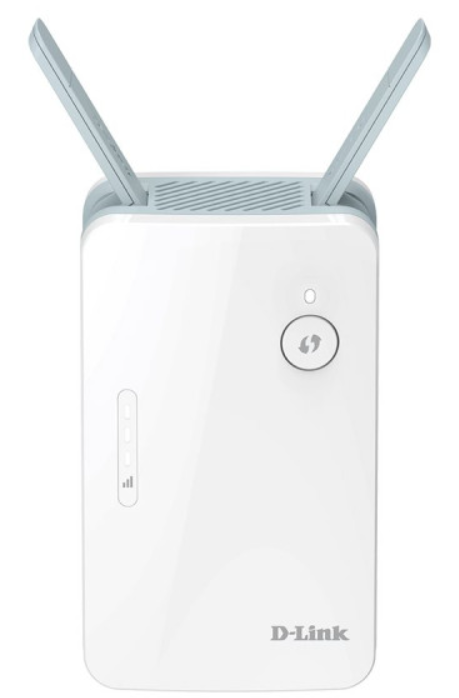
The d-link AX1500 Wi-Fi 6 AI Mesh Range Extender is an advanced device designed to enhance and expand your existing Wi-Fi network with cutting-edge Wi-Fi 6 technology. Its primary goal is to deliver faster speeds, greater capacity, and reduce network congestion, making it ideal for modern smart homes with numerous connected devices. This range extender supports dual-band Wi-Fi, offering combined speeds of up to 1.5 Gbps, which ensures smooth 4K streaming, lag-free gaming, seamless video chatting, and uninterrupted smart home device connectivity.
Targeted at tech-savvy consumers, gamers, families, and remote workers seeking reliable and extended Wi-Fi coverage, the d-link AX1500 is perfect for those needing to eliminate dead zones in medium to large homes or offices. Its AI-powered optimizations continuously monitor and improve network performance through features like AI Wi-Fi Optimizer and AI Mesh Optimizer, providing a smart and self-healing network environment.
The device also features an intuitive setup via the free EAGLE PRO AI mobile app, voice control compatibility with Google Assistant and Amazon Alexa, and a compact wall plug design for convenient placement. Priced competitively around $50 to $70,, depending on the region, it offers excellent value for users looking to upgrade to Wi-Fi 6 mesh technology with easy expansion options.
INSTALLATION
OPTION 1
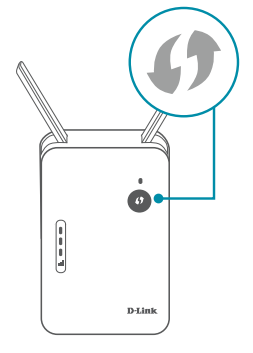
QUICK WPS SETUP
- Plug the E15 into a power source near your wireless router. Wait for the Status LED to flash orange.
- Press the WPS button on your router for 3 seconds. Refer to your router’s manual for router behaviour.
- Press the WPS button on your E15 for 3 seconds. The status LED should start to flash white.
- When the Status LED turns solid white (may take up to 3 minutes), this indicates that your E15 is connected to your wireless router.
- Your setup is complete! You can now unplug and move your device to a location between your router and the area where you want wireless coverage. By default, your device will share the same Wi-Fi name and password as your router.
- IMPORTANT
WPS may be disabled on some Routers or Modems. If the WPS Status LED on your Router or Modem does not start blinking when you have pressed the WPS button, try again and hold it a little longer. If it still does not blink, STOP, and configure your E15 using - Option 2: D-Link Ai App Setup.
OPTION 2
D-LINK AI APP SETUP
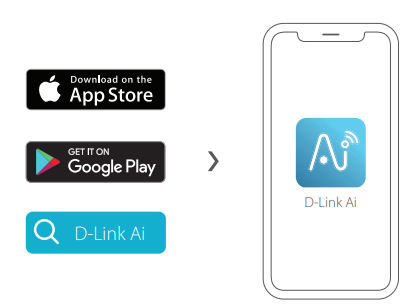
- Download the D-Link Ai app and launch it.
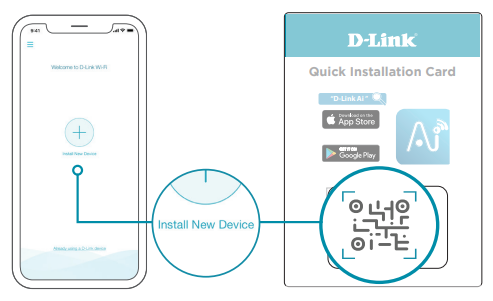
- Tap Install New Device. Scan the Setup code on the Quick Installation Card. Follow the on-screen instructions to complete the setup.
Specifications of the D-Link AX1500 Wi-Fi 6 AI Mesh Range Extender
- Wi-Fi Technology: Wi-Fi 6 (802.11ax), backward compatible with 802.11ac/n/g/b/a
- Wireless Bands: Dual-band 2.4 GHz (up to 300 Mbps) and 5 GHz (up to 1201 Mbps)
- Total Speed: Up to 1.5 Gbps combined
- Coverage: Extends Wi-Fi coverage up to 230 square meters (approx. 2600 sq. ft.)
- Ethernet Port: 1 x Gigabit Ethernet LAN port for wired device connectivity
- Antennas: Two external antennas for improved signal strength
- AI Features: AI Wi-Fi Optimizer, AI Mesh Optimizer, AI Assistant for network monitoring and optimization
- Security: Supports WPA3 encryption and Clean Network Initiative compliance for enhanced privacy and safety
- Mesh Support: Compatible with other D-Link Eagle Pro AI devices for scalable mesh network expansion
- Additional Features: MU-MIMO, OFDMA, Beamforming, Target Wake Time (TWT) for efficient battery usage on devices
- Setup & Indicators: LED wireless signal strength indicator, Wi-Fi Protected Setup (WPS) button, space-saving wall plug design
Compared to similar range extenders in the AX1500 class, the D-Link E15 stands out by integrating AI-assisted network optimization and mesh capabilities, features not always found at this price point, making it a competitive choice for consumers upgrading to Wi-Fi 6 mesh extenders.
Troubleshooting the D-Link AX1500 Wi-Fi 6 AI Mesh Range Extender
- Common Issue: No Internet After Setup – Ensure the extender is within range of the main router; restart both devices. Use the EAGLE PRO AI app to verify connection status.
- Problem: Slow Speeds or Connection Drops – Check for interference from other electronics or physical obstructions; reposition the extender. Enable the AI Wi-Fi Optimizer to automatically select the best channel.
- Error Codes: LED indicators help diagnose issues; a flashing red light often indicates no connection to the router—reset the device using the reset button.
- Preventive Measures: Keep firmware updated via the app, avoid placing the extender near microwaves or thick walls, and use the Gigabit Ethernet port for devices requiring stable wired connections.
- Warranty & Support: D-Link offers a limited warranty (usually 1-2 years depending on region). Support is accessible through official D-Link websites, customer service hotlines, and the EAGLE PRO AI app support section.
- Contact Information: For assistance, users can visit D-Link’s support portal or contact their regional D-Link service center listed on the official website.
Pros and Cons of the d-link AX1500 Wi-Fi 6 AI Mesh Range Extender
- Pros:
- Fast dual-band Wi-Fi 6 speeds up to 1.5 Gbps, suitable for bandwidth-intensive tasks like 4K streaming and gaming
- AI-powered optimizations ensure continuous network improvement and self-healing mesh capabilities
- Easy installation and management via the free EAGLE PRO AI app with intuitive AI Assistant features
- Compact, space-saving wall plug design with LED signal strength indicator for ease of placement
- Supports WPA3 security and the Clean Network Initiative to protect user privacy
- Compatible with other D-Link AI mesh devices, enabling scalable home network expansion
- Cons:
- Coverage area (up to 230 sqm) may require multiple units for very large homes..
- Single Gigabit LAN port limits wired connectivity options to one device
- Voice control features depend on integration with external assistants like Google Assistant or Alexa
- Some users may find the app-based setup challenging without prior experience
- Value for Money: The d-link AX1500 is competitively priced with advanced AI and mesh features, offering a solid balance of performance and affordability compared to other Wi-Fi 6 range extenders in the market.
Customer Reviews of the d-link AX1500 Wi-Fi 6 AI Mesh Range Extender
Customers generally praise the D-Link AX1500 Wi-Fi 6 AI Mesh Range Extender for its reliable performance and ease of expansion. Users highlight the significant improvement in Wi-Fi coverage and speed, especially for 4K streaming and gaming purposes. The AI features receive positive feedback for simplifying network management and automatically optimizing connections.
Some common complaints include occasional difficulty during initial setup and the limited number of Ethernet ports. However, the overall star rating tends to be around 4 to 4.5 out of 5 stars, with many recommending it as a cost-effective solution for upgrading home networks to Wi-Fi 6 technology.
Typical testimonials mention that pairing multiple E15 units creates a robust mesh network that eliminates dead zones efficiently, making it a highly recommended product for smart homes and small offices.
Faqs
How do I set up the d-link AX1500 Wi-Fi 6 AI Mesh Range Extender for the first time?
What should I do if the d-link AX1500 Wi-Fi 6 AI Mesh Range Extender is not working properly?
Can I use the d-link AX1500 Wi-Fi 6 AI Mesh Range Extender with any Wi-Fi router?
How often should I update the firmware of the d-link AX1500 Wi-Fi 6 AI Mesh Range Extender?
What are the key features that make the d-link AX1500 Wi-Fi 6 AI Mesh Range Extender different?
How can I optimize the performance of the d-link AX1500 Wi-Fi 6 AI Mesh Range Extender?
Can I use multiple d-link AX1500 Wi-Fi 6 AI Mesh Range Extenders to create a larger mesh network?
How do I reset the d-link AX1500 Wi-Fi 6 AI Mesh Range Extender to its factory settings?
More d-link manuals
- Setup: D-Link DCS-5000L Wi-Fi Pan & Tilt Camera User Manual
- D-Link MU-MIMO WiFi Nano USB Adapter DWA-181 User Guide
- Setup: D-Link 2026 EV Charging Solution Guide User Guide
- D-Link HD Wi-Fi Spotlight Camera DCS-8627LH User Guide
- D-Link DBR-560 AX6000 Wi-Fi 6 SOHO Router User Manual
- D-Link AC1900 Gigabit Wi-Fi Router DIR-1950 User Guide
Leave a Comment