
Denon AVR-1312 Av Surround Receiver User Manual
Content
Denon AVR-1312 AV Surround Receiver: Complete Product Manual
Introduction
The Denon AVR-1312 AV Surround Receiver is a compact 5.1-channel home theater receiver designed for users who want straightforward setup, reliable performance, and clean surround sound without unnecessary complexity. It delivers 75 watts per channel into 8 ohms, supports HDMI 1.4 with 3D video passthrough, and includes essential decoding for modern movie and music playback. For many buyers, this model stands out because it combines practical connectivity with Denon’s reputation for durable audio engineering in an easy-to-use package.
This receiver is well suited for first-time home theater owners, apartment setups, bedrooms, and living rooms where a full-featured but affordable AV receiver is needed. It works well with Blu-ray players, game consoles, cable boxes, and TVs, making it a versatile choice for everyday entertainment. The Denon AVR-1312 AV Surround Receiver also appeals to users who prefer a traditional receiver layout with clear speaker terminals, simple source switching, and dependable audio performance for movies and TV audio.
At launch and in the secondary market, the AVR-1312 typically falls into a budget-to-midrange price range, often found around the lower end of used AV receiver pricing due to its discontinued status. Availability is usually limited to refurbished units, used marketplaces, and remaining retail stock where applicable. For shoppers seeking a value-oriented surround receiver with solid core features, it remains a practical option.
Specifications
- Channels: 5.1-channel AV receiver
- Amplifier power: 75W per channel at 8 ohms, 20 Hz to 20 kHz, 0.08% THD
- Power output: 110W per channel at 6 ohms, 1 kHz, 0.7% THD
- HDMI: 4 HDMI inputs and 1 HDMI output, HDMI 1.4 support
- Video features: 3D video, Deep Color, x.v.Color, auto lip-sync, HDMI-CEC
- Audio inputs: 1 optical digital input, 1 coaxial digital input, multiple analog line inputs
- Tuner: FM and AM radio built in
- Frequency response: 10 Hz to 100 kHz in Direct mode
- Signal-to-noise ratio: 98 dB in Direct mode
- Power consumption: 330W, standby power 0.5W
- Dimensions: 434 x 166 x 382 mm
- Weight: 8.9 kg
Compared with newer budget AV receivers, the Denon AVR-1312 AV Surround Receiver offers fewer streaming and network features but retains strong basic HDMI switching and dependable amplification. It is best compared to entry-level 5.1 receivers from Yamaha, Pioneer, and Sony that focus on core theater performance rather than smart-home integration.
Detailed Description
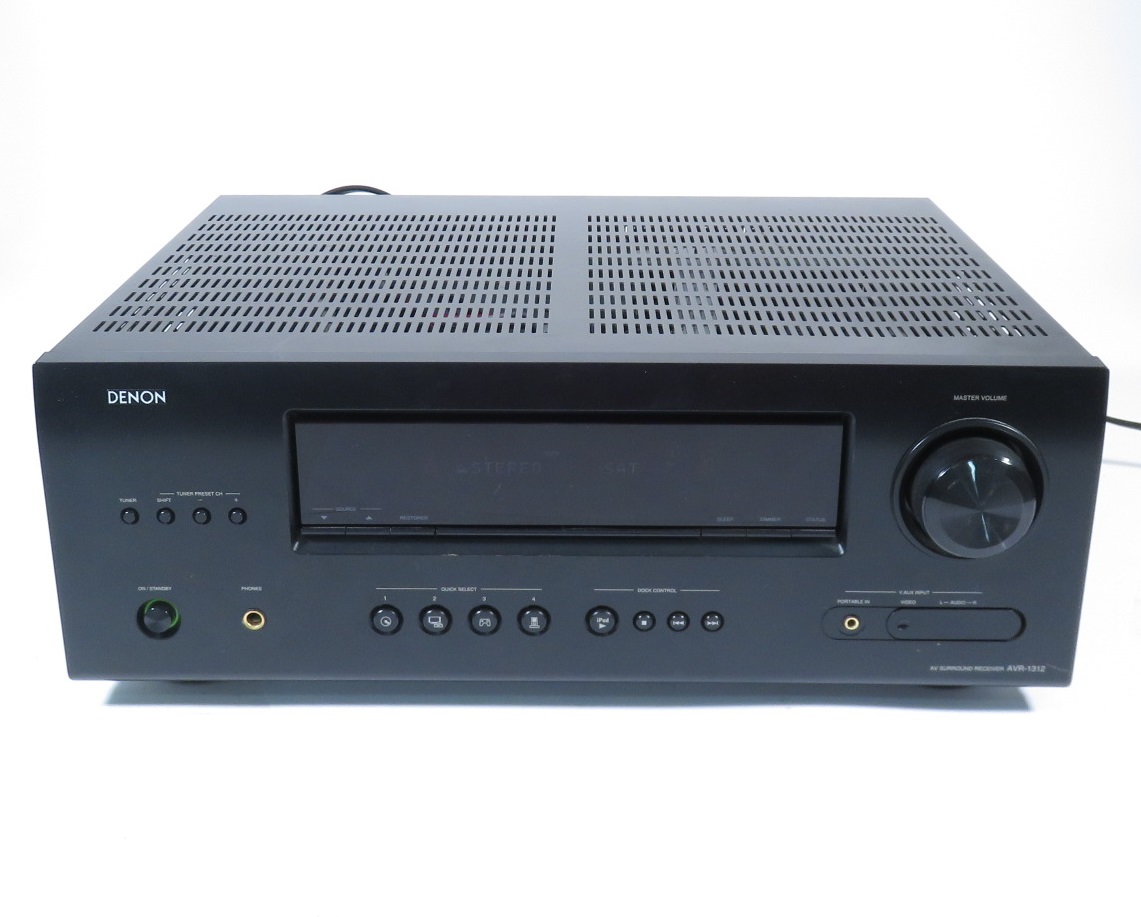
The Denon AVR-1312 AV Surround Receiver is built to act as the central hub of a basic home theater system. It accepts audio and video from multiple sources, processes surround formats, and sends amplified sound to five speakers and a subwoofer. In practical use, this means a Blu-ray player can feed both picture and sound through HDMI, while the receiver handles switching, decoding, and speaker output. The result is a cleaner setup with fewer cables and better control over your entertainment system.
Its build quality reflects Denon’s traditional receiver design: a solid chassis, clearly labeled inputs, and speaker binding posts that support secure connections. The front panel is simple and functional, which helps reduce confusion during daily use. This makes the unit attractive for users who want a straightforward audio video receiver without app-based control or network setup.
Real-world use includes home movie nights, console gaming, and TV audio upgrades. The receiver can improve dialogue clarity, deliver wider sound separation, and provide fuller bass when paired with a powered subwoofer. For users upgrading from TV speakers, the difference is immediate and significant.
Setup Guide
Setting up the Denon AVR-1312 AV Surround Receiver is relatively simple if you follow the correct order. Begin by placing the receiver in a well-ventilated area with several inches of clearance on all sides. Connect the front, center, surround, and subwoofer speakers using the labeled terminals, then connect your TV to the HDMI output.
- Connect all source devices such as Blu-ray players, game consoles, or cable boxes to the HDMI inputs.
- If using older devices, connect optical, coaxial, or analog audio cables as needed.
- Run the receiver’s setup menus to assign inputs and configure speaker sizes.
- Set the TV to the correct HDMI input and verify audio output through the receiver.
- Test each speaker individually to confirm correct wiring and channel balance.
For pairing and connectivity, HDMI is the easiest option because it carries both audio and video. If no sound is heard, confirm that the source device is set to output bitstream or PCM as appropriate and that the receiver is on the correct input. Avoid blocking ventilation openings, and never connect speakers while the unit is powered on.
For safety, disconnect power before making wiring changes and keep the receiver away from moisture, heat sources, or unstable shelves.
Troubleshooting
Most issues with the Denon AVR-1312 AV Surround Receiver involve setup, cable routing, or incorrect source selection rather than hardware failure. If there is no sound, check speaker wiring, input selection, mute status, and the audio output settings on the source device. If HDMI video appears but audio is missing, try a different HDMI cable or verify that the source is sending audio over HDMI.
- No sound: Confirm speaker connections and select the correct input.
- Weak bass: Check subwoofer power, LFE settings, and crossover settings.
- Distorted audio: Lower volume, inspect speaker wire strands, and verify impedance compatibility.
- HDMI handshake problems: Power-cycle the TV, source device, and receiver.
- Tuner issues: Reposition the FM/AM antenna for better reception.
This model does not typically use visible error codes for everyday operation, so troubleshooting is usually done through source checks and connection verification. Preventive measures include keeping the unit ventilated, using quality cables, and avoiding overdriving speakers. Warranty support is limited for older units, so buyers should rely on the seller’s return policy, Denon archived documentation, or authorized service channels when available.
For help, contact the seller, Denon support resources, or a qualified AV technician if the receiver powers on but continues to malfunction.
Pros & Cons
Pros
- Clean, reliable 5.1-channel surround sound for movies and TV
- 75W per channel is sufficient for small to medium rooms
- HDMI 1.4 support with 3D passthrough adds useful compatibility
- Simple interface makes it easy for beginners to set up
- Good value on the used market for basic home theater builds
Cons
- No network streaming, Wi-Fi, or Bluetooth
- No USB or Ethernet connectivity
- No Audio Return Channel support on HDMI
- Limited features compared with modern AV receivers
- Best suited for users who only need core surround sound functions
For buyers comparing budget AV receivers, the Denon AVR-1312 AV Surround Receiver is a strong choice if the priority is dependable amplification and simple operation rather than smart features. It offers good value for basic theater setups, but modern alternatives may be better if streaming, voice control, or room correction are required.
Customer Reviews
Typical user feedback for the Denon AVR-1312 AV Surround Receiver is generally positive, especially among buyers who appreciate simple setup and dependable sound. Many users rate it around 4 out of 5 stars for movie playback, clear dialogue, and strong value on the used market. A common praise is that it “just works” without complicated menus or extra apps.
Frequent complaints include the lack of USB, networking, and newer HDMI convenience features. Some users also note that it is not ideal for advanced multi-room or streaming-focused systems. A representative comment might be: “Great sound for the price, but clearly a basic receiver by today’s standards.” Another common reaction is: “Perfect for a starter home theater, especially if you already have source devices handled elsewhere.”
It is a good purchase for users who need a reliable entry-level surround receiver and do not require wireless features. Buyers seeking app control, music streaming, or modern calibration tools may prefer a newer model instead.
Faqs
How do I set up the denon AVR-1312 Av Surround Receiver for the first time with a TV and Blu-ray player?
What should I do if the denon AVR-1312 Av Surround Receiver has no sound even though the power is on?
Is the denon AVR-1312 Av Surround Receiver compatible with 3D TV, Blu-ray, and game consoles?
Does the denon AVR-1312 Av Surround Receiver support Dolby TrueHD and DTS-HD Master Audio?
Why does the denon AVR-1312 Av Surround Receiver sound weak or unbalanced between speakers?
Can I connect a turntable directly to the denon AVR-1312 Av Surround Receiver?
How can I improve music playback quality on the denon AVR-1312 Av Surround Receiver?
How should I clean and maintain the denon AVR-1312 Av Surround Receiver for long-term reliability?
More denon manuals
- Denon AVR-1709 Av Surround Receiver User Manual
- Denon AVC-X4800H Integrated Network Av Amplifier User Manual
- Denon AVR-5800 Av Surround Receiver User Manual
- Denon HS2 HomeCinema Soundbar and Subwoofer System User Manual
- Denon AVR-1908 Av Surrouned Receiver User Manual
- Denon AVR-X1700H Integrated Network Av Receiver User Manual
Leave a Comment