
Denon AVC-X4800H Integrated Network Av Amplifier User Manual
Content
Introduction to the Denon AVC-X4800H Integrated Network AV Amplifier
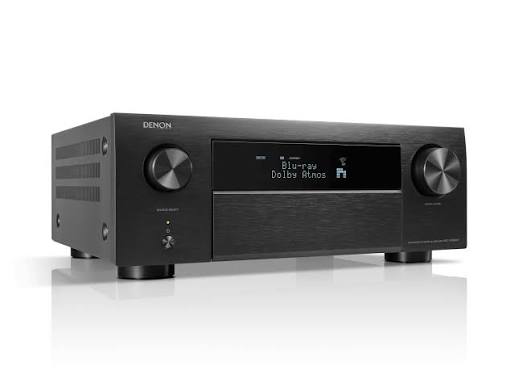
The Denon AVC-X4800H integrated network AV amplifier is a premium home theater powerhouse built for movie lovers, gamers, and serious audio enthusiasts who want immersive surround sound with modern connectivity. With 9.4 channels of built-in amplification and processing support for up to 11.4 channels, it is designed to deliver flexible system configurations for Dolby Atmos, DTS:X, Auro-3D, and IMAX Enhanced setups. Its 8K-ready HDMI section, HEOS multi-room streaming, and advanced room correction make it a strong choice for a future-proof entertainment hub.
This model stands out for its balance of power, feature depth, and customization. It offers 125 watts per channel into 8 ohms, robust speaker-driving capability, and support for multiple subwoofers, making it ideal for medium to large home theaters. Users also benefit from modern wireless streaming, voice assistant compatibility, and broad HDMI 2.1 support for gaming consoles and next-generation video sources. The denon AVC-X4800H Integrated Network Av Amplifier is especially well suited to dedicated cinema rooms, premium living room systems, and upgrade paths where expandability matters.
In current market terms, the estimated price range is typically around the upper mid-range to premium bracket, often landing near $1,500 to $2,600 depending on region, retailer, and promotional pricing. Availability is generally strong through major AV retailers and Denon distributors, though stock can vary by finish and territory.
Specifications and Key Features of the Denon AVC-X4800H
- Amplification: 9.4 channels built in, with processing for up to 11.4 channels.
- Power output: 125W per channel at 8 ohms, 20Hz-20kHz, 0.05% THD, 2-channel driven.
- Higher-output ratings: 165W per channel at 6 ohms, 1kHz, 0.7% THD; 200W per channel at 6 ohms, 1kHz, 1% THD, 1-channel driven.
- HDMI: 7 inputs and 3 outputs, with 8K support on all inputs and eARC on one output.
- Video support: 8K/60Hz and 4K/120Hz passthrough, plus HDR10, HDR10+, Dolby Vision, and HLG compatibility.
- Audio formats: Dolby Atmos, DTS:X, Auro-3D, IMAX Enhanced, Dolby TrueHD, and DTS-HD Master Audio.
- Room correction: Audyssey MultEQ XT32 with Dirac Live upgrade path in many markets.
- Streaming: HEOS Built-in, Wi-Fi, Bluetooth, AirPlay 2, and Ethernet.
- Inputs: optical, coaxial, RCA, phono, USB-A, and multi-zone connectivity.
- Comparison note: it sits above more mainstream 7-channel AV receivers and below flagship models with larger amplifier counts, while offering strong value for advanced home theater builds.
Detailed Description: How the Denon AVC-X4800H Works in Real Home Theater Setups
The denon AVC-X4800H Integrated Network Av Amplifier combines preamplification, decoding, amplification, and network streaming in one chassis. It receives audio and video from source devices, decodes surround formats, processes the signal for your speaker layout, and powers the main channels directly. This makes it a practical centerpiece for systems built around a TV, projector, gaming console, Blu-ray player, or media streamer.
In real-world use, the amplifier shines in immersive setups such as 5.2.4, 7.2.2, or 9.2 layouts, where height channels and dual subwoofers create a cinematic soundstage. The chassis is solidly built, with Denon’s familiar premium black finish, clearly labeled rear-panel connections, and a layout that supports tidy cable management. The user experience is enhanced by on-screen setup guidance, mobile app control, and streaming integration. For music, HEOS and AirPlay 2 make it easy to play albums, playlists, and internet radio throughout the house. For movies and games, the HDMI 2.1 features help ensure smooth high-resolution playback and low-latency performance.
Compared with smaller AV receivers, it offers stronger amplification reserves and more tuning flexibility. Compared with higher-end flagship models, it delivers much of the same immersive format support in a more approachable package.
Setup Guide: How to Set Up the Denon AVC-X4800H Integrated Network AV Amplifier
- Place the unit on a stable, well-ventilated shelf with several inches of clearance above and around it.
- Connect speakers by matching polarity carefully: positive to positive and negative to negative.
- Attach your TV or projector to the HDMI output that supports eARC if you want TV app audio return.
- Connect source devices such as a console, streamer, or disc player to the HDMI inputs.
- Run the setup assistant on screen, then choose your speaker layout, subwoofer count, and input assignments.
- Use the supplied calibration microphone for Audyssey room correction, then save the calibration profile.
- Set up Wi-Fi, Bluetooth, or Ethernet for streaming and firmware updates.
- Enable gaming or low-latency settings if you use a PlayStation 5, Xbox Series X, or PC.
Always power off the amplifier before changing speaker wiring. Avoid blocking ventilation openings, and do not place it near heat sources. If there is no picture, confirm the HDMI cable supports 8K/4K120 bandwidth and that the correct HDMI input is selected. If audio is missing from the TV, verify eARC is enabled on both the TV and amplifier.
Troubleshooting the Denon AVC-X4800H: Common Problems and Fixes
- No sound: check speaker wiring, source selection, mute status, and whether the correct surround mode is active.
- No video signal: test the HDMI cable, try another input, and confirm the display supports the chosen resolution and refresh rate.
- Network connection failure: restart the router, reconnect Wi-Fi, or use Ethernet for a more stable link.
- Weak bass or uneven sound: rerun room correction and confirm the subwoofer is powered and correctly connected.
- ARC/eARC problems: enable HDMI control and eARC in both the TV and amplifier menus.
- Overheating: improve ventilation, reduce stacking, and lower listening levels if the amplifier is running too hot.
There are no widely documented generic error codes commonly associated with casual home use, but on-screen warnings usually point to HDMI, speaker, or network setup issues. Preventive maintenance includes periodic firmware updates, careful cable management, and regular dust removal. Warranty coverage and support options depend on the country of purchase and retailer policy. For help, use Denon’s official support channels, authorized service centers, or the retailer’s after-sales team.
Pros and Cons of the Denon AVC-X4800H
Pros
- Powerful 9.4-channel amplification with support for up to 11.4-channel processing.
- Excellent format support for Dolby Atmos, DTS:X, Auro-3D, and IMAX Enhanced.
- Strong HDMI 2.1 feature set for 8K and 4K/120Hz sources.
- HEOS, AirPlay 2, Bluetooth, and Wi-Fi make streaming flexible and convenient.
- Room correction and multi-subwoofer support improve real-world sound quality.
- Good value for buyers who want near-flagship features without moving to the highest price tier.
Cons
- Large chassis may be difficult to fit into compact cabinets.
- Advanced setup options can feel complex for first-time AV users.
- Top-tier performance may still require external amplification in very demanding systems.
- Pricing is higher than mainstream 7-channel receivers and entry-level network AV amplifiers.
Compared with simpler alternatives, this model offers more channels, more processing flexibility, and better long-term expandability. For buyers focused on value for money in a serious home theater, it is one of the strongest options in its class.
Customer Reviews and User Feedback
Typical customer feedback for the denon AVC-X4800H Integrated Network Av Amplifier is strongly positive, with many owners praising the immersive soundstage, clean power delivery, and easy streaming features. A common rating pattern falls around 4.5 out of 5 stars among enthusiasts, especially from users upgrading from older 7-channel receivers.
- "The sound is massive, and the setup assistant made calibration much easier than expected."
- "Great for movies and gaming, especially with 4K120 and Dolby Atmos content."
- "A little complex at first, but the flexibility is worth it."
- "Very strong performer for the price, especially compared with other premium AV amplifiers."
Frequent praise includes HDMI feature support, room correction quality, and broad speaker configuration options. Common complaints focus on size, menu complexity, and the learning curve for advanced audio settings. Buyers who want a future-ready home theater centerpiece will usually find it a strong recommendation, while casual users may prefer a simpler receiver with fewer configuration choices.
Faqs
How do I set up the denon AVC-X4800H Integrated Network Av Amplifier for the first time with an ARC or eARC TV?
What speaker layouts does the denon AVC-X4800H Integrated Network Av Amplifier support, and how do I choose the right one?
Why is there no sound from my denon AVC-X4800H Integrated Network Av Amplifier after connecting HDMI sources?
How do I optimize room correction and speaker calibration on the denon AVC-X4800H Integrated Network Av Amplifier?
Is the denon AVC-X4800H Integrated Network Av Amplifier compatible with Dolby Atmos, DTS:X, and other surround formats?
Can I use streaming services and multi-room audio with the denon AVC-X4800H Integrated Network Av Amplifier?
What should I do if my denon AVC-X4800H Integrated Network Av Amplifier keeps freezing or acting unstable?
How should I maintain and care for the denon AVC-X4800H Integrated Network Av Amplifier for long-term reliability?
More denon manuals
- Denon AVR-1312 Av Surround Receiver User Manual
- Denon HS2 HomeCinema Soundbar and Subwoofer System User Manual
- Denon AVR-1709 Av Surround Receiver User Manual
- Denon AVR-X1700H Integrated Network Av Receiver User Manual
- Denon AVR-5800 Av Surround Receiver User Manual
- Denon AVR-2809CI Av Surround Receiver User Manual
Leave a Comment