
Denon AVR-X1700H Integrated Network Av Receiver User Manual
Content
Denon AVR-X1700H Integrated Network AV Receiver: Complete Product Manual
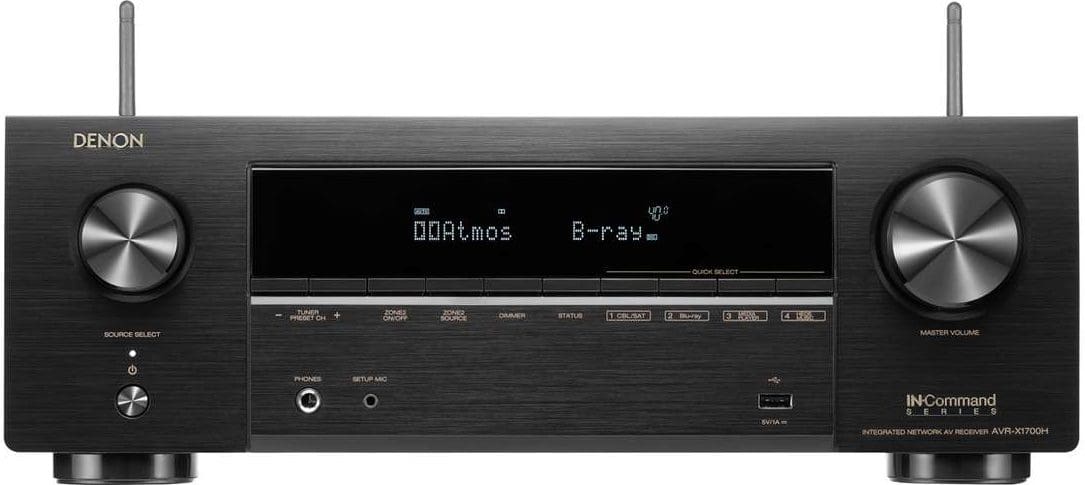
The denon AVR-X1700H Integrated Network AV Receiver is a versatile 7.2-channel home theater receiver designed for movie lovers, gamers, and music fans who want modern connectivity without sacrificing sound quality. It delivers 80 watts per channel into 8 ohms, supports 8K/60Hz and selected 4K/120Hz passthrough on three HDMI inputs, and includes HEOS Built-in for wireless multi-room streaming. With Dolby Atmos, DTS:X, eARC, Bluetooth, Wi-Fi, and voice-assistant compatibility, the denon AVR-X1700H Integrated Network AV Receiver fits compact living rooms, dedicated media spaces, and entry-level surround systems that need room to grow.
Its biggest selling points are simple setup, strong HDMI 2.1 support, and a balanced feature set that covers both gaming and cinematic playback. Users upgrading from older receivers will appreciate the three 8K-ready HDMI inputs, HDR format compatibility, and support for modern consoles and streaming devices. The receiver is also a practical choice for people building a 5.1.2 Dolby Atmos setup or a standard 7.2 system. In current retail channels, the estimated price range is typically in the mid-range AV receiver segment, often around $400 to $700 depending on region, sales, and bundled promotions. Availability remains broad through major electronics retailers, Denon dealers, and online marketplaces, making it easy to find in both new and refurbished condition.
Specifications and Key Features of the denon AVR-X1700H Integrated Network AV Receiver
- 7.2-channel AV receiver with 7 power amplifier channels
- 80 watts per channel at 8 ohms, 20 Hz to 20 kHz, 0.08% THD, 2 channels driven
- 120 watts per channel at 6 ohms, 1 kHz, 0.7% THD, 2 channels driven
- Three HDMI inputs with 8K/60Hz and selected 4K/120Hz support
- 6 HDMI inputs and 1 HDMI output with eARC support
- Supports Dolby Atmos, DTS:X, Dolby Vision, HDR10+, HLG, ALLM, and VRR
- Built-in HEOS for multi-room audio streaming
- Wi-Fi, Bluetooth, AirPlay 2, and network streaming capabilities
- Phono input for turntables and dual subwoofer outputs for flexible bass management
- AM/FM tuner and support for 4-16 ohm speakers
Performance-wise, the denon AVR-X1700H Integrated Network AV Receiver is best described as efficient and capable rather than high-power. It is well suited for small to medium rooms and performs especially well with moderately efficient speakers. Compared with the AVR-X2700H, the X1700H is the more affordable option with a slightly simpler feature set, while the Sony STR-DH790 is a more budget-focused alternative that lacks the same level of HDMI 2.1 and network ecosystem depth.
Troubleshooting Common Issues with the denon AVR-X1700H Integrated Network AV Receiver
If the receiver freezes, becomes unresponsive, or fails to boot correctly, perform a restart by pressing and holding the unit’s button until “Restart” appears, or unplug the power cord briefly and reconnect it. If HDMI video is missing, confirm that the source device, cable, and display all support the selected resolution and that the receiver’s HDMI input is assigned correctly. For 4K/120Hz or 8K playback, use certified Ultra High Speed HDMI cables.
Common error symptoms include no sound, distorted audio, network dropouts, or audio-video sync problems. Reset speaker connections, verify the speaker impedance is within 4-16 ohms, and check that surround or Zone settings are not muting output. If the receiver shows an error code related to speaker wiring or overheating, power down the unit, inspect for shorted wires, and improve ventilation. Prevent issues by keeping firmware updated, leaving adequate airflow above the chassis, and avoiding overloaded power strips.
Warranty support is generally handled through Denon’s authorized service network, with coverage depending on region and purchase terms. For help, contact Denon customer support through the official website, your local Denon distributor, or the retailer where the receiver was purchased. Keep the serial number, proof of purchase, and a description of the issue ready before requesting service.
Pros and Cons of the denon AVR-X1700H Integrated Network AV Receiver
Pros
- Excellent value for a 7.2-channel receiver with modern HDMI 2.1 support
- Three 8K-capable inputs make it a smart choice for gaming and next-gen streaming
- HEOS, Wi-Fi, and Bluetooth provide flexible music streaming options
- Dolby Atmos and DTS:X support deliver immersive home theater sound
- Dual subwoofer outputs improve bass control in home cinema setups
- Easy setup and intuitive on-screen guidance make it beginner-friendly
Cons
- Power output is adequate but not ideal for very large rooms or inefficient speakers
- Only three HDMI inputs support the most advanced 8K and gaming features
- No built-in pre-outs for all channels, limiting future expansion for some users
- Competing models in the same price range may offer more amplification headroom
For buyers seeking a balanced receiver for movies, console gaming, and streaming, the denon AVR-X1700H Integrated Network AV Receiver offers strong value for money. It is more feature-rich than many entry-level models, while alternatives such as the Yamaha RX-V6A may appeal to users wanting a different sound signature and the Sony STR-DH790 may suit tighter budgets.
Customer Reviews for the denon AVR-X1700H Integrated Network AV Receiver
Overall customer feedback trends positive, with many buyers rating it around 4.5 out of 5 stars. Users frequently praise the clean sound, easy setup, stable streaming, and strong HDMI features for modern TVs and gaming consoles. One common compliment is that it “just works” for mixed use, from Netflix and PlayStation to music streaming and surround movie nights.
Frequent complaints focus on the limited number of high-end HDMI 2.1 ports, the need for careful speaker matching, and occasional setup confusion for first-time AV receiver owners. A typical testimonial reads: “Great sound for the price, simple menu system, and enough power for my living room theater.” Most reviewers recommend it for buyers who want a future-ready AV receiver without stepping into premium pricing.
Faqs
How do I set up denon AVR-X1700H Integrated Network Av Receiver for the first time?
What should I do if denon AVR-X1700H Integrated Network Av Receiver has no sound from my TV or streaming device?
Which speakers work best with denon AVR-X1700H Integrated Network Av Receiver in a 5.1.2 home theater setup?
How can I improve Dolby Atmos and surround sound performance on denon AVR-X1700H Integrated Network Av Receiver?
Does denon AVR-X1700H Integrated Network Av Receiver support 4K HDMI, HDR, and gaming consoles?
How do I connect denon AVR-X1700H Integrated Network Av Receiver to Wi-Fi, Bluetooth, and music streaming services?
Why is denon AVR-X1700H Integrated Network Av Receiver overheating, and how can I prevent it?
How often should I update and maintain denon AVR-X1700H Integrated Network Av Receiver for reliable performance?
More denon manuals
- Denon HS2 HomeCinema Soundbar and Subwoofer System User Manual
- Denon AVR-2809CI Av Surround Receiver User Manual
- Denon AVC-X4800H Integrated Network Av Amplifier User Manual
- Denon AVR-2308CI Av Surround Receiver User Manual
- Denon AVR-1312 Av Surround Receiver User Manual
- Denon AVR-1604 Av Surround Receiver User Manual
Leave a Comment